The right classroom TV mount keeps displays visible, protects expensive equipment, and helps teachers present lessons without wasting valuable floor or cabinet space. The best choice depends on screen size, wall construction, viewing angles, and how often the display needs adjustment.
We selected 10 mounts spanning fixed, tilting, full-motion, and no-stud designs so schools can match installation style and classroom layout to the hardware they already use.
Best 10 TV Wall Mounts for Classrooms Picks for 2026
Best Tilting Classroom Mount
PERLESMITH 23–60-Inch TV Mount

- Supports TVs up to 60 inches and 115 pounds
- 7° tilt helps manage glare
- Low-profile 1.2-inch wall clearance
Best For: Medium-size classroom TVs needing a simple tilt adjustment
Best Small-Screen Flexibility
WALI Full-Motion 13–32-Inch Mount

- Tilts, swivels, and rotates for flexible viewing
- Extends 15 inches and retracts to 2 inches
- Supports displays up to 33 pounds
Best For: Small classroom monitors requiring frequent angle changes
Best Large Fixed Classroom Mount

- Supports TVs up to 86 inches and 132 pounds
- Fits wood studs spaced up to 24 inches
- Keeps the TV 1.28 inches from the wall
Best For: Large classroom TVs with a fixed, planned viewing position
Best Studless Drywall Option

- Designed for studless drywall installation
- Supports TVs up to 55 inches and 99 pounds
- Maintains a slim 1.1-inch profile
Best For: Suitable drywall classrooms without convenient stud locations
Flexible Small-Screen Pick
ELIVED Full Motion TV Wall Mount
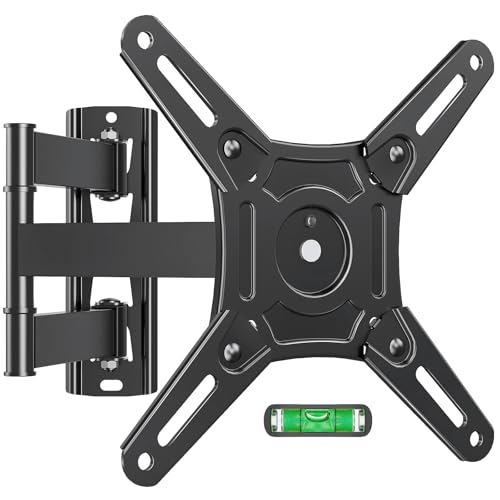
- Fits 14- to 42-inch screens
- Swivels, tilts, extends, and rotates
- Supports wood stud, brick, and concrete walls
Best For: Classrooms needing flexible positioning for smaller TVs or monitors
Drywall-Friendly Pick
Antimbee No Stud TV Wall Mount

- Installs without locating a stud
- Supports up to 100 pounds
- Fits screens from 13 to 55 inches
Best For: Compatible drywall, wood-wall, or plasterboard classroom installations
Low-Profile Compact Pick
Mount-It! Tilting TV Wall Mount

- Sits only 1.65 inches from the wall
- Tilts to reduce glare
- Quick-release design aids maintenance
Best For: Small classroom TVs or monitors needing a slim fixed-position mount
Best Compact Articulating Mount
Amazon Basics Full Motion TV Wall Mount

- Supports 12-40 inch TVs up to 40 lb
- Tilts and swivels for flexible viewing
- Includes hardware, template, and manual
Best For: Small classroom TVs needing adjustable angles
Best Low-Profile Fixed Mount
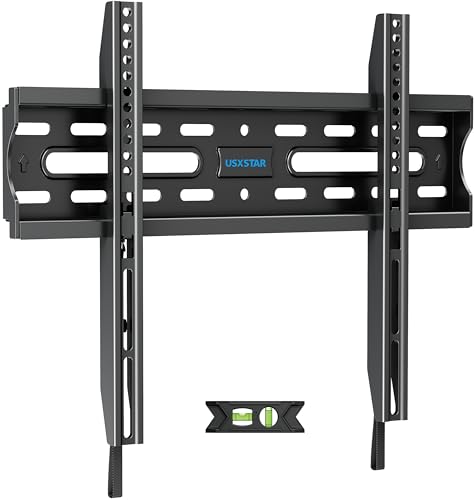
- Fits 26-60 inch TVs up to 99 lb
- Slim 1.3-inch wall profile
- Includes quick-release straps and leveling tools
Best For: Stationary classroom TV installations
Best Flexible Small-Screen Mount
monTEK Full Motion TV Wall Mount

- Fits 13-43 inch TVs up to 44 lb
- Offers tilt, swivel, and portrait rotation
- Extends 14.6 inches with cable management
Best For: Small classrooms needing wide angle adjustment
Best Tilting Classroom Mount – PERLESMITH 23–60-Inch TV Mount
For classrooms comparing tv wall mounts for classrooms, this PERLESMITH model offers a practical combination of screen support, glare reduction, and space-saving installation. It fits many 23- to 60-inch TVs, supports up to 115 pounds, and tilts down 7 degrees for a more comfortable viewing angle.
Best For: Classrooms using a medium-size TV where a low-profile mount and modest downward tilt can improve visibility.
Pros:
- Supports TVs from 23 to 60 inches and up to 115 pounds.
- 7-degree tilt can help reduce glare and improve sightlines.
- Low-profile 1.2-inch design preserves wall and floor space.
- Works with 8-, 12-, or 16-inch wood studs, concrete, and brick walls.
Cons:
- It is a tilting mount, not a full-motion option.
- It must not be installed on drywall alone.
- Buyers need to verify VESA pattern, TV weight, studs, and cable clearance.
Its locking mechanism, quick-release pull cord, included hardware, bubble level, and five-year warranty make it a solid choice for a straightforward classroom installation, provided the wall and TV specifications match.
Best Small-Screen Flexibility – WALI Full-Motion 13–32-Inch Mount
For smaller displays, this WALI model is one of the more flexible tv wall mounts for classrooms. Its articulating design supports 13- to 32-inch screens up to 33 pounds and allows tilt, swivel, and rotation adjustments for changing seating or presentation positions.
Best For: Small classroom monitors, compact TVs, or instructor displays that need frequent repositioning.
Pros:
- Offers ±15-degree tilt, 180-degree swivel, and 360-degree rotation.
- Extends up to 15 inches and retracts to 2 inches from the wall.
- Fits 13- to 32-inch displays up to 33 pounds.
- Includes mounting hardware, a user manual, and seven-day US-based customer support.
Cons:
- Its 33-pound capacity and 32-inch size limit exclude larger classroom TVs.
- Drywall alone is not supported.
- Articulating mounts require more clearance than low-profile fixed designs.
The broad range of movement is useful when students view the screen from different angles, but confirm the display uses a 75x75mm or 100x100mm VESA pattern and that the wall can accept the mount.
Best Large Fixed Classroom Mount – USX STAR 37–86-Inch TV Mount
For larger screens, this USX STAR bracket is a sturdy fixed option among tv wall mounts for classrooms. It supports most 37- to 86-inch TVs up to 132 pounds and places the screen 1.28 inches from the wall to conserve space in classrooms, conference rooms, and other shared areas.
Best For: Large classroom or presentation TVs that can remain in one fixed viewing position.
Pros:
- Supports TVs from 37 to 86 inches and up to 132 pounds.
- Fits wood-stud spacing up to 24 inches.
- Quick-release pull straps simplify TV removal.
- Low-profile 1.28-inch clearance helps free floor space.
Cons:
- It is fixed and does not tilt or swivel.
- VESA compatibility must be between 150x100mm and 600x400mm.
- Stud spacing should be confirmed before purchase, and drywall alone is not an installation surface.
The included mounting template, hardware, and ten-year customer support make installation more approachable. Because there is no viewing-angle adjustment, it is best suited to rooms where the mounting height and screen position are already well planned.
Best Studless Drywall Option – Auoace 12–55-Inch TV Hanger
This Auoace hanger stands out for classrooms where locating studs is difficult and the wall is suitable drywall. It is designed for 12- to 55-inch TVs up to 99 pounds, uses a studless installation approach, and maintains a slim 1.1-inch profile.
Best For: Drywall classroom installations where a no-stud, no-drill mounting method is appropriate.
Pros:
- Supports many 12- to 55-inch TVs up to 99 pounds.
- Uses a studless drywall installation with included hardware and level.
- Fits VESA patterns from 100x100mm to 400x400mm.
- Its 1.1-inch clearance creates a clean, space-saving profile.
Cons:
- It is a fixed mount with no tilt, swivel, or rotation.
- Compatibility depends on suitable drywall and the TV’s VESA pattern and weight.
- The advertised quick installation should still be checked against the wall and manufacturer instructions.
Its supplied mounting kit, bubble level, steel cable, and five-year customer service add convenience for a simple installation. Schools should carefully verify that the drywall construction and TV load are appropriate before using a studless mount.
Flexible Small-Screen Pick – ELIVED Full Motion TV Wall Mount
For classrooms using smaller displays or monitors, this full-motion option adds useful positioning flexibility without taking up much wall space. It supports 14- to 42-inch screens, offers swivel, tilt, extension, and portrait-or-landscape rotation, and works on single wood studs or concrete and brick walls.
Best For: Classrooms that need adjustable viewing angles for compact TVs or monitors.
Pros:
- Fits 14- to 42-inch TVs and monitors with 75x75mm to 200x200mm VESA patterns.
- Swivels up to 90 degrees and rotates 90 degrees for landscape or portrait positioning.
- Tilts from +5 to -10 degrees and extends up to 14.8 inches for glare reduction and access.
- Includes mounting hardware and step-by-step installation instructions.
Cons:
- Should not be installed into drywall alone.
- Its 44-pound capacity limits use with larger classroom displays.
This is a strong choice among TV wall mounts for classrooms when a smaller screen needs to serve multiple seating directions. Its broad range of movement is especially practical for flexible teaching layouts, while the size and weight limits require careful compatibility checks.
Drywall-Friendly Pick – Antimbee No Stud TV Wall Mount
When a classroom wall lacks an accessible stud, this stationary mount offers a simpler installation approach for many drywall, wood-wall, and plasterboard surfaces. It supports 13- to 55-inch TVs, carries up to 100 pounds, and includes a bubble level, security cable, and installation hardware.
Best For: Classrooms with suitable drywall or plasterboard surfaces where drilling into a stud is impractical.
Pros:
- No-stud installation uses small picture-hanging nails rather than drilling or adhesives.
- Supports TVs from 13 to 55 inches and up to 100 pounds.
- Includes hardware, brand-specific screws, a bubble level, and a security cable.
- Fits VESA mounting patterns up to 400x400mm.
Cons:
- It is stationary, so it does not swivel or extend.
- Not intended for brick, concrete, or concrete block.
- Wall-surface and TV compatibility must be confirmed before installation.
Among TV wall mounts for classrooms, this model stands out for its no-stud installation concept and high stated load capacity. It can simplify placement on compatible interior surfaces, but its fixed design makes careful screen positioning important before mounting.
Low-Profile Compact Pick – Mount-It! Tilting TV Wall Mount
This compact tilting mount is suited to classrooms using smaller TVs or monitors where a close-to-wall installation is preferred. It supports 24- to 32-inch screens up to 30 pounds, sits just 1.65 inches from the wall, and provides tilt adjustment to help reduce glare from overhead lighting or windows.
Best For: Small classroom displays that need a slim, straightforward wall-mounted setup.
Pros:
- Low-profile 1.65-inch design keeps the screen close to the wall.
- Tilts up to 15 degrees down or 5 degrees up to help manage reflections.
- Quick-release bracket allows the TV to be removed without taking down the wall plate.
- Includes hardware and tools, with a lifetime manufacturer warranty and US-based support.
Cons:
- Fits only 24- to 32-inch screens up to 30 pounds.
- Supports 75x75mm or 100x100mm VESA patterns only.
- Tilts but does not swivel side to side.
For classrooms that prioritize a neat, shallow installation over broad movement, this is a practical option. Its quick-release feature can simplify cleaning or cable changes, but the narrow size and VESA range make pre-installation measurements essential.
Best Compact Articulating Mount – Amazon Basics Full Motion TV Wall Mount
For classrooms using a smaller display, this full-motion option is one of the more adaptable tv wall mounts for classrooms. It supports 12- to 40-inch TVs up to 40 pounds and fits VESA patterns from 75×75 to 200×200 mm. Verify the wall type, TV weight, size, and VESA pattern before installation.
Best For: Small classroom TVs that need adjustable viewing angles.
Pros:
- Tilts from +15° to -5° and swivels up to 180°.
- Extends from 2.3 to 16.3 inches for flexible positioning.
- Includes mounting hardware, template, and user manual.
Cons:
- Limited to TVs up to 40 inches and 40 pounds.
- Designed for concrete, brick, or a single wood stud, not drywall alone.
This mount is a practical fit when a classroom needs a compact display that can be angled toward different seating areas, provided the TV and wall meet its specifications.
Best Low-Profile Fixed Mount – USX STAR Fixed TV Wall Mount
This fixed bracket is a straightforward choice among tv wall mounts for classrooms when the screen can remain in one position. It fits many 26- to 60-inch TVs weighing less than 99 pounds, with VESA compatibility from 75×75 to 400×400 mm. Confirm stud spacing and the TV’s mounting pattern before buying.
Best For: Classrooms that want a slim, stationary installation for a medium or large TV.
Pros:
- Supports TVs from 26 to 60 inches and up to 99 pounds.
- Holds the TV about 1.3 inches from the wall.
- Includes quick-release pull straps, a bubble level, instructions, and labeled hardware.
- Backed by ten years of after-sales support.
Cons:
- Fixed design provides no tilt or swivel adjustment.
- Requires careful stud-spacing verification, especially with off-center 16-inch studs.
Choose this model when stability and a clean, space-saving profile matter more than repositioning the screen during lessons.
Best Flexible Small-Screen Mount – monTEK Full Motion TV Wall Mount
For smaller classroom displays that need frequent repositioning, this full-motion model offers useful flexibility. It fits 13- to 43-inch TVs up to 44 pounds with VESA patterns from 75×75 to 200×200 mm, making it a versatile option among tv wall mounts for classrooms. Installation must use a single wood stud or concrete/brick wall, not drywall alone.
Best For: Small classrooms needing wide viewing-angle adjustment or landscape-to-portrait rotation.
Pros:
- Tilts +5°/-15° and swivels up to ±90°.
- Extends to 14.6 inches and retracts to 2.6 inches.
- Supports landscape and portrait rotation.
- Includes cable management, hardware, instructions, and technical support.
Cons:
- Limited to 43-inch TVs and 44 pounds.
- Maximum rotation depends on screen size.
- Cannot be installed on drywall alone.
Its broad adjustment range makes it especially useful where students sit across a wide area or the display serves different presentation formats.
How We Picked These TV Wall Mounts for Classrooms
We focused on the installation and usability factors that matter most in schools: supported screen sizes and weights, VESA compatibility, movement range, wall and stud requirements, profile depth, release features, and practical classroom viewing needs. The selection includes compact mounts for monitors and small displays, heavy-duty brackets for larger TVs, and studless options for compatible drywall installations.
Because classroom walls and teaching setups vary, no single mount is ideal for every room. Always verify the television’s weight, VESA pattern, wall type, and the manufacturer’s installation requirements before buying.
Quick Comparison
| Mount type | Best for | Main advantage | Watch for |
|---|---|---|---|
| Fixed | Dedicated viewing positions | Low profile and stable | Limited access and adjustment |
| Tilting | Displays mounted above eye level | Reduces glare and improves viewing angle | Little or no side-to-side movement |
| Full motion | Flexible classroom layouts | Extends, swivels, and tilts | Needs careful clearance and secure mounting |
| Studless | Approved drywall installations | Can avoid locating wall studs | Strict weight and wall-surface limits |
Key Buying Factors for TV Wall Mounts for Classrooms
Screen Size, Weight, and VESA Pattern
Check all three specifications rather than relying on screen size alone. A compatible mount must support the TV’s weight and match its horizontal and vertical VESA hole spacing. Leave additional capacity when possible, especially for displays that may be moved or adjusted regularly.
Wall Construction and Attachment Points
Stud-mounted brackets are generally the preferred choice for heavier classroom TVs because they transfer the load into structural framing. Drywall-only or studless mounts should be used only when the product explicitly supports the wall type, load, and installation method. Do not substitute drywall anchors for required studs.
Viewing Angle and Movement
Choose fixed mounting when the screen faces a consistent seating area. Tilting can help with glare or high mounting positions. Full-motion designs are useful when students view the display from different areas, but the arm requires space and should be secured against unwanted movement.
Safety and Daily Access
Look for locking hardware, quick-release features that remain secure when installed correctly, cable clearance, and a profile that keeps the TV away from student traffic. Plan cable routing before installation and use appropriate cable management to prevent snagging.
Who Should Buy Which TV Wall Mounts for Classrooms?
- For a permanent front-of-room display: Choose a fixed mount for a clean, stable, low-profile installation.
- For glare or elevated mounting: A tilting bracket offers useful vertical adjustment without the bulk of a long arm.
- For flexible seating arrangements: Select a full-motion mount with enough extension and swivel range for the room.
- For smaller monitors or compact TVs: Use a lightweight mount whose VESA and weight limits closely match the display.
- For approved drywall-only locations: Consider a studless design, but confirm the wall condition and load rating carefully before installation.
For any of these TV Wall Mounts for Classrooms, installation quality matters as much as the bracket itself. Measure twice, locate structural support accurately, follow the included hardware instructions, and have facilities staff or a qualified installer handle large or unusually heavy displays.