A wall-mounted TV can make a room look more spacious, but exposed power and HDMI cables quickly undermine the clean design. The best setups pair a properly rated mount with a practical way to route or conceal wiring.
This roundup compares 10 TV wall mounts with cable management, including low-profile, tilting, full-motion, in-wall, and paintable surface-routing solutions for different room layouts and installation preferences.
Best 10 TV Wall Mounts with Cable Management Picks for 2026
Best Overall Bundle
XL Tilt Mount with In-Wall Power

- Fits 42–90-inch TVs up to 110 pounds
- Includes in-wall power cable management
- Tilts for glare reduction and port access
Best For: Large-TV installations with concealed power wiring
Best No-Drill Option
Paintable Adhesive Cable Raceway

- Installs without screws or drilling
- Includes 116 inches of raceway and fittings
- Cuttable and paintable for a cleaner match
Best For: Non-textured walls and simple cable concealment
Best for Built-In Storage

- Supports TVs up to 90 inches and 135 pounds
- Includes a 17-inch in-wall media box
- Provides power knockouts and pass-throughs
Best For: Concealed AV gear and streamlined entertainment walls
Best Raceway Capacity

- Offers 157 inches of cable coverage
- Snap-on design simplifies installation
- Fits two to four wires and can be painted
Best For: Longer surface-mounted TV cable runs
Best All-in-One Cable-Clean Mount
ECHOGEAR Tilting TV Wall Mount

- Fits 42–90-inch TVs up to 130 pounds
- Includes ETL in-wall power and AV cable kit
- Low-profile 2.11-inch design with tilt adjustment
Best For: Low-profile installations with hidden power and AV cables
Best Budget Cable-Hiding Kit
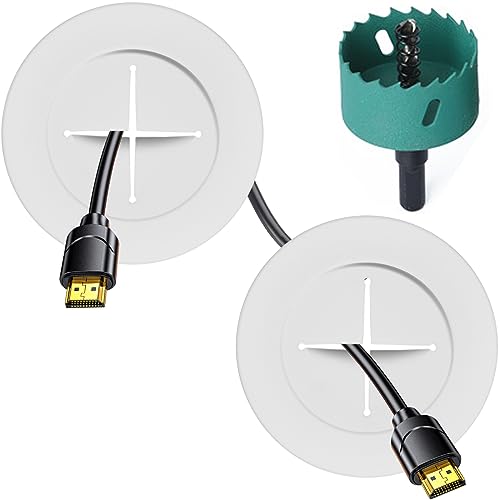
- Includes two pass-throughs and a hole saw attachment
- Fits compatible 12–18 mm plaster or wood plank walls
- White plastic design for a discreet installation
Best For: Adding in-wall cable routing to an existing TV mount
Best Full-Motion Premium Bundle
SANUS Premium Full Motion TV Mount

- Extends 22 inches with swivel and tilt adjustment
- Slides up to 16 inches for easier TV centering
- Includes in-wall power and cable management components
Best For: Large-screen setups needing flexible viewing and hidden device power
Best Overall
ECHOGEAR Low-Profile Mount with Cable Raceway
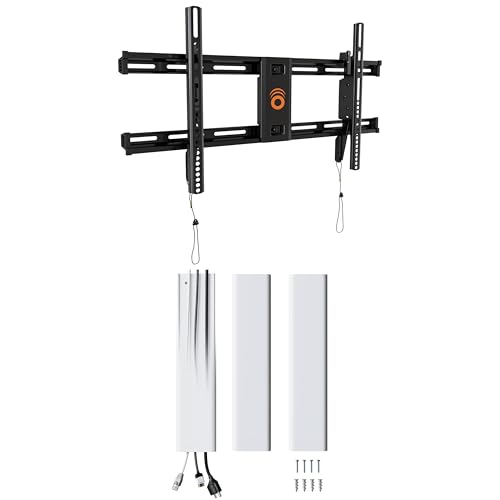
- Supports TVs up to 90 inches
- Paintable 48-inch raceway hides 6+ cables
- Includes leveling, tilt, and centering adjustments
Best For: Large TVs and straightforward surface cable concealment
Best Overall Bundle – XL Tilt Mount with In-Wall Power
For shoppers seeking TV wall mounts with cable management built in, this ECHOGEAR bundle combines a tilting mount with an in-wall power kit. It supports 42- to 90-inch TVs up to 110 pounds and includes features designed to hide power cords rather than simply organize them.
Best For: Large-TV installations where you want tilt adjustment and concealed power wiring in one package.
Pros:
- Supports TVs from 42 to 90 inches and up to 110 pounds.
- Includes an in-wall power cable management kit for hiding cords.
- Tilts 12° downward and 10° upward for glare reduction and port access.
- Includes a drilling template, divided hardware, and hole saw attachment.
Cons:
- The in-wall installation requires drilling and more planning than a surface raceway.
- It is a tilting mount, not a full-motion model.
This is a strong all-in-one choice when a clean installation matters as much as the mount itself. Its broad TV and VESA compatibility makes it especially practical for larger screens.
Best No-Drill Option – Paintable Adhesive Cable Raceway
This YesBes raceway is a straightforward add-on for TV wall mounts with cable management needs. Its adhesive installation avoids drilling, while the 116-inch channel can be cut and painted to better match the wall.
Best For: Renters or homeowners who want to conceal TV cables without drilling into the wall.
Pros:
- No-drill, self-adhesive installation.
- Provides 116 inches of cable coverage with multiple connectors and elbows.
- Can be cut to length and painted to match the wall.
- UL94 V-0-rated material offers higher flame retardancy than ordinary materials.
Cons:
- The adhesive should not be used on textured walls.
- It conceals cables on the wall rather than routing them inside it.
Choose this kit when installation simplicity is more important than a fully recessed look. The included fittings also make it easier to route cables around corners and branches.
Best for Built-In Storage – Tilt Mount with Media Box
When TV wall mounts with cable management need to do more than hide wires, this ECHOGEAR bundle adds a 17-inch in-wall media box. The low-profile tilting mount supports TVs up to 90 inches and 135 pounds, while the box stores streaming devices and AV gear behind the wall.
Best For: Clean entertainment walls that need concealed storage for streaming devices, routers, or other AV equipment.
Pros:
- Supports TVs up to 90 inches and 135 pounds.
- Low-profile design keeps the television close to the wall.
- 17-inch in-wall media box hides streaming devices and AV equipment.
- Includes power knockouts and low-voltage pass-throughs for cable routing.
Cons:
- In-wall storage requires a more involved installation than an external cable cover.
- The mount offers tilt adjustment rather than full-motion movement.
This bundle is aimed at a polished, built-in installation rather than a quick cable cleanup. It is particularly useful when visible streaming boxes and AV equipment are part of the clutter.
Best Raceway Capacity – 157-Inch Snap-On Cord Hider
The Delamu cord hider is a flexible surface-mount solution for TV wall mounts with cable management. Its 157-inch length, snap-together design, and capacity for two to four wires make it useful when cables need to travel a longer route across the wall.
Best For: Longer cable runs requiring a cuttable, paintable raceway with easy access to the wires.
Pros:
- Provides 157 inches of cable-cover length.
- Snap structure makes installation and opening the channel easier.
- Designed to organize two to four wires.
- Can be cut and painted, with connectors for flexible splicing.
Cons:
- Surface-mounted cable management is less concealed than in-wall routing.
- It is designed for indoor and outdoor use, but the supplied notes do not specify weatherproofing details.
This is a practical choice for extended runs where a short raceway would fall short. The removable snap structure also makes future cable changes more convenient.
Best All-in-One Cable-Clean Mount – ECHOGEAR Tilting TV Wall Mount
If you want tv wall mounts with cable management built into the installation plan, this ECHOGEAR bundle combines a tilting mount with an in-wall power and AV cable kit. It supports 42- to 90-inch TVs up to 130 pounds and keeps the screen just 2.11 inches from the wall.
Best For: Viewers who want a low-profile tilting mount and a clean, nearly wire-free installation.
Pros:
- Supports TVs from 42 to 90 inches and up to 130 pounds.
- Includes an ETL in-wall cable management kit for power and AV routing.
- Tilting design helps reduce glare, while templates and a hole saw simplify installation.
- Includes step-by-step instructions and access to seven-day support.
Cons:
- In-wall cable routing requires cutting into the wall.
- The fixed low-profile design provides tilting rather than full-motion adjustment.
This is a strong choice when a streamlined appearance matters as much as basic viewing-angle adjustment. Its integrated cable kit makes it more complete than a mount-only option, but installation still requires careful in-wall planning.
Best Budget Cable-Hiding Kit – Riozoo In-Wall TV Wire Hider
For shoppers comparing tv wall mounts with cable management, this Riozoo kit focuses on the cable-hiding portion of the installation rather than the mount itself. It includes two pass-throughs and a hole-saw attachment for routing cords through compatible plaster or wood plank walls.
Best For: Wall-mounted TV owners who already have a mount and need a simple white in-wall cable pass-through solution.
Pros:
- Includes two pass-throughs and drilling accessories.
- Designed for perforated walls measuring 12 to 18 mm thick.
- White plastic construction is intended to blend with home or office décor.
- Backed by a two-year warranty and 24/7 customer support.
Cons:
- It is a cable-management kit, not a TV wall mount.
- Compatibility is specifically described for 12- to 18-mm plaster or wood plank walls.
- Indoor use only.
This kit makes sense as an add-on when your existing mount handles the TV and you simply need a tidy route for cables. Confirm wall thickness and construction before drilling.
Best Full-Motion Premium Bundle – SANUS Premium Full Motion TV Mount
Among tv wall mounts with cable management, this SANUS bundle stands out for combining a large full-motion mount with an in-wall power and cable kit. The articulating arms extend 22 inches, and the mount can swivel, tilt, and slide along the wall plate for easier centering.
Best For: Large-TV installations that need broad viewing adjustment and concealed power for multiple entertainment devices.
Pros:
- Full-motion design extends, swivels, and tilts for flexible viewing.
- Dual articulating arms extend up to 22 inches from the wall.
- Works with 16- or 24-inch stud spacing and allows up to 16 inches of lateral adjustment.
- Includes a SANUS in-wall power and cable kit with modules, cords, bracket, template, and instructions.
Cons:
- The articulated design is less low-profile than a fixed or tilting mount.
- In-wall installation still requires cutting into the wall, even though an electrician is not required.
- The supplied listing does not clearly state a specific supported TV size or weight range.
This is the most versatile option here for positioning a large screen, especially above a fireplace or in a seating area with multiple viewing angles. Check your TV and wall specifications carefully before purchase.
Best Overall – ECHOGEAR Low-Profile Mount with Cable Raceway
If you want tv wall mounts with cable management built into the setup, this ECHOGEAR option combines a low-profile TV bracket with a 48-inch snap-on raceway. It supports TVs up to 90 inches, includes post-install positioning adjustments, and is designed for a quick three-step installation.
Best For: Large-screen TV owners who want a close-to-the-wall mount and an easy way to conceal multiple cables.
Pros:
- Supports TVs up to 90 inches and includes a universal hardware pack.
- 48-inch paintable raceway hides more than six cables and allows cords to be added or removed.
- Offers ±5° tilt plus side-to-side and leveling adjustments after installation.
- Includes a wall template, safety lock, and pull strings for cable access.
Cons:
- The cable cover is surface-mounted rather than routed inside the wall.
- The supplied notes list a 90-inch minimum supported screen size, so verify compatibility with your TV.
This is the most complete choice when you want mounting hardware and visible-wire concealment in one package. Its raceway keeps installation simpler than an in-wall solution while still providing a cleaner finished look.
Best Recessed Fit – In-Wall Cable Kit with 9.8-Foot Cord
For a nearly flush installation, this in-wall kit is a practical companion to tv wall mounts with cable management. It routes power, HDMI, Ethernet, and audio/video cables inside the wall while using recessed outlet boxes to reduce the gap behind a mounted TV.
Best For: DIY installers who want power and low-voltage cables hidden inside the wall behind a TV.
Pros:
- Accommodates a power cord plus several low-voltage cables through the brush plate.
- Includes a 9.8-foot power cord and dual 15A/125V sockets.
- Recessed boxes help the TV or A/V equipment sit closer to the wall.
- Includes installation diagrams and wing-shaped clips for gypsum board.
Cons:
- Requires at least 3.74 inches of wall-cavity depth.
- Deeper cable runs may require fish tape or a wire snake.
- It manages in-wall wiring but does not include a TV mounting bracket.
This kit is suited to a clean, professional-looking installation when your wall has enough cavity depth. Check the wall dimensions first, and plan on using a separate TV mount.
Best DIY Kit – PRLF In-Wall Organizer with Hole Saw
This PRLF kit is designed for homeowners who want tv wall mounts with cable management without buying a separate hole saw. Its two-module layout hides TV power and AV cables inside the wall, with a supplied drill attachment and extension cord for a more flexible installation.
Best For: DIY users who want an in-wall cable solution with the basic drilling accessory included.
Pros:
- Includes a 3-inch hole saw and step-by-step instructions.
- Allows up to a 5-foot vertical distance between the upper and lower modules.
- Provides a 6-foot extension cord for reaching an existing outlet.
- Locking wings secure the modules behind the wall.
Cons:
- Requires at least 3 inches of wall-cavity depth.
- TV plug width must not exceed 1.125 inches.
- Installation requires drilling two 3-inch holes with a standard drill.
The included hole saw makes this a convenient choice for a basic DIY project, especially where the upper and lower connection points need flexible spacing. Confirm cavity depth and plug dimensions before cutting.
How We Picked the Best TV Wall Mounts with Cable Management
We focused on the factors that matter most during installation and daily use: TV-size and weight compatibility, mounting style, cable-routing approach, installation complexity, and the flexibility to accommodate power and low-voltage connections. The selection includes complete mount-and-management bundles as well as dedicated cord hiders and recessed cable kits, since not every room needs the same solution.
Before buying, verify your television’s VESA pattern, weight, screen size, and the wall type where it will be installed. A mount should never be selected by screen size alone.
Quick Comparison
| Type | Best For | Typical Cable Solution | Installation |
|---|---|---|---|
| Low-profile mount | Minimal wall clearance | Surface raceway or in-wall kit | Moderate |
| Tilting mount | Reducing glare and improving viewing angle | In-wall routing or cord cover | Moderate |
| Full-motion mount | Corner rooms and adjustable viewing | Flexible in-wall or surface routing | Moderate to advanced |
| Standalone cord hider | Existing mounts and rental-friendly installs | Paintable surface raceway | Easy |
| Recessed power kit | Clean, concealed connections | Recessed outlet and pass-throughs | Advanced |
Key Buying Factors for TV Wall Mounts with Cable Management
Mount Movement and Viewing Angle
Choose a fixed or low-profile design when the TV will face one seating area. Tilting models help reduce reflections and are useful when the screen is mounted above eye level. Full-motion mounts are better for corner placements or rooms where viewers sit in multiple positions, but their arms require more cable slack and careful routing.
In-Wall Versus Surface Cable Management
In-wall kits create the cleanest appearance by routing power and low-voltage cables behind the drywall. They require more planning and may involve cutting into the wall. Paintable raceways and snap-on cord covers install faster, conceal wires on the surface, and are often the better choice for renters or finished walls. Never run a standard power cord inside a wall unless the product is specifically designed and approved for that use.
Fit, Capacity, and Installation Details
Check the mount’s maximum weight, supported screen range, VESA compatibility, and wall-stud requirements. For cable kits, measure the route before installation and confirm that the raceway is wide enough for every cable. Recessed boxes and pass-through kits may require a drill, hole saw, electrical access, and confidence working around wall construction.
Who Should Buy Which TV Wall Mounts with Cable Management?
- Choose a low-profile bundle for a streamlined TV installation with minimal protrusion from the wall.
- Choose a tilting mount if glare control or a high mounting position is a priority.
- Choose a full-motion mount for corner installations, open-plan rooms, or frequently changing viewing positions.
- Choose a paintable cord hider when you want a quick, inexpensive, surface-mounted solution without opening the wall.
- Choose an in-wall power and cable kit for the cleanest finished appearance and a more permanent installation.
For any option, anchor the mount securely to suitable studs or approved structural hardware, keep ventilation openings clear, and test cable reach before tightening the final connections.