The right mobile TV stand can turn a classroom display into a flexible teaching tool. It should move smoothly between rooms, hold the screen securely, and keep cables and accessories manageable without taking up unnecessary floor space.
These 10 options cover common classroom needs, from compact carts for smaller displays to heavy-duty stands for larger televisions. Use the guide below to narrow your choice by screen size, weight capacity, adjustability, and everyday usability.
Best 10 TV Floor Stands for Classrooms Picks for 2026
Best Mobile Workhorse
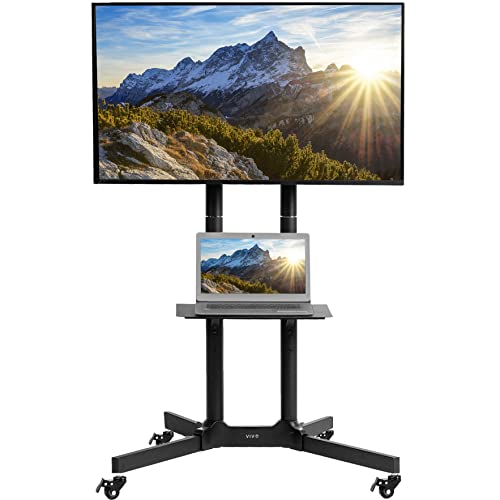
- Fits 32–83-inch screens up to 110 pounds
- Locking casters support mobile or stationary use
- Height-adjustable, tilting mount with utility shelf
Best For: Large classrooms that frequently reposition a display
Best Presentation-Style Design
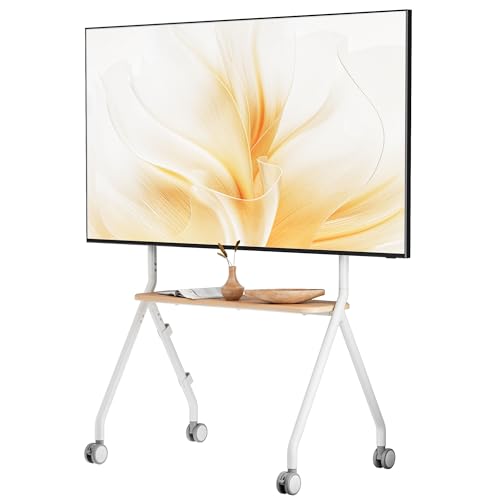
- Supports 49–80-inch TVs up to 110 pounds
- Lockable 360° wheels enable room-to-room movement
- Wood shelves and cable management aid organization
Best For: Display-focused classrooms and polished learning spaces
Best Built-In Power and Storage

- Includes three AC outlets and two USB ports
- Adjusts from about 53.5 to 60.6 inches
- Adds shelves, drawer, hooks, and lockable wheels
Best For: Classrooms with multiple connected media devices
Best Heavy-Duty Wide-Range Cart

- Fits 32–85-inch TVs up to 132 pounds
- Height adjusts up to 67.5 inches
- X-shaped base, lockable casters, and cable routing
Best For: Classrooms using a range of display sizes
Best Swivel Option

- 70° total swivel range
- Three height settings
- Supports up to 99 pounds
Best For: Stationary classroom displays needing flexible viewing angles
Best Mobile Classroom Cart
Rolling TV Stand with Locking Wheels

- Locking rolling casters
- Height and tilt adjustment
- Supports up to 88 pounds
Best For: Classrooms that frequently change layouts or move displays
Best with Media Shelf

- Adjustable AV equipment shelf
- Rolling design for easy repositioning
- Five-year manufacturer warranty
Best For: Classrooms needing a mobile TV and space for presentation equipment
Best Classroom-Ready Pick

- Supports 23- to 65-inch TVs up to 88 pounds
- Locking casters support room-to-room mobility
- Adjustable shelf and cable management organize AV gear
Best For: Classrooms and shared presentation spaces
Best Long-Warranty Option

- Fits 23- to 60-inch TVs up to 88 pounds
- Height-adjustable brackets customize viewing position
- Includes locking casters and a 10-year warranty
Best For: Flexible classrooms and conference rooms
Best Tilt Range

- Fits 23- to 60-inch TVs up to 88 pounds
- Tilts 5 degrees up and 10 degrees down
- Quiet PU wheels lock for stable positioning
Best For: Classrooms needing glare control and quiet movement
Best Mobile Workhorse – VIVO Mobile TV Cart
For classrooms needing flexible tv floor stands for classrooms, the VIVO Mobile TV Cart supports screens from 32 to 83 inches and can hold up to 110 pounds. Its locking casters, adjustable height, tilt range, and media shelf make it practical for presentations, lessons, and shared spaces.
Best For: Classrooms that need a sturdy, broadly compatible cart for moving and positioning large displays.
Pros:
- Supports 32–83-inch TVs up to 110 pounds.
- Locking casters allow mobile or stationary use.
- Offers height adjustment and +15° to -15° tilt.
- Includes a 10-pound utility shelf for media devices.
Cons:
- The shelf is limited to 10 pounds.
- Its large 35.3-by-26-inch base may need substantial floor space.
This is a versatile classroom choice when display compatibility and repositioning matter more than a compact footprint. The wide VESA support and included installation guidance add convenience for shared educational environments.
Best Presentation-Style Design – ECOTINY Rolling Easel Stand
The ECOTINY Rolling Easel TV Stand brings a cleaner, gallery-inspired look to tv floor stands for classrooms. It supports 49- to 80-inch TVs up to 110 pounds, rolls on four lockable wheels, and adds wooden shelves for classroom media equipment.
Best For: Classrooms, studios, or learning areas where appearance, storage, and quiet movement are priorities.
Pros:
- Supports most 49–80-inch TVs up to 110 pounds.
- Four 360° wheels include brakes for positioning.
- Wood shelves provide room for soundbars, consoles, or accessories.
- Integrated cable management helps organize cords.
Cons:
- Its 49-inch minimum screen size excludes smaller displays.
- The supplied details list the movement type as fixed, so the screen itself is not described as adjustable.
Choose this model when a classroom display should look less industrial than a conventional cart. Its rolling frame and shelves are useful for shared spaces, though buyers should confirm the TV’s VESA pattern and plan around the larger screen-size range.
Best Built-In Power and Storage – Hellsehen Rolling TV Stand
The Hellsehen Rolling TV Stand combines display mobility with built-in power and storage, making it a feature-rich option among tv floor stands for classrooms. It fits 32- to 75-inch screens, offers adjustable height, and includes outlets, USB ports, shelves, a fabric drawer, and side hooks.
Best For: Classrooms that connect several media devices and need accessible storage for small accessories.
Pros:
- Fits 32–75-inch flat or curved TVs with VESA support up to 600x400mm.
- Provides three AC outlets and two USB ports.
- Height adjusts from approximately 53.5 to 60.6 inches.
- Includes open shelves, a fabric drawer, and headphone hooks.
Cons:
- The supplied notes give conflicting load information: the title says 220 pounds, while the bullet says up to 330 pounds.
- The 4.7-foot power cord may limit placement away from wall outlets.
- It supports screens only up to 75 inches.
This stand is especially practical for technology-heavy teaching setups, but the load rating should be verified before purchase. Its adjustable height, power access, and concealed storage can reduce cable and accessory clutter around a classroom display.
Best Heavy-Duty Wide-Range Cart – Perlegear Rolling TV Stand
The Perlegear Rolling TV Stand is a strong fit for tv floor stands for classrooms when a wide screen range and high capacity are important. It supports 32- to 85-inch TVs up to 132 pounds, includes height adjustment, and uses a stable X-shaped base with lockable swivel casters.
Best For: Classrooms that use anything from a moderate-size display to a large 85-inch screen and need room-to-room portability.
Pros:
- Supports 32–85-inch TVs up to 132 pounds.
- Compatible with VESA patterns from 100x100mm to 600x400mm.
- Adjustable viewing height reaches up to 67.5 inches.
- Includes a 22-pound AV shelf and internal cable organization.
Cons:
- The AV shelf is limited to 22 pounds.
- The broad X-shaped base may require careful placement in crowded classrooms.
With its broad compatibility, elevated maximum capacity, and adjustable viewing height, this cart is a dependable all-purpose option. The lockable casters and cable-routing design are particularly useful when one display serves multiple rooms or teaching areas.
Best Swivel Option – Rfiver Swivel Floor TV Stand
For classrooms that need a fixed, space-conscious display with flexible viewing angles, this swivel model is one of the more adaptable tv floor stands for classrooms. It supports compatible 32- to 70-inch screens, offers three height settings, and does not require wall drilling.
Best For: Classrooms needing a stationary TV stand with broad side-to-side viewing adjustment.
Pros:
- 70-degree total swivel range helps students view the screen from different seating positions.
- Three height settings provide up to 5.9 inches of adjustment.
- Reinforced wood-panel base is designed for stability while using limited floor space.
- Supports TVs up to 99 pounds with VESA patterns from 100x100mm to 400x400mm.
Cons:
- It is not designed to roll between classrooms.
- Compatibility depends on the TV’s size, weight, and VESA pattern.
This stand makes the most sense when the screen will remain in one teaching area but needs to face different parts of the room. Check the TV specifications and available base space before ordering.
Best Mobile Classroom Cart – Rolling TV Stand with Locking Wheels
This rolling TV stand is a practical choice among tv floor stands for classrooms when the display must move between teaching areas. Its four casters, locking wheels, adjustable height, and tilt function support changing classroom layouts without wall installation.
Best For: Teachers and facilities teams that regularly reposition a TV for lessons, presentations, or meetings.
Pros:
- Four PU caster wheels make the stand easy to move between rooms, with locks for parking.
- Height adjustment and +10°/-10° tilt help reduce glare and improve screen positioning.
- Supports compatible 21- to 60-inch TVs weighing up to 88 pounds.
- Includes cable management and requires no wall drilling.
Cons:
- Its listed screen range is smaller than some larger classroom TV stands.
- Assembly is required before use.
Choose this model if mobility is more important than a built-in media shelf. Confirm the TV’s VESA pattern, weight, and screen size, then use the wheel locks whenever the stand is parked for instruction.
Best with Media Shelf – Rfiver Mobile TV Stand
For classrooms that need room for a laptop, speaker, or other equipment, this rolling cart adds an adjustable media shelf to the standard mobile design. It is a versatile option among tv floor stands for classrooms, supporting compatible flat, curved, and outdoor TVs without wall drilling.
Best For: Classrooms that need a movable display plus convenient space for presentation or AV equipment.
Pros:
- Fits compatible 23- to 65-inch screens weighing up to 88 pounds.
- Adjustable shelf can hold a laptop, DVD player, gaming system, speaker, or other AV equipment.
- Wheels make it easier to move the display around classrooms, offices, and other spaces.
- Includes cable management and a five-year manufacturer warranty.
Cons:
- The shelf and rolling base require additional floor space compared with a compact stationary stand.
- It provides tilt adjustment rather than a stated swivel range.
- Assembly is required.
This is a strong fit when the classroom setup includes more than just a screen. Review the shelf’s available space alongside the TV’s VESA pattern and weight before purchase.
Best Classroom-Ready Pick – BONTEC Rolling TV Stand
For classrooms needing flexible presentation equipment, the BONTEC rolling TV stand combines broad TV compatibility with locking wheels, tilt adjustment, and cable management. It supports 23- to 65-inch TVs up to 88 pounds and includes an adjustable media shelf for presentation accessories.
Best For: Classrooms, training rooms, and shared spaces that need a movable, organized TV display.
Pros:
- Supports most 23- to 65-inch TVs and VESA patterns up to 400x400mm.
- Four 360-degree locking casters make repositioning and securing the stand straightforward.
- Includes up to 10 degrees of tilt, an adjustable shelf, and integrated cable management.
Cons:
- The maximum supported screen size is listed as 60 inches in the product details, despite the title and bullets stating 65 inches.
- The stand requires assembly before use.
Its combination of mobility, storage, and cable organization makes it a practical choice for classrooms that regularly switch between lessons, presentations, and video instruction. Verify your TV’s size, weight, and VESA pattern before purchasing.
Best Long-Warranty Option – Xyndyx Mobile TV Cart
The Xyndyx mobile TV cart is a flexible option among tv floor stands for classrooms, with support for 23- to 60-inch LCD, LED, OLED, and curved TVs up to 88 pounds. Its height adjustment, tilt movement, locking casters, and compact design suit changing classroom layouts.
Best For: Classrooms and conference rooms that value adjustable viewing height and a lengthy manufacturer warranty.
Pros:
- Accommodates many 23- to 60-inch TVs with VESA support up to 400x400mm.
- Height-adjustable brackets help tailor the viewing position for different activities.
- High-grade steel construction, locking wheels, and a 10-year manufacturer warranty add practical reassurance.
Cons:
- The supplied notes do not specify the exact height-adjustment range.
- Assembly is still required, even though hardware and instructions are included.
This cart is a strong fit when several users or room arrangements call for a customizable screen position. Its compact, close-to-wall design may also help preserve floor space in busy learning environments.
Best Tilt Range – PERLESMITH Rolling TV Stand
The PERLESMITH rolling TV stand offers a useful tilt range and quiet, lockable wheels for classroom presentations. It fits 23- to 60-inch TVs up to 88 pounds, supports numerous VESA patterns through 400x400mm, and uses a steel frame with a safety screw.
Best For: Classrooms where glare reduction, quiet movement, and broad mounting-pattern compatibility are priorities.
Pros:
- Supports 23- to 60-inch TVs and a wide range of VESA patterns up to 400x400mm.
- Tilts 5 degrees upward and 10 degrees downward to help improve viewing angles.
- Lockable PU wheels are designed for quieter movement, and the stand holds up to 88 pounds.
Cons:
- The supplied details do not mention adjustable height.
- Careful installation is required, and the TV’s VESA pattern should be checked before purchase.
For classrooms that frequently reposition a display or deal with overhead lighting, the combination of quiet casters and two-way tilt is particularly useful. Confirm the TV’s mounting pattern and weight before installation.
How We Picked These TV Floor Stands for Classrooms
We focused on practical features that matter in schools: compatible screen sizes, weight capacity, rolling mobility, locking casters, height adjustment, tilt or swivel range, shelves, drawers, cable management, and overall versatility. A classroom stand should be easy for staff to reposition but stable enough to remain secure during lessons. We also included options across several size and price ranges so you can match the cart to the television already in use.
Quick Comparison
Before choosing, compare each stand’s maximum screen size and weight rating first. A cart rated for a 60-inch display may not support a heavier 65- or 75-inch television, even if the mounting pattern appears compatible. Smaller mobile carts generally suit compact classrooms and shared displays, while larger models are better for auditoriums, multipurpose rooms, and large-group instruction.
What to Check at a Glance
- Screen range: Confirm both the television size and VESA mounting pattern.
- Weight limit: Include the TV, soundbar, media player, and any mounted accessories.
- Mobility: Look for smooth-rolling casters and wheel locks for parked stability.
- Storage: Shelves, drawers, and outlets can simplify presentations and device charging.
Key Buying Factors for TV Floor Stands for Classrooms
Stability and Safety
Prioritize a broad, sturdy base, dependable locking wheels, and a mount that keeps the screen centered. Check that the stand will not obstruct walkways or create a trip hazard. In busy classrooms, secure all cables and avoid exceeding the manufacturer’s weight limit.
Height and Viewing Angle
Height adjustment helps accommodate seated students, standing instruction, and different room layouts. Tilt or swivel functions can reduce glare and improve visibility from the side of the room. Make sure adjustments can be locked firmly after positioning.
Compatibility and Setup
Verify the TV’s VESA dimensions, mounting hardware, screen weight, and any unusual rear-panel shape before ordering. A stand with clear instructions and accessible hardware is especially valuable when several staff members may assemble or relocate it.
Mobility and Classroom Storage
Choose larger casters for frequent movement over thresholds or uneven flooring. A shelf or fabric drawer can hold remotes, adapters, keyboards, and presentation equipment, while an integrated outlet may reduce cable clutter. Keep stored items light enough to preserve stability.
Who Should Buy Which TV Floor Stands for Classrooms?
Choose a compact 23- to 60-inch cart for small classrooms, tutoring rooms, or shared displays that need easy repositioning. Choose a 32- to 75-inch model for general-purpose classrooms where height adjustment, storage, and stronger support are useful. Choose a heavy-duty 32- to 85-inch stand for large screens, multipurpose rooms, or installations that need a higher weight capacity.
If glare or side-angle viewing is a recurring issue, prioritize tilt or swivel adjustment. If the stand will move between rooms frequently, favor smooth casters, locking wheels, and a manageable frame over extra shelves. Finally, measure doorways, storage areas, and presentation spaces before buying so your new classroom TV cart fits the way you plan to use it.