A flight yoke can make simulator flying feel far more natural, but many home pilots do not have room for a permanent cockpit. The best flight simulator yokes for small spaces deliver precise control while fitting neatly on a desk, shelf, or compact stand.
We selected 10 options across PC and console compatibility, integrated controls, foldable stands, and premium force-feedback designs. Use the guide below to match your available space, simulator platform, and preferred level of immersion.
Best 10 Flight Simulator Yokes for Small Spaces Picks for 2026
Premium Compact Control
Honeycomb Alpha Flight Controls

- 180-degree smooth yoke movement
- Integrated switch and ignition panel
- Clamp and micro-suction mounting options
Best For: PC pilots wanting an all-in-one yoke and switch setup
All-in-One Space Saver

- Seven axes in one controller
- Built-in throttle, trim, and rudder controls
- Works with PC, PS5, iOS, and Android
Best For: Beginners needing broad control with minimal desk equipment
Adjustable Compact Cockpit

- Modular mounting for flight and racing gear
- Adjustable positions and pedal angle
- Provides space for keyboard and mouse
Best For: Builders consolidating multiple simulator peripherals
Streamlined Desk Yoke
Honeycomb Alpha LITE Flight Yoke

- Simplified design for essential yoke control
- 180-degree movement with minimal dead zone
- Programmable switches and buttons
Best For: PC beginners and compact custom cockpit setups
Best Fold-Away Stand
Anman Foldable Flight Simulator Stand

- Folds for compact storage
- Supports flight and racing accessories
- Stable X-shaped frame
Best For: Flexible multi-use cockpit setups
Best Desktop Yoke
Logitech G PRO Flight Yoke System
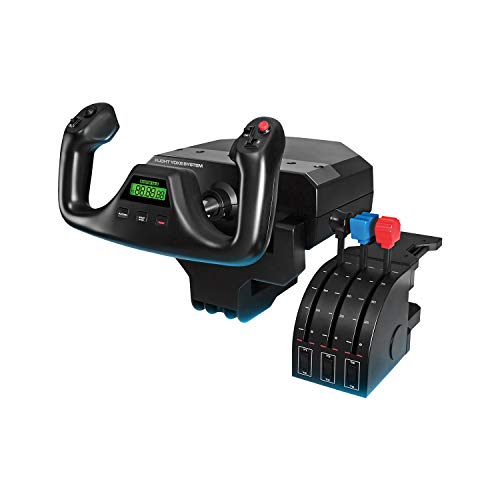
- Clamps directly to a desk
- Includes throttle quadrant
- Provides extensive programmable controls
Best For: Compact Windows desktop setups
Best Boeing-Style Pack
Thrustmaster TCA Yoke Boeing Edition

- Licensed Boeing 787-inspired design
- Includes yoke and throttle quadrant
- Works with PC and Xbox
Best For: Boeing-focused simulator setups
Compact Precision Pick
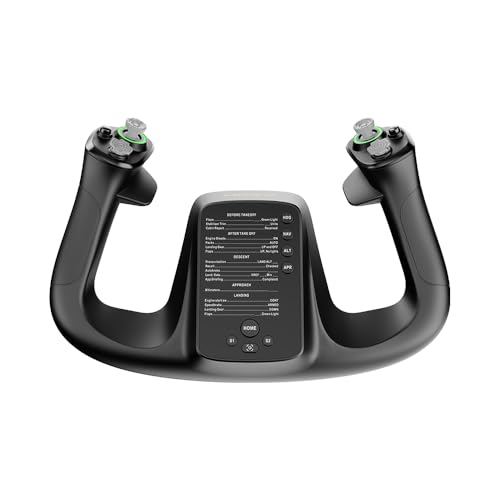
- Lightweight 1.3 kg design
- 34 configurable inputs
- PC-compatible with quick release
Best For: PC pilots wanting a lightweight, customizable yoke
All-in-One Setup Choice
Turtle Beach VelocityOne Flight
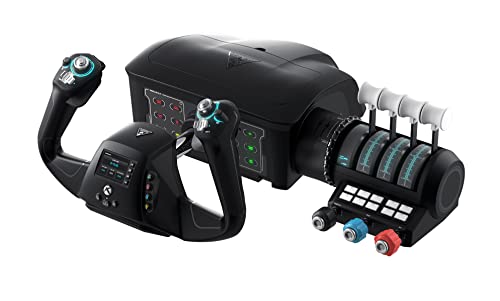
- Integrated yoke and throttle system
- Includes trim, rudder, and brake controls
- Works with Xbox and Windows
Best For: Users wanting one complete flight-control unit
Force-Feedback Performance Pick

- 9 Nm force feedback torque
- 150 mm travel distance
- 13 programmable switches
Best For: PC sim pilots prioritizing detailed yoke feedback
Premium Compact Control – Honeycomb Alpha Flight Controls
For shoppers comparing flight simulator yokes for small spaces, the Honeycomb Alpha combines a yoke and switch panel in one substantial unit. Its 180-degree rotation, smooth steel shaft, and dual mounting options make it practical for a sturdy desk, though its feature-rich design needs adequate surface area.
Best For: PC pilots who want realistic yoke control and integrated aircraft switches in one setup.
Pros:
- 180-degree rotation with a steel shaft, ball bearings, minimal deadzone, and dampened self-centering.
- Integrated switches, ignition control, LED backlighting, and multiple yoke buttons.
- Includes heavy-duty clamps and a clamp-free micro-suction mounting option for suitable tabletops.
Cons:
- Its listed 19 x 13.1 x 10.3-inch dimensions and 4.9 kg weight may be substantial for a small desk.
- Designed for PC use, limiting console compatibility.
The Alpha is a strong choice when desk space is limited but you still want a built-in switch panel. Measure your tabletop carefully and confirm it can support the unit and mounting method.
All-in-One Space Saver – Thrustmaster TCA SKY YOKE
The Thrustmaster TCA SKY YOKE is especially appealing among flight simulator yokes for small spaces because it combines a yoke, throttle, trim wheel, and rudder controls in one controller. That integrated layout can reduce the number of separate devices competing for desk room.
Best For: Beginners and multi-platform users who want essential controls without assembling several peripherals.
Pros:
- Seven axes include built-in throttle, trim wheel, and rudder functionality.
- 180-degree movement, steel pitch axis, damping, and Hall Effect magnetic sensing support precise control.
- Offers 24 action buttons and compatibility with PC, PS5, iOS, and Android.
Cons:
- Rudder pedals and the optional three-axis quadrant are sold separately for expanded control.
- Its broader platform compatibility may still require checking the specific simulator and device setup.
For compact stations, consolidating the main flight controls is a meaningful advantage. This model is a practical starting point when you want fewer pieces on the desk and support for both PC and PS5.
Adjustable Compact Cockpit – Marada Flight Simulator Stand
The Marada stand takes a different approach to flight simulator yokes for small spaces: instead of being a yoke itself, it organizes compatible flight controls on an adjustable simulator frame. Its modular boards and position adjustments can help consolidate a yoke, keyboard, and mouse, but the stand still requires dedicated floor space.
Best For: Users building an adjustable multi-device flight or racing simulator station.
Pros:
- Adjustable front, rear, vertical, and lateral positioning supports different equipment and users.
- Modular mounting boards accommodate listed Logitech, Thrustmaster, Honeycomb, Turtle Beach, VKB, VPC, and Winwing gear.
- Designed to hold a mouse and keyboard while providing foot space and adjustable pedal positioning.
Cons:
- The listed dimensions are substantial, so it is not a tabletop solution for very tight rooms.
- Yoke, wheel, pedals, throttle, joystick, and other electronics are not included.
- Manual assembly and configuration are required.
This stand can make a small gaming area more organized by giving multiple peripherals defined mounting points. However, measure floor clearance first; it is better suited to a compact dedicated rig than a desk-only setup.
Streamlined Desk Yoke – Honeycomb Alpha LITE Flight Yoke
The Honeycomb Alpha LITE is a simpler option for shoppers seeking flight simulator yokes for small spaces. It removes the full Alpha model’s switch panel and focuses on essential yoke controls, making it easier to fit into a compact PC setup while retaining 180-degree movement.
Best For: Entry-level PC pilots, VR users, and custom cockpit builders who need a focused yoke.
Pros:
- Streamlined design omits the additional switch panel for a simpler setup.
- 180-degree self-centering control has a minimal center dead zone.
- Includes programmable buttons, rocker switches, and a POV switch for core simulator inputs.
Cons:
- PC-focused compatibility is specified for Microsoft Flight Simulator 2020 and 2024.
- Additional aircraft functions may require keyboard commands, virtual cockpit controls, or separate panels.
- The listed 9.92-pound weight still calls for a rigid, compatible mounting surface.
Alpha LITE is the most straightforward fit here for a compact desk that does not need a dedicated switch panel. Check the mounting surface and allow room for the yoke’s movement before ordering.
Best Fold-Away Stand – Anman Foldable Flight Simulator Stand
For shoppers comparing flight simulator yokes for small spaces, the Anman stand is a flexible cockpit-style option that folds for storage. Its X-shaped frame supports flight and racing equipment, while the adjustable pedal section and separate keyboard-and-mouse placement help make a compact setup more practical.
Best For: Users who want a foldable stand for both flight simulation and racing gear.
Pros:
- Folds down to save storage space.
- Supports a wide range of Logitech, Thrustmaster, and other flight or racing accessories.
- X-shaped, double-triangle design is intended to improve stability.
- Comes 80% pre-installed for quicker assembly.
Cons:
- Its 37.5-by-38.4-inch footprint may still be substantial for very tight spaces.
- It is a stand rather than a yoke, so controls must be purchased separately.
- Warranty coverage is listed as three months.
This is a sensible choice when storage flexibility matters more than a minimal desktop footprint. Check the listed dimensions and mounting compatibility before buying.
Best Desktop Yoke – Logitech G PRO Flight Yoke System
The Logitech G PRO Flight Yoke System is a practical desktop pick for shoppers seeking flight simulator yokes for small spaces. Its desk clamps avoid a separate cockpit frame, while the included throttle quadrant and programmable controls provide a fuller setup without requiring a floor stand.
Best For: Desktop pilots who want a clamp-mounted yoke and included throttle quadrant.
Pros:
- Desk clamps provide flexible mounting on compatible desks.
- Includes both the flight yoke and throttle quadrant.
- Offers a POV hat, 14 buttons, and a three-position mode switch.
- Works with Windows 11, 10, 8.1, and 7.
Cons:
- Requires optional software for listed flight simulators.
- Desk space is still needed for the yoke, quadrant, and clamp placement.
- Compatibility is listed for Windows rather than Xbox consoles.
Among these options, this is the most straightforward choice for a compact desk-based setup. Its clamp mounting can free floor space, but measure your desk and plan where the throttle quadrant will sit.
Best Boeing-Style Pack – Thrustmaster TCA Yoke Boeing Edition
The Thrustmaster TCA Yoke & Quadrant Boeing Edition delivers a yoke-and-throttle package for PC and Xbox users considering flight simulator yokes for small spaces. It uses a 1:1 Boeing 787-inspired design, a suspended pendular mechanism, and a bundled throttle quadrant, though its listed dimensions call for careful desk planning.
Best For: Boeing fans who want a feature-rich yoke pack for Microsoft Flight Simulator on PC or Xbox.
Pros:
- Officially licensed Boeing 787-inspired 1:1 design.
- PENDUL_R mechanism provides an 8.3-inch range of motion.
- Includes a throttle quadrant with Boeing autopilot functions.
- Offers 35 action buttons, two extra axes, and a metal internal structure.
Cons:
- The listed 19-by-15-by-19-inch dimensions may be challenging in a small workspace.
- Rudder pedals are compatible but sold separately.
- Its feature-rich design may take more desk room than a basic yoke.
This pack suits users prioritizing Boeing realism and broad control coverage over the smallest possible footprint. Confirm available desk depth and height before committing to this larger setup.
Compact Precision Pick – MOZA MFY Yoke
For shoppers comparing flight simulator yokes for small spaces, the MOZA MFY is a relatively lightweight PC option with a compact-focused feature set. It weighs 1.3 kg and combines a quick-release design with configurable controls for flexible desk setups.
Best For: PC pilots who want a lightweight yoke with extensive customization.
Pros:
- Lightweight 1.3 kg construction is easier to position or store.
- Aluminum alloy quick-release system supports convenient setup changes.
- Offers 34 configurable inputs and customizable RGB lighting.
- Hall effect joystick and drift-free control support precise handling.
Cons:
- Compatible with PC rather than Xbox consoles.
- Does not include the integrated throttle, trim wheel, and rudder controls found on an all-in-one system.
The MFY is a sensible small-space choice when low weight and flexible inputs matter more than an included control ecosystem. Its PC-only compatibility and separate-control approach are the main points to consider.
All-in-One Setup Choice – Turtle Beach VelocityOne Flight
The Turtle Beach VelocityOne Flight is an all-in-one option for shoppers seeking flight simulator yokes for small spaces without assembling separate controls. Its secure clamping system is designed for a variety of home setups, while the integrated throttle, trim, rudder, and brake controls consolidate the cockpit.
Best For: Xbox and Windows users who want a complete control system in one unit.
Pros:
- Combines a yoke, throttle quadrant, trim wheel, rudder, and brake controls.
- Secure clamping system helps fit different home setups.
- 180° yoke rotation uses a non-contact Hall effect sensor.
- Supports Xbox consoles and Windows 10 and 11 PCs.
Cons:
- Its 19.01 x 7.2 x 19.5-inch listed dimensions require more room than a yoke-only controller.
- At 10 pounds, it is less convenient to move or store than a lightweight standalone yoke.
- The integrated design may be more equipment than users seeking only basic yoke control need.
The VelocityOne Flight saves desk clutter by combining multiple flight controls, but its larger footprint makes measuring your available surface especially important. It is the strongest fit when broad compatibility and an integrated cockpit outweigh portability.
Force-Feedback Performance Pick – MOZA AY210 Yoke Base
For flight simulator yokes for small spaces, the MOZA AY210 offers a streamlined yoke-base format while focusing on high-detail force feedback. Its aircraft-grade aluminum body, quick-release system, and 150 mm travel distance suit PC pilots who prioritize control feel and can accommodate a dedicated base.
Best For: PC enthusiasts seeking professional-grade force-feedback control.
Pros:
- Dual high-torque servo motors provide smooth force feedback.
- 9 Nm torque and 210 N push force deliver detailed resistance.
- 150 mm travel distance supports controlled, precise inputs.
- Includes 13 mappable switches and a programmable switch panel.
Cons:
- PC-only compatibility limits console use.
- It is a yoke base rather than an all-in-one system with integrated throttle and rudder controls.
- The performance-focused force-feedback hardware may be more than casual pilots need.
The AY210 is best viewed as a compact-format performance component rather than a complete cockpit. It can simplify a small-space setup, but buyers should plan for any additional controls their simulator requires.
How We Picked the Best Flight Simulator Yokes for Small Spaces
We focused on the practical constraints of compact home setups: desk footprint, mounting flexibility, storage, connection options, and ease of setup. The selection includes standalone yokes, systems with throttle or switch controls, and stands designed to consolidate flight hardware without requiring a dedicated cockpit.
We also considered platform support and control layout. Compatibility can vary by simulator and operating system, so check the manufacturer’s current specifications before buying, particularly for Xbox, PlayStation, mobile, and PC use.
Quick Comparison
| Best For | Look For |
|---|---|
| Small desk setups | Compact clamp-on hardware or a standalone yoke |
| Easy storage | Foldable stands and removable control panels |
| Complete controls | Yoke-and-throttle packages or integrated switch panels |
| Advanced immersion | Force-feedback bases with strong mounting support |
| Console pilots | Explicit compatibility with your Xbox or PlayStation console |
Key Buying Factors for Flight Simulator Yokes for Small Spaces
Footprint and Mounting
Measure the usable depth and width of your desk before ordering. A yoke may be compact on its own but need extra clearance for clamps, cable routing, or its forward-and-back movement. If you pack away your setup after every session, prioritize a lightweight or foldable design.
Stability
Small hardware should not slide when you pull or rotate the yoke. Look for sturdy clamps, a rigid base, non-slip feet, or a stand with a fixed control slot. A compact stand can be worthwhile if your desk cannot support a secure clamp.
Controls and Expandability
Integrated switches and throttles reduce desk clutter, while separate components allow easier upgrades. Consider whether you need trim, autopilot, landing-light, or engine controls immediately, or whether you prefer adding them later.
Compatibility and Connections
Confirm support for your simulator, console, operating system, and USB arrangement. Some products are designed primarily for PC, while others target specific console ecosystems. Also check whether the package includes every cable, quadrant, or mounting accessory shown.
Force Feedback and Noise
Force feedback can add realism, but it usually increases cost, weight, and mounting requirements. It may also produce more audible mechanical activity than a conventional yoke. Choose it when immersion is more important than the simplest, quietest setup.
Who Should Buy Which Flight Simulator Yokes for Small Spaces?
Choose a compact standalone yoke if you already own a throttle and want the smallest upgrade path. Choose an integrated yoke-and-switch system if reducing desk clutter and cable count matters most. Choose a foldable stand if you need to store the entire setup between flights or cannot clamp hardware safely to your desk.
Console users should begin with confirmed platform compatibility rather than appearance or price. Serious PC sim pilots may prefer a robust system with a separate quadrant or force feedback, provided they have enough clearance and a stable mounting surface. For occasional users, a simpler, lighter yoke is usually easier to live with and offers better value in a small room.