A quality flight simulator yoke can make pitch, roll, and cockpit procedures feel far more natural than a gamepad or basic joystick. The right model depends on your simulator, platform, available desk space, and whether you want a standalone controller or a broader flight-control system.
We compare 10 popular yokes and yoke-based flight systems across compatibility, controls, installation, realism, and value to help you choose with confidence.
Best 10 Flight Simulator Yoke Picks for 2026
Premium Bundle
Honeycomb Alpha Flight Controls Yoke Bundle

- Includes Alpha yoke and Bravo throttle quadrant
- Configurable throttle support for one- to four-engine aircraft
- Adds autopilot, trim, gear, flap, and annunciator controls
Best For: Windows users building a feature-rich cockpit setup
All-in-One Pick

- Seven axes with built-in throttle, trim, and rudder controls
- 24 action buttons and smooth magnetic-sensor input
- Compatible with PC, PS5, iOS, and Android
Best For: Beginners seeking a versatile multi-platform yoke
Programmable Classic
Logitech G PRO Flight Yoke System
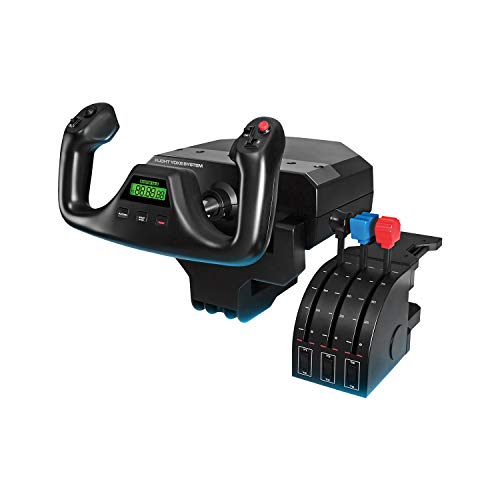
- Includes yoke, throttle quadrant, cables, and desk clamps
- Provides 14 buttons, a POV hat, and three-position mode switch
- Designed for Windows flight simulators
Best For: Desktop pilots wanting configurable controls and secure mounting
Console Combat Kit
Thrustmaster T-Flight Full Kit HOTAS

- Includes stick, detachable throttle, and rudder pedals
- Works with Xbox Series X|S and PC
- Adds five axes, 14 buttons, trigger, and hat switch
Best For: Xbox and PC users wanting a complete HOTAS setup
Best Overall PC Yoke
Honeycomb Alpha Flight Controls

- 180° rotation with steel shaft and smooth bearings
- Integrated switch panel and 33 controls
- Clamps and micro-suction mounting included
Best For: PC pilots wanting an immersive all-in-one yoke
Best Boeing-Style Flight Pack
Thrustmaster TCA Yoke & Quadrant

- 787-inspired yoke with pendular movement
- Includes throttle quadrant and Boeing autopilot controls
- Works with Windows and Xbox Series consoles
Best For: Airliner fans building a Boeing-style cockpit
Best Force-Feedback Upgrade
MOZA AY210 Force Feedback Yoke

- 9Nm torque and 210N push force
- 150mm travel with dual servo motors
- 13 mappable switches and quick-release design
Best For: PC users seeking customizable force-feedback control
Best Entry-Level Pick

- 180-degree self-centering yoke
- Essential programmable controls
- PC support for MSFS 2020 and 2024
Best For: Entry-level PC pilots and custom cockpit builders
Best All-in-One System
Turtle Beach VelocityOne Flight
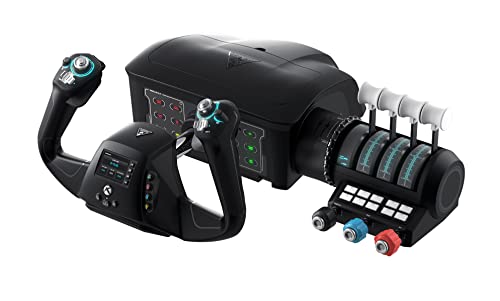
- Yoke, throttle, trim, rudder, and brakes
- Works with Xbox and Windows PCs
- Includes flight management display
Best For: Xbox and PC users wanting a complete control system
Best Premium Yoke Setup
Honeycomb Alpha Flight Controls

- Smooth 180-degree yoke movement
- Integrated aircraft switch panel
- PC and Mac compatibility
Best For: Simmers and students wanting dedicated cockpit switches
Premium Bundle – Honeycomb Alpha Flight Controls Yoke Bundle
Honeycomb Alpha Flight Controls Yoke Bundle | Bravo throttle quadrant, (2 items)
Check Price On AmazonThe Honeycomb Alpha Flight Controls Yoke Bundle is a substantial flight simulator yoke setup for Windows users who want both yoke control and a configurable throttle quadrant. It combines the Alpha yoke and switch panel with the Bravo quadrant for a more complete cockpit-style experience.
Best For: Windows sim pilots building a detailed general-aviation or commercial-aircraft cockpit.
Pros:
- Includes both the Alpha Flight Controls Yoke and Bravo Throttle Quadrant.
- Bravo supports configurable throttle setups for single-engine through four-engine aircraft.
- Built-in cockpit features include autopilot, annunciator panel, gear and flap lever, trim wheel, and LED landing-gear indicators.
Cons:
- Designed for Windows rather than consoles.
- The complete bundle is relatively heavy at 12.13 kg and requires substantial desk space.
This is a strong choice when you want a broad range of cockpit controls in one package. Its size and weight make it better suited to a dedicated or spacious desktop setup than a compact casual arrangement.
All-in-One Pick – Thrustmaster TCA SKY YOKE
The Thrustmaster TCA SKY YOKE is an all-in-one flight simulator yoke for PC, PS5, iOS, and Android. With seven axes, built-in throttle, trim wheel, rudder controls, and 24 action buttons, it offers a straightforward way to start flying without immediately buying several separate controllers.
Best For: Beginners and multi-platform pilots who want built-in controls and broad device compatibility.
Pros:
- Combines yoke, throttle, trim wheel, and rudder controls in one unit.
- Provides seven axes, 24 action buttons, and up to 180 degrees of yoke rotation.
- Uses H.E.A.R.T. magnetic technology with 16-bit resolution and supports dual-control operation on PS5 and PC.
Cons:
- TFRP rudder pedals and the TCA SKY Quadrant are sold separately.
- Its listed console compatibility is focused on PS5, while Xbox is not listed.
With plug-and-play recognition in Microsoft Flight Simulator 2024 and Infinite Flight, this yoke is especially convenient for new users. It also leaves room to expand later with separate pedals or a quadrant.
Programmable Classic – Logitech G PRO Flight Yoke System
The Logitech G PRO Flight Yoke System is a Windows-focused flight simulator yoke package that includes a flight yoke and throttle quadrant. Its stainless-steel shaft, desk clamps, mode switch, and programmable controls make it practical for users who want a secure, configurable desktop setup.
Best For: Windows pilots who value programmable controls and a clamp-mounted yoke-and-throttle arrangement.
Pros:
- Includes the flight yoke, throttle quadrant, USB cable, PS/2 cable, and two desk clamps.
- Offers a POV hat, 14 buttons, and a three-position mode switch for extensive programming.
- Stainless-steel yoke shaft and two-position clamps support smooth control and mounting flexibility.
Cons:
- Compatible with Windows systems rather than current consoles.
- Optional software download is required for Microsoft Flight Simulator, FSX, X-Plane 10, and Prepar3D.
This system is a sensible middle ground for desktop sim pilots who want a traditional yoke with a separate throttle quadrant. The included clamps help keep the controls secure, while the programmable layout can accommodate varied simulator setups.
Console Combat Kit – Thrustmaster T-Flight Full Kit HOTAS
The Thrustmaster T-Flight Full Kit is a complete HOTAS flight setup for Xbox Series X|S and PC, combining a flight stick, detachable throttle, and TFRP rudder pedals. While it is not a traditional flight simulator yoke, it is a practical alternative for pilots who prioritize console compatibility, combat controls, and included yaw pedals.
Best For: Xbox and PC users who want a complete stick, throttle, and rudder-pedal package.
Pros:
- Includes a flight stick, detachable throttle quadrant, and TFRP rudder pedals.
- Offers five axes, 14 programmable buttons, a trigger, and a multidirectional hat switch.
- Provides official Xbox console integration with dedicated Guide, View, and Menu buttons.
Cons:
- Uses a flight stick rather than a yoke-style control.
- Listed compatibility focuses on PC and Xbox Series X|S, not PlayStation.
Choose this kit when platform support and a full control set matter more than yoke-style handling. The included pedals and Xbox-specific controls make it particularly convenient for console-based flight simulation and space-combat sessions.
Best Overall PC Yoke – Honeycomb Alpha Flight Controls
The Honeycomb Alpha is a practical flight simulator yoke for PC pilots who want a more complete cockpit setup without adding a separate switch panel. Its 180-degree rotation, steel shaft, ball bearings, and dampened self-centering mechanism are designed for smooth, precise inputs.
Best For: PC users seeking an immersive yoke with integrated aircraft controls and flexible tabletop mounting.
Pros:
- 180-degree rotation with a solid steel shaft and dual linear ball bearings.
- Integrated switches, ignition control, LED backlighting, and 33 buttons.
- Includes heavy-duty clamps and a clamp-free micro-suction mounting option.
- Compatible with Microsoft Flight Simulator and other leading flight simulation software.
Cons:
- Designed for PC use rather than Xbox consoles.
- Its 19-inch-wide footprint may require substantial desk space.
The Alpha is a well-rounded choice when realism, integrated controls, and sturdy construction matter more than console compatibility or specialized force feedback.
Best Boeing-Style Flight Pack – Thrustmaster TCA Yoke & Quadrant
The Thrustmaster TCA Yoke Pack is a flight simulator yoke bundle built around the Boeing 787 cockpit experience. Its officially licensed 1:1-inspired design combines pendular yoke motion with a throttle quadrant, making it a strong option for Microsoft Flight Simulator users on PC or Xbox.
Best For: Boeing fans and PC or Xbox users who want a yoke-and-throttle bundle with airliner-focused controls.
Pros:
- PENDUL_R mechanism provides an 8.3-inch range of smooth pendular movement.
- Includes a throttle quadrant with Boeing autopilot controls for altitude, airspeed, and heading.
- Metal internal structure, adjustable spring tension, and magnetic technology support precise control.
- Offers 35 action buttons and two additional axes.
Cons:
- Rudder pedals are compatible but sold separately.
- The Boeing-focused design may be less appealing for users seeking a generic cockpit setup.
With its included quadrant and Xbox compatibility, this pack is especially compelling for airliner-oriented simmers who want more than a standalone yoke.
Best Force-Feedback Upgrade – MOZA AY210 Force Feedback Yoke
The MOZA AY210 is a PC flight simulator yoke base focused on detailed force feedback and extended travel. Dual high-torque servo motors, 9Nm of torque, and 210N of push force are designed to reproduce changing aircraft resistance and handling sensations.
Best For: PC sim pilots prioritizing customizable, professional-grade force feedback and precise control.
Pros:
- Dual servo motors deliver customizable force feedback with 9Nm torque and 210N push force.
- 150mm travel distance provides room for detailed control inputs.
- Aircraft-grade aluminum body includes a quick-release system.
- Provides 13 mappable switches and a 15-bit magnetic encoder.
Cons:
- PC-only compatibility limits use with Xbox consoles.
- Listed as a yoke base, so a complete cockpit setup may require additional components.
The AY210 is the specialist choice in this lineup for users who value tactile feedback and deep customization over an all-in-one yoke-and-switch package.
Best Entry-Level Pick – Honeycomb Alpha LITE
The Honeycomb Alpha LITE is a streamlined flight simulator yoke for PC users who want essential controls without the added switch panel of the full Alpha model. Its 180-degree self-centering movement and minimal center dead zone provide a straightforward starting point for general aviation simulation.
Best For: Entry-level pilots, VR flyers, and custom cockpit builders who already use keyboard, virtual cockpit, or separate-panel controls for additional aircraft functions.
Pros:
- 180-degree self-centering yoke rotation with minimal center dead zone
- Compact control layout with programmable buttons, rocker switches, and a POV switch
- Compatible with Microsoft Flight Simulator 2020 and 2024 on PC
- Mounting system is suited to a flat, rigid surface
Cons:
- Does not include the full Alpha model’s switch panel
- PC setup may require calibration, axis assignment, and sensitivity adjustment
- Desk and clamp compatibility should be checked before ordering
Choose the Alpha LITE when you want a focused flight simulator yoke and are comfortable handling some aircraft functions through software or separate hardware. Proper mounting and calibration are important for the best results.
Best All-in-One System – Turtle Beach VelocityOne Flight
The Turtle Beach VelocityOne Flight is an all-in-one flight simulator yoke system for PC and Xbox users. It combines a 180-degree yoke with a throttle quadrant, trim wheel, rudder and brake controls, and onboard display features, reducing the need to assemble separate flight controls.
Best For: Xbox and Windows simmers who want yoke, throttle, trim, rudder, and brake controls in one expandable home setup.
Pros:
- Combines yoke, throttle quadrant, trim wheel, rudder, and brake controls
- Supports Xbox consoles and Windows 10 and 11 PCs
- Uses a non-contact Hall effect sensor for the yoke
- Includes a full-color flight management display and status indicator panel
Cons:
- Its all-in-one design requires more physical space than a basic yoke
- Secure clamping is needed to suit different home setups
- Control configuration may take time because of the many axes, switches, and buttons
The VelocityOne Flight is a practical choice if you want a broad set of flight controls without buying multiple peripherals. Its Xbox compatibility also makes it more flexible than PC-only options.
Best Premium Yoke Setup – Honeycomb Alpha Flight Controls
The Honeycomb Alpha Flight Controls combines a 180-degree flight simulator yoke with a dedicated switch panel. Its steel shaft, dual linear ball bearings, and dampened self-centering mechanism are designed to provide smooth control, while the base adds aircraft-style power and ignition switches.
Best For: Simmers, flight students, and pilots who want a more complete desktop yoke experience with dedicated panel controls on PC or Mac.
Pros:
- 180-degree rotation with a steel shaft and dual linear ball bearings
- Integrated switch panel includes master, alternator, avionics, light, and ignition controls
- Offers numerous hat switches, rocker switches, buttons, and push-to-talk control
- Includes heavy-duty clamps and a clamp-free mounting option for suitable tabletops
Cons:
- Larger and heavier than the Alpha LITE
- Desktop mounting space and surface compatibility should be confirmed
- Its broader control set may require more simulator configuration
The Alpha Flight Controls is a strong fit when dedicated cockpit-style switches matter as much as yoke movement. It offers a more comprehensive desktop setup than the LITE while remaining focused on yoke and switch-panel control.
How We Picked the Best Flight Simulator Yokes
We evaluated each Flight Simulator Yoke for the factors that matter most in a home cockpit: platform compatibility, control layout, construction, mounting options, included accessories, and suitability for different simulator types. We also considered whether each system is better suited to beginners, casual players, serious desktop pilots, or enthusiasts building a more complete setup.
Compatibility deserves particular attention. Some products are designed primarily for PC, while others support Xbox consoles, PlayStation, mobile devices, or multiple platforms. Simulator support and available mappings can also vary, so check the manufacturer’s current compatibility information before buying.
Quick Comparison
- Best all-around setup: Honeycomb Alpha Flight Controls Yoke Bundle
- Best for a professional-style layout: Logitech G PRO Flight Yoke System
- Best for Xbox-focused pilots: Thrustmaster TCA Yoke and Quadrant Boeing Edition Flight Pack
- Best for force feedback: MOZA AY210 Force Feedback Yoke Base
- Best compact PC option: Honeycomb Alpha LITE Flight Yoke
- Best complete universal system: Turtle Beach VelocityOne Flight
Key Buying Factors for a Flight Simulator Yoke
Platform and Simulator Compatibility
Confirm support for your operating system and preferred simulator before comparing features. PC users generally have the widest choice, while console users should verify console generation, game support, and required connection methods.
Controls and Expansion
Built-in switches, trim controls, throttle levers, and autopilot functions can reduce keyboard use and improve immersion. A yoke with an included quadrant or switch panel may offer better value than adding accessories later, but standalone models can be easier to customize.
Feel, Travel, and Mounting
Look for smooth pitch and roll movement, a comfortable grip, and enough desk space for the unit and any accompanying controls. Strong clamps or a secure mounting solution help prevent movement during long sessions. Force feedback can add realism, but it may increase cost, size, and setup requirements.
Aircraft Type and Realism
A traditional yoke is especially well suited to airliners, general-aviation aircraft, and other planes controlled with a yoke. Combat aircraft and many aerobatic aircraft typically feel more natural with a joystick and throttle, so consider the aircraft you fly most often.
Who Should Buy Which Flight Simulator Yoke?
New pilots and casual users should prioritize easy installation, broad compatibility, and a sensible price. A compact standalone yoke or all-in-one system is often the simplest starting point.
Airliner and general-aviation enthusiasts will benefit from a yoke paired with a throttle quadrant and dedicated switches. These features make cockpit procedures more accessible and reduce reliance on the keyboard.
Xbox pilots should focus first on officially supported console models and complete packages that include the controls they need. Advanced PC users may prefer a modular system or force-feedback base that can grow with a larger cockpit.
Before purchasing, measure your desk, confirm your platform, and decide whether you need rudder pedals, a throttle quadrant, or a switch panel immediately. Choosing the right foundation will make future upgrades easier and help your Flight Simulator Yoke remain useful as your setup evolves.