The best compact flight simulator yokes give pilots a more authentic flying experience without requiring a full-size cockpit. This roundup covers space-conscious options for PC, Xbox, PlayStation, and mobile-compatible setups.
Because yoke systems vary widely in mounting style, included controls, platform support, and feedback technology, the right choice depends on both your aircraft preferences and your available desk space.
Best 10 Compact Flight Simulator Yokes Picks for 2026
Full-Cockpit Pick
Honeycomb Alpha Flight Controls Yoke Bundle

- Combines Alpha yoke with Bravo throttle quadrant
- Supports configurable single- to four-engine throttle setups
- Adds gear, flap, trim, autopilot, and annunciator controls
Best For: Desktop pilots wanting a complete Windows flight-simulation setup
Airbus-Style Pick
Thrustmaster TCA Captain Pack X

- Uses 1:1-scale Airbus sidestick and throttle replicas
- Includes thrust reverser and 31 quadrant action buttons
- Connects to PC or Xbox through one ecosystem-hub USB cable
Best For: Airbus simulation fans using PC or Xbox
Programmable Controls Pick
Logitech G PRO Flight Yoke System
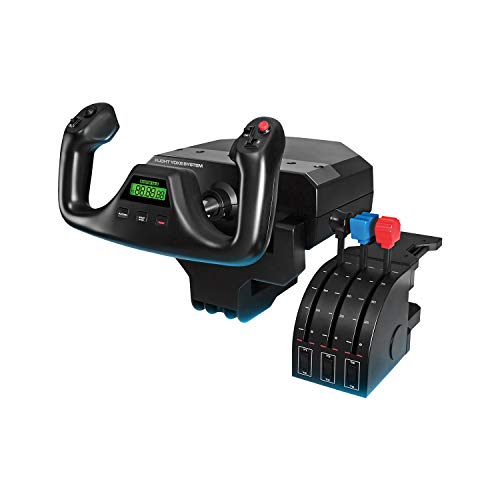
- Includes yoke, throttle quadrant, and two desk clamps
- Provides a stainless steel shaft and accurate control
- Offers extensive programmable inputs for Windows simulators
Best For: Desktop pilots wanting clamp-mounted controls and customization
All-in-One Pick

- Integrates yoke, throttle, trim wheel, and rudder controls
- Offers seven axes, 24 buttons, and Hall-effect precision
- Works with PC, PS5, iOS, and Android
Best For: Beginners wanting a space-conscious multi-platform setup
Premium Force-Feedback Pick

- 9Nm torque and 210N push force
- 150mm travel with dual servo motors
- 13 mappable switches and aluminum body
Best For: Advanced PC flight simulation setups
All-in-One Starter

- Seven axes with throttle, trim, and rudder
- 24 action buttons and magnetic sensing
- Works with PC, Xbox, iOS, and Android
Best For: Beginners wanting broad platform compatibility
Compact FFB Value

- 4.2Nm torque and 90N push-pull force
- Compact housing for desktop or cockpit rigs
- Desk-clamp and profile-rail mounting support
Best For: PC users needing a compact force-feedback base
Compact HOTAS Value Pick

- Detachable throttle for flexible layouts
- 12 programmable buttons and 5 axes
- Plug-and-play PC setup with profile memory
Best For: PC pilots wanting a compact, customizable joystick-and-throttle system
All-in-One Yoke Choice
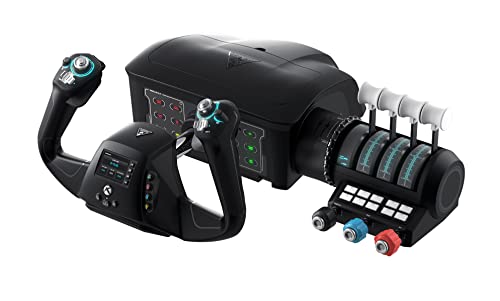
- Yoke, throttle, trim, rudder, and brakes included
- 180-degree Hall effect yoke rotation
- Works with Xbox and Windows flight titles
Best For: Home pilots building a complete Microsoft Flight Simulator control setup
Premium Touchscreen Yoke

- Built-in 4.3-inch touchscreen
- 26 programmable inputs and multiple profiles
- Hall effect thumbsticks and reinforced composite build
Best For: Dedicated PC sim pilots wanting advanced cockpit customization
Full-Cockpit Pick – Honeycomb Alpha Flight Controls Yoke Bundle
Honeycomb Alpha Flight Controls Yoke Bundle | Bravo throttle quadrant, (2 items)
Check Price On AmazonThe Honeycomb Alpha Flight Controls Yoke Bundle is a substantial option for shoppers seeking compact flight simulator yokes with a broader cockpit setup. It combines the Alpha yoke and switch panel with the Bravo throttle quadrant, adding controls for several aircraft configurations.
Best For: Desktop pilots who want a yoke-and-throttle bundle with extensive cockpit controls.
Pros:
- Includes both the Alpha Flight Controls Yoke and Bravo Throttle Quadrant.
- Configurable throttle setup supports single-engine general aviation through four-engine commercial aircraft.
- Includes autopilot, annunciator, landing gear, flap, and trim controls.
- Landing gear lever includes LED indicator lights.
Cons:
- The listed package is relatively heavy at 12.13 kg.
- Its 23.8 x 17.8 x 19-inch dimensions may require significant desk or cockpit space.
- Compatibility is listed for Windows systems.
This is less suited to minimal desk setups than a standalone controller, but it offers a more complete simulation station for users who value integrated controls over portability.
Airbus-Style Pick – Thrustmaster TCA Captain Pack X
The Thrustmaster TCA Captain Pack X is an Airbus-focused alternative for shoppers comparing compact flight simulator yokes and other flight controls. Rather than using a traditional yoke, it pairs a 1:1-scale sidestick with a throttle quadrant for an airline-style setup on Xbox and PC.
Best For: Airbus enthusiasts who prefer a sidestick and throttle layout over a conventional yoke.
Pros:
- Officially licensed, 1:1-scale Airbus sidestick and throttle replicas.
- Offers 14 remappable sidestick buttons and swappable joystick head modules.
- Throttle includes a built-in thrust reverser mechanism.
- Quadrant provides trim, landing gear, autobrake, rudder trim, and parking brake controls.
Cons:
- It is not a traditional yoke, so it may not suit users seeking yoke-style controls.
- Its Airbus-oriented design is less general-purpose than a conventional yoke.
- Additional accessories connect through the ecosystem hub but are sold separately.
The single-cable ecosystem hub helps keep connections organized, while the extensive Airbus controls make this a focused choice for airline simulation rather than a universal yoke replacement.
Programmable Controls Pick – Logitech G PRO Flight Yoke System
The Logitech G PRO Flight Yoke System is a practical choice for users seeking compact flight simulator yokes with a separate throttle quadrant. Its stainless steel yoke shaft, desk clamps, and programmable controls are designed for a secure desktop installation and broad simulator control.
Best For: New or experienced pilots who want a clamp-mounted Windows yoke with many programmable inputs.
Pros:
- Includes the flight yoke, throttle quadrant, and two desk clamps.
- Provides a stainless steel yoke shaft for smooth, accurate control.
- Offers a POV hat, 14 buttons, and a three-position mode switch.
- Supports up to 54 programmable controls according to the supplied notes.
Cons:
- Requires optional software download for listed flight simulators.
- Compatibility is listed for Windows systems.
- The separate throttle quadrant adds components and desk space compared with an all-in-one controller.
With adjustable desk clamping and a dedicated throttle quadrant, this system balances a realistic desktop feel with customization, though it is best suited to users who have room for both control units.
All-in-One Pick – Thrustmaster TCA SKY YOKE
The Thrustmaster TCA SKY YOKE is a streamlined option for shoppers comparing compact flight simulator yokes. It combines a yoke, throttle, trim wheel, and rudder controls in one controller, making it useful for beginners who want essential functions without buying several separate components.
Best For: Beginners and console or mobile pilots seeking an all-in-one yoke with built-in controls.
Pros:
- Combines seven axes with built-in throttle, trim wheel, and rudder controls.
- Provides 24 action buttons and a yoke that rotates up to 180 degrees.
- Uses Hall-effect magnetic technology with 16-bit resolution.
- Supports PC, PlayStation 5, iOS, and Android, with plug-and-play recognition on listed simulators.
Cons:
- Rudder pedals and the three-axis SKY Quadrant are sold separately.
- It may offer less dedicated cockpit expansion than multi-component bundles.
- Its warranty is listed as one year.
The integrated controls keep the setup simple and space-conscious, while dual-control support on PS5 and PC adds flexibility for instructor-and-student or pilot-and-copilot use.
Premium Force-Feedback Pick – MOZA AY210 Yoke Base
For pilots seeking compact flight simulator yokes with advanced feedback, the MOZA AY210 is a powerful PC-only yoke base built around dual high-torque servo motors. Its aluminum construction, customizable controls, and generous travel are aimed at users who want detailed aircraft-response simulation in a desktop or cockpit setup.
Best For: Enthusiasts and advanced sim pilots prioritizing strong, customizable force feedback.
Pros:
- 9Nm torque and 210N push force provide highly detailed feedback.
- 150mm travel distance supports precise pitch control.
- Includes 13 mappable switches and customizable intelligent force feedback.
- Aircraft-grade aluminum body with a quick-release system.
Cons:
- Designed for PC use rather than Xbox or mobile platforms.
- As a yoke base, it may require additional compatible cockpit controls.
The AY210 is a performance-focused choice rather than a minimalist entry-level controller. Its substantial force-feedback specifications and programmable switch panel make it a strong fit for serious PC simulator rigs.
All-in-One Starter – Thrustmaster TCA SKY YOKE
The Thrustmaster TCA SKY YOKE is a practical option for shoppers comparing compact flight simulator yokes that combine several controls in one unit. It includes a yoke, throttle, trim wheel, and rudder controls, while supporting PC, Xbox Series X|S, iOS, and Android.
Best For: Beginners and multi-platform pilots who want an all-in-one controller.
Pros:
- Combines seven axes, throttle, trim wheel, and rudder controls.
- Offers 24 action buttons for accessible in-flight functions.
- H.E.A.R.T. magnetic technology and 16-bit resolution support precise control.
- Plug-and-play compatibility with Xbox, PC, iOS, and Android.
Cons:
- Additional TFRP pedals and TCA SKY QUADRANT controls are sold separately.
- It does not provide the force feedback described for the MOZA bases.
With built-in throttle, trim, and rudder functions, the TCA SKY YOKE can reduce the need to buy multiple starter peripherals. Its broad device compatibility also makes it the most flexible choice in this group.
Compact FFB Value – MOZA AY90 Yoke Base
The MOZA AY90 is a compact flight simulator yoke base for PC users who want force feedback without a larger, heavier setup. Its lightweight housing, desk-clamp mounting support, and 4.2Nm torque make it suitable for flexible desktop installations as well as cockpit rigs.
Best For: PC pilots who need a compact, mountable force-feedback base.
Pros:
- 4.2Nm torque and 90N push-pull force provide responsive feedback.
- Compact, lightweight profile suits desktop setups and cockpit rigs.
- Supports desk-clamp, profile-rail, and standard 80/20-style mounting.
- Includes a tool-free aluminum-alloy quick-release mechanism and customizable RGB lighting.
Cons:
- PC-only compatibility limits use with consoles and mobile devices.
- Its 95mm pitch travel and 4.2Nm torque are lower than the AY210’s specifications.
The AY90 balances force-feedback capability with easier placement and mounting flexibility. It is a sensible middle ground for desktop simmers who want a more compact base than a professional-grade setup.
Compact HOTAS Value Pick – T-Flight Hotas X
The Thrustmaster T-Flight Hotas X is a practical alternative to compact flight simulator yokes for PC pilots who prefer a joystick-and-throttle layout. Its detachable throttle, weighted base, and plug-and-play setup make it easy to adapt to limited desktop space.
Best For: PC users who want an affordable, programmable HOTAS setup for civil or military flight simulators.
Pros:
- Detachable, full-size throttle supports flexible desktop arrangements.
- Offers 12 programmable buttons and 5 axes.
- Adjustable joystick resistance and dual rudder control improve maneuverability.
- Preconfigured controls and onboard profile memory simplify setup.
Cons:
- It is a joystick-and-throttle system rather than a traditional yoke.
- Its larger footprint may still require dedicated desk space.
- Compatibility is listed for PC and PlayStation 3, not Xbox platforms.
Choose this model when compactness, flexible controls, and straightforward installation matter more than a commercial-aircraft yoke feel.
All-in-One Yoke Choice – VelocityOne Flight
The Turtle Beach VelocityOne Flight is a complete control system for shoppers comparing compact flight simulator yokes with broader cockpit functionality. It combines a yoke, throttle quadrant, trim wheel, and integrated rudder and brake controls, with a clamping system for home setups.
Best For: Xbox and Windows pilots seeking an all-in-one system for Microsoft Flight Simulator.
Pros:
- Includes yoke, throttle quadrant, trim wheel, rudder, and brake controls.
- True-to-life 180-degree rotation uses a non-contact Hall effect sensor.
- Provides 12 analog axes, two POV switches, and two four-way HAT switches.
- Clamping system accommodates a variety of home setups.
Cons:
- Its all-in-one design is considerably larger and heavier than a basic controller.
- The system weighs 10 pounds and may be less convenient for frequent storage.
- It is a more involved setup than a compact standalone joystick.
This is the strongest fit when you want authentic yoke handling and integrated controls in one system, but measure your desk before buying.
Premium Touchscreen Yoke – MOZA MFY Pro
The MOZA MFY Pro is a feature-rich option for buyers seeking compact flight simulator yokes with modern cockpit integration. Its carbon-fiber-reinforced construction, integrated 4.3-inch touchscreen, and programmable controls place flight information and customization directly on the yoke.
Best For: PC sim pilots who prioritize premium materials, configurable inputs, and integrated flight information.
Pros:
- Integrated 4.3-inch touchscreen supports instruments, checklists, timers, and shortcuts.
- Provides 26 programmable buttons and axes with multiple profiles.
- Hall effect thumbsticks are designed for smooth, drift-free operation.
- Carbon-fiber-reinforced composite construction supports control forces up to 30 kg.
Cons:
- It is designed for personal computers rather than Xbox consoles.
- Its advanced features may be more than casual pilots need.
- Some checklist customization and interface enhancements depend on future firmware updates.
The MFY Pro makes sense for dedicated PC cockpit builders who will use its touchscreen and extensive customization, not merely the basic yoke function.
How We Picked These Compact Flight Simulator Yokes
We selected these 10 models by comparing the features that matter most in a home flight-simulation setup: physical footprint, platform compatibility, control layout, mounting flexibility, included throttle hardware, construction, and ease of expansion. We also considered whether each system suits beginners, casual players, or enthusiasts building a more detailed cockpit.
The selection includes traditional yokes, yoke-and-throttle bundles, force-feedback bases, and alternatives such as sidesticks and HOTAS controls. That mix is useful because not every aircraft or gaming platform is best served by a conventional yoke.
Quick Comparison
| What to Compare | Why It Matters |
|---|---|
| Platform support | Determines whether the yoke works with your PC, Xbox, PlayStation, or mobile device. |
| Control layout | Yokes suit many general-aviation aircraft, while sidesticks and HOTAS controls may better fit airliners, fighters, or space simulators. |
| Throttle included | A bundled throttle can save desk space and reduce the need to buy another peripheral. |
| Feedback technology | Force feedback can add resistance and aerodynamic cues, but usually increases cost and setup complexity. |
| Mounting and footprint | Check clamp clearance, cable placement, and available desk depth before buying. |
Key Buying Factors for Compact Flight Simulator Yokes
Compatibility Comes First
Confirm support for your exact platform and simulator before focusing on design or price. PC users generally have the broadest choices, while console support can depend on the specific Xbox or PlayStation generation and game.
Measure Your Desk
Compact does not always mean shallow. Measure the usable desk area, including room for clamps, cables, a monitor, and a separate throttle. A bundled control system may occupy more width but reduce clutter overall.
Choose the Right Control Style
A yoke is a natural fit for many single-engine and commercial aircraft. A sidestick or HOTAS arrangement can be more comfortable for Airbus-style aircraft, combat flight, and games that rely heavily on buttons and rapid inputs.
Consider Expansion
Look for programmable buttons, modular components, trim controls, and compatibility with rudder pedals or additional panels. A simple starter system may be enough for casual flying, while enthusiasts should prioritize an upgrade path.
Who Should Buy Which Compact Flight Simulator Yokes?
Beginners should favor a straightforward bundle with broad compatibility and an included throttle. These systems offer a simpler path to getting airborne and avoid buying several separate peripherals.
PC simulator enthusiasts may prefer a higher-end force-feedback base or a modular system that can accept different handles and additional controls. Force feedback is especially appealing if you value immersion and realistic control resistance.
Console players should prioritize officially supported platform compatibility and a tidy, stable mounting solution. If desk space is extremely limited, compare the total footprint of the yoke, throttle, and any required accessories rather than judging the yoke alone.