The right flight yoke can make a gaming-room simulator feel more precise, immersive, and comfortable without requiring a full-size professional cockpit. This roundup compares ten notable yokes, HOTAS systems, cockpit stands, and mounting accessories for different budgets and room layouts.
Whether you fly on PC, Xbox, PlayStation, or mobile devices, focus on platform compatibility, mounting stability, control layout, and available space before buying. The best choice is the one that matches both your aircraft preferences and your everyday setup.
Best 10 Flight Simulator Yokes for Gaming Rooms Picks for 2026
Professional Control
Logitech G PRO Flight Yoke System
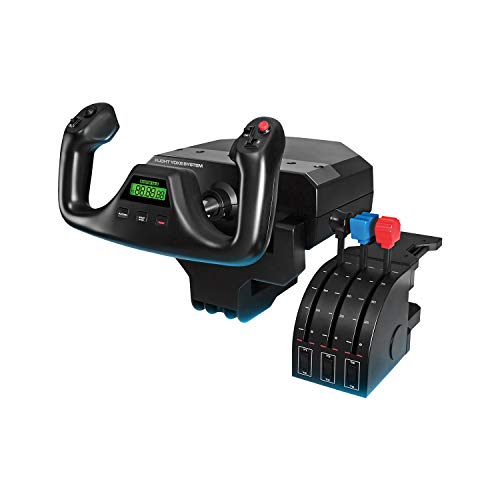
- Includes yoke and throttle quadrant
- Offers extensive programmable controls
- Uses secure dual desk clamps
Best For: PC pilots building a flexible desktop flight setup
All-in-One Flying

- Built-in throttle, trim, and rudder controls
- Supports PC, PS5, iOS, and Android
- Provides seven axes and 24 buttons
Best For: Beginners seeking a multi-platform all-in-one yoke
Immersive Cockpit Base
Marada Flight Simulator Cockpit

- Converts between flight and racing setups
- Offers extensive seat and panel adjustment
- Electronics and controls are not included
Best For: Dedicated rooms needing a modular simulation frame
Boeing-Style Realism
Thrustmaster TCA Boeing Edition

- Uses a 1:1 Boeing 787-inspired design
- Includes yoke and autopilot throttle quadrant
- Offers pendular movement and 35 buttons
Best For: PC and Xbox pilots seeking airline-style realism
Best Adjustable Stand
Marada Universal Flight Racing Simulator Stand

- Stable 40mm square-tube frame
- Adjustable, modular mounting design
- Supports flight, racing, mouse, and keyboard setups
Best For: Custom gaming-room cockpit builders with multiple compatible controls
Best Plug-and-Play Controls
Thrustmaster T-Flight Hotas One MSFS 2024

- Works with PC and Xbox Series X|S
- Includes detachable throttle and dual rudder options
- Offers five axes and 14 action buttons
Best For: Console and PC players seeking an accessible all-in-one flight controller
Best Cockpit Panel Kit
Meza Pre-Cut Flight Sim Mounting Set

- Fits Logitech and Honeycomb cockpit controls
- Supports two throttle quadrants
- Adds dimmable LED panel lighting
Best For: PC cockpit builders organizing existing yokes and flight instruments
Console-Ready Flight Control

- Official Microsoft Flight Simulator license
- 16-bit precision with five axes and 14 buttons
- Detachable throttle with dual rudder control
Best For: PS5, PS4, and PC pilots wanting a flexible HOTAS setup
All-in-One Yoke System
Turtle Beach VelocityOne Flight
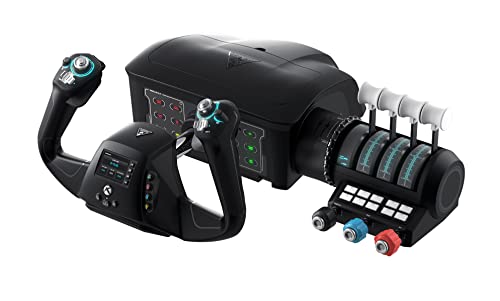
- 180-degree yoke with Hall-effect sensor
- Integrated throttle, trim, rudder, and brake controls
- Compatible with Xbox and Windows flight titles
Best For: Dedicated Xbox or Windows flight-simulation rooms
Flexible Cockpit Foundation
Anman Foldable Simulator Stand

- Stable X-shaped frame for flight and racing gear
- Wide pre-drilled panels support varied accessories
- Folds down and arrives 80% pre-installed
Best For: Shared gaming rooms switching between flight and racing
Professional Control – Logitech G PRO Flight Yoke System
The Logitech G PRO Flight Yoke System is a practical starting point for flight simulator yokes for gaming rooms, combining a yoke and throttle quadrant in one desktop setup. Its stainless steel shaft, desk clamps, and broad programmable control layout suit pilots who want hands-on control without immediately building a larger cockpit.
Best For: PC flight sim users who want a complete yoke-and-throttle setup with extensive programmable controls.
Pros:
- Includes both the flight yoke and throttle quadrant.
- Provides 14 buttons, a POV hat, and a three-position mode switch for extensive programmability.
- Stainless steel yoke shaft and dual desk clamps support smooth, secure desktop use.
- Works with Windows 11, 10, 8.1, and 7, with optional software for major flight simulators.
Cons:
- Designed for Windows rather than listed console compatibility.
- Requires optional software downloads for Microsoft Flight Simulator, FSX, X-Plane 10, and Prepar3D.
This is a well-rounded choice for a gaming room where flexibility and programmable cockpit functions matter. The included throttle quadrant makes it more complete than a yoke-only controller, although its desktop footprint should be considered before buying.
All-in-One Flying – Thrustmaster TCA SKY YOKE
The Thrustmaster TCA SKY YOKE is a convenient option for flight simulator yokes for gaming rooms when you want several essential controls in one compact controller. It combines a yoke with throttle, trim wheel, and rudder functions, while supporting PC, PS5, iOS, and Android platforms.
Best For: Beginners and multi-platform players who want built-in flight controls without purchasing several separate devices.
Pros:
- Combines seven axes with built-in throttle, trim wheel, and rudder controls.
- Offers 24 action buttons for keeping common functions close at hand.
- Steel pitch hardware, self-centering damping, and H.E.A.R.T. magnetic technology support smooth control.
- Supports plug-and-play recognition on PS5 and PC, including Microsoft Flight Simulator 2024 and Infinite Flight.
Cons:
- Rudder pedals and the additional three-axis quadrant are sold separately.
- Dual-control operation requires connecting two TCA SKY YOKE controllers.
For a gaming room shared across platforms, this yoke stands out for its built-in functions and broad compatibility. It is especially approachable for new pilots, while expansion options allow the setup to grow later.
Immersive Cockpit Base – Marada Flight Simulator Cockpit
The Marada Racing Flight Simulator Cockpit is a foundation for flight simulator yokes for gaming rooms rather than a yoke controller itself. Its adjustable frame accepts yokes, HOTAS equipment, rudder pedals, and keyboards, and it can also convert into a racing simulator cockpit.
Best For: Dedicated gaming rooms that need a sturdy, adjustable cockpit frame for multiple simulation systems.
Pros:
- Supports flight and racing configurations with interchangeable mounting panels.
- Offers adjustable joystick panels, rudder-pedal positioning, seat, backrest, and middle plate.
- Heavy-duty square-tube construction and anti-slip pads are designed to reduce wobble.
- Fits equipment from Logitech, Thrustmaster, Honeycomb, and Turtle Beach according to the supplied notes.
Cons:
- Does not include the yoke, steering wheel, pedals, joystick, HOTAS electronics, or other controls.
- Its large footprint and 96.5-pound weight make it less suitable for small rooms.
- Listed warranty coverage is three months, plus permanent online technical support.
This cockpit makes sense when the room and budget are ready for a permanent simulation station. Because the electronics are excluded, calculate the cost of the compatible yoke and other controls before treating it as a complete flight setup.
Boeing-Style Realism – Thrustmaster TCA Boeing Edition
The Thrustmaster TCA Yoke & Quadrant Boeing Edition brings airline-inspired controls to flight simulator yokes for gaming rooms. This PC and Xbox bundle pairs a 1:1 Boeing 787-style yoke with a throttle quadrant, offering pendular movement, adjustable tension, and a dedicated autopilot function.
Best For: Boeing fans and flight sim users who prioritize airliner-style control layouts on PC or Xbox.
Pros:
- Officially licensed Boeing design with a 1:1 787-inspired yoke.
- PENDUL_R movement provides an 8.3-inch range for a pendular control feel.
- Includes a throttle quadrant with autopilot functions for altitude, airspeed, and heading.
- Features a metal internal structure, two extra axes, and 35 action buttons.
Cons:
- Compatible rudder pedals are sold separately.
- Its Boeing-specific styling may be less appealing to users seeking a general aviation layout.
- Listed compatibility is Windows and Xbox Series X/S rather than a broad range of platforms.
This bundle is a strong match for a gaming room centered on airliner simulation and Microsoft Flight Simulator. Its realistic Boeing design and included quadrant create a more cockpit-like experience, but users should budget separately for rudder pedals and confirm their platform.
Best Adjustable Stand – Marada Universal Flight Racing Simulator Stand
For gaming rooms that need flexible flight simulator yokes for gaming rooms, the Marada Universal Flight Racing Simulator Stand provides a sturdy, configurable platform for flight and racing equipment. Its modular frame includes mounting boards for compatible controls, plus space for a mouse and keyboard.
Best For: Gamers building a height-adjustable flight-and-racing station around Logitech, Honeycomb, Thrustmaster, Turtle Beach, VKB, VPC, or Winwing equipment.
Pros:
- 40mm square-tube construction is designed for structural stability.
- Adjustable connections allow front, back, up, down, and side-to-side positioning.
- Modular mounting boards support multiple flight and racing configurations.
- Includes provisions for mouse and keyboard placement.
Cons:
- Flight controls, yokes, pedals, wheels, and other electronics are not included.
- The large stand may require dedicated room space.
- It uses manual adjustment rather than powered positioning.
This is a practical foundation for a customizable gaming-room cockpit, especially if you already own compatible controls and want one stand to support both flight and racing setups.
Best Plug-and-Play Controls – Thrustmaster T-Flight Hotas One MSFS 2024
The Thrustmaster T-Flight Hotas One is a straightforward control option for gaming rooms using a PC or Xbox console. As an officially licensed Microsoft Flight Simulator 2024 joystick, it combines a detachable throttle, multiple axes, and accessible controls in a compact setup.
Best For: Beginners and console or PC players who want complete flight controls without building a full yoke-based cockpit.
Pros:
- Compatible with PC and Xbox Series X|S for plug-and-play use.
- Provides 10-bit precision, five axes, 14 action buttons, and a multidirectional hat switch.
- Detachable throttle supports desk, lap, or separated cockpit arrangements.
- Offers both joystick Z-axis and throttle-mounted rudder control.
Cons:
- This is a joystick-and-throttle HOTAS, not a traditional flight yoke.
- Rudder pedals are sold separately.
- Its listed compatibility is limited to PC and Xbox platforms.
While it is not a yoke, this Thrustmaster controller is a versatile alternative for rooms where simple setup and broad aircraft compatibility matter more than a dedicated yoke cockpit.
Best Cockpit Panel Kit – Meza Pre-Cut Flight Sim Mounting Set
The Meza Cockpit Simulator Panel Kit helps organize a gaming-room flight station around compatible yokes, throttle quadrants, and flight panels. It is a mounting frame rather than a complete control system, with pre-drilled positions, adjustable feet, desk clamps, and dimmable LED lighting.
Best For: Home cockpit builders who already own Logitech or Honeycomb controls and want a cleaner, more structured instrument-panel arrangement.
Pros:
- Compatible with Logitech yokes, throttle quadrants, flight panels, and Honeycomb yokes.
- Supports up to two throttle quadrants and multiple instrument positions.
- Aluminum-alloy construction is designed to resist bending and flexing.
- Dimmable LED lighting adds adjustable cockpit illumination.
Cons:
- The frame does not include yokes, throttle quadrants, displays, or electronic instruments.
- Desk clamps fit surfaces from 0.5 to 2.2 inches thick.
- It is intended for PC-based setups.
This kit is best viewed as an organization and mounting upgrade: it can make compatible flight controls feel more like a dedicated cockpit, but you must supply the electronics separately.
Console-Ready Flight Control – Thrustmaster T.Flight Hotas 5
For flight simulator yokes for gaming rooms, a joystick can be a practical alternative when you want broad platform support and flexible controls. The Thrustmaster T.Flight Hotas 5 is officially licensed for Microsoft Flight Simulator and works with PS5, PS4, and PC.
Best For: Console and PC pilots who want a compact HOTAS-style setup with a detachable throttle.
Pros:
- Official Microsoft Flight Simulator license with Plug & Play support for Microsoft Flight Simulator 2024.
- 16-bit precision, five axes, 14 buttons, a rapid-fire trigger, and a multidirectional hat switch.
- Detachable throttle and two rudder-control options: twist-axis grip or throttle lever.
Cons:
- It is a joystick rather than a traditional yoke.
- Rudder pedals are an optional separate purchase.
This is a versatile choice for gaming rooms shared between console and PC use. Its adjustable resistance and detachable throttle make it easier to adapt to different seating and desk arrangements.
All-in-One Yoke System – Turtle Beach VelocityOne Flight
Among flight simulator yokes for gaming rooms, the Turtle Beach VelocityOne Flight stands out as a complete control station rather than a standalone yoke. It combines a 180-degree yoke, throttle quadrant, trim wheel, rudder and brake controls, and flight-management displays for Xbox and Windows setups.
Best For: Microsoft Flight Simulator players who want an integrated yoke system with extensive controls and console compatibility.
Pros:
- All-in-one design includes yoke, modular throttle quadrant, trim wheel, and rudder controls.
- True-to-life 180-degree rotation uses a non-contact Hall-effect sensor.
- Provides 12 analog axes, 26 buttons, flight-management display, and an authentic status indicator panel for PC.
- Secure clamping system suits a variety of home gaming setups.
Cons:
- Its 10-pound weight and broad footprint require dedicated room on a desk or table.
- The supplied notes specify Xbox and Windows compatibility, not PlayStation support.
For a dedicated flight corner, this system offers the most complete cockpit-style control layout of the three options. The integrated trim, throttle, and rudder functions can reduce the need for separate peripherals.
Flexible Cockpit Foundation – Anman Foldable Simulator Stand
When choosing flight simulator yokes for gaming rooms, the stand can matter as much as the controller. The Anman Foldable Racing Flight Simulator Stand provides a stable, adjustable platform for flight sticks, yokes, pedals, and racing equipment while folding for easier storage.
Best For: Multi-use gaming rooms that need one adjustable stand for both flight simulation and racing.
Pros:
- X-shaped, double-triangle construction is designed to improve stability and reduce shaking.
- Wide, pre-drilled panels support various flight and racing accessories.
- Supports equipment such as the VelocityOne, Logitech G29/G920/G923, and several Thrustmaster devices.
- Arrives 80% pre-installed and folds to a more compact size for storage.
Cons:
- This is a stand, not a yoke or flight-control system.
- Its listed dimensions require substantial floor space when set up.
- The warranty is listed as three months, with permanent online technical support.
This stand is a practical foundation when your gaming room serves multiple purposes. Its compatibility and folding design make it especially useful for players switching between flight and racing equipment.
How We Picked These Flight Simulator Yokes for Gaming Rooms
We selected products that can support a range of gaming-room setups, from desktop flight controls to dedicated cockpits. Our comparison considers platform compatibility, control type, mounting options, adjustability, storage, construction, and how easily each product can fit into a shared or space-conscious room.
The list includes traditional yokes, yoke-and-throttle packages, HOTAS-style alternatives, cockpit frames, and mounting panels. That mix matters because not every pilot needs the same level of realism or permanence. A compact controller may suit occasional sessions, while a fixed stand or cockpit can provide better positioning for frequent simulation.
Quick Comparison
- Best for a conventional yoke setup: Logitech G PRO Flight Yoke System.
- Best for Boeing-style controls: Thrustmaster TCA Yoke and Quadrant Boeing Edition.
- Best for Xbox-focused users: Thrustmaster T-Flight Hotas One or Turtle Beach VelocityOne Flight.
- Best for compact room layouts: A foldable stand or desktop-mounted yoke system.
- Best for a complete cockpit feel: A simulator cockpit with a seat, stand, and mounting panel.
Key Buying Factors for Flight Simulator Yokes for Gaming Rooms
Platform and Game Compatibility
Check the exact compatibility listing for your console, computer, operating system, and simulator. PC support is common, but Xbox, PlayStation, iOS, and Android compatibility varies considerably. Also verify whether the required cables, adapters, or software are included.
Yoke Feel and Control Layout
Look for smooth pitch-and-roll movement, useful resistance, a secure center position, and enough buttons for trimming, views, radios, and autopilot functions. A yoke-and-quadrant package can feel more authentic for aircraft that use a conventional control column, while HOTAS controls may be better for jets and space-oriented games.
Mounting, Stability, and Room Footprint
A desk-mounted unit is convenient, but it needs a sturdy surface and enough clearance for clamps. A stand or cockpit provides better ergonomics and reduces movement during aggressive inputs, though it takes more floor space. Foldable designs are useful when the room serves multiple purposes.
Ergonomics and Expandability
Consider seat height, reach to the throttle, keyboard and mouse access, pedal placement, and whether the frame can accept future accessories. A modular panel or universal stand may be worthwhile if you expect to add rudder pedals, a different yoke, or extra controls.
Who Should Buy Which Flight Simulator Yokes for Gaming Rooms?
Choose a desktop yoke if you want realistic airliner or general-aviation control without dedicating the room to simulation. Choose a yoke-and-quadrant bundle if coordinated throttle and yoke inputs are central to your flying style.
Choose HOTAS controls if you mainly fly modern military aircraft, use console simulators, or want a versatile controller with a smaller footprint. Choose a cockpit or stand if you fly regularly and value fixed positioning, improved comfort, and a more immersive presentation.
Before ordering, measure the desk or floor area, confirm every platform requirement, and decide whether the setup will stay assembled. These checks will help you choose among the best Flight Simulator Yokes for Gaming Rooms without paying for features your space or games cannot use.