The right yoke can make flight simulation feel more controlled, immersive, and predictable. Adjustable flight simulator yokes vary widely in mounting options, platform support, travel, included throttles, and cockpit realism.
We compare 10 leading choices for home pilots, from compact PC setups to expandable Xbox and multi-platform controls, so you can match your budget and flying style to the right hardware.
Best 10 Adjustable Flight Simulator Yokes Picks for 2026
Premium Bundle
Honeycomb Alpha Flight Controls Yoke Bundle

- Includes Alpha yoke and Bravo throttle quadrant
- Configurable setup for single- to four-engine aircraft
- Adds autopilot, trim, gear, flap and annunciator controls
Best For: Windows users building a complete cockpit setup
Cross-Platform Starter
Thrustmaster TCA SKY YOKE for PS5 and PC

- Seven axes with throttle, trim and rudder controls
- 24 buttons and Hall Effect precision
- Plug-and-play support for PS5, PC, iOS and Android
Best For: Beginners wanting an all-in-one PS5 or PC yoke
Professional PC Pick
Logitech G PRO Flight Yoke System
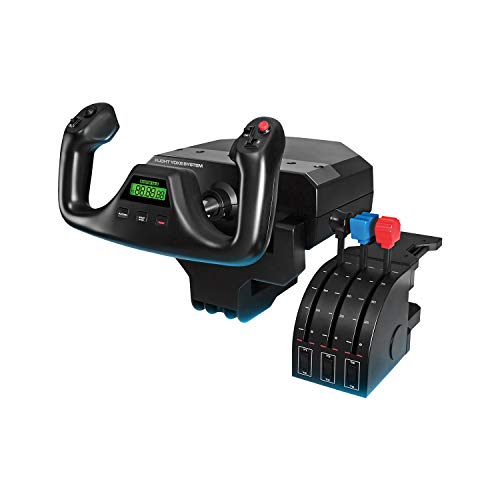
- Includes yoke, throttle quadrant and desk clamps
- Stainless steel shaft for smooth, accurate control
- Offers at least 54 programmable controls
Best For: Windows users wanting a programmable yoke-and-throttle setup
Xbox All-in-One
Thrustmaster TCA SKY YOKE for Xbox and PC

- Seven axes with integrated throttle, trim and rudder
- 24 buttons with Hall Effect precision
- Plug-and-play support for Xbox Series X|S and PC
Best For: Xbox Series X|S and PC beginners
Premium All-Rounder
Honeycomb Alpha Flight Controls

- 180° rotation with smooth, dampened self-centering
- Integrated switch panel with ignition controls
- Clamps and micro-suction mounting options
Best For: PC sim pilots wanting a complete cockpit-style yoke
Airliner Specialist
Thrustmaster Boeing TCA Yoke Pack

- Officially licensed 787-inspired 1:1 design
- Pendular motion with adjustable spring tension
- Includes throttle quadrant and autopilot controls
Best For: PC or Xbox pilots building a Boeing-style cockpit
Connected Control Upgrade

- 4.3-inch touchscreen for flight data and shortcuts
- 26 programmable inputs with multiple profiles
- Hall effect thumbsticks and customizable RGB lighting
Best For: PC sim pilots seeking a highly configurable interface
Best Entry-Level Pick

- 180-degree self-centering yoke
- Essential programmable controls
- For Microsoft Flight Simulator on PC
Best For: Entry-level pilots, VR flyers, and custom cockpit builders
Best All-in-One System
Turtle Beach VelocityOne Flight
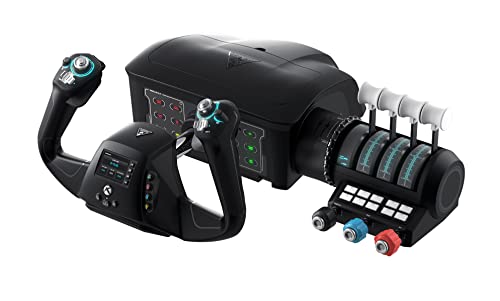
- Yoke, throttle, trim, and rudder controls
- Supports Xbox and Windows PC
- Includes display and 12 analog axes
Best For: Players wanting an integrated Xbox or PC flight setup
Best for Boeing Realism
Thrustmaster TCA Yoke Boeing Edition

- 1:1 Boeing 787-inspired design
- Adjustable spring tension and pendular motion
- 18 buttons plus additional axes
Best For: Boeing fans and airliner-focused PC or Xbox sim pilots
Premium Bundle – Honeycomb Alpha Flight Controls Yoke Bundle
Honeycomb Alpha Flight Controls Yoke Bundle | Bravo throttle quadrant, (2 items)
Check Price On AmazonFor shoppers seeking adjustable flight simulator yokes with a broader cockpit setup, this Honeycomb bundle combines the Alpha Flight Controls Yoke and Switch Panel with the Bravo Throttle Quadrant. It is designed for Windows PC use and adds controls for several common aircraft functions.
Best For: Windows users building a more complete, multi-aircraft flight simulation cockpit.
Pros:
- Includes both the Alpha yoke and Bravo throttle quadrant.
- Bravo supports configurable throttle setups from single-engine aircraft to four-engine commercial aircraft.
- Includes autopilot, annunciator, gear and flap controls, plus a trim wheel.
- Gear lever includes LED landing-gear indicator lights.
Cons:
- Designed for Windows, so it is not a universal console option.
- The bundled cockpit components create a comparatively large, heavy setup.
This is a strong choice when you want more than a standalone yoke. Its extensive cockpit controls and configurable throttle arrangement make it particularly suitable for users who want to grow into different aircraft types.
Cross-Platform Starter – Thrustmaster TCA SKY YOKE for PS5 and PC
The Thrustmaster TCA SKY YOKE is an all-in-one option for shoppers comparing adjustable flight simulator yokes for PS5, PC, iOS or Android. It combines a yoke with throttle, trim-wheel and rudder controls, helping beginners start without immediately buying several separate devices.
Best For: Beginners and PS5 or PC pilots who want built-in controls in one unit.
Pros:
- Provides seven axes with integrated throttle, trim wheel and rudder controls.
- Offers 24 action buttons and up to 180 degrees of yoke rotation.
- Uses Hall Effect magnetic technology with 16-bit resolution.
- Supports plug-and-play recognition on PS5 and PC in Microsoft Flight Simulator 2024 and Infinite Flight.
Cons:
- Rudder pedals and the TCA SKY QUADRANT are sold separately for expanded control.
- Its listed one-year warranty is shorter than some competing options.
With essential controls built into one ergonomic device, this model keeps the entry path simple. Dual Control also allows two compatible units to be connected for instructor-and-student or pilot-and-copilot use.
Professional PC Pick – Logitech G PRO Flight Yoke System
The Logitech G PRO Flight Yoke System is a practical Windows option for shoppers evaluating adjustable flight simulator yokes with a separate throttle quadrant. It includes desk clamps, a stainless steel yoke shaft and programmable controls aimed at both new pilots and experienced sim users.
Best For: Windows pilots who want a yoke-and-throttle system with substantial programmable control access.
Pros:
- Includes the flight yoke, throttle quadrant, cables and two desk clamps.
- Stainless steel yoke shaft is designed for smooth, accurate control.
- Provides 14 buttons, a POV hat and a three-position mode switch.
- Supports at least 54 programmable controls according to the supplied specifications.
Cons:
- Compatible with Windows rather than the listed modern consoles.
- Optional software download is required for several named flight simulators.
- Throttle and yoke connect through separate included cables.
This system suits users who value desk stability and access to many aircraft functions. Its clamps and programmable layout make it a flexible Windows-centered choice for building muscle memory.
Xbox All-in-One – Thrustmaster TCA SKY YOKE for Xbox and PC
For Xbox-focused shoppers comparing adjustable flight simulator yokes, the Thrustmaster TCA SKY YOKE combines yoke, throttle, trim-wheel and rudder functions in one controller. It supports Xbox Series X|S, PC, iOS and Android, with plug-and-play recognition in Microsoft Flight Simulator 2024 and Infinite Flight.
Best For: Xbox Series X|S and PC beginners who want an integrated flight-control solution.
Pros:
- Includes seven axes plus built-in throttle, trim wheel and rudder controls.
- Provides 24 action buttons with an ergonomic control layout.
- Uses Hall Effect magnetic technology and 16-bit resolution for the listed axes.
- Supports Dual Control for connecting two units on Xbox or PC.
Cons:
- Rudder pedals and the three-axis TCA SKY QUADRANT are sold separately.
- The listed console compatibility is limited to Xbox Series X|S.
This version is the clearest fit for Xbox pilots who want to avoid assembling several separate controls at the start. It also leaves room to expand later with Thrustmaster’s compatible pedals and quadrant.
Premium All-Rounder – Honeycomb Alpha Flight Controls
The Honeycomb Alpha is a practical choice for shoppers comparing adjustable flight simulator yokes for PC. Its 180-degree rotation, dampened self-centering mechanism, minimal deadzone, and integrated switch panel create a more complete cockpit-style control setup.
Best For: PC flight sim enthusiasts who want realistic yoke handling and built-in aircraft switches.
Pros:
- Steel shaft with dual linear ball bearings for smooth control.
- Integrated switches include avionics, lighting, alternator, and ignition controls.
- Offers two heavy-duty clamps plus a micro-suction mounting option.
- Includes numerous buttons, rocker switches, view control, and push-to-talk.
Cons:
- Designed for PC-based setups rather than Xbox consoles.
- Its substantial 4.9 kg build may be more than casual users need.
Choose the Alpha when you want a durable, feature-rich yoke with useful cockpit controls already integrated. It is especially compelling for users prioritizing smooth control and flexible tabletop mounting.
Airliner Specialist – Thrustmaster Boeing TCA Yoke Pack
The Thrustmaster TCA Boeing Edition stands out among adjustable flight simulator yokes for users seeking an airliner-focused setup. Its officially licensed 787-inspired design pairs pendular movement and adjustable spring tension with a matching throttle quadrant and autopilot controls.
Best For: PC and Xbox pilots who want Boeing-style controls and a bundled throttle quadrant.
Pros:
- 1:1 Boeing 787-inspired design with an 8.3-inch pendular movement range.
- Adjustable spring tension supports personalized control feel.
- Includes a throttle quadrant with Boeing autopilot functions for altitude, airspeed, and heading.
- Provides 35 action buttons, two extra axes, and a metal internal structure.
Cons:
- Rudder pedals are compatible but sold separately.
- The airliner-focused design may be less suited to shoppers seeking a general aviation yoke.
This pack is a strong fit when realism means replicating a modern Boeing cockpit. The included quadrant and console compatibility also make it a versatile option for Microsoft Flight Simulator users on PC or Xbox.
Connected Control Upgrade – MOZA MFY Pro Yoke
The MOZA MFY Pro brings a modern interface to adjustable flight simulator yokes. Built around a carbon fiber reinforced composite handle, it adds a 4.3-inch touchscreen, Hall effect thumbsticks, 26 programmable inputs, and customizable RGB lighting for a highly configurable PC cockpit.
Best For: PC users who value programmable controls, onboard information, and a contemporary yoke interface.
Pros:
- Integrated touchscreen provides access to flight information, shortcuts, checklists, and timers.
- Offers 26 programmable buttons and axes with multiple profiles.
- Hall effect thumbsticks are designed for smooth, drift-free operation.
- Carbon fiber reinforced composite construction supports control forces up to 30 kg.
Cons:
- Compatible hardware platform is PC only.
- Some interface and checklist capabilities depend on future firmware updates.
The MFY Pro is best suited to sim pilots who want customization beyond traditional yoke controls. Its touchscreen and programmable inputs can streamline cockpit information and aircraft-specific profiles while keeping the handle relatively light.
Best Entry-Level Pick – Honeycomb Alpha LITE
The Honeycomb Alpha LITE is a streamlined option for shoppers seeking adjustable flight simulator yokes for PC without the extra switch panel found on the full Alpha model. Its 180-degree self-centering movement and compact control layout focus on essential simulator inputs.
Best For: Entry-level pilots, VR flyers, and custom cockpit builders using Microsoft Flight Simulator on PC.
Pros:
- 180-degree rotation with a minimal center dead zone.
- Includes POV, rocker, and programmable button controls.
- Designed for Microsoft Flight Simulator 2020 and 2024 on PC.
- Mounting system can secure to a suitable flat, rigid surface.
Cons:
- Does not include the full Alpha model’s additional switch panel.
- Some aircraft functions may require keyboard, virtual cockpit, or separate-panel controls.
- Desk and mounting-surface compatibility should be verified before purchase.
The Alpha LITE keeps the core yoke experience straightforward, making it a practical starting point for PC users who value essential controls and a less elaborate cockpit setup.
Best All-in-One System – Turtle Beach VelocityOne Flight
The Turtle Beach VelocityOne Flight is a versatile choice among adjustable flight simulator yokes, combining a yoke handle with a throttle quadrant, trim wheel, rudder controls, and flight-management display. It supports Xbox consoles as well as Windows PCs.
Best For: Players who want a broad, integrated control system for Microsoft Flight Simulator on Xbox or PC.
Pros:
- All-in-one design includes throttle, trim, yoke, rudder, and brake controls.
- Uses 180-degree yoke rotation with a non-contact Hall effect sensor.
- Offers 12 analog axes, two POV switches, and two four-way HAT switches.
- Compatible with Xbox consoles and Windows 10 and 11 PCs.
Cons:
- The integrated system has a larger footprint than a basic yoke.
- Its many controls and configuration features may be more than beginners need.
- It requires a secure clamping setup that fits the intended home configuration.
With its extensive controls and console support, the VelocityOne Flight is suited to users who prefer one connected system rather than assembling separate throttle, trim, and rudder components.
Best for Boeing Realism – Thrustmaster TCA Yoke Boeing Edition
The Thrustmaster TCA Yoke Boeing Edition stands out among adjustable flight simulator yokes with a 1:1 Boeing 787-inspired design, pendular movement, and adjustable spring tension. Its metal internal structure and extra axes target users who want a more specialized airliner-style setup.
Best For: Boeing fans and flight-sim users on PC or Xbox who prioritize airliner-inspired motion and adjustable resistance.
Pros:
- Officially licensed by Boeing and Xbox.
- PENDUL_R mechanism provides an 8.3-inch range of pendular movement.
- Adjustable spring tension supports personalized resistance.
- Includes two additional axes, magnetic technology, and 18 action buttons.
Cons:
- Its 1:1-inspired design and 15.3-pound weight may require substantial desk space.
- Rudder pedals are compatible but sold separately.
- Its Boeing-focused design may be less suitable for users seeking a compact general-purpose controller.
This yoke is a strong fit for dedicated simulator users who value Boeing styling, suspended movement, and adjustable tension over a minimal desktop footprint.
How We Picked the Best Adjustable Flight Simulator Yokes
We focused on the factors that have the greatest effect on everyday simulator use: platform compatibility, adjustability, control layout, mounting flexibility, included throttle hardware, build quality, and upgrade potential. We also considered whether each system suits a desk, dedicated cockpit, or shared gaming space.
Compatibility deserves special attention. Some yokes are designed primarily for PC, while others support Xbox consoles or mobile devices. Always confirm support for your simulator and operating system before buying, particularly when comparing console-specific versions of otherwise similar products.
Quick Comparison
| Best For | What to Prioritize | Recommended Type |
|---|---|---|
| New flight sim pilots | Simple setup and broad compatibility | Standalone yoke system |
| Airliner simulation | Throttle quadrant and realistic layout | Yoke-and-throttle bundle |
| Xbox users | Official console support | Xbox-compatible model |
| Dedicated cockpits | Rigid mounting and expandability | Modular premium system |
| Limited desk space | Compact footprint and easy storage | Lightweight desktop yoke |
Key Buying Factors for Adjustable Flight Simulator Yokes
Platform and Simulator Compatibility
Check compatibility with your exact platform, simulator software, and connection method. PC support is common, but Xbox compatibility is more selective. Mobile support may also depend on the device, operating system, and game.
Adjustment and Mounting
Look for adjustable clamps, a stable base, and enough clearance for your desk. A yoke that shifts during turns will feel less realistic than a simpler unit with a secure mount. Dedicated cockpit users should check screw points and mounting dimensions.
Travel, Resistance, and Control Feel
Longer shaft travel can provide more precise pitch and roll control, while adjustable resistance lets you tune the feel to different aircraft. Consider whether the mechanism is self-centering and how smoothly it returns to neutral.
Included Controls and Expansion
Bundles with throttle quadrants, switch panels, or integrated buttons can reduce extra purchases and simplify wiring. If you plan to add rudder pedals, panels, or trim controls later, choose a system with enough desk space and compatible expansion options.
Build Quality and Storage
Metal reinforcement, sturdy clamps, and responsive switches matter for frequent use. If the simulator is shared with other activities, prioritize a design that can be removed without excessive effort.
Who Should Buy Which Adjustable Flight Simulator Yokes?
Choose a basic PC yoke if you are learning flight simulation or want a straightforward upgrade from a gamepad. Choose a bundle with a throttle quadrant if you fly airliners regularly and want coordinated controls without assembling a system piece by piece.
Choose an Xbox-compatible model if console support is essential, and verify the exact Xbox generation before ordering. Choose a premium modular yoke for a permanent cockpit, frequent flying, or a setup you expect to expand. For occasional users, a compact and easily stored unit may offer better overall value than a larger professional-style system.