Choosing among USB duplicators under $300 is less about finding the most ports and more about matching the machine to your workflow. Some models copy several flash drives at once, while others clone hard drives, SSDs, SD cards, or serve as connected computer accessories.
This roundup compares ten practical options across speed, format support, duplication capacity, portability, and ease of use, so you can spend less time sorting specifications and more time choosing the right tool.
Best 10 USB Duplicators Under 300 Picks for 2026
Best Compact USB Copier

- Standalone 1-to-2 USB duplication
- Quick Copy and bit-for-bit modes
- Built-in testing and erase tools
Best For: Small-scale USB deployment and field use
Best High-Speed CompactFlash Copier

- Standalone FPGA-based operation
- Transfers up to 3.9GB/min
- Quick and bit-for-bit copy modes
Best For: Portable CompactFlash or CFast duplication
Best USB Eraser and Cloner

- Standalone 1-to-3 USB duplication
- Smart and bit-for-bit copy modes
- DoD-compliant USB erasure
Best For: Business USB deployment and secure media reuse
Best Hard Drive Clone Dock

- Offline cloning without a computer
- Supports dual 2.5/3.5-inch SATA drives
- USB 3.0 with UASP and up to 5Gbps
Best For: SATA HDD and SSD cloning and backups
Best USB Sharing Switch
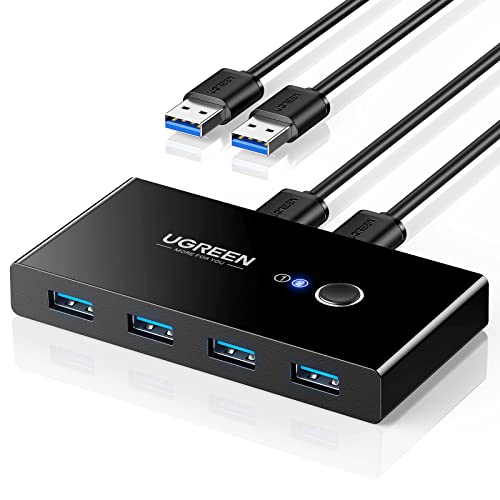
- Shares four USB devices between two computers
- USB 3.0 speeds up to 5Gbps
- One-button, driver-free switching
Best For: Workstations sharing peripherals between two computers
Best SD Card Duplicator

- Standalone operation with no PC required
- Duplicates SD or microSD cards to three targets
- Includes Raw Mode, error skipping, and Secure Erase
Best For: Portable SD and microSD duplication in field or production settings
Best NVMe Duplicator
StarTech 1:1 M.2 NVMe SSD Dock

- Standalone M.2 NVMe cloning without a computer
- Duplication rates up to 90GB per minute
- USB-C 3.2 Gen 2x2 external dock functionality
Best For: NVMe SSD upgrades, backups, and IT imaging
Best Standalone USB Duplicator
EZ Dupe 1-to-7 Mini USB Plus MK III

- Copies up to seven USB drives at once
- Standalone operation needs no computer
- Supports USB 1.0, 2.0, and 3.0 media
Best For: Computer-free flash-drive duplication
Best Hard-Drive Cloner
MAIWO Dual-Bay SATA Duplicator Dock

- Offline clones 2.5- and 3.5-inch SATA drives
- Supports up to 24TB per bay
- Adds three USB 3.0 hub ports
Best For: SATA drive upgrades and backups
Best Computer-Connected USB Duplicator
DupliM 1-to-10 Mini USB Duplicator

- Duplicates up to ten USB drives simultaneously
- Works with USB 2.0 and 3.0 media
- Copies from images, drives, files, or folders
Best For: Software-controlled Windows and Mac workflows
Best Compact USB Copier – BestDuplicator UB300 1:2
If you need usb duplicators under 300 for straightforward flash-drive deployment, the BestDuplicator UB300 offers standalone 1-to-2 copying without a computer. Its Quick Copy and Whole Media Copy modes cover both file-level duplication and bit-for-bit cloning, while built-in testing and erase tools help with media preparation.
Best For: IT departments, schools, technicians, and small businesses duplicating two USB drives at a time.
Pros:
- Copies one USB drive to two targets simultaneously without a PC.
- Supports Quick Copy and Whole Media Copy modes.
- Includes capacity, device, speed-test, and erase functions.
- Compact design with LCD controls and port status LEDs.
Cons:
- USB 1.1 and 2.0 support is older than USB 3.x standards.
- High performance is best achieved with source and target media of similar capacity.
- Memory-card duplication requires a compatible USB card reader.
The UB300 is a practical choice when simple, computer-free two-drive duplication matters more than maximum throughput or a large target count.
Best High-Speed CompactFlash Copier – U-Reach CF 1-1
Among usb duplicators under 300, the U-Reach CF 1-1 is a specialized standalone option for CompactFlash workflows. Its FPGA-based, non-PC operation supports transfers up to 3.9GB per minute and offers both quick data-and-system copying and exact bit-for-bit duplication.
Best For: Users who need portable, dedicated CompactFlash or CFast card duplication.
Pros:
- Standalone FPGA-based operation does not require a computer.
- Advertised transfer speeds reach up to 3.9GB/min.
- Supports quick copying and bit-for-bit duplication.
- Compatible with Windows and Linux file systems listed in the specifications.
Cons:
- Designed for CompactFlash/CFast media rather than general USB flash-drive duplication.
- It duplicates one source to one target at a time.
- Its listed weight is 4 pounds, making it less lightweight than the other compact options.
This U-Reach model makes the most sense for specialized media work where dedicated CompactFlash compatibility and speed are more important than multi-target USB copying.
Best USB Eraser and Cloner – Vinpower Flash Memory 1:3
For buyers comparing usb duplicators under 300 with security features, the Vinpower Flash Memory USB Duplicator combines standalone 1-to-3 copying with secure erasure. Smart Copy handles accessible files efficiently, while Raw Copy supports complete bit-by-bit cloning of bootable drives, operating systems, software, and backups.
Best For: Businesses, IT teams, schools, healthcare offices, and agencies that need multi-drive copying and USB data wiping.
Pros:
- Duplicates USB drives to three targets without a PC.
- Offers Smart Copy and Raw Copy modes for different duplication needs.
- Includes DoD 5220.22-M data wiping for drive reuse or disposal.
- Read Error Skip can bypass damaged sectors during duplication.
Cons:
- The supplied notes do not specify copy speed.
- Its functions are focused on USB flash drives rather than broader storage formats.
- Raw copying may duplicate all source contents, including unused areas.
With three target ports, secure erasure, and error-skipping recovery assistance, this is the most feature-rich choice here for organizations managing USB media regularly.
Best Hard Drive Clone Dock – ORICO Dual Bay SATA
Although it is not a thumb-drive duplicator, the ORICO Dual Bay Docking Station is worth considering alongside usb duplicators under 300 if your priority is offline hard-drive cloning. It supports two 2.5- or 3.5-inch SATA HDDs or SSDs, clones without a computer, and also works as a USB 3.0 dock for transfers and backups.
Best For: Users cloning SATA hard drives or SSDs and needing a reusable desktop drive dock.
Pros:
- Offline clone function works without connecting to a computer.
- Supports 2.5- and 3.5-inch SATA I/II/III drives up to 44TB total.
- USB 3.0, UASP, and transfer speeds up to 5Gbps support file access and backups.
- Toolless dual-bay design enables convenient drive insertion and removal.
Cons:
- It clones SATA hard drives and SSDs, not USB flash drives.
- The target disk must be larger than the source disk for offline cloning.
- The dock will not power on without a hard drive inserted.
Choose the ORICO when your cloning tasks involve SATA storage rather than USB sticks; its offline operation and dual-bay design make it a versatile alternative to a dedicated flash duplicator.
Best USB Sharing Switch – UGREEN 2-in-4 USB 3.0 Switch
If you need usb duplicators under 300 for sharing peripherals rather than cloning storage, this UGREEN USB switch is a practical, budget-friendly option. It lets two computers share up to four USB devices, with one-button switching and USB 3.0 speeds up to 5Gbps.
Best For: Home offices and workstations that share keyboards, mice, printers, scanners, or other USB accessories between two computers.
Pros:
- Allows two computers to share four USB devices.
- Supports USB 3.0 transfer speeds up to 5Gbps and remains backward compatible with USB 2.0.
- Plug-and-play compatibility with Windows, macOS, Chrome OS, and Linux.
- Includes two USB 3.0 data cables and offers optional USB-C power input for higher-power devices.
Cons:
- It is not a KVM switch and cannot transmit monitor or video signals.
- Power adapter is not included, and multiple or high-power devices may require extra power.
This is a USB peripheral selector, not a memory-card or SSD duplicator. Choose it when your goal is convenient device sharing between two computers.
Best SD Card Duplicator – Vinpower SDMiniDup 1-to-3
Vinpower SDMiniDup 1 to 3 Standalone SD/MicroSD Card Flash Memory Drive Duplicator Copier
Check Price On AmazonFor buyers comparing usb duplicators under 300 for removable media, the Vinpower SDMiniDup provides standalone SD and microSD copying without a computer. Its 1-to-3 design can duplicate to multiple cards, while Smart Copy and Raw Mode address different copying needs.
Best For: Field technicians, content distributors, and users who need standalone SD or microSD duplication with recovery-oriented features.
Pros:
- Operates independently without requiring a PC.
- Copies to up to three SD or microSD cards.
- Smart Copy transfers accessible data, while Raw Mode performs bit-by-bit duplication.
- Read Error Skip can continue copying around bad sectors, and Secure Erase is available for thorough data removal.
Cons:
- Designed for SD and microSD media rather than USB flash drives, SSDs, or hard drives.
- Raw Mode and error-skipping workflows may take longer depending on the media condition.
The compact, 1.2-pound unit is useful when portability matters and electrical power is available. Its standalone operation also avoids tying up a computer during card duplication.
Best NVMe Duplicator – StarTech 1:1 M.2 NVMe SSD Dock
Among usb duplicators under 300, this StarTech dock targets M.2 NVMe SSD cloning and external drive access. It works standalone, performs sector-by-sector duplication at rates up to 90GB per minute, and connects to a computer through USB-C 3.2 Gen 2×2 at up to 20Gbps.
Best For: SSD upgrades, backups, IT imaging, and maintenance tasks involving PCIe M.2 NVMe drives.
Pros:
- Clones M.2 NVMe drives without a computer or cloning software.
- Supports any file format through full sector-by-sector duplication.
- Top-loading design accommodates M-Key PCIe drives, including models with pre-installed heatsinks.
- Also functions as an external M.2 drive dock with USB 3.2 Gen 2×2 connectivity.
Cons:
- Supports M.2 NVMe drives only; it is not intended for SATA M.2 or other drive types.
- The target drive must be equal to or larger than the source drive.
- It is a 1:1 duplicator, so it clones one source drive to one target at a time.
With progress and SMART LEDs, an audible completion signal, and active/passive cooling, this is a focused choice for NVMe workflows. Its included power adapter and two USB cables add flexibility for standalone and connected use.
Best Standalone USB Duplicator – EZ Dupe 1-to-7 Mini USB Plus MK III
If you need usb duplicators under 300 for routine flash-drive duplication without tying up a computer, the EZ Dupe Mini USB Plus MK III is a practical choice. Its standalone design can copy up to seven USB drives at once, with asynchronous operation for starting new copies as other jobs finish.
Best For: Small businesses, IT work, and users who want computer-free duplication of USB flash drives.
Pros:
- Duplicates up to seven USB drives simultaneously.
- Standalone plug-and-use operation requires no computer.
- Supports USB 1.0, 2.0, and 3.0 media, plus external USB storage with its own power source.
- Updated version offers a listed copy speed of up to 2.5GB per minute.
Cons:
- It is designed for USB media rather than direct SATA hard-drive cloning.
- Actual speed depends on the connected flash drives.
- External USB hard drives require their own power source.
The EZ Dupe stands out when convenience and independent operation matter most. Its seven-port capacity and asynchronous copying make it well suited to repeated flash-drive batches.
Best Hard-Drive Cloner – MAIWO Dual-Bay SATA Duplicator Dock
Among usb duplicators under 300, the MAIWO docking station is the better fit for users duplicating SATA hard drives or SSDs rather than only thumb drives. It supports offline cloning between two 2.5- or 3.5-inch SATA drives and also works as a USB 3.0 dock with three additional Type-A ports.
Best For: Drive upgrades, backups, data processing, and users who need a dual-bay SATA cloner with USB hub functionality.
Pros:
- Clones SATA HDDs and SSDs offline without a computer or drivers.
- Supports 2.5- and 3.5-inch drives, with up to 24TB per bay according to the supplied specifications.
- Includes three USB 3.0 Type-A hub ports.
- LED indicators show clone progress at 25%, 50%, 75%, and 100%.
Cons:
- It is a hard-drive and SSD cloner, not a dedicated multi-port USB flash duplicator.
- Offline cloning requires compatible SATA source and target drives.
- The included power adapter is required for operation.
The MAIWO is the most versatile option here for storage-device work. Choose it when SATA drive cloning and USB connectivity are more important than duplicating several thumb drives simultaneously.
Best Computer-Connected USB Duplicator – DupliM 1-to-10 Mini USB Duplicator
For usb duplicators under 300 that connect to a workstation, the DupliM 1-to-10 Mini offers high-capacity flash-drive duplication through included software. It can duplicate up to ten USB 2.0 or 3.0 drives simultaneously and supports source images, flash drives, or selected files and folders from a computer.
Best For: Windows and Mac users who want software-controlled duplication of larger USB flash-drive batches.
Pros:
- Duplicates up to ten USB drives simultaneously.
- Supports USB 2.0 and USB 3.0 flash drives.
- Can copy from image files, flash drives, or selected computer files and folders.
- Includes software, power adapter, USB 3.0 cable, and U.S.-based technical support.
Cons:
- Requires a connected Windows or Mac computer.
- Operation depends on the listed operating-system and hardware requirements.
- It is intended for USB flash media rather than SATA hard-drive cloning.
The DupliM is a strong choice when you want ten-port throughput and more control over source content. Its computer-connected workflow is less standalone than the EZ Dupe, but it adds useful image-file and folder-based duplication options.
How We Picked the Best USB Duplicators Under 300
We focused on the factors that most affect real-world duplication work: supported media formats, simultaneous copy capacity, standalone versus computer-connected operation, interface speed, drive compatibility, and physical design. We also considered whether a model is better suited to occasional home use, IT maintenance, media production, or repeated batch jobs.
Not every product in this category performs the same task. A USB flash duplicator is not automatically suitable for cloning an NVMe SSD, and a drive dock may be more useful for storage migration than for producing multiple identical thumb drives. The comparison below keeps those distinctions clear.
Quick Comparison
| Best For | Look For | Product Types Represented |
|---|---|---|
| Small flash-drive batches | 1:2 or 1:3 standalone copying | Compact USB duplicators |
| Larger production runs | 1:7 or 1:10 simultaneous duplication | High-port flash-media towers |
| Hard-drive and SSD cloning | Compatible SATA or NVMe bays | Docking stations and cloners |
| SD and microSD media | Dedicated card slots and verification | Standalone card duplicators |
| Mixed computer peripherals | USB switching rather than duplication | Computer-connected USB switches |
Key Buying Factors for USB Duplicators Under $300
Media Compatibility
Confirm the exact source and target formats before buying. USB-A flash drives, SD cards, 2.5-inch SATA SSDs, 3.5-inch hard drives, and M.2 NVMe drives use different connectors and duplication methods. Adapters can expand compatibility, but they may add limits or extra points of failure.
Copy Ratio and Workload
A 1:2 or 1:3 unit is often enough for occasional duplication and takes up less space. If you regularly prepare many drives, a 1:7 or 1:10 model can reduce hands-on time. Higher port counts matter most when the source and all target drives can sustain the required speed.
Standalone Operation and Verification
Standalone duplicators work without a computer, which is useful for repeatable field or production tasks. Look for clear status indicators and, when available, compare or verify modes that confirm the copied data rather than merely reporting completion.
Speed, Capacity, and Physical Design
Interface ratings are theoretical maximums, so actual results depend on the source media, target drives, file structure, and data size. For hard-drive cloners, check maximum supported capacity and whether the bays accept both HDDs and SSDs. Also consider fan noise, power requirements, cable management, and portability.
Who Should Buy Which USB Duplicators Under 300?
Choose a compact standalone USB duplicator if you need simple, repeatable flash-drive copies without a computer. Buyers producing several drives per batch should prioritize models with more target ports. For migrating or backing up internal storage, a dual-bay SATA dock or dedicated NVMe cloner is usually the better fit. SD and microSD users should select a card-specific duplicator to avoid relying on improvised adapters.
If your goal is to share a keyboard, mouse, printer, or scanner between computers, choose a USB switch instead of a duplicator; it changes device access but does not create copies. Finally, verify the seller’s compatibility details, warranty, included power supply, and return policy before ordering, especially when working with high-capacity or specialized media.