When you need to prepare multiple USB drives with the same files, a standalone duplicator can save hours of repetitive computer-based copying. The right model can also verify data, erase media securely, and handle larger production runs with fewer manual steps.
These 10 picks cover compact workstations, mid-volume office use, and high-output duplication. Use the buying guide below to match port count, speed, compatibility, and security features to your workflow.
Best 10 USB Duplicators for Bulk Copying Picks for 2026
Compact Technician Pick

- Standalone 1:2 copying and erasing
- Sector-by-sector and file-copy modes
- LCD controls with Copy & Compare
Best For: Technicians handling small USB batches
Seven-Port Workhorse

- Copies to seven drives simultaneously
- Standalone bit-by-bit duplication
- Synchronous and asynchronous modes
Best For: Small teams running repeat USB batches
High-Capacity Flexibility Pick

- Supports up to 15 USB targets
- Four copy and four erase modes
- Works with flash drives and external HDDs/SSDs
Best For: Mixed-media and large-drive duplication
Fifteen-Port Production Choice

- Handles up to 15 target drives
- Standalone bit-by-bit copying
- Synchronous and asynchronous modes
Best For: High-volume USB production batches
High-Capacity IT Workhorse

- Duplicates up to 15 USB drives
- Includes cloning, erasing, and verification modes
- Standalone LCD operation for IT workflows
Best For: High-volume IT duplication and drive sanitizing
Compact Speed Pick

- Copies up to seven drives simultaneously
- Rated up to 2.5 GB/min or 45 MB/s
- Compact standalone design with asynchronous copying
Best For: Portable small-batch USB duplication
Balanced Office Option

- Duplicates or erases up to five drives
- Supports file and sector-by-sector copying
- Includes LCD controls and Copy & Compare
Best For: Small-batch office and technician workflows
Best Compact Pick
EZ Dupe Mini USB Plus MK II 1-to-4 Duplicator

- Copies up to four USB drives simultaneously
- Standalone operation with no computer required
- Updated speed rated up to 2.5GB per minute
Best For: Small-batch copying and portable workflows
Best High-Volume Pick
BestDuplicator 1-to-23 USB Duplicator

- Copies to up to 23 USB targets simultaneously
- Standalone design requires no PC
- Auto-counter tracks successful copies
Best For: Large duplication runs and production workflows
Best Versatile Mid-Size Pick
EZ Dupe MiniUSB Pro 1-to-9 Duplicator
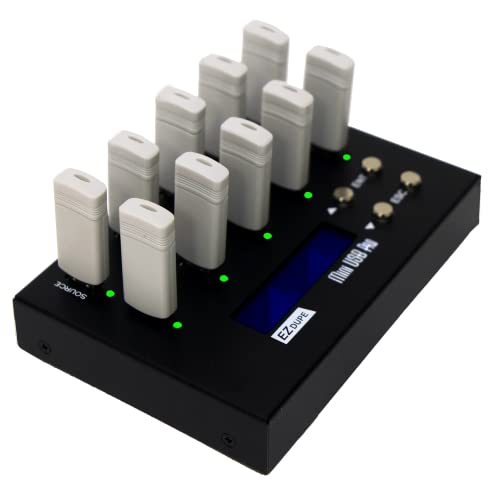
- Copies up to nine USB drives simultaneously
- Offers Quick Copy and sector-by-sector modes
- Includes two erase functions
Best For: Small-to-medium jobs needing flexible copy and erase modes
Compact Technician Pick – StarTech 1:2 USB Duplicator
For technicians seeking usb duplicators for bulk copying without connecting a computer, the StarTech 1:2 model offers two target ports, straightforward controls, and a compact design. It supports system-and-file or sector-by-sector duplication, plus several erase options.
Best For: IT technicians and small-batch copying, drive sanitizing, and verification.
Pros:
- Standalone operation with no computer required
- Supports FAT16/32, NTFS, Linux ext2, ext3, and ext4 for system-and-file copying
- Offers sector-by-sector copying, quick erase, and single- or three-pass overwrite modes
- LCD menu, activity/error LEDs, and Copy & Compare verification
Cons:
- Copies to only two target drives at a time
- Asynchronous copying is limited to source content under 64 MB
- External USB devices may require their own power source
Its small footprint and verification features make it a practical choice for service desks and occasional production runs. Choose a higher-port-count unit if you routinely need more than two copies per cycle.
Seven-Port Workhorse – Systor 1:7 USB Duplicator
The Systor SYS-USBD-7 is a sensible option for usb duplicators for bulk copying when seven target drives are enough for a production batch. It works standalone, supports synchronous and asynchronous modes, and maintains its stated 2GB-per-minute copy speed as the number of loaded drives increases.
Best For: Offices, technicians, and small production teams duplicating up to seven USB drives at once.
Pros:
- Seven USB target ports for larger batches than compact two-port units
- Standalone operation requires no computer or software
- Performs bit-by-bit copying from the source drive
- Supports USB 1.1, 2.0, and 3.0 flash drives, with Type-C support through an adapter
Cons:
- Copy speed is listed at up to 2GB per minute, or 33MB per second
- USB Type-C drives require an adapter
- Its 10-pound desktop form factor is less portable
With seven outputs and hot-swappable support, this model balances throughput and manageable size. Its included warranty and lifetime technical support also suit organizations that expect regular use.
High-Capacity Flexibility Pick – EZ Dupe USB Cyclone 1:15
For usb duplicators for bulk copying that need broad media compatibility, the EZ Dupe USB Cyclone provides 15 ports and supports USB flash drives plus external HDDs and SSDs. Its independent bandwidth design, multiple copy modes, and drive-size support make it suited to varied duplication jobs.
Best For: Businesses and multimedia users copying mixed USB media, large drives, or external storage.
Pros:
- Supports up to 15 USB targets with independent bandwidth design
- Handles USB 1.0 through 3.1 flash media and powered external hard drives
- Offers Essential Files, Full, Partitioned, and Percentage Copy modes
- Includes Quick, Full, DoD 3-pass, and DoD 7-pass erase options
Cons:
- Listed transfer speed is up to 45MB per second, depending on the USB device
- External hard drives may require power support
- Its seven-pound chassis is less compact than a small two-port duplicator
The Cyclone is the most flexible choice here for mixed media and larger-capacity drives. Automatic alerts for slow drives can help prevent a weaker device from holding back the copy process.
Fifteen-Port Production Choice – Systor 1:15 USB Duplicator
The Systor SYS-USBD-15 is designed for usb duplicators for bulk copying when a 15-drive batch is more useful than a compact footprint. It is standalone, performs bit-by-bit duplication, and supports synchronous and asynchronous copy modes at up to 2GB per minute.
Best For: Businesses and production environments that regularly prepare large batches of USB drives.
Pros:
- Copies to up to 15 USB drives in one cycle
- Requires no computer or software
- Maintains the stated copy speed even as the number of loaded drives increases
- Supports synchronous and asynchronous operation plus hot swapping
Cons:
- Listed transfer rate is 33MB per second
- USB Type-C drives require an adapter
- Its 15-port design is more appropriate for a fixed workspace than portable use
This model is a strong fit when batch capacity is the priority and source-to-target bit-by-bit copying meets your workflow. The included three-year labor, one-year parts warranty, and lifetime technical support add useful long-term coverage.
High-Capacity IT Workhorse – 15-Port USB Duplicator
For technicians and IT professionals comparing usb duplicators for bulk copying, the StarTech USBDUPE115 offers up to 15 target ports and standalone operation. It supports USB 2.0 and 3.0 flash media, system or file copying, sector-by-sector cloning, and several erase modes.
Best For: IT teams that need high-volume drive duplication, sanitizing, and verification without a computer.
Pros:
- Copies to up to 15 USB drives simultaneously.
- Supports file-system copying, whole-drive sector copying, and DoD/NIST SP 800-88 Rev. 1 Clear overwrite options.
- LCD menu, error scanning, and Copy & Compare help monitor and verify results.
- Asynchronous copying lets users replace completed drives without stopping, for sources under 128 MB.
Cons:
- Its 1.5 GB/min rated write speed may be slower than newer high-speed workflows.
- The asynchronous mode is limited to source content under 128 MB.
- Some external USB storage devices require their own power source.
This is the strongest choice here when maximum port count and drive-management features matter. Its LCD controls and verification options add practical value for repeatable IT and deployment work.
Compact Speed Pick – 7-Port Mini USB Duplicator
The updated EZ Dupe Mini USB Plus MK III is a compact option for usb duplicators for bulk copying when seven simultaneous targets are sufficient. It works without a computer, supports USB 1.0 through 3.0 flash drives, and is rated for copying at up to 2.5 GB/min or 45 MB/second, depending on the drives used.
Best For: Small teams and portable workflows that need straightforward, computer-free duplication of up to seven USB drives.
Pros:
- Copies to up to seven USB flash drives at once.
- Asynchronous mode allows finished drives to be replaced while copying continues.
- Updated version offers claimed 25% faster copying than the original model.
- Supports USB 1.0, 2.0, and 3.0 flash media plus external USB storage.
Cons:
- Has fewer target ports than the 15-port StarTech model.
- Actual speed depends on the read/write performance of the connected flash drives.
- External USB hard drives must have their own power source.
With its small footprint, seven-port capacity, and asynchronous operation, this model balances throughput and convenience. It is a practical fit when portability and speed matter more than advanced erase or verification functions.
Balanced Office Option – 5-Port USB Duplicator
The StarTech USBDUP15 is a five-port standalone choice for usb duplicators for bulk copying in smaller batches. It supports USB 2.0 and 3.0 flash media, offers file-based and sector-by-sector copying, and includes erase, error-scanning, and Copy & Compare features.
Best For: Offices, technicians, and deployment tasks that typically require up to five duplicate USB drives at a time.
Pros:
- Duplicates or erases up to five USB drives without a computer.
- Supports FAT16/32, NTFS, Linux ext2, ext3, and ext4 system or file copying.
- Offers sector-by-sector copying for formats outside supported file systems.
- Includes quick erase, single-pass, and three-pass overwrite modes.
Cons:
- Its five-target capacity is less suitable for larger production runs.
- Asynchronous copying is limited to source content under 64 MB.
- Some external USB storage devices need a separate power source.
This model provides a useful middle ground for routine duplication and sanitizing. It has the same practical 1.5 GB/min rating and management features as the larger StarTech unit, but in a more limited five-port format.
Best Compact Pick – EZ Dupe Mini USB Plus MK II 1-to-4 Duplicator
For shoppers comparing usb duplicators for bulk copying, the EZ Dupe Mini USB Plus MK II is a portable standalone option for producing up to four USB copies at once. Its updated version offers a stated copy speed of up to 2.5GB per minute, with performance depending on the connected drives.
Best For: Small-batch copying, portable use, and users who want asynchronous duplication without a computer.
Pros:
- Copies up to four USB drives simultaneously.
- Standalone plug-and-use operation requires no computer.
- Supports USB 1.0, 2.0, and 3.0 flash drives and compatible externally powered USB storage.
- Supports capacities above 2TB and can use a power bank or USB power source.
Cons:
- Its four-drive capacity is lower than larger production-oriented duplicators.
- Maximum speed depends on the read/write performance of the USB drives.
- External USB devices require their own power source.
This is a practical choice when portability and flexible small-batch workflows matter more than maximum output volume. The compact design and asynchronous copying can help keep successive jobs moving.
Best High-Volume Pick – BestDuplicator 1-to-23 USB Duplicator
For usb duplicators for bulk copying at a larger scale, the BestDuplicator BD-USB-23T provides 23 target ports in a standalone unit. It is designed for projects that need many USB copies in one run without relying on a PC.
Best For: High-volume USB duplication projects where output capacity and project tracking are priorities.
Pros:
- Supports copying to up to 23 USB targets at once.
- Standalone operation does not require a computer.
- Bit-by-bit duplication supports all data formats, while Smart Copy can copy accessible content quickly.
- Auto-counter technology tracks successful copies against the desired output.
Cons:
- At 19 pounds, it is substantially less portable than compact duplicators.
- The listed warranty is six months.
- Its feature set is geared toward larger projects rather than occasional personal copying.
The BD-USB-23T is the strongest fit here for maximizing simultaneous output. Secure erase, multilingual LCD support, firmware upgradeability, and copy counting add useful controls for repeatable production work.
Best Versatile Mid-Size Pick – EZ Dupe MiniUSB Pro 1-to-9 Duplicator
The EZ Dupe MiniUSB Pro is a useful middle ground for usb duplicators for bulk copying, handling up to nine USB targets simultaneously. It offers both Quick Copy for essential files and whole-media, sector-by-sector duplication, plus erase functions for reuse.
Best For: Users who need more capacity than a four-target copier while still wanting a relatively compact standalone unit.
Pros:
- Copies up to nine USB flash drives at the same time.
- Supports USB 1.0, 2.0, and 3.0 media and compatible USB devices.
- Provides Quick Copy and sector-by-sector whole-media modes.
- Includes two erase functions for data-sanitizing workflows.
Cons:
- Its listed copy speed is lower than the updated four-target EZ Dupe model.
- External USB hard drives must be separately powered and are supported up to 2TB.
- It has fewer target ports than a high-volume 23-target duplicator.
This model balances throughput, copying flexibility, and reuse-oriented features. It is a sensible option for recurring small-to-medium jobs where both file copying and secure erasure are useful.
How We Picked the Best USB Duplicators for Bulk Copying
We focused on standalone systems designed to copy one source drive to multiple target drives at the same time. The selected models span four to 23 targets and include options for USB 2.0, USB 3.0, and USB 3.1 media where specified. We also considered advertised transfer rates, independent operation, LCD or menu controls, verification, drive sanitization, portability, and suitability for repeated production runs.
Because real-world speed depends on the source drive, target media, file sizes, and data quality, published throughput should be treated as a useful comparison rather than a guarantee. A duplicator with more ports is not automatically the best choice if your source media or workflow cannot sustain the additional load.
Quick Comparison
- Four to seven targets: Best for small offices, technicians, classrooms, and occasional batch preparation.
- Nine to 15 targets: A practical range for recurring media distribution, deployment, and service work.
- 23 targets: Designed for the highest-volume jobs when minimizing operator time matters most.
- Portable mini models: Useful when storage space, transport, or a compact workstation is the priority.
- Sanitizer and eraser models: Better suited to recycling, IT asset handling, and sensitive-data workflows.
Key Buying Factors for USB Duplicators for Bulk Copying
Target Count and Throughput
Choose the number of simultaneous target ports based on your typical batch size, not just your largest occasional job. More ports can improve productivity, but only when you regularly fill them. Compare rated transfer speeds, then allow extra time for verification and slower flash drives.
Media and Interface Compatibility
Confirm that the unit supports the USB generations and drive types you use. USB 3.x compatibility can reduce bottlenecks with modern flash media, while older USB 2.0 devices may remain suitable for basic document distribution. Check whether the duplicator supports external hard drives or SSDs if those are part of your process.
Copy, Verify, and Erase Modes
For dependable deployments, prioritize bit-for-bit or file-level verification options appropriate to your use case. Built-in erase and sanitization modes are valuable when drives are reused, returned, or handled with confidential information. Review the available erase standards and whether they fit your compliance requirements.
Controls and Workflow
Standalone operation keeps a computer free for other tasks. Clear LCD menus, status indicators, asynchronous copying, and simple source-to-target setup can make a major difference during repeated batches. A compact chassis may be preferable for mobile technicians, while a larger duplicator can be easier to manage in a fixed production area.
Who Should Buy Which USB Duplicators for Bulk Copying?
Choose a four- or seven-target unit for occasional copying, small teams, field service, or limited storage space. Choose a nine- or 15-target model when you distribute media regularly and want a balanced combination of capacity and workflow efficiency. Choose a 23-target duplicator for schools, distributors, repair centers, or deployment teams handling large batches. If secure reuse is central to your work, select a model with dedicated erase or sanitization functions rather than relying only on a computer’s file deletion tools.