The right projector mount can improve classroom visibility, protect equipment, and keep valuable floor and desk space clear. However, classrooms often require more than a basic universal bracket.
This roundup compares 10 projector mounts for classrooms across ceiling, wall, drop-ceiling, adjustable-height, and no-hole installation styles. Use the guide below to match your projector, room layout, and installation constraints with the right mount.
Best 10 Projector Mounts for Classrooms Picks for 2026
Best Low-Profile Pick
VIVO MOUNT-VP01W Ceiling Mount

- 6-inch low-profile ceiling placement
- Supports projectors up to 30 pounds
- Tilt, swivel, and 360-degree rotation
Best For: Compatible projectors in classrooms needing a close-to-ceiling mount
Best Versatile Installation

- Supports three ceiling or wall configurations
- Holds up to 44 pounds
- Includes 15-degree tilt and 8-degree swivel
Best For: Classrooms needing flexible wall or ceiling projector placement
Best Extended Ceiling Reach

- Adjustable 15- to 23-inch ceiling drop
- Supports projectors up to 30 pounds
- 360-degree rotation with tilt and swivel
Best For: Classrooms requiring a lower, adjustable projector position
Best Heavy-Duty 3-in-1 Option

- Supports up to 44 pounds
- Works for flush, extended, or wall mounting
- Includes cable management and drilling template
Best For: Classrooms needing a sturdy, flexible projector installation
Best Drop-Ceiling Pick
White Scissor Clamp Projector Mount

- Made for suspended metal drop-ceiling grids
- Supports up to 29.7 pounds
- Adjustable tilt, swivel, and rotation
Best For: Classrooms with compatible projectors and drop ceilings
Best Height Flexibility
Full Motion Extendable Ceiling Mount
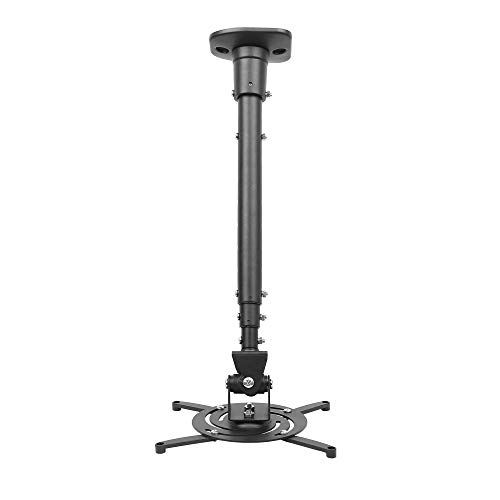
- Extends from 23 to 43.6 inches
- Supports up to 30 pounds
- Pre-assembled with full-motion adjustment
Best For: Flat-ceiling classrooms needing adjustable projector height
Most Versatile Installation
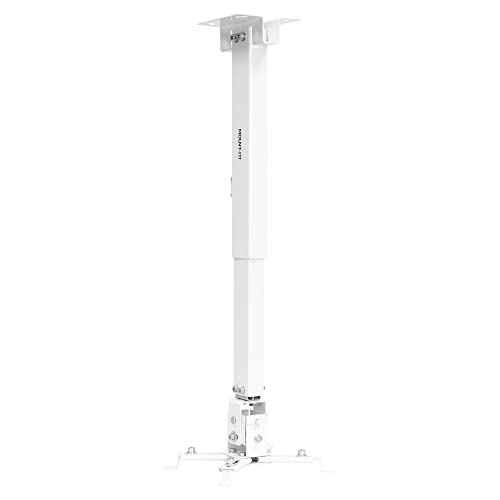
- Works with flush ceiling, telescoping ceiling, or wall setups
- Supports up to 44 pounds
- Includes cable management
Best For: Classrooms needing flexible wall or ceiling installation
Flexible 3-in-1 Mount
Adjustable Wall or Ceiling Projector Bracket

- Flush-ceiling, telescoping-ceiling, or wall installation
- +/-30-degree tilt and swivel adjustment
- Steel construction with quick-release hooks
Best For: Classrooms needing flexible placement on solid mounting surfaces
Tray-Style Classroom Pick

- 13.77-by-8.66-inch metal tray
- Supports up to 22 pounds
- Hidden cable routing and adjustable arm
Best For: Classrooms wanting a tray platform for projectors or other devices
Heavy-Duty Classroom Mount
Extendable Cable-Managed Projector Holder
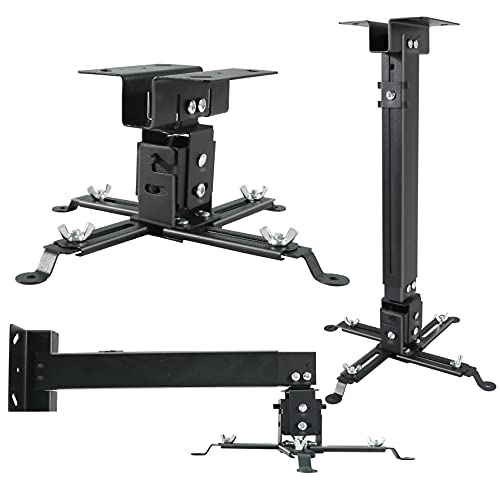
- 44-pound load capacity
- Flush, telescoping, or wall installation
- Concealed cable routing with quick-release hooks
Best For: Classrooms needing a sturdy mount for heavier projectors
Best Low-Profile Pick – VIVO MOUNT-VP01W Ceiling Mount
For classrooms that need a clean, unobtrusive installation, the VIVO MOUNT-VP01W is a practical choice among projector mounts for classrooms. Its steel frame supports up to 30 pounds, while tilt, swivel, and rotation adjustments help align the image with the screen.
Best For: Classrooms and offices using a compatible projector where a low-profile ceiling installation is preferred.
Pros:
- Holds the projector just 6 inches from the ceiling.
- Supports up to 30 pounds with a sturdy steel design.
- Offers 15-degree tilt, 15-degree swivel, and 360-degree rotation.
- Includes hardware, instructions, and quick-release hooks.
Cons:
- Compatibility depends on the projector’s mounting-hole pattern.
- Not compatible with several listed Epson, Mitsubishi, and LG models.
- Mini projectors may require removing the extension arms.
This mount suits straightforward classroom installations where keeping the projector close to the ceiling matters. Check the hole spacing carefully before ordering.
Best Versatile Installation – WALI PM-003-W 3-in-1 Mount
The WALI PM-003-W stands out among projector mounts for classrooms because it supports flush-ceiling, telescoping-ceiling, and wall installations. Its steel construction supports up to 44 pounds, giving schools flexibility when ceiling placement is not practical.
Best For: Classrooms that need ceiling or wall mounting options and have a compatible projector with 9- to 12.6-inch hole spacing.
Pros:
- Works as a flush ceiling, telescoping ceiling, or wall mount.
- Supports up to 44 pounds.
- Provides 15-degree tilt and 8-degree swivel adjustment.
- Includes mounting hardware and a user manual.
Cons:
- Does not support vaulted ceilings or regular drywall.
- Its mounting-hole compatibility range is narrower than some universal mounts.
- Swivel adjustment is limited to 8 degrees.
For schools working with varied room layouts, this WALI mount offers useful installation flexibility. Confirm both the projector pattern and the supporting ceiling or wall surface first.
Best Extended Ceiling Reach – VIVO MOUNT-VP02W
The VIVO MOUNT-VP02W is designed for rooms where the projector must hang lower than a standard low-profile mount. As projector mounts for classrooms go, its telescoping column, 30-pound capacity, and adjustable positioning make it useful for larger or challenging room layouts.
Best For: Classrooms, conference rooms, and offices that need 15 to 23 inches of adjustable ceiling drop.
Pros:
- Extends the projector 15 to 23 inches from the ceiling.
- Supports up to 30 pounds with high-grade steel construction.
- Provides 15-degree tilt, 15-degree swivel, and 360-degree rotation.
- Uses quick-release hooks for installation and removal.
Cons:
- Requires a compatible mounting-hole pattern.
- Not compatible with several listed Epson, Mitsubishi, and LG models.
- The extended design may be unnecessary where a low-profile mount is sufficient.
This is a good fit when ceiling height or screen alignment calls for additional drop. Measure the room and verify projector compatibility before selecting it.
Best Heavy-Duty 3-in-1 Option – PEGZONE HWO1005BK
The PEGZONE HWO1005BK combines flush-ceiling, extendable-ceiling, and wall mounting in one bracket. It is a strong contender among projector mounts for classrooms, supporting up to 44 pounds and offering cable management for a tidier presentation setup.
Best For: Classrooms and presentation spaces needing a heavy-duty mount with flexible installation positions.
Pros:
- Supports flush ceiling, extendable ceiling, and wall mounting.
- Holds projectors up to 44 pounds.
- Offers 15-degree tilt and 8-degree swivel adjustment.
- Includes hardware, drilling template, instructions, and cable management.
Cons:
- Projector mounting holes must measure approximately 8.85 to 12.44 inches.
- Ceiling extension range starts at 16.9 inches, which may be too low for some rooms.
- The supplied details identify it as a wall mount, so installation requirements should be checked carefully.
Choose this PEGZONE mount when weight capacity and installation flexibility are priorities. Its included template and cable-management features can also simplify a more polished classroom setup.
Best Drop-Ceiling Pick – White Scissor Clamp Projector Mount
For classrooms with suspended ceilings, the VIVO MOUNT-VP10DP is a practical choice among projector mounts for classrooms. Its scissor-clamp design attaches to a drop-ceiling grid, while adjustable arms and broad angle adjustment help position compatible projectors for comfortable viewing.
Best For: Classrooms using suspended metal drop-ceiling grids and compatible projectors weighing up to 29.7 pounds.
Pros:
- Designed specifically for suspended metal drop-ceiling grids.
- Supports up to 29.7 pounds and hangs 15.5 inches from the ceiling.
- Offers tilt, swivel, and 360-degree rotation adjustments.
- Removable extension arms accommodate mini projectors with 1.5-by-1.5-inch hole spacing.
Cons:
- Projector mounting-hole spacing must be 12.5 inches or less.
- Designed for drop ceilings rather than standard flat-ceiling installation.
Choose this model when a suspended ceiling is the defining installation requirement. Verify the projector’s mounting-hole pattern and weight before ordering.
Best Height Flexibility – Full Motion Extendable Ceiling Mount
The DYNAVISTA full-motion mount is a flexible option for projector mounts for classrooms where ceiling height and viewing position may vary. Its extendable arm adjusts from a compact 23-inch position to as much as 43.6 inches from the ceiling, with broad motion controls for alignment.
Best For: Flat-ceiling classroom installations that need adjustable projector height and wide positioning flexibility.
Pros:
- Supports most projectors with mounting-hole spacing of 12.1 inches or less.
- Adjusts from 23 to 43.6 inches from the ceiling.
- Provides 25-degree tilt, 90-degree swivel, and 360-degree rotation.
- Pre-assembled design includes hardware and installation instructions.
Cons:
- Maximum load is 30 pounds, so heavier projectors are not suitable.
- Designed for flat ceilings and may require careful screw tightening to reduce shaking.
This mount suits rooms where the projector must be positioned at different heights. Its compatibility range should be checked against the projector before installation.
Most Versatile Installation – 3-in-1 Wall or Ceiling Mount
The Mount-It! MI-604 stands out among projector mounts for classrooms because it supports flush-ceiling, telescoping-ceiling, and wall installation. Its steel construction, cable-management system, and 44-pound capacity make it useful when a classroom layout calls for more than one mounting approach.
Best For: Classrooms that need wall- or ceiling-mount flexibility and support for heavier compatible projectors.
Pros:
- Supports three installation configurations: flush ceiling, telescoping ceiling, and wall mounting.
- Handles up to 44 pounds.
- Offers pitch, roll, swivel, and height adjustment.
- Cable management helps keep wiring concealed and organized.
Cons:
- Projector mounting-hole spacing must be between 8.85 and 12.40 inches.
- Wall and ceiling installations have different extension and height ranges to account for.
This is the strongest fit when installation flexibility matters more than a single-purpose design. Confirm the projector’s hole spacing and choose the configuration that matches the room.
Flexible 3-in-1 Mount – Adjustable Wall or Ceiling Projector Bracket
For classrooms that need adaptable projector placement, this 3-in-1 bracket supports flush-ceiling, telescoping-ceiling, and wall installation. Its adjustable tilt, swivel, and arm length can help align the image, provided the classroom has a solid mounting surface and a compatible projector.
Best For: Classrooms with solid walls or ceilings that need flexible wall- or ceiling-mounted projector placement.
Pros:
- Supports flush ceiling, telescoping ceiling, and wall installation.
- Offers +/-30-degree tilt and swivel adjustment.
- Steel construction supports projectors up to 40 pounds and includes quick-release hooks.
- Includes installation hardware and instructions.
Cons:
- Not designed for mini projectors, vaulted ceilings, or regular drywall.
- Requires a projector with 3–4 mounting holes measuring 3 or 4 mm.
- The supplied details contain conflicting weight-capacity information, so verify the specifications before purchase.
This is a versatile option among projector mounts for classrooms when installation conditions and projector-hole measurements match its requirements. Its broad adjustment range is useful for dialing in the viewing angle, but compatibility and surface strength should be checked first.
Tray-Style Classroom Pick – No-Hole Projector Shelf Mount
This adjustable tray-style mount is a practical choice for projector mounts for classrooms when a shelf platform is more convenient than a multi-arm mounting head. The metal tray supports up to 22 pounds, while the adjustable arm and hidden cable routing help create a cleaner installation on a wall or ceiling.
Best For: Classrooms using a tray-supported projector, camera, laptop, or similar electronic device with a wall or ceiling installation.
Pros:
- Metal 13.77-by-8.66-inch tray supports up to 22 pounds.
- Adjustable arm extends 14.17 to 21.65 inches from the ceiling.
- Can be installed on a wall or ceiling and includes hidden cable management.
- Includes mounting hardware and step-by-step instructions.
Cons:
- A tray design may take up more visible space than a compact projector bracket.
- Installation still requires screwing the mount to the wall or ceiling.
- It is not water resistant.
For classrooms that value a stable platform and cleaner cable routing, this PUTORSEN mount offers a straightforward setup. Confirm that the projector and other equipment fit within the tray and remain under the 22-pound capacity.
Heavy-Duty Classroom Mount – Extendable Cable-Managed Projector Holder
Designed with classroom and commercial use in mind, this universal mount combines flush-ceiling, telescoping-ceiling, and wall installation with concealed cable routing. Its commercial-grade steel construction is rated for up to 44 pounds, making it a strong candidate for heavier compatible projectors.
Best For: Classrooms, boardrooms, and other shared spaces needing a heavy-duty projector mount with adjustable reach and cable organization.
Pros:
- Supports flush-ceiling installation from a 4.5-inch minimum length, plus ceiling and wall extension from 16.9 to 25.6 inches.
- 44-pound load capacity with commercial-grade steel construction.
- Square-tube cable management helps conceal HDMI, audio, video, and power cables.
- Quick-release hooks and a no-slip adjustment system support servicing and positioning.
Cons:
- Not suitable for vaulted ceilings or drywall.
- Requires a projector with 3–4 mounting holes, 3, 4, or 5 mm in diameter, with spacing up to 14.2 inches.
- Security still requires unscrewing four bolts when releasing the projector.
Among projector mounts for classrooms, this Homcine model stands out for its higher stated capacity and integrated cable management. It is best suited to a properly reinforced installation where the projector’s mounting-hole pattern has been verified.
How We Picked the Best Projector Mounts for Classrooms
We focused on the factors that matter most in educational spaces: compatibility with common LCD and DLP projectors, supported weight, mounting flexibility, adjustment range, installation style, and practical access for maintenance. We also considered whether a mount can accommodate different classroom layouts, including standard ceilings, drop ceilings, and wall installations.
Universal mounting arms are useful when a school uses multiple projector brands, while extension poles and adjustable height ranges can help position the image correctly in rooms with tall or uneven ceilings. For safety, always verify the mount’s weight rating against the projector’s total installed weight and follow the manufacturer’s hardware requirements.
Quick Comparison
- Best for a straightforward ceiling installation: Choose a fixed or adjustable universal ceiling mount with a compatible arm pattern.
- Best for changing room layouts: Look for rotating, swiveling, or height-adjustable designs.
- Best for drop ceilings: A scissor clamp mount can simplify attachment to compatible ceiling grids, but confirm grid strength and local installation requirements.
- Best for wall mounting: Select a wall-or-ceiling bracket when ceiling access is limited or a rear wall offers a better projection angle.
- Best for avoiding drilled holes: A projector shelf or no-hole design may work for lightweight equipment, provided the surface and security arrangement are suitable.
Key Buying Factors for Projector Mounts for Classrooms
Compatibility and Load Capacity
Check the mounting-hole pattern, arm reach, and supported projector dimensions. A universal label does not guarantee compatibility with every model. The mount should also exceed the projector’s weight, ideally with additional margin for cables and accessories.
Ceiling Type and Installation Method
Identify whether the room has a solid ceiling, suspended grid, exposed structure, or usable wall. Solid-ceiling mounts generally need appropriate anchors or structural attachment. Drop-ceiling installations may require separate reinforcement, and no-drill shelves should only be used where the mounting surface can safely support the load.
Adjustment and Image Alignment
Tilt, swivel, rotation, and height adjustment make it easier to center the image and correct small alignment issues. Extension poles are particularly helpful in rooms with high ceilings, while low-profile mounts can reduce visual clutter.
Maintenance and Classroom Safety
Choose a design that allows access to cables, filters, and projector controls without removing the entire mount. Secure cable routing, locking hardware, and a secondary safety tether can reduce risk in busy classrooms. Have installation performed by qualified personnel when required by building policy.
Who Should Buy Which Projector Mounts for Classrooms?
Schools standardizing across several rooms should favor universal, adjustable ceiling mounts with broad projector compatibility. A compact low-profile bracket suits classrooms with modest ceiling heights and a consistent projection position. Rooms with suspended ceilings should consider a purpose-built scissor clamp solution after confirming structural support. If drilling is restricted, a lightweight shelf-style mount may be the practical choice, but it provides less security than a mechanically anchored bracket. For flexible teaching spaces, choose a wall-or-ceiling model with swivel and height adjustment so the projector can serve different screen positions.