The right projector mount can improve presentation visibility, protect expensive equipment, and keep conference rooms free of unstable carts and clutter. However, ceiling height, projector weight, mounting surface, and adjustment range all affect which design will work best.
We selected 10 projector mounts for conference rooms that cover common office installations, from drop-ceiling kits and wall brackets to heavy-duty universal mounts with adjustable arms. Use the guide below to narrow the choices by room layout, projector size, and installation requirements.
Best 10 Projector Mounts for Conference Rooms Picks for 2026
Drop-Ceiling Starter
Adjustable 2 x 2 ft Projector Mount

- Fits a standard 2 x 2-foot drop ceiling
- Multiple mounting holes for alignment
- Supports up to 13.61 kg
Best For: Conference rooms with suspended 2 x 2-foot ceilings
Commercial Heavy-Duty Pick

- Supports projectors up to 77 pounds
- Full-motion adjustment for precise aiming
- Quick-release head and cable management
Best For: Permanent commercial conference-room installations
Ultra-Short-Throw Wall Option
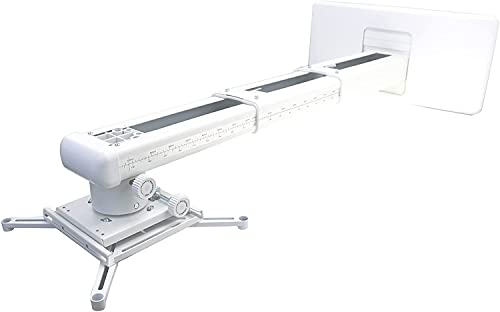
- Extends 19.49 to 49.21 inches
- Three-direction positioning adjustments
- Supports up to 22 pounds
Best For: Wall-mounted ultra-short-throw projectors
Drop-Ceiling Flexibility Pick

- Replaces a 2 x 2-foot ceiling tile
- 15–23-inch telescoping height
- Supports up to 29.7 pounds
Best For: Adjustable suspended-ceiling conference-room setups
Most Versatile
Universal Ceiling and Wall Projector Mount

- Supports three installation configurations
- 40-pound capacity with full-motion adjustment
- Built-in cable management and lifetime warranty
Best For: Flexible conference-room installations on solid surfaces
Best for Drop Ceilings
VIVO Scissor Clamp Projector Mount

- Clamps to suspended metal ceiling grids
- Supports up to 29.7 pounds
- Fits standard and select mini projectors
Best For: Conference rooms with drop ceilings
Best Extended Reach
Full Motion Ceiling Projector Mount
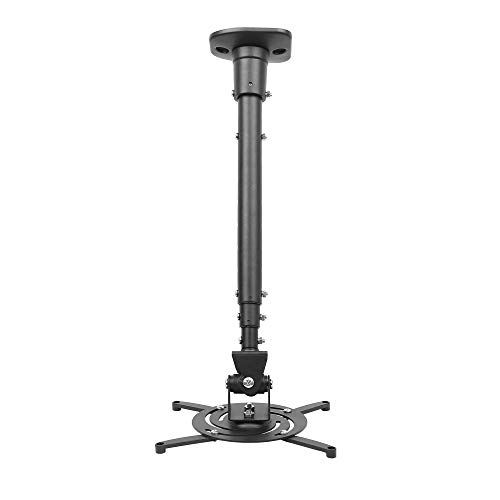
- Extends up to 43.6 inches
- Supports up to 30 pounds
- Pre-assembled with broad motion adjustment
Best For: Flat-ceiling rooms needing substantial projector extension
Best Tall-Ceiling Pick
VIVO Extending Ceiling Projector Mount

- Extends 33.5–58 inches
- Supports up to 29.7 pounds
- Adjusts for flat or pitched ceilings
Best For: High-ceiling conference rooms and offices
Best Heavy-Duty Versatility
Homcine 3-in-1 Projector Mount
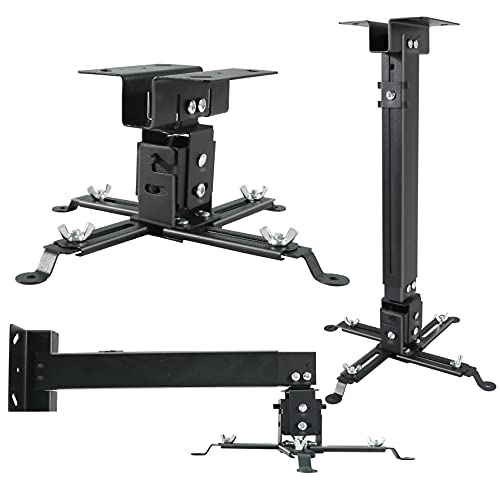
- Supports ceiling or wall mounting
- Rated for up to 44 pounds
- Includes cable-management design
Best For: Flexible boardroom and conference-room installations
Best Wide-Angle Adjustment
Tonalee Adjustable Projector Mount

- Offers ±30° tilt and swivel
- Supports wall or ceiling installation
- Uses high-grade steel construction
Best For: Compatible projectors on solid office walls or ceilings
Drop-Ceiling Starter – Adjustable 2 x 2 ft Projector Mount
For conference rooms with suspended ceilings, the AMER MOUNTS AMRDCP100KIT provides a clean 2 x 2-foot ceiling-mount platform without requiring a separate wall installation. Its reinforced steel plate and multiple mounting holes help support practical projector alignment.
Best For: Conference rooms using standard 2 x 2-foot drop-ceiling tiles and projectors weighing up to 13.61 kg.
Pros:
- Designed to replace a 2 x 2-foot drop-ceiling section.
- Multiple mounting holes support alignment adjustments.
- Lightweight, heat-dissipating reinforced steel and aluminum construction.
Cons:
- Maximum listed capacity is 13.61 kg.
- Provides fewer stated positioning adjustments than full-motion mounts.
- White finish may be more noticeable with darker ceiling designs.
This is a straightforward choice when matching the mount to a suspended ceiling matters more than extensive articulation. Confirm the projector’s mounting pattern and weight before installation.
Commercial Heavy-Duty Pick – PRO 77 lb Ceiling Mount
For permanent projector mounts in conference rooms, boardrooms, and training spaces, the Mount-It! PRO emphasizes capacity, adjustment range, and serviceability. Its heavy-gauge steel arm supports projectors up to 77 pounds while routing cables through the mount.
Best For: Commercial installations using full-size LCD or DLP projectors up to 77 pounds.
Pros:
- Supports up to 77 pounds and standard universal mounting patterns.
- Offers tilt, swivel, and joint rotation adjustments for positioning.
- Quick-release head simplifies projector maintenance and reinstallation.
- Integrated cable management keeps power and signal cables organized.
Cons:
- Not designed for mini projectors.
- Its heavy-duty commercial design may be more than lightweight setups require.
- Adjustment range is specified as tilt ±20°, swivel ±8°, and joint rotation ±180°.
This mount is the strongest fit for facilities that need a permanent, serviceable installation. Its quick-release design is particularly useful when projectors must be cleaned, swapped, or serviced without losing alignment.
Ultra-Short-Throw Wall Option – Telescopic Projector Bracket
When a conference room cannot use a ceiling mount, this NC wall bracket provides a telescopic alternative for universal LCD/DLP projectors. It extends from 19.49 to 49.21 inches and includes fine adjustments for positioning the projected image.
Best For: Wall-mounted ultra-short-throw projectors weighing up to 22 pounds.
Pros:
- Telescopes from 19.49 to 49.21 inches from the wall.
- Provides vertical and horizontal fine-tuning adjustments.
- Adjustable mounting arms support a range of projector patterns.
- Steel construction and a stated 22-pound capacity suit many compact setups.
Cons:
- It is a wall mount rather than a ceiling mount.
- Projector mounting-hole spacing must be less than 12.5 inches.
- Its 22-pound capacity is lower than the heavy-duty ceiling option.
This bracket is a practical solution for ultra-short-throw conference-room layouts where wall placement is preferable. Carefully measure the projector’s mounting holes and required extension before buying.
Drop-Ceiling Flexibility Pick – VIVO 2 x 2 ft Projector Mount
The VIVO MOUNT-VP08DP is designed for conference rooms with 2 x 2-foot suspended ceilings, replacing a ceiling tile without drilling. Its telescoping arm, broad adjustment range, and cable-management openings make it useful when projector placement and clean presentation matter.
Best For: Drop-ceiling installations needing adjustable height and support for projectors up to 29.7 pounds.
Pros:
- Replaces a standard 2 x 2-foot ceiling tile without drilling.
- Telescopes from 15 to 23 inches below the ceiling surface.
- Provides ±15° tilt and swivel adjustment plus 360° rotation.
- Quick-release hooks and cable-management openings simplify installation and adjustments.
Cons:
- Maximum supported weight is 29.7 pounds.
- Projector mounting-hole diagonals must measure up to 12.5 inches.
- Requires a compatible 2 x 2-foot suspended-ceiling layout.
This is a versatile choice for conference rooms that need more positioning control than a basic drop-ceiling plate. Verify both the projector’s mounting pattern and the ceiling grid dimensions before installation.
Most Versatile – Universal Ceiling and Wall Projector Mount
For conference rooms that may need different installation configurations, the Mount-It! offers a flexible approach to projector mounts for conference rooms. It can be installed as a flush ceiling mount, an adjustable-arm ceiling mount, or a wall mount, provided the surface is solid and the projector matches the specified hole pattern.
Best For: Conference rooms needing flexible ceiling or wall installation and precise alignment.
Pros:
- Supports flush ceiling, telescoping-arm ceiling, and wall-mount configurations.
- Offers tilt, swivel, and 360-degree rotation adjustments.
- Includes built-in cable management and supports projectors up to 40 pounds.
- Backed by a lifetime warranty and US-based technical support.
Cons:
- Requires a solid ceiling or wall and is not intended for vaulted ceilings or drywall.
- Projector mounting holes must measure between 8.85 and 12.44 inches with three or four holes.
This is the strongest all-around option when a conference room setup may change or when cable organization matters. Confirm the projector pattern and installation surface before buying.
Best for Drop Ceilings – VIVO Scissor Clamp Projector Mount
The VIVO MOUNT-VP6DP is designed specifically for suspended metal drop-ceiling grids, making it a practical choice when conventional projector mounts for conference rooms are not suitable for a solid ceiling. Its adjustable arms accommodate many standard and mini projectors.
Best For: Conference rooms with suspended metal drop ceilings and compatible projectors weighing up to 29.7 pounds.
Pros:
- Scissor-clamp design attaches directly to a suspended metal drop-ceiling grid.
- Adjustable mounting range supports projector hole spacing from 5.25 to 12.5 inches.
- Removable extension arms can accommodate mini projectors with 1.5-by-1.5-inch hole spacing.
- Provides tilt, swivel, and 360-degree rotation adjustments.
Cons:
- Designed for drop-ceiling installation rather than standard solid ceilings or walls.
- Its 29.7-pound capacity is lower than some heavy-duty alternatives.
Choose this mount when the conference room uses a suspended metal ceiling grid and the projector falls within its mounting and weight limits. The included hardware and instructions simplify installation.
Best Extended Reach – Full Motion Ceiling Projector Mount
The DYNAVISTA full-motion mount suits conference rooms where projector placement requires substantial vertical reach. Its extendable arm can extend to 43.6 inches, while the mount also offers broad angle adjustment for positioning the image on the screen.
Best For: Flat-ceiling conference rooms requiring long extension and adjustable projector positioning.
Pros:
- Extends up to 43.6 inches and collapses to 23 inches with the arm.
- Supports up to 30 pounds and is made from heavy-duty steel.
- Provides 25-degree tilt, 90-degree swivel, and 360-degree rotation.
- Arrives pre-assembled with quick-release hooks, hardware, and instructions.
Cons:
- Designed for flat ceilings and does not offer a wall-mount configuration.
- Projector mounting-hole spacing must be 12.1 inches or less.
- Long extension may require careful tightening to help prevent shaking.
This mount is a good fit when ceiling height or screen alignment calls for extra reach. Verify the projector hole spacing and plan to tighten the designated screws securely during installation.
Best Tall-Ceiling Pick – VIVO Extending Ceiling Projector Mount
For conference rooms with high or pitched ceilings, the VIVO MOUNT-VP03W is a practical choice among projector mounts for conference rooms. Its telescoping design positions a compatible projector 33.5 to 58 inches from the ceiling, while tilt, swivel, and rotation adjustments help fine-tune the image.
Best For: Offices, conference rooms, classrooms, and home theaters needing substantial ceiling extension.
Pros:
- Extends 33.5 to 58 inches from the ceiling surface.
- Supports projectors up to 29.7 pounds.
- Offers ±15° tilt, ±15° swivel, and 360° rotation.
- Works on flat and pitched ceilings.
Cons:
- Not compatible with several listed Epson, Mitsubishi, and LG projector models.
- Requires projector mounting-hole spacing of 5.25 to 12.5 inches with arms.
This mount is especially useful when a conference-room projector must hang well below the ceiling. Confirm projector compatibility and mounting-hole spacing before ordering.
Best Heavy-Duty Versatility – Homcine 3-in-1 Projector Mount
The Homcine projector mount stands out among projector mounts for conference rooms because it supports flush-ceiling, telescoping-ceiling, and wall installation. Its extendable arm, cable-management design, and 44-pound tested capacity suit boardrooms and other shared presentation spaces.
Best For: Boardrooms, classrooms, hotels, and conference rooms that need flexible ceiling or wall placement.
Pros:
- Supports flush, ceiling-arm, and wall-mounted installation.
- Holds projectors up to 44 pounds.
- Adjusts from 16.9 to 25.6 inches for ceiling or wall mounting.
- Helps conceal and organize HDMI, audio, video, and power cables.
Cons:
- Does not support vaulted ceilings or drywall.
- Requires a projector with 3–4 installation holes and spacing up to 14.2 inches.
- Projector removal still requires unscrewing four bolts.
Choose this model when installation flexibility and a higher load rating matter more than a minimal footprint. Verify the ceiling or wall surface and projector-hole specifications first.
Best Wide-Angle Adjustment – Tonalee Adjustable Projector Mount
The Tonalee 4365 offers ceiling and wall installation in a compact adjustable design, making it a flexible option among projector mounts for conference rooms. Its arm reaches 16.9 to 25.6 inches from the ceiling and provides broad tilt and swivel adjustment for aligning the projection.
Best For: Home and office installations using a compatible standard-size projector on a solid wall or ceiling.
Pros:
- Supports flush-ceiling, telescoping-ceiling, and wall installation.
- Provides ±30° tilt and ±30° swivel adjustment.
- Extends 16.9 to 25.6 inches from the ceiling.
- Uses high-grade steel construction.
Cons:
- Not designed for mini projectors.
- Requires a hard, solid wall and does not support vaulted ceilings or regular drywall.
- Projector must have 3–4 screw holes with 3 mm or 4 mm diameters.
This mount is a good fit when image alignment requires more adjustment range and the installation surface is solid. Check projector-hole requirements and the supported wall or ceiling structure before purchase.
How We Picked These Projector Mounts for Conference Rooms
We focused on universal compatibility, mounting flexibility, load capacity, adjustment range, and installation type. The selection includes ceiling mounts for permanent installations, wall-mounted options for rooms without suitable ceiling access, and drop-ceiling products designed for suspended tile systems. We also considered practical features such as extendable arms, height adjustment, swivel or tilt capability, quick-release access, and low-profile or flush-mount configurations.
Always verify the projector’s mounting-hole pattern and weight before buying. A mount’s advertised capacity is only useful when the included hardware and mounting surface can safely support the complete installation.
Quick Comparison
| Mount Type | Best For | Main Advantage | Watch For |
|---|---|---|---|
| Drop-ceiling mount | Suspended tile conference rooms | Clean integration with a grid ceiling | Grid compatibility and structural support |
| Heavy-duty ceiling mount | Large or heavier projectors | Higher load capacity | Reinforced ceiling attachment |
| Wall mount | Low ceilings or limited overhead access | Useful alternative to ceiling installation | Wall strength and projection distance |
| Adjustable universal mount | Mixed office installations | Flexible height, tilt, and projector fit | Arm reach and cable clearance |
Key Buying Factors for Projector Mounts for Conference Rooms
Mounting Surface and Room Layout
Choose a drop-ceiling model only when the suspended ceiling grid is suitable for the mount and can be properly reinforced. For concrete or wood ceilings, use hardware rated for that surface. A wall mount may be the better choice in rooms with exposed beams, low ceilings, or restricted access above the ceiling.
Projector Weight and Mounting Pattern
Check the projector’s weight against the mount’s stated capacity, leaving a sensible safety margin. Universal arms should reach all mounting points without obstructing vents, ports, focus controls, or lamp access.
Height, Tilt, and Alignment
Adjustable height and extendable arms make it easier to fill the screen accurately, especially in rooms with tall ceilings or multiple seating zones. Tilt and swivel controls help correct alignment, but a mount should still be installed as level and centered as possible.
Cable Routing and Maintenance
Plan HDMI, power, and network cable paths before installation. Look for designs that leave room around connectors and allow the projector to be removed without dismantling the entire bracket. Quick-release features can simplify servicing and equipment upgrades.
Who Should Buy Which Projector Mounts for Conference Rooms?
Choose a drop-ceiling mount for a standard suspended conference-room ceiling and a clean, integrated appearance. Pick a heavy-duty ceiling mount when the projector is larger or approaches the weight limit of lighter universal brackets. A wall mount suits rooms where ceiling installation is impractical, while an adjustable universal ceiling mount is the most flexible choice for changing projector models or varied room dimensions.
For a permanent corporate installation, prioritize load capacity, structural compatibility, cable access, and serviceability over the lowest price. If the room is rented or frequently reconfigured, favor a simpler wall or low-profile mount that can be adjusted or removed with less disruption. Professional installation is recommended whenever the projector is heavy, the ceiling structure is uncertain, or the mount will be attached to a suspended grid.