The right mount can make a conference-room display easier to see, safer to use, and better aligned with cameras, tables, and seating. The 10 options in this roundup cover compact fixed brackets, full-motion mounts, corner installations, and extra-large screens.
Before choosing, match the mount to your TV’s size, weight, VESA pattern, wall construction, and required viewing angle. A clean installation also depends on stud placement, cable clearance, and the room’s layout.
Best 10 TV Wall Mounts for Conference Rooms Picks for 2026
Best All-Around Choice
USX Mount Ultra Slim Full-Motion Mount

- Fits 37-90 inch TVs up to 120 pounds
- Tilts, swivels, and extends for flexible viewing
- Retracts to 1.45 inches from the wall
Best For: Medium-to-large conference rooms needing adjustable viewing
Best for Extra-Large Displays
Mount-It! The Beast Heavy-Duty Mount

- Supports 60-110 inch TVs up to 275 pounds
- Extends up to 39 inches with full positioning range
- Includes cable management and a sliding wall plate
Best For: Large conference rooms and commercial installations
Best Fixed Installation
USX STAR Low-Profile Fixed Mount

- Supports 37-86 inch TVs up to 132 pounds
- Sits 1.28 inches from the wall
- Quick-release straps simplify TV removal
Best For: Fixed, front-facing conference room displays
Best for Massive Commercial Screens
monTEK Heavy-Duty Full-Motion Mount

- Supports 60-120 inch TVs up to 265 pounds
- Extends 27.7 inches and swivels ±60°
- Fits VESA patterns up to 900x600mm
Best For: Commercial rooms with very large presentation displays
Best Rally Bar Fit

- Made for Rally Bar and Rally Bar Mini setups
- Supports above- or below-display installation
- Includes cable management and 10° tilt adjustment
Best For: Conference rooms using Logitech Rally Bar equipment
Best Heavy-Duty Choice
Mount-It! 100-Inch Full-Motion Mount

- Holds displays up to 264 pounds
- Fits 60- to 120-inch TVs and wide VESA sizes
- Extends, swivels, tilts, and includes a lifetime warranty
Best For: Large conference-room displays on wood-stud walls
Best Low-Profile Option
monTEK Ultra-Slim TV Wall Mount

- Retracts to a slim 1.38-inch profile
- Supports up to 90-inch, 143-pound TVs
- Provides swivel, tilt, extension, and cable clips
Best For: Small to medium conference rooms needing a clean wall-mounted display
Best for Corner Flexibility
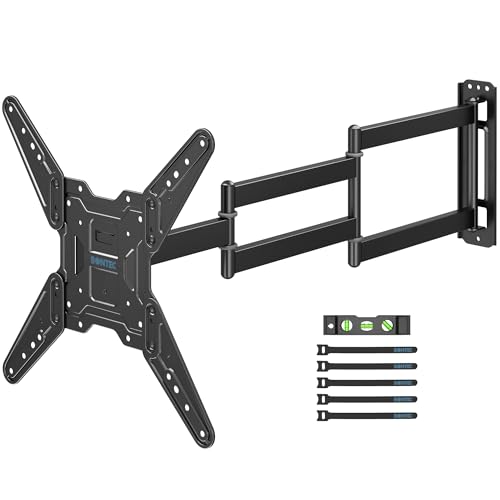
- 37.4-inch extension with ±90° swivel
- Supports 26–65-inch TVs up to 77 lb
- Includes leveling, tilt, and installation accessories
Best For: Small conference rooms and corner-mounted displays
Best for Large Conference Displays
USX STAR Full Motion TV Wall Mount

- Supports 37–90-inch TVs up to 132 lb
- Extends 16.61 inches with ±45° swivel
- Fits VESA patterns up to 600x400mm
Best For: Large conference rooms and commercial display areas
Best Corner Mount for Mid-Size Screens
USX MOUNT Long Arm TV Wall Mount
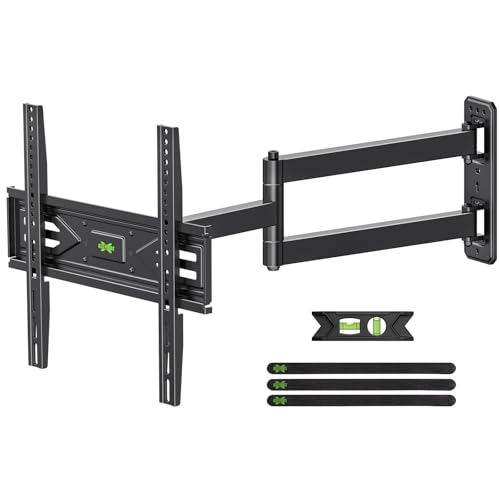
- 31.22-inch extension for corner placement
- Supports 26–65-inch TVs up to 80 lb
- ±90° swivel with tilt and leveling adjustment
Best For: Small to medium rooms with corner-mounted displays
Best All-Around Choice – USX Mount Ultra Slim Full-Motion Mount
For conference rooms needing flexible viewing without a bulky wall profile, this full-motion option is a practical pick among TV wall mounts for conference rooms. It supports 37- to 90-inch TVs, extends for cable access, and offers tilt and swivel adjustment for different seating positions.
Best For: Medium-to-large conference rooms that need adjustable viewing angles and a low-profile installation.
Pros:
- Fits many 37- to 90-inch TVs with VESA patterns up to 600x400mm.
- Offers ±45° swivel, +10°/-10° tilt, and extension up to 11.92 inches.
- Supports up to 120 pounds and works with wood studs, concrete, and brick walls.
- Retracts to 1.45 inches from the wall.
Cons:
- Maximum swivel angle depends on the TV.
- Installation requires checking stud spacing, VESA pattern, and TV weight.
- Concrete anchors may need to be requested separately.
This mount balances broad compatibility, useful movement, and a slim retracted profile. Confirm the display specifications and wall structure before installation.
Best for Extra-Large Displays – Mount-It! The Beast Heavy-Duty Mount
Large presentation displays require more capacity than standard brackets provide. Among TV wall mounts for conference rooms, The Beast is designed for 60- to 110-inch screens up to 275 pounds, with long extension arms that help accommodate seating across a wide room.
Best For: Large conference rooms, commercial installations, and ultra-large displays mounted to wood studs or solid concrete.
Pros:
- Supports TVs from 60 to 110 inches weighing up to 275 pounds.
- Provides up to 39 inches of extension, plus tilt, swivel, and 360° rotation.
- Accommodates VESA patterns from 100x100mm to 800x600mm.
- Includes a sliding wall plate and integrated cable management.
Cons:
- Not suitable for drywall-only walls.
- Its 43.7-pound mount and large capacity may be excessive for smaller displays.
- Requires mounting to wood studs or solid concrete.
The Beast is a strong choice when a conference room uses a very large, heavy screen and needs extensive positioning range. Verify the wall substrate and mounting points before installation.
Best Fixed Installation – USX STAR Low-Profile Fixed Mount
If the display will face a consistent seating layout, a fixed bracket keeps the installation simple and close to the wall. This USX STAR model is a straightforward option among TV wall mounts for conference rooms, supporting many 37- to 86-inch screens and offering a quick-release design for service access.
Best For: Conference rooms, lobbies, and other spaces where a screen can remain fixed at one viewing angle.
Pros:
- Supports compatible 37- to 86-inch TVs weighing up to 132 pounds.
- Fits VESA patterns from 150x100mm to 600x400mm and up to 24-inch stud spacing.
- Places the TV 1.28 inches from the wall to save space.
- Quick-disconnect pull straps help remove the TV from the mount.
Cons:
- This is a fixed mount with no tilt or swivel adjustment.
- Stud spacing and TV specifications must be verified before purchase.
- Concrete anchors may need to be requested separately.
This mount makes sense for a permanent, front-facing display where a slim profile matters more than repositioning. Choose a different design if participants sit at varied angles or glare is a concern.
Best for Massive Commercial Screens – monTEK Heavy-Duty Full-Motion Mount
For conference rooms built around an exceptionally large display, this monTEK mount combines high weight capacity with broad adjustment range. It supports 60- to 120-inch TVs up to 265 pounds and can extend, swivel, and tilt to help serve seating across an open room.
Best For: Commercial conference spaces and presentation rooms using 100-inch-plus displays.
Pros:
- Supports 60- to 120-inch TVs up to 265 pounds.
- Offers 27.7 inches of extension, ±60° swivel, and +5°/-15° tool-free tilt.
- Works with VESA patterns up to 900x600mm and wood studs, concrete, or brick.
- Includes a preassembled structure, quick-lock release, template, level, and hardware.
Cons:
- The heavy mount is recommended for two-person installation.
- Its large capacity may be unnecessary for smaller conference room TVs.
- Installation still requires confirming wall type, stud spacing, and display compatibility.
This is a capable choice for large-format conference room installations where stability and viewing flexibility are priorities. Its weight and size make careful planning and team installation especially important.
Best Rally Bar Fit – Logitech Rally Bar Wall Mount
For conference rooms using Logitech Rally Bar or Rally Bar Mini equipment, this dedicated bracket offers a straightforward way to mount the camera system above or below a display. Its 200 x 50mm VESA compatibility, cable routing, and included installation hardware make it a focused option among TV wall mounts for conference rooms.
Best For: Conference rooms, offices, classrooms, and home meeting spaces using Logitech Rally Bar equipment.
Pros:
- Designed for Logitech Rally Bar and Rally Bar Mini setups.
- Supports above- or below-display placement and includes a 10° tilt adapter.
- Integrated cable channels help organize cables upward or downward.
- Heavy-duty metal construction and included screws support a relatively simple installation.
Cons:
- Its compatibility is specialized for Logitech Rally Bar systems.
- Uses a specific 200 x 50mm VESA pattern rather than broad TV-mount sizing.
This is best viewed as a purpose-built conference-camera mount rather than a general TV bracket. Choose it when Rally Bar placement and a tidy installation matter more than broad display compatibility.
Best Heavy-Duty Choice – Mount-It! 100-Inch Full-Motion Mount
Large conference-room displays need a mount with substantial capacity and broad fit coverage. This Mount-It! model supports 60- to 120-inch TVs up to 264 pounds, with slotted rails covering VESA patterns from 200 x 200 to 900 x 600mm, making it one of the more versatile TV wall mounts for conference rooms.
Best For: Large conference rooms, hospitality spaces, restaurants, and professional AV installations with sturdy wood-stud walls.
Pros:
- Supports displays from 60 to 120 inches and up to 264 pounds.
- Full-motion arms extend 3 to 27.7 inches, swivel 120°, and tilt from +5° to -15°.
- Broad VESA coverage accommodates patterns from 200 x 200 to 900 x 600mm.
- Includes a template, bubble level, hardware, and lifetime manufacturer warranty.
Cons:
- Not intended for metal studs or drywall-only walls.
- Its heavy construction makes a two-person lift advisable.
- Requires careful fit and wall assessment before installation.
For oversized displays and rooms where viewing angles change, the articulating design is a strong advantage. Confirm the TV’s VESA pattern and wall structure first, since this mount is designed for substantial, properly supported installations.
Best Low-Profile Option – monTEK Ultra-Slim TV Wall Mount
When a conference room benefits from a clean, close-to-wall installation without giving up basic viewing adjustment, the monTEK bracket is a practical candidate. It retracts to 1.38 inches, supports TVs up to 90 inches and 143 pounds, and fits VESA patterns through 600 x 400mm.
Best For: Small to medium conference rooms using 37- to 90-inch displays and compatible wood-stud, concrete, or brick walls.
Pros:
- Ultra-slim 1.38-inch profile keeps the display close to the wall.
- Supports TVs up to 143 pounds with 4X weight testing.
- Offers up to 10.2 inches of extension, ±30° swivel, and +3°/-15° tilt.
- Includes pre-labeled hardware, a drill template, bubble level, instructions, and cable clips.
Cons:
- Does not support TVs larger than 90 inches or VESA patterns beyond 600 x 400mm.
- Must not be installed on drywall alone.
- Its movement range is narrower than a mount designed for very large displays.
This mount balances a streamlined appearance with useful adjustment for different seating positions. It is a sensible choice when the display falls within its size and VESA limits and the wall provides suitable structural support.
Best for Corner Flexibility – BONTEC Long Arm TV Wall Mount
For conference rooms that need flexible screen placement, this BONTEC mount is a practical option among TV wall mounts for conference rooms. Its 37.4-inch extension can bring a display out from the wall or into view from a corner, while the 2.9-inch retracted depth keeps the setup tidy when not in use.
Best For: Small conference rooms, corner installations, and spaces where the screen must swing toward different seating areas.
Pros:
- Extends up to 37.4 inches and swivels up to ±90° for flexible positioning.
- Supports 26–65-inch TVs up to 77 pounds with VESA patterns up to 400x400mm.
- Includes tilt, leveling adjustment, cable ties, tools, a bubble level, and installation guidance.
Cons:
- It is not intended for drywall installation.
- Its maximum supported screen size is 65 inches, which may not suit larger conference displays.
This mount stands out when reach and corner access matter more than supporting a very large screen. Confirm the wall type, TV weight, and VESA pattern before installation.
Best for Large Conference Displays – USX STAR Full Motion TV Wall Mount
For larger meeting spaces, the USX STAR is one of the more capable TV wall mounts for conference rooms. It supports TVs from 37 to 90 inches and up to 132 pounds, with enough articulation to adjust viewing angles while keeping the screen relatively close to the wall when retracted.
Best For: Large conference rooms, lobbies, showrooms, waiting areas, and other commercial spaces using bigger displays.
Pros:
- Supports 37–90-inch TVs up to 132 pounds.
- Offers up to 16.61 inches of extension, ±45° swivel, tilt adjustment, and ±4° leveling.
- Fits several VESA patterns through 600x400mm and includes a template, bubble level, labeled hardware, and cable ties.
Cons:
- Concrete anchors are available by request rather than noted as standard included hardware.
- The maximum swivel angle depends on the screen size.
This is the strongest fit of the three for a large shared display, especially where substantial weight capacity and broad TV compatibility are priorities. Verify stud spacing, wall construction, and required anchors before ordering.
Best Corner Mount for Mid-Size Screens – USX MOUNT Long Arm TV Wall Mount
The USX MOUNT XMM931 is designed for rooms where a mid-size screen needs to reach around a corner or serve multiple seating areas. Among TV wall mounts for conference rooms, it combines a 31.22-inch arm with broad motion adjustment and support for TVs up to 65 inches.
Best For: Small to medium conference rooms with corner layouts and 26–65-inch displays.
Pros:
- Extends 31.22 inches and retracts to 2.52 inches for a cleaner profile.
- Supports 26–65-inch TVs up to 80 pounds and VESA patterns from 75x75mm to 400x400mm.
- Provides ±90° swivel, -12° to +5° tilt, and ±4° post-installation leveling.
Cons:
- Concrete anchors or M8x50 screws may need to be requested.
- It does not support screens larger than 65 inches.
This mount offers a useful balance of reach, motion, and capacity for mid-size meeting-room displays. Its corner-focused design is especially helpful when a flat wall position would limit sightlines.
How We Picked the Best TV Wall Mounts for Conference Rooms
We selected these TV Wall Mounts for Conference Rooms based on practical installation and meeting-room requirements: supported screen size and weight, mounting flexibility, low-profile design, articulation, extension range, compatibility with common VESA patterns, and suitability for different wall layouts. The list includes fixed, full-motion, heavy-duty, corner, and Logitech Rally Bar mounting solutions rather than focusing on one installation style.
Because room construction varies, verify the manufacturer’s specifications before ordering. A mount’s advertised capacity does not replace proper attachment to studs or an appropriately rated masonry surface.
Quick Comparison
- Best for a slim, clean installation: Fixed or ultra-slim mounts such as the UL Listed Fixed model and monTEK Ultra Slim.
- Best for adjustable viewing: Full-motion options from USX Mount, monTEK, or Mount-It!.
- Best for very large displays: Mount-It! 100 Inch, Mount-It! The Beast, or monTEK Heavy Duty models.
- Best for corner placement: The USX MOUNT Corner model or BONTEC Long Arm.
- Best for video bars: The Rally wall mount designed for Logitech Rally Bar and Rally Bar Mini.
Key Buying Factors for TV Wall Mounts for Conference Rooms
Screen Size, Weight, and VESA Pattern
Check all three specifications, not just the diagonal screen measurement. Large commercial displays can exceed the capacity of ordinary brackets, while the TV’s VESA hole spacing must align with the mount. Leave a safety margin below the mount’s maximum load where possible.
Fixed Versus Full Motion
Fixed mounts offer a tidy profile and fewer moving parts, making them suitable when seating faces one wall. Tilting or articulating mounts are more useful when glare, multiple seating angles, or camera positioning matters. Long-arm models can help with corner installations but require careful clearance planning.
Wall Structure and Installation
Identify stud spacing before selecting a bracket. Some mounts accommodate 16-, 18-, and 24-inch stud layouts, while others may need a specific pattern or additional blocking. For concrete or masonry, use suitable anchors and follow the installation instructions. A heavy mount should be installed by someone comfortable verifying load-bearing attachment.
Cable Access and Room Usability
Confirm that HDMI, power, USB, and network cables can bend without strain when the screen moves. Consider whether the mount permits post-installation leveling, quick release, or enough extension to reach service ports. Keep the extended TV clear of doors, walkways, whiteboards, and conference tables.
Who Should Buy Which TV Wall Mounts for Conference Rooms?
Choose a fixed or ultra-slim bracket for a dedicated meeting room where the display position is permanent and a discreet appearance matters most. Select a full-motion mount when attendees sit at varied angles or glare changes throughout the day. For 85-inch-plus displays, prioritize heavy-duty models with ample capacity and a broad wall plate. A corner or long-arm mount suits rooms where the only practical wall is beside a corner, but measure the swing path carefully. Finally, choose the dedicated Rally mount when the installation is centered on a Logitech Rally Bar or Rally Bar Mini rather than a television.