Choosing the right screen can make a bigger difference in a meeting room than the projector itself. The best projector screens for conference rooms improve contrast, reduce distortion, and keep slides readable from every seat.
Below, we focus on practical options for business presentations, training rooms, and hybrid meeting spaces, with picks that balance image quality, installation style, and everyday convenience.
Best 10 Projector Screens for Conference Rooms Picks for 2026
Fixed Frame 16:9 Classic
Silver Ticket STR 120" 1.1 Gain

- 120-inch 16:9 fixed-frame screen
- 1.1 gain surface with 160-degree viewing angle
- Wall-mounted design with aluminum frame
Best For: Dedicated conference rooms needing a permanent presentation screen
Motorized Convenience Pick
DINAH 120" Electric Screen with Remote

- 120-inch motorized drop-down screen
- Remote control with smooth retract/retract operation
- Ceiling-mount design for a clean room setup
Best For: Offices and conference rooms that want easy motorized operation
Manual Roll-Down Value
Pyle 84" Pull-Down Matte White

- 84-inch manual retractable screen
- Auto-locking height adjustment
- Wall or ceiling mount design
Best For: Smaller rooms that need a simple manual screen
Quiet Electric Wide Format
ZUEDA 100" Motorized 16:9 Screen
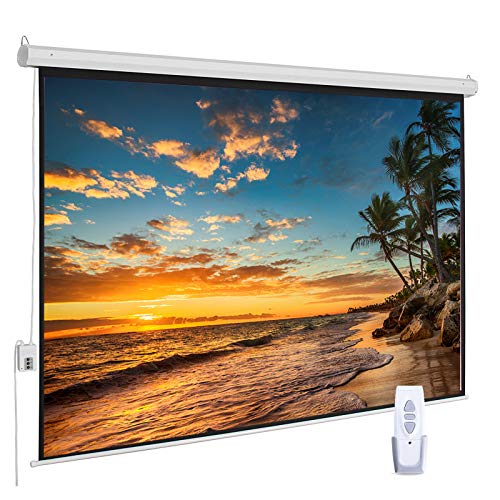
- 100-inch 16:9 electric screen
- RF remote and whisper-quiet motor
- Wrinkle-free 1.1 gain matte white surface
Best For: Medium meeting rooms needing a quiet motorized widescreen
Motorized Wall-Ceiling Pick
Kayle 120 Inch Motorized Screen

- Motorized 120-inch 16:9 screen with RF remote
- Wall or ceiling mount, fully assembled for easier install
- 1.2 gain surface with 180-degree viewing angle
Best For: Permanent conference rooms and easy daily use
Manual Pull-Down Pick
Elite Screens 150-Inch Manual Series

- 150-inch manual pull-down screen with auto-lock height settings
- Black-backed MaxWhite 2 surface with 1.1 gain
- Wall or ceiling mount for fixed conference-room installs
Best For: Dedicated meeting rooms needing a large manual screen
Simple Mounted Meeting Screen
120-Inch Manual Pull-Down 1:1 Screen

- Manual self-locking pull-down operation
- Wall or ceiling mount for clean installation
- Matte surface supports 4K and 8K content
Best For: Conference rooms and classrooms needing a mounted manual screen
Premium Motorized Boardroom Screen
150-Inch Motorized 16:9 Conference Screen

- 150-inch motorized 16:9 screen
- Remote control plus third-party control input
- GREENGUARD and GREENGUARD Gold certified
Best For: Large offices and conference rooms that want a motorized setup
Fixed Frame 16:9 Classic – Silver Ticket STR 120" 1.1 Gain
If you want projector screens for conference rooms that deliver a clean, permanent presentation surface, this Silver Ticket fixed-frame model is built for that job. The 120-inch 16:9 format and 1.1 gain white surface are suited to detailed slides, video, and general AV use, while the 160-degree viewing angle helps keep the image readable across a wide room.
Best For: Conference rooms and presentation spaces that need a wall-mounted, cinema-style fixed screen.
Pros:
- 120-inch diagonal 16:9 viewing area suits modern presentations and video content.
- 1.1 gain white surface with a 160-degree viewing angle supports broad room visibility.
- Heavy-duty aluminum frame with black velvet wrap gives a crisp, finished look.
- Works with long-throw, short-throw, and many ultra short throw projectors, though some UST models are not compatible.
Cons:
- Fixed wall-mount design is not portable and has no stand or leg option.
- The standard white material is not acoustically transparent.
- UST compatibility is limited, and some projectors may require the S7 frame series instead.
This is a strong choice when the room is dedicated to presentations and you want a stable, professional screen surface. Just verify projector compatibility and size before installing, especially if you plan to use an ultra short throw model.
Motorized Convenience Pick – DINAH 120" Electric Screen with Remote
For projector screens for conference rooms where quick setup and a cleaner look matter, this DINAH motorized screen is built to lower and retract at the touch of a button. The 120-inch display size, ceiling-mount design, and quiet automatic operation make it suitable for meeting spaces that need an easy, polished presentation setup.
Best For: Meeting rooms, classrooms, and offices that want a motorized drop-down screen with remote control.
Pros:
- Motorized screen lowers and retracts smoothly with the included remote.
- 120-inch viewing area provides a large image for group viewing.
- Ceiling-mount design helps keep the room neat and professional.
- Designed for 4K, 3D, and HD projection with a 160-degree viewing angle.
Cons:
- Uses a 4:3 format, which may not match widescreen 16:9 presentations as well.
- Requires ceiling or wall installation rather than simple portable use.
- The notes do not specify a manual backup option.
This is a practical pick if you want an automated screen that disappears when not in use. It’s especially appealing for spaces where convenience and a professional look are just as important as image size.
Manual Roll-Down Value – Pyle 84" Pull-Down Matte White
If you need projector screens for conference rooms without committing to a motorized system, this Pyle pull-down screen keeps things simple. The 84-inch size, matte white surface, and auto-locking height adjustment make it useful for everyday meetings, training sessions, and classroom-style presentations.
Best For: Budget-conscious offices, classrooms, and smaller meeting spaces that need a manual retractable screen.
Pros:
- Manual roll-down design is straightforward and easy to use.
- Auto-locking height adjustment lets you stop the screen at different positions.
- Matte white viewing surface is paired with a black border for clearer alignment.
- Works with wall or ceiling mounting for flexible installation.
Cons:
- 84-inch size is smaller than the larger conference-room screens in this roundup.
- Manual operation is less convenient than an electric model.
- Best suited to smaller spaces rather than large boardrooms.
This is the no-frills option for teams that want dependable screen functionality at a smaller scale. It’s a sensible fit when the priority is simplicity, flexibility, and lower complexity.
Quiet Electric Wide Format – ZUEDA 100" Motorized 16:9 Screen
For projector screens for conference rooms that need a balance of size, convenience, and a clean widescreen layout, this ZUEDA motorized screen is a strong fit. Its 100-inch 16:9 viewing area, quiet RF remote control, and wrinkle-free matte white surface make it well suited to presentations, video playback, and mixed-use meeting spaces.
Best For: Medium-sized offices and presentation rooms that want a motorized 16:9 screen with quiet operation.
Pros:
- 100-inch diagonal 16:9 format matches modern presentation and video content.
- Whisper-quiet electric motor and RF remote add convenience.
- 1.1 gain matte white PVC surface is designed to stay wrinkle-free.
- Wall or ceiling installation options make placement more flexible.
Cons:
- Smaller than 120-inch options if you need a larger image for a bigger room.
- Metal casing adds a more permanent install requirement than a portable screen.
- The product notes recommend checking the size chart carefully before buying.
This is a well-rounded choice when you want the ease of an electric screen without moving up to a very large format. It suits rooms where clean presentation, simple control, and widescreen compatibility matter most.
Portable Outdoor Pick – 150-inch Projector Screen with Stand
If you need projector screens for conference rooms that can also handle off-site presentations or flexible meeting spaces, this 150-inch portable option gives you a very large 16:9 image and quick setup. Its wrinkle-free polyester fabric is designed for clear, high-resolution viewing, and the included stand, ropes, and ground nails add stability when you need a freestanding screen.
Best For: Large rooms, temporary conference setups, and teams that want a portable screen for both presentations and events.
Pros:
- Huge 150-inch 16:9 viewing area for large audiences.
- Wrinkle-free, opaque polyester material aimed at crisp image quality.
- Fast, tool-free assembly with a carrying bag for transport.
- Ground nails and rigging ropes help stabilize the freestanding frame.
Cons:
- Best suited to large spaces rather than small conference rooms.
- Freestanding design may be more setup than a fixed wall-mounted screen.
- Primarily optimized for portable use, not permanent installation.
For teams that need flexibility, this is a practical large-format screen that can move between presentation spaces and event use. It is especially appealing when portability matters as much as screen size.
Motorized Wall-Ceiling Pick – Kayle 120 Inch Motorized Screen
For projector screens for conference rooms, a motorized model can make daily use much easier, and this 120-inch Kayle screen is built for that kind of setup. It arrives fully assembled, mounts to a wall or ceiling, and includes RF remote control plus a wall switch, making it a strong choice when you want a cleaner, more permanent presentation solution.
Best For: Conference rooms, education spaces, and home theaters that want an automatic retractable screen.
Pros:
- Motorized operation with wireless remote and wall switch.
- 120-inch 16:9 format suited to standard presentation and video content.
- 1.2 gain screen with 180-degree viewing angle.
- Fully assembled and designed for wall or ceiling installation.
Cons:
- Requires fixed installation instead of portable use.
- 120-inch size may be smaller than some large-room needs.
- Better for standard meeting rooms than very flexible, temporary setups.
This is the most straightforward pick if convenience is the priority. The automatic retractable design helps keep a conference room tidy while still delivering a solid viewing surface for presentations.
Manual Pull-Down Pick – Elite Screens 150-Inch Manual Series
If you want projector screens for conference rooms with a more traditional installed look, this 150-inch manual pull-down model is built for wall or ceiling mounting and daily use. The auto-lock system lets you set the screen at different heights, while the black-backed MaxWhite 2 surface is designed to improve color reproduction and block light penetration for indoor viewing.
Best For: Fixed conference rooms, training spaces, and presenters who want a large manual screen with variable height settings.
Pros:
- Large 150-inch 16:9 viewing area for big meeting spaces.
- Auto-lock pull-down design with variable height settings.
- Black-backed MaxWhite 2 surface with 1.1 gain and wide viewing angle.
- Wall or ceiling installation with GREENGUARD and GREENGUARD Gold certification.
Cons:
- Manual operation is less convenient than motorized screens.
- Not compatible with short-throw or ultra short-throw projectors.
- Designed for fixed installation, so it is not portable.
This model is a strong fit when you want a durable, no-frills screen for a dedicated room. It offers a large image and dependable materials without adding motorized complexity.
Portable Conference-Friendly Screen – 16:9 120-Inch Tripod Projector Screen
If you need projector screens for conference rooms that can also move between spaces, this 120-inch model is built for big-group viewing. The 16:9 fiberglass screen offers a 1.2 gain and 160-degree viewing angle, while the tripod stand and carry bag make it easier to transport than a fixed installation.
Best For: Flexible meeting spaces, temporary conference room setups, and users who want a large portable screen that can also work indoors.
Pros:
- Large 120-inch 16:9 viewing area for presentations and group viewing
- Tripod stand is adjustable and includes spring-tension support for stability
- Lightweight 13.07 lb design with carry bag for portability
- Includes ground spikes for outdoor use and a wall bracket for indoor mounting
Cons:
- Large size may require checking your room height and floor space first
- Wind can affect stability outdoors, especially with a screen this large
- Not a fixed conference-room installation solution
For teams that want a big image without committing to a permanent mount, this screen offers useful flexibility. Its strength is portability, but you should confirm the space can handle the footprint before buying.
Simple Mounted Meeting Screen – 120-Inch Manual Pull-Down 1:1 Screen
For projector screens for conference rooms where a fixed wall or ceiling mount makes sense, this manual pull-down option keeps things simple. It uses a 120-inch diagonal 1:1 format with a matte white surface and 160-degree viewing angle, making it a straightforward choice for presentations, classrooms, and meeting spaces.
Best For: Conference rooms, classrooms, and meeting areas that want a wall- or ceiling-mounted screen with easy manual operation.
Pros:
- Manual retractable design with self-locking mechanism for simple height control
- Wall or ceiling mounting keeps the setup clean and space-saving
- Matte white surface supports 3D, 1080P, 4K, and 8K content
- Roll-up design makes storage and transport easier than fixed screens
Cons:
- 1:1 aspect ratio is less flexible than 16:9 for widescreen content
- Screws and L-bracket are not included
- Requires enough wall or ceiling space for the overall 90 x 92 in size
This screen is a practical pick if you want a dependable manual setup without electric controls. Its square format is the main thing to consider, but it can be a good fit for standard presentation use.
Premium Motorized Boardroom Screen – 150-Inch Motorized 16:9 Conference Screen
If you want projector screens for conference rooms with a more polished, automated feel, this 150-inch motorized model is designed for that role. It features a 16:9 MaxWhite 2 surface with 1.1 gain, 180-degree viewing angle, and IR remote control, plus a wall-box controller and RJ45 input for third-party system integration.
Best For: Larger conference rooms, offices, and presentation spaces that benefit from a motorized screen with remote control and automation options.
Pros:
- 150-inch diagonal 16:9 format for large presentation areas
- Motorized operation with IR remote and detachable wall box controller
- RJ45 input supports integration with third-party control systems
- GREENGUARD and GREENGUARD Gold certified for lower emissions
Cons:
- Not compatible with ultra-short-throw or short-throw projectors
- Larger housing and screen size require significant wall or ceiling space
- Heavier than portable options at 30.3 pounds
For rooms that host frequent presentations, the motorized design can make daily use noticeably easier. It is best suited to standard throw projectors and larger spaces where a permanent installation is acceptable.
How We Picked the Best Projector Screens for Conference Rooms
For Projector Screens for Conference Rooms, we prioritized screen type, viewing area, ease of installation, surface quality, and how well each option fits real workplace use. We also considered whether a screen is better for permanent conference rooms, flexible training spaces, or portable presentation setups.
Quick Comparison
Fixed-frame screens tend to deliver the flattest image and strongest professional look. Motorized screens are best when you want a clean wall and the ability to hide the screen after meetings. Manual pull-down screens are a simpler, lower-cost option for rooms used less frequently. Portable screens work best for traveling teams or multipurpose spaces where setup and teardown matter more than a permanent install.
Key Buying Factors for Projector Screens for Conference Rooms
Screen Size and Room Distance
Match the diagonal size to the room depth and seating layout. Larger conference rooms usually benefit from 120-inch to 150-inch screens, while smaller rooms may be fine with an 84-inch to 100-inch option.
Format and Aspect Ratio
A 16:9 screen is the most versatile choice for modern presentations, video calls, and widescreen content. If your team still uses older presentation formats or specialized content, check whether a 1:1 or other ratio fits your workflow better.
Mounting Style
Fixed-frame screens are ideal for dedicated boardrooms. Wall- or ceiling-mounted pull-down models save space. Motorized screens add convenience and a polished look. Portable tripod and stand screens are best when the room layout changes often.
Surface Quality and Gain
Look for a surface that stays flat and offers consistent brightness across the screen. Moderate gain is usually the safest choice for shared rooms, since it helps maintain visibility without creating hot spots.
Controls and Ease of Use
Remote-controlled screens are especially useful in conference settings because they reduce setup time and keep meetings moving. Manual locks and auto-stop features are helpful when you want straightforward operation without more complexity.
Who Should Buy Which Projector Screens for Conference Rooms?
Choose a fixed-frame screen if your conference room is dedicated and presentation quality matters most. Choose a motorized screen if you want a clean, professional install with fast deployment. Choose a manual screen if you need reliable performance at a lower price. Choose a portable screen if you present in multiple rooms or need a screen that can travel between sites.
In short, the best Projector Screens for Conference Rooms are the ones that match your room size, usage pattern, and installation preferences. Focus on those three factors first, and the right choice becomes much easier.