Looking for a NAS that feels fast in daily use, not just large on paper? The right enclosure with M.2 cache can improve responsiveness for shared files, media libraries, backups, and creative workflows.
This roundup focuses on 10 practical options for home users, creators, and small teams that want a smarter balance of capacity, speed, and expandability.
Best 10 Nas Enclosures with M2 Cache Picks for 2026
Top Pick for a Compact Hybrid Build
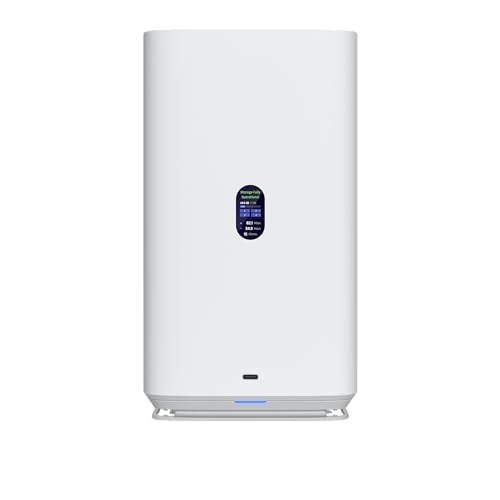
- Dual M.2 NVMe cache slots
- 2.5GbE Ethernet networking
- 4-bay HDD enclosure with USB-C
Best For: Compact NAS buyers who want cache support and 2.5GbE
Most Trusted Software Ecosystem
Synology DS925+ 4-Bay Diskless NAS

- Dual 2.5GbE ports
- Up to 522/565 MB/s sequential speeds
- Diskless 4-bay design with file, photo, and backup tools
Best For: Users who want Synology software and strong 4-bay performance
Best All-in-One Loaded Bundle

- Comes with 4x1TB NVMe M.2 SSDs
- Includes 2x16TB HDDs and 8GB RAM
- Dual 2.5GbE plus HDMI 2.0b
Best For: Buyers who want a ready-to-use NAS bundle with cache drives
Best High-Speed Creator NAS

- 10GbE network port
- Supports Docker and virtual machines
- Up to 144TB advertised capacity
Best For: Creators and small teams needing fast wired storage
Hybrid 8-Bay Storage

- 4 HDD/SSD bays plus 4 M.2 NVMe slots
- Up to 10Gbps USB 3.2 Gen 2 performance
- Independent drives with no built-in RAID
Best For: Hybrid expansion with separate HDD and NVMe storage
Pro 4-Bay NAS

- Two M.2 PCIe 4.0 slots for cache or storage
- Intel Core i3-1315U with DDR5 memory
- 10GbE plus 2.5GbE networking
Best For: Power users needing a fast NAS with cache-ready M.2 slots
Desktop NAS Workstation

- Five SATA bays and three M.2 slots
- Ryzen 7 255 with DDR5 upgrade support
- Dual 10GbE/5GbE plus USB4 and OCuLink
Best For: Expandable desktop NAS buyers who want lots of I/O and NVMe flexibility
Creator-Grade All-in-One

- Dual 10GbE networking for fast transfers
- Two M.2 SSDs for expansion and caching
- Supports Docker, VMs, and surveillance
Best For: Creators and small teams needing speed and flexibility
Expandable Performance Pick

- Two M.2 NVMe slots for caching and Qtier
- Dual 2.5GbE with port trunking support
- Two PCIe Gen3 slots for upgrades
Best For: Users who want a flexible NAS they can expand later
Compact Cache-Friendly Choice

- Dual M.2 PCIe SSD slots for caching
- 2.5GbE keeps everyday tasks responsive
- Hardware transcoding for smooth streaming
Best For: Home users wanting a compact, responsive NAS
Top Pick for a Compact Hybrid Build – Ubiquiti 4-Bay UniFi NAS
Ubiquiti 4-Bay NAS with 2.5/3.5" HDD Slots & 2 M.2 NVMe SSD Cache Slots by Ubiquiti
Check Price On AmazonIf you want one of the more compact nas enclosures with m2 cache, this Ubiquiti 4-bay model gives you a straightforward mix of HDD storage and dual M.2 NVMe cache slots. It also adds 2.5GbE networking and USB-C connectivity, making it a practical fit for a small server or desktop setup that needs better responsiveness without moving to a larger chassis.
Best For: Buyers who want a compact 4-bay enclosure with dual NVMe cache support and 2.5GbE networking.
Pros:
- Dual M.2 NVMe SSD cache slots for faster access to frequently used data
- 2.5GbE Ethernet support for improved network throughput
- 4-bay HDD layout keeps storage flexible for home or small office use
- USB-C connectivity adds another practical connection option
Cons:
- Diskless chassis means drives are not included
- Only four drive bays, so expansion is limited compared with larger systems
- Focuses on core storage and cache hardware rather than bundled drives
This is a sensible choice if your priority is a clean, compact NAS with M.2 cache support and solid 2.5GbE networking. It keeps the hardware simple while still giving you a useful performance upgrade path through NVMe caching.
Most Trusted Software Ecosystem – Synology DS925+ 4-Bay Diskless NAS
The Synology DS925+ belongs on any shortlist of nas enclosures with m2 cache if you value a mature platform and strong transfer performance. Synology highlights up to 522/565 MB/s sequential read/write throughput plus dual 2.5GbE ports, so it is aimed at users who want a fast diskless 4-bay system with room for caching and dependable day-to-day file handling.
Best For: Buyers who want Synology’s software ecosystem in a fast 4-bay diskless NAS.
Pros:
- Dual 2.5GbE ports for faster transfers and added redundancy
- Up to 522/565 MB/s sequential read/write throughput
- Diskless design lets you choose drives from the official compatibility list
- Built-in file, photo, backup, virtualization, and surveillance features
Cons:
- Drives are not included
- Compatibility is tied to Synology’s official list
- Higher-end features may be more than casual users need
If you want a reliable 4-bay NAS platform with strong network performance and the option to build around an established software stack, the DS925+ is an easy recommendation. It is especially appealing for buyers who care about stability and ecosystem support as much as raw hardware specs.
Best All-in-One Loaded Bundle – Asustor AS5402T 36TB Bundle
For shoppers comparing nas enclosures with m2 cache, this Asustor bundle stands out because it arrives fully loaded with storage and cache hardware already installed. The package combines a 2-bay AS5402T NAS with 2x16TB SATA HDDs and 4x1TB NVMe M.2 SSDs, plus 8GB RAM and dual 2.5GbE LAN, so it is built for buyers who want a ready-to-run setup instead of assembling parts separately.
Best For: Buyers who want a fully loaded NAS bundle with HDDs, NVMe cache, and dual 2.5GbE.
Pros:
- Includes 4x1TB NVMe M.2 SSDs alongside 2x16TB SATA HDDs
- 8GB DDR4 RAM and quad-core CPU support multitasking
- Dual 2.5GbE LAN plus multiple USB 3.2 Gen 2×1 ports and HDMI 2.0b
- Supports RAID 0, 1, 5, 6, and 10 for flexible data protection
Cons:
- Only 2 drive bays, so the enclosure itself is less expandable
- Bundle format may be more than some buyers need
- Storage is preconfigured, which limits customization at purchase
This is a strong pick if you want storage, cache, and networking sorted in one purchase. The bundled NVMe drives make it especially convenient for users who want the performance benefits of M.2 caching without building the system piece by piece.
Best High-Speed Creator NAS – UGREEN DXP4800 Plus 4-Bay NAS
The UGREEN DXP4800 Plus is a strong option in the nas enclosures with m2 cache category if you want higher-speed networking and a feature set aimed at families, creators, and small teams. It combines a 4-bay layout with a 10GbE port, 10Gbps USB ports, and support for Docker and virtual machines, while also offering wide device compatibility and a large advertised capacity ceiling.
Best For: Creators and small teams who want fast networking and flexible app support in a 4-bay NAS.
Pros:
- 10GbE port and 10Gbps USB ports for fast transfers
- Supports Docker and virtual machines
- 4-bay design with up to 144TB advertised capacity
- Works with many third-party drives, including Western Digital, Seagate, and Toshiba
Cons:
- Hard drives are not included
- Actual transfer speeds depend on network, CPU, drive, and file size
- Wireless networking is not supported on this model
If your priority is speed plus flexible software tools, the DXP4800 Plus is an appealing choice. It is especially useful for users who want a fast wired NAS that can handle modern workflows without giving up private-cloud storage features.
Hybrid 8-Bay Storage – TerraMaster D8 Hybrid 2
If you want one of the more flexible nas enclosures with m2 cache-style expansion, the TerraMaster D8 Hybrid 2 stands out because it supports both 4 SATA drives and 4 M.2 2280 NVMe SSDs in a single box. It is a DAS rather than a traditional NAS, but it is built for users who want high-capacity HDD storage alongside fast SSD tiers, with up to 10Gbps USB 3.2 Gen 2 performance and plug-and-play compatibility across Windows, macOS, Linux, and NAS operating systems.
Best For: Users who need a high-capacity hybrid enclosure with separate HDD and NVMe bays for fast expansion and backup workflows.
Pros:
- Supports 4 SATA HDDs/SSDs plus 4 independent M.2 NVMe SSDs.
- USB 3.2 Gen 2 connection with claimed read speeds up to 1020 MB/s on a single M.2 SSD.
- Independent drive design gives flexible storage management without built-in RAID.
- Includes TerraMaster power management modes plus TPC Backupper software.
Cons:
- No built-in RAID, so RAID depends on third-party software if needed.
- As a DAS enclosure, it is not a full standalone NAS system.
- Uses a plastic enclosure instead of a metal chassis.
Overall, the D8 Hybrid 2 is best viewed as a versatile high-speed storage expansion box for users who want to combine big HDD capacity with NVMe speed in one device. If you need a straightforward hybrid enclosure with strong compatibility and simple drive access, it fits that job well.
Pro 4-Bay NAS – UGREEN DXP4800 Pro
Among nas enclosures with m2 cache support, the UGREEN DXP4800 Pro is aimed at users who want a proper all-in-one NAS with strong hardware and fast networking. It pairs an Intel Core i3-1315U, DDR5 memory, dual network ports, and two M.2 PCIe 4.0 SSD slots that can be used as either cache or storage pools, making it a solid fit for demanding file workflows, virtualization, and media-heavy setups.
Best For: Power users, developers, and small teams that want a fast NAS with M.2 cache options and advanced app support.
Pros:
- Dual M.2 PCIe 4.0 slots can be used for cache or storage pools.
- Intel Core i3-1315U and 8GB DDR5 RAM support heavy multitasking.
- 10GbE + 2.5GbE networking can reach up to 1.25GB/s transfers.
- Supports Docker, virtual machines, RAID options, and UGOS Pro tools.
Cons:
- Only four HDD bays, so raw capacity is lower than larger desktop NAS units.
- Advanced features may be more than casual home users need.
- DDR5 RAM is expandable, but that may add cost for full performance tuning.
The DXP4800 Pro is a strong choice if you want a compact NAS with real workstation-level features and flexible M.2 support. Its cache-ready SSD slots, fast networking, and app ecosystem make it well suited to serious everyday use.
Desktop NAS Workstation – MINISFORUM N5 Air
The MINISFORUM N5 Air is a desktop NAS for buyers who want more than basic storage, especially if they are comparing nas enclosures with m2 cache options and expansion-heavy designs. It combines five SATA bays, three M.2 slots, an AMD Ryzen 7 255 processor, dual DDR5 slots, dual LAN, and multiple high-speed outputs, so it is built around storage, connectivity, and workstation-style flexibility rather than simple file sharing alone.
Best For: Users who want a highly expandable desktop NAS with NVMe flexibility, fast networking, and broad I/O.
Pros:
- Five SATA bays plus three M.2 slots for flexible storage setups.
- AMD Ryzen 7 255 and Radeon 780M graphics support demanding multitasking.
- Dual 10GbE and 5GbE networking can be combined for up to 15Gbps.
- Includes USB4, HDMI 8K, and OCuLink for extensive expansion options.
Cons:
- More complex than a basic NAS if you only need simple backups.
- Some capacity and configuration details depend on how the M.2 slots are used.
- The feature set may be overkill for small households or light file storage.
Overall, the N5 Air is best for buyers who want desktop-grade performance and a broad mix of storage and expansion options in one system. If you value flexibility, strong networking, and room to grow, it is the most workstation-like option in this group.
Creator-Grade All-in-One – UGREEN DXP4800 GT 4-Bay NAS
If you’re shopping for nas enclosures with m2 cache that can also handle heavier creative and office workloads, the UGREEN DXP4800 GT is built to do more than simple file storage. Its AMD Ryzen Embedded processor, dual 10GbE networking, and support for up to two M.2 SSDs make it a strong fit for fast transfers, backups, media processing, and multi-user use.
Best For: Creators, small teams, and power users who want fast storage, app flexibility, and local security in one NAS.
Pros:
- Dual 10GbE and SSD expansion support for fast transfers and responsive workflows
- Can scale to 64GB RAM for multitasking, Docker, virtual machines, and more
- Built-in surveillance support with ONVIF/RTSP camera compatibility
- SD card slot and USB-C/USB-A ports simplify direct media and backup imports
Cons:
- Drives and SSDs are not included
- Some capacity options depend on using specific bay and SSD combinations
- Best feature set may be more than casual home users need
Overall, this is a versatile NAS for users who want speed, local privacy, and expandability in the same box. It stands out most when you need a storage system that can also support creative workflows, apps, and surveillance duties.
Expandable Performance Pick – QNAP TS-673A 6-Bay NAS
QNAP TS-673A-8G 6 Bay High-Performance NAS with 2 x 2.5GbE Ports and Two PCIe Gen3 Slots
Check Price On AmazonFor buyers comparing nas enclosures with m2 cache, the QNAP TS-673A stands out because it combines two M.2 PCIe NVMe SSD slots with a strong expansion path. It also includes dual 2.5GbE ports, with support for higher aggregate throughput through port trunking, so it can grow into a faster network setup as your storage needs increase.
Best For: Users who want a flexible 6-bay NAS with caching, upgrade options, and room to add more performance hardware.
Pros:
- Two M.2 NVMe slots support SSD caching and Qtier storage optimization
- Dual 2.5GbE ports can deliver up to 5Gbps with port trunking
- Two PCIe Gen3 slots allow add-ons like 10GbE, extra USB, or wireless cards
- Supports entry-level NVIDIA graphics cards for video processing or VM passthrough
Cons:
- Rack-mount design may not suit every desk or home setup
- To unlock more performance, you may need to buy add-in cards separately
- Larger 6-bay format can be more than simple backup users need
This is a strong choice if you want caching plus long-term expandability in one chassis. The TS-673A is especially appealing for users who expect to upgrade networking or add accelerator hardware later.
Compact Cache-Friendly Choice – QNAP TS-262A 2-Bay NAS
If you want a smaller option in the category of nas enclosures with m2 cache, the QNAP TS-262A focuses on everyday responsiveness without taking up much space. Its built-in 2.5GbE connection and dual M.2 PCIe SSD slots are designed to keep backups, browsing, and media access feeling snappy while fitting neatly on a desk or shelf.
Best For: Home users who want a compact NAS with caching, easy multimedia use, and straightforward backup features.
Pros:
- Dual M.2 PCIe SSD slots support caching and Qtier auto-tiering
- 2.5GbE helps keep routine file access and backups responsive
- Intel UHD Graphics enables hardware video transcoding for smooth streaming
- Compact two-bay design with tool-less, hot-swappable trays
Cons:
- Two-bay capacity is more limited than larger NAS options
- Designed more for home and personal use than heavier team workloads
- May need SSDs added to take full advantage of the caching setup
For users who want a compact NAS that still benefits from SSD caching, this model hits a practical sweet spot. It balances storage, media features, and everyday speed in a size that’s easy to live with.
How We Picked the Best Nas Enclosures with M2 Cache
We focused on NAS enclosures with M.2 cache and related hybrid storage designs that offer a meaningful performance boost for real-world use. Priority went to systems with strong CPU and RAM options, multi-bay flexibility, reliable network connectivity, and clear upgrade paths for storage and expansion.
We also considered how well each unit fits different buyer profiles, from simple household media storage to heavier multitasking and team file sharing.
Quick Comparison
In broad terms, 2-bay systems are best for compact setups and simpler storage needs, 4-bay models offer the best balance of price and expansion, and 5- to 6-bay units suit users who expect larger libraries or more demanding workloads. If you want the best everyday value, a 4-bay NAS with M.2 cache is usually the sweet spot.
Key Buying Factors for NAS Enclosures with M.2 Cache
Cache Versus Storage
M.2 slots may be used as cache, fast storage, or both depending on the platform. Make sure the system supports the cache behavior you actually need, especially if you plan to accelerate metadata-heavy tasks or frequently accessed shared folders.
Network Speed
A fast cache setup helps most when paired with stronger networking. For many buyers, dual 2.5GbE is a useful baseline, while 10GbE is better for large media projects, multiple users, or workstation-heavy workflows.
Drive Bays and RAID Flexibility
More bays give you more room to balance capacity, redundancy, and performance. If you expect growth, choose a platform with enough bays to avoid replacing the whole system too soon.
Processor and Memory
CPU and RAM affect multitasking, indexing, container workloads, and virtual services. If your NAS will do more than basic file storage, look for a stronger processor and upgradeable memory.
Software Ecosystem
The best hardware can be held back by weak software. Evaluate backup tools, mobile apps, remote access, and administration features before buying.
Who Should Buy Which Nas Enclosures with M2 Cache?
Home users: Choose a simpler 2-bay or 4-bay model if you mainly want faster file access, photo libraries, and backups.
Creators and power users: Look for 4-bay or larger NAS enclosures with M.2 cache, dual 2.5GbE or 10GbE, and strong CPU/RAM headroom for editing, syncing, and project sharing.
Small teams and offices: Prioritize reliability, network speed, and expandability over raw benchmark claims. A well-rounded 4-bay or 6-bay platform is usually the safest long-term choice.