Replacing or duplicating a drive does not have to mean installing complicated software. A hard drive enclosure with offline cloning can copy data directly from one drive to another, while also serving as a convenient dock for backups, migrations, and routine storage access.
This roundup compares 10 options spanning SATA HDD and SSD docks, dual- and multi-bay stations, and newer NVMe cloners. Pay close attention to drive compatibility, connection speed, capacity limits, and whether the device supports true computer-free cloning.
Best 10 Hard Drive Enclosure with Offline Cloning Picks for 2026
Best All-Around SATA Dock

- Supports 2.5-inch and 3.5-inch SATA drives
- Offline cloning without a computer
- USB 3.0 speeds up to 5Gbps
Best For: Everyday SATA drive access and cloning
Fastest NVMe Option
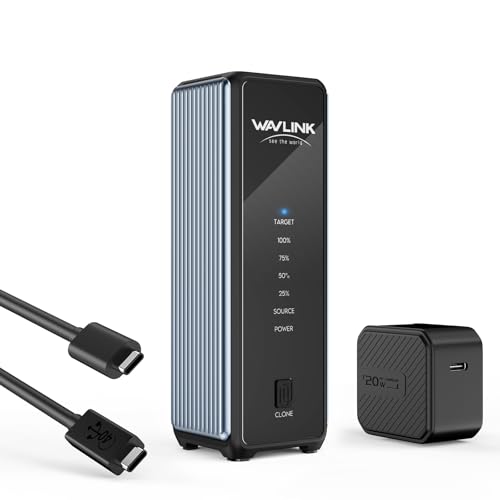
- USB4 connectivity up to 40Gbps
- Supports two M.2 NVMe SSDs
- Active cooling for heavy workloads
Best For: High-speed NVMe upgrades and duplication
Best for Multi-Drive Workflows

- Four trayless SATA drive bays
- Offline cloning with progress LEDs
- USB 3.0 speeds up to 5Gbps
Best For: Managing and cloning multiple SATA drives
Best Compact NVMe Cloner

- Tool-free dual NVMe SSD design
- One-click offline cloning
- Compact aluminum heat-dissipating body
Best For: Portable NVMe SSD upgrades and duplication
Best SATA Cloner

- Offline SATA cloning without a computer
- Fits 2.5-inch and 3.5-inch SATA drives
- Two drives accessible over USB-C
Best For: Straightforward SATA drive duplication and transfers
Best NVMe Option

- Offline cloning for dual NVMe SSDs
- USB 3.2 Gen 2x2 up to 20Gbps
- Includes USB-C and USB-A cables
Best For: Fast M.2 NVMe duplication and transfers
Best High-Capacity Dock

- Supports up to 44TB total capacity
- Offline cloning with a dedicated button
- Compatible with 2.5-inch and 3.5-inch SATA drives
Best For: High-capacity SATA backups and multi-device use
Best Overall
Triple-Bay NVMe/SATA Offline Cloning Dock

- One-touch offline cloning
- Three tool-free bays for mixed drives
- USB 3.2 Gen 2 speeds up to 10Gbps
Best For: Mixed NVMe and SATA storage workflows
Best SATA Value

- Offline SATA-to-SATA cloning
- Supports two drives up to 20TB each
- Tool-free USB 3.0 operation
Best For: SATA drive backups and upgrades
Best Cross-Protocol

- Offline NVMe-to-SATA cloning
- Adjustable active cooling fan
- 10Gbps USB-C computer transfers
Best For: Cross-format migrations and extended transfer sessions
Best All-Around SATA Dock – Dual-Bay Offline Cloner
If you need a practical hard drive enclosure with offline cloning for standard SATA drives, the SABRENT EC-HD2B is a versatile dual-bay choice. It accepts both 2.5-inch and 3.5-inch SATA hard drives or SSDs, connects over USB 3.0, and supports drives up to 10TB.
Best For: Home users and technicians who need to read, access, or clone two conventional SATA drives without installing drivers.
Pros:
- Supports 2.5-inch and 3.5-inch SATA HDDs and SSDs.
- Provides offline cloning without requiring a computer.
- USB 3.0 transfer speeds reach up to 5Gbps.
- Supports up to 10TB drives and includes a two-year extended warranty option after registration.
Cons:
- Designed for SATA drives rather than M.2 NVMe SSDs.
- Offline cloning is listed at up to 60Mbps, slower than its USB-connected transfer rate.
This dock is a strong general-purpose option when broad SATA compatibility matters more than the smaller size and higher speeds of an NVMe enclosure.
Fastest NVMe Option – 40Gbps Dual NVMe Cloner
For users seeking a high-speed hard drive enclosure with offline cloning for NVMe storage, the WAVLINK dual enclosure combines USB4 connectivity with two M.2 slots. It supports M-key and B&M-key NVMe SSDs in common lengths from 2230 through 2280, with active cooling for sustained workloads.
Best For: Performance-focused users upgrading or duplicating NVMe SSDs with USB4, Thunderbolt, or compatible USB systems.
Pros:
- USB4 bandwidth reaches up to 40Gbps, with listed read speeds up to 3300MB/s.
- Supports two NVMe SSDs and one-click offline cloning.
- Active fan cooling, aluminum housing, and vents help manage heat.
- Works with Windows, macOS, Android, and iOS devices.
Cons:
- Supports NVMe M.2 drives, not standard 2.5-inch or 3.5-inch SATA drives.
- The target SSD must be at least as large as the source, and cloning formats the target.
This is the most speed-oriented option in the group, but its benefits depend on having compatible NVMe drives and a sufficiently fast host connection.
Best for Multi-Drive Workflows – Four-Bay SATA Clone Dock
The SABRENT DS-U3B4 is a useful hard drive enclosure with offline cloning when you need to manage several SATA drives from one station. Its four trayless bays accept 2.5-inch or 3.5-inch SATA HDDs and SSDs, while LED indicators show cloning progress.
Best For: Users handling multiple SATA drives for backups, file access, or drive-to-drive management.
Pros:
- Holds up to four 2.5-inch or 3.5-inch SATA drives.
- Supports direct offline cloning without a computer.
- Trayless design allows direct drive insertion without tools.
- USB 3.0 host connection supports transfers up to 5Gbps.
Cons:
- Built for SATA drives and does not list M.2 NVMe support.
- Its larger four-bay design is less compact than a dual-bay dock.
If your workflow involves several bare SATA drives, the extra bays make this a more capable management station than a basic two-drive enclosure.
Best Compact NVMe Cloner – 20Gbps Dual-Bay Dock
The ACASIS dual-bay dock is a compact hard drive enclosure with offline cloning for M.2 NVMe SSDs. It offers tool-free installation, aluminum heat dissipation, and one-click cloning without a computer, while supporting M.2 sizes 2230, 2242, 2260, and 2280.
Best For: Users who want a small, tool-free NVMe duplicator for SSD upgrades and direct drive cloning.
Pros:
- Supports two M.2 NVMe SSDs and capacities up to 8TB.
- One-click offline cloning requires no computer, drivers, or software.
- Aluminum construction helps dissipate heat.
- Supports up to 20Gbps on compatible USB 3.2 Gen 2×2 devices.
Cons:
- NVMe only; SATA SSDs are not supported.
- Offline cloning erases the target drive, and the target must be at least as large as the source.
- S.M.A.R.T. monitoring and TRIM are unavailable during offline cloning.
This enclosure is a convenient choice for NVMe upgrades, especially when portability and simple tool-free operation matter more than USB4-level performance.
Best SATA Cloner – SABRENT Dual-Bay USB-C Dock
The SABRENT EC-CH2B is a practical hard drive enclosure with offline cloning for bare 2.5-inch and 3.5-inch SATA HDDs and SSDs. Its two bays work independently over USB-C when connected to a computer, while the standalone clone function copies one SATA drive to another without a PC.
Best For: Users who need a straightforward offline SATA drive duplicator with dual-drive computer access.
Pros:
- Clones SATA drives without a computer at up to 60MBps.
- Supports both 2.5-inch and 3.5-inch SATA HDDs and SSDs.
- Reads and writes two mounted drives simultaneously over USB.
- Tool-free, hot-swappable design with an access LED for each bay.
Cons:
- Does not support IDE/PATA, M.2, NVMe, or Molex-powered drives.
- The target drive must be the same size as or larger than the source.
- The included cable is USB-C on the dock end, so a USB-C computer port or separate adapter may be needed.
Choose this model if your drives are standard SATA and you value simple, button-operated cloning. Its USB 3.0 connection supports up to 5Gbps, although actual file-transfer performance depends on the installed drives.
Best NVMe Option – Rosewill Dual-Bay M.2 Cloner
The Rosewill RS-N2-CL is a hard drive enclosure with offline cloning designed specifically for dual M.2 NVMe SSDs. It supports M Key and B+M Key NVMe drives, combines one-button standalone cloning with a USB 3.2 Gen 2×2 connection, and includes both USB-C and USB-A cables.
Best For: NVMe SSD owners who want fast computer transfers and convenient offline duplication.
Pros:
- Supports offline cloning with a single button press.
- Dual bays accommodate M Key and B+M Key NVMe SSDs.
- USB 3.2 Gen 2×2 provides speeds up to 20Gbps.
- Includes S.M.A.R.T. monitoring and TRIM support.
Cons:
- Designed for M.2 NVMe SSDs rather than 2.5-inch or 3.5-inch SATA drives.
- Actual transfer speeds depend on the drives and host system.
- Its listed platform support and specifications are oriented toward PC, Mac, and Android use.
This is the specialized choice for users moving to NVMe storage. It offers substantially faster interface potential than USB 3.0 SATA docks, while its included power adapter and cables make the dual-bay setup ready for use.
Best High-Capacity Dock – ORICO Dual-Bay SATA Cloner
The ORICO DD28U3-C is a hard drive enclosure with offline cloning that supports two 2.5-inch or 3.5-inch SATA HDDs and SSDs, with a combined capacity of up to 44TB. Its dedicated clone button, independent power supply, and broad device compatibility make it useful for backups, disk imaging, and drive transfers.
Best For: Users who need high-capacity SATA docking across computers, TVs, routers, and other compatible devices.
Pros:
- Supports up to 44TB across two SATA drives.
- Offline cloning starts by holding the CLONE button for about three seconds.
- Works with 2.5-inch and 3.5-inch SATA I/II/III HDDs and SSDs.
- Supports UASP and TRIM with transfer speeds up to 5Gbps.
Cons:
- The target disk must be larger than the source disk.
- Uses a USB-A connection rather than USB-C.
- The dock will not power on without a hard drive inserted.
Consider the ORICO when capacity and compatibility matter more than a compact enclosure format. Its 36W power supply supports stable operation, while the tool-free bays and automatic sleep mode add convenience for routine drive work.
Best Overall – Triple-Bay NVMe/SATA Offline Cloning Dock
If you need a hard drive enclosure with offline cloning that can handle several drive formats, the ICY BOX triple-bay dock is a versatile choice. It supports M.2 NVMe, 2.5-inch SATA, and 3.5-inch SATA drives, with cloning available between NVMe and SATA sources and targets.
Best For: Users managing mixed NVMe and SATA storage who want three drive bays and 10Gbps computer-connected transfers.
Pros:
- One-touch offline cloning without a computer or software installation.
- Supports NVMe-to-NVMe and SATA-to-NVMe cloning, as well as multiple SATA drive types.
- Three independent, tool-free bays make swapping and accessing drives convenient.
- Includes USB-C/USB-A connectivity and a two-year warranty.
Cons:
- The plastic enclosure may be less rugged than a metal-bodied dock.
- Its three-bay design takes more desk space than a compact single-drive enclosure.
The ICY BOX stands out for format flexibility and capacity to work with three drives at once. It is especially practical for mixed-storage workflows, though buyers seeking the simplest SATA-only setup may not need all of its capabilities.
Best SATA Value – Dual-Bay Offline Clone Dock
For a straightforward hard drive enclosure with offline cloning, the WAVLINK dual-bay dock focuses on 2.5-inch and 3.5-inch SATA HDDs and SSDs. It can clone between two SATA drives without a computer and supports drives up to 20TB per bay.
Best For: SATA-only backups, drive upgrades, and users who want an affordable dual-bay cloning station.
Pros:
- Offline cloning starts with a dedicated button and requires no computer.
- Supports 2.5-inch and 3.5-inch SATA I/II/III HDDs and SSDs.
- Dual bays accommodate drives up to 20TB each.
- Tool-free, hot-swappable operation with broad operating-system compatibility.
Cons:
- It does not support M.2 NVMe drives.
- Offline cloning requires the target drive to have capacity equal to or greater than the source.
- USB 3.0 transfer speeds are lower than the 10Gbps models in this roundup.
The WAVLINK is a practical pick when your drives are SATA and you do not need NVMe support. Its dual-bay layout, large stated drive capacity, and simple cloning control make it well suited to routine upgrades and backups.
Best Cross-Protocol – Cooled NVMe/SATA Clone Dock
The GRAUGEAR is a hard drive enclosure with offline cloning designed for cross-protocol work. It combines an M.2 NVMe slot with support for SATA M.2, 2.5-inch SATA, and 3.5-inch SATA drives, allowing computer-free cloning between NVMe and SATA formats.
Best For: Users moving data between modern NVMe storage and legacy SATA drives who value active cooling during extended transfers.
Pros:
- Supports cross-protocol NVMe-to-SATA and SATA-to-NVMe offline cloning.
- Built-in adjustable three-speed fan helps manage heat during long sessions.
- USB 3.2 Gen 2 provides transfer speeds up to 10Gbps when connected to a computer.
- Tool-free design supports Windows, macOS, and Linux.
Cons:
- It does not support NVMe-to-NVMe offline cloning.
- The target drive must have greater actual capacity than the source.
- BitLocker-encrypted drives are not supported for cloning.
GRAUGEAR is a strong specialist option for cross-format migrations, particularly when sustained workloads make cooling useful. Confirm the clone direction, target capacity, and encryption status before buying to avoid compatibility surprises.
How We Picked the Best Hard Drive Enclosure with Offline Cloning
We focused on products that combine drive access with offline cloning rather than simple single-drive enclosures. The selection covers SATA 2.5-inch and 3.5-inch HDDs and SSDs, M.2 NVMe drives, dual-bay designs, multi-bay docks, and USB-C or USB 3.0 connectivity. We also considered practical details such as tool-free installation, supported M.2 sizes, cloning direction, independent power, and whether a device can be used as a reader after cloning.
Because “offline cloning” can describe different functions, verify the manufacturer’s instructions before purchase. Some models clone only from a source bay to a target bay, while others support SATA-to-NVMe or NVMe-to-SATA transfers.
Quick Comparison
- Best for standard SATA drives: Choose a dual-bay dock supporting both 2.5-inch and 3.5-inch drives.
- Best for several installed drives: A four-bay station provides more simultaneous access and backup flexibility.
- Best for M.2 NVMe upgrades: Select a dedicated NVMe cloner with the correct M-key or B+M-key support and physical length compatibility.
- Best for mixed storage: Look for a SATA and NVMe dock that clearly supports the specific source and target combination you need.
- Best for modern computers: USB-C and 20Gbps or 40Gbps models can offer higher potential throughput, provided the host port supports the same standard.
Key Buying Factors for a Hard Drive Enclosure with Offline Cloning
Drive Type and Physical Fit
Check whether the dock accepts SATA, NVMe, or both. For M.2 drives, confirm the interface, key type, and supported lengths such as 2230, 2242, 2260, or 2280. A SATA dock cannot clone an NVMe drive simply because both use an M.2-shaped board.
Cloning Limits
Offline cloning normally copies one drive directly to another without a computer, but the target drive generally must be the same size or larger than the source. Existing data on the target may be erased, so back up important files first and follow the device’s LED or button sequence carefully.
Speed and Connection
USB 3.0 is adequate for many SATA drives, while USB 3.2 Gen 2, 20Gbps, or 40Gbps connections better suit fast NVMe storage. Real-world speeds depend on the drive, cable, host port, and controller, not just the advertised number.
Power and Usability
3.5-inch hard drives typically need dedicated power, making powered desktop docks preferable. Tool-free bays simplify swaps, while fixed bezels or exposed slots can affect drive access and protection. Consider heat dissipation when cloning or reading NVMe drives for long periods.
Who Should Buy Which Hard Drive Enclosure with Offline Cloning?
Choose a dual-bay SATA dock if you are upgrading a laptop drive, duplicating a desktop disk, or regularly accessing bare 2.5-inch and 3.5-inch drives. A four-bay model is better for IT work, multiple backup disks, or a small home lab. Choose a dedicated M.2 NVMe cloner for PCIe SSD migrations, especially when compact size and high USB-C throughput matter. If your storage collection mixes SATA and NVMe formats, a hybrid station offers the broadest flexibility, but confirm its supported cloning paths before ordering.