Enclosed CNC routers make desktop cutting and engraving more manageable by containing chips, reducing noise, and adding a defined safety barrier around the work area. The right model depends on your materials, available space, desired work envelope, and comfort with CNC setup.
We compared ten machines ranging from compact beginner systems to larger benchtop routers and enclosed mini mills. Use the guide below to narrow the options by capability, workflow, and long-term value.
Best 10 Enclosed Cnc Routers Picks for 2026
Best Beginner Pick
Genmitsu Cubiko Enclosed CNC Router
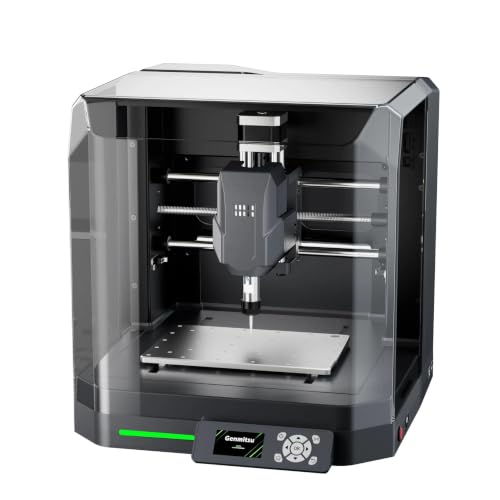
- Pre-assembled desktop design
- Supports auto probing and height mapping
- Enclosure reduces dust and operating noise
Best For: Beginners, DIY projects, and light engraving
Best 4th-Axis Value
Carvera Air CNC with Rotary Kit

- Includes a 4th-axis rotary module
- Quick tool changes for multi-step projects
- Auto probing and leveling support
Best For: Advanced hobbyists making cylindrical and 3D parts
Best Large-Format Open Frame
Twotrees TTC450 Pro CNC Router

- 18.1-inch square working area
- Expansion ports for rotary and laser modules
- All-metal structure with GRBL compatibility
Best For: Larger woodworking, signage, and workshop projects
Best Premium Enclosed Mill

- Fully enclosed compact footprint
- Auto probing and surface leveling
- Quick tool changer with broad material support
Best For: Precision prototypes, parts, and detailed engravings
Metal-Cutting Upgrade Pick

- Rigid all-metal frame with dual linear guides
- 800W router cuts metal and nonmetal materials
- Upgradeable spindle, table, motors, and ball screws
Best For: Small home workshops and upgrade-minded metalworking users
Large-Work-Area Choice
Twotrees TTC450 Ultra CNC Router
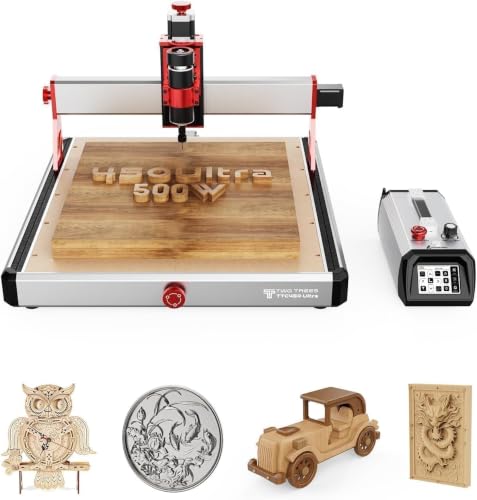
- 465 x 465mm work area for larger projects
- 500W spindle supports wood, plastics, and metals
- Touchscreen and offline TF-card operation
Best For: Makers and educators needing a spacious, mostly assembled machine
Beginner-Friendly Hobby Pick
FoxAlien Masuter Pro CNC Router

- Pre-wired assembly can take 10–15 minutes
- 400 x 400 x 60mm work area for hobby projects
- All-metal frame with expandable spindle options
Best For: Beginners and DIY users working mainly with wood and plastics
Best Beginner Enclosed CNC Router

- Pre-assembled for a simpler start
- Enclosure helps contain chips and noise
- Auto Z-probing and PCB surface mapping
Best For: Beginners making desktop projects in wood, acrylic, and PCBs
Best Large-Format CNC Router

- 33-by-33-inch working area
- Closed-loop 2.6 N·m stepper motors
- Rigid frame with ball screws and linear rails
Best For: Large woodworking, milling, and engraving projects
Best Upgradeable CNC Router

- Reinforced spoilboard reduces bed flex
- Rigid steel-tube and lead-screw motion system
- Upgradeable spindle mounts and accessory ports
Best For: Makers wanting a sturdy, expandable desktop CNC platform
Best Beginner Pick – Genmitsu Cubiko Enclosed CNC Router
The Genmitsu Cubiko is one of the more approachable enclosed CNC routers for beginners, hobbyists, and DIY makers. Its pre-assembled desktop format reduces setup time, while the integrated frame and cover help support stable, cleaner, and quieter engraving.
Best For: Beginners learning CNC workflows, home DIY projects, PCB work, and light engraving on wood, acrylic, plastics, and selected soft metals.
Pros:
- Ships factory-assembled for a faster start.
- Supports Genmitsu App, Fusion 360, Candle, Easel, and Carveco.
- Offers auto Z-probing and height-mapping support with proper setup.
- Enclosure helps contain dust, reduce noise, and pause operation when opened.
Cons:
- Designed for light-duty projects rather than demanding production work.
- Probing requires correct calibration and a conductive probe connection.
The Cubiko stands out when ease of setup and workspace containment matter more than maximum cutting capacity. It is a practical entry point for learning desktop CNC without assembling a larger open-frame machine.
Best 4th-Axis Value – Carvera Air CNC with Rotary Kit
The Carvera Air with 4th Axis Kit is an enclosed CNC router option for makers who want expanded machining capability in a desktop format. Its rotary module supports cylindrical work and double-sided objects, while automatic probing, leveling, and a quick tool changer streamline complex projects.
Best For: Advanced hobbyists and small workshops creating cylindrical parts, 3D shapes, multi-step carvings, and projects involving wood, plastics, or metals.
Pros:
- Includes a 4th-axis rotary module for cylindrical and double-sided machining.
- Quick tool changer switches tools in about 10 seconds.
- Auto-probing and leveling support precise setup on uneven materials.
- Closed-loop spindle control and low stated runout support detailed machining.
Cons:
- At 99 pounds, it is substantially heavier than many compact desktop machines.
- The broader capabilities may be more than beginners need.
This Carvera Air configuration is a strong fit for users who specifically want rotary machining without moving to a larger shop router. Its software, connectivity, and automation features make it suited to more involved workflows.
Best Large-Format Open Frame – Twotrees TTC450 Pro CNC Router
The Twotrees TTC450 Pro is an open-frame CNC router for users who prioritize a larger work area and upgrade potential over enclosure benefits. Its 18.1-inch square workspace, all-metal construction, expansion ports, and GRBL compatibility support woodworking, signage, prototyping, and longer machining sessions.
Best For: Makers, small workshops, educational spaces, and home craftsmen working on larger panels, signs, furniture components, and functional parts.
Pros:
- Large 460 x 460 x 80 mm working area handles bigger projects.
- Supports 4th-axis and laser upgrades through dedicated expansion ports.
- All-metal structure and dual limit switches help stabilize operation.
- Works with Windows, macOS, Linux, and popular GRBL-compatible software.
Cons:
- Open-frame design does not provide the dust and noise containment of enclosed CNC routers.
- Assembly and CH340 or CH341 driver installation are required.
- Its 775 brushed spindle is less integrated than the enclosed machines in this roundup.
The TTC450 Pro makes sense when material size and future expansion are key priorities. Choose it over an enclosed model if you have a suitable workspace and are comfortable handling open-frame CNC safety and cleanup.
Best Premium Enclosed Mill – Carvera Air Desktop CNC
The standard Carvera Air is a fully enclosed CNC router and mini mill designed for precision desktop work. It combines a compact footprint with automatic probing and leveling, quick tool changes, cross-platform control, and compatibility with materials ranging from hardwood and acrylic to aluminum and brass.
Best For: Makers, small workshops, labs, and studios producing prototypes, custom parts, jewelry, electronics projects, and detailed engravings.
Pros:
- Fully enclosed design helps reduce noise and contain chips and dust.
- Automatic probing and surface leveling assist with accurate setup.
- Quick tool changer supports faster multi-tool machining.
- Wi-Fi and USB control work with Makera CAM and several CAD/CAM platforms.
Cons:
- Its 90.3-pound weight makes it less portable than a typical desktop router.
- The standard configuration is a 3-axis machine and does not include the 4th-axis kit.
- The compact work area may limit larger panel projects.
The Carvera Air is a polished choice for users who value enclosure, automation, and precision-oriented features in a compact machine. It is especially compelling for detailed parts and repeatable workflows rather than oversized stock.
Metal-Cutting Upgrade Pick – 3030-Evo Max CNC Router
The 3030-Evo Max is one of the more capable enclosed cnc routers for small home workshops and light-duty metal projects. Its all-metal frame, dual linear guides, 800W trim router, and upgrade path to a 1.5kW spindle make it a flexible choice for cutting aluminum, brass, stainless steel, wood, acrylic, MDF, and plastics.
Best For: Home users who want a compact router with metal-cutting capability, Wi-Fi control, and room to upgrade.
Pros:
- Rigid all-metal structure with MGN-15 dual linear guides on each axis.
- 800W router supports 8,000–24,000 RPM and handles several metal and nonmetal materials.
- Upgradeable to a 1.5kW spindle, ball screws, closed-loop motors, and a larger 3060 table.
- 32-bit GRBL_ESP32 control supports Wi-Fi operation, laser engraving, a fourth axis, and touch probing.
Cons:
- Speed adjustment for the included router requires manual dial control.
- The base working area is smaller than the optional 3060 extension setup.
- Its light-duty home-machine positioning may not suit continuous production work.
Choose this model if upgradeability matters as much as out-of-the-box capability. It offers a sturdy starting platform and useful modern controls, though buyers should budget for upgrades if they need higher cutting capacity or extended workholding space.
Large-Work-Area Choice – Twotrees TTC450 Ultra CNC Router
The Twotrees TTC450 Ultra stands out among enclosed cnc routers for its 465 x 465mm work area and mostly assembled design. It combines a 500W spindle, all-metal chassis, touchscreen controls, and compatibility with wood, acrylic, MDF, nylon, aluminum, carbon fiber, and stainless steel.
Best For: Hobbyists, educators, and makers who want a relatively large work area with touchscreen and offline operation.
Pros:
- Large 465 x 465mm work area supports bigger signs, models, and prototypes.
- All-metal chassis with MGN12H dual rails and T8 lead screws is designed for stability.
- 3.5-inch touchscreen, TF-card and USB support, and CNC/laser mode switching simplify operation.
- 90% pre-assembled package includes tools, fixtures, test material, and data cables.
Cons:
- The included spindle is 500W, while the 3,000W rating requires an upgrade.
- At 19kg, the machine may need a sturdy dedicated work surface.
- Fourth-axis, Wi-Fi/Bluetooth, and handwheel features require additional hardware.
This is a strong fit when workspace and convenience are priorities. The broad material support and integrated touchscreen make it approachable, while the expansion interfaces leave room to develop a more advanced setup later.
Beginner-Friendly Hobby Pick – FoxAlien Masuter Pro CNC Router
The FoxAlien Masuter Pro is a straightforward entry point for shoppers comparing enclosed cnc routers for woodworking and craft projects. Its all-aluminum frame, linear-rail Z-axis, pre-wired components, and 400 x 400 x 60mm work area are suited to wood, acrylic, MDF, nylon, and similar materials.
Best For: Beginners and DIY hobbyists who want quick assembly, a compact footprint, and expansion options for larger projects.
Pros:
- All-metal construction and linear-rail Z-axis provide a stable foundation for engraving.
- Main parts arrive pre-assembled and pre-wired, with setup estimated at 10–15 minutes.
- 400 x 400 x 60mm working area handles a useful range of hobby projects.
- Supports multiple spindle clamp sizes and an optional Y-axis extension kit.
Cons:
- The included 60W spindle is less powerful than the upgraded spindle options.
- It is primarily positioned for wood, acrylic, MDF, and nylon rather than demanding metal work.
- The 69mm spindle clamp and other advanced upgrades are sold separately.
The Masuter Pro makes the most sense for newcomers who value simple setup over maximum cutting power. Its expandable design can grow with a hobbyist, but heavier routing tasks will require an optional spindle or other upgrades.
Best Beginner Enclosed CNC Router – Cubiko Desktop CNC Router
The Genmitsu Cubiko is one of the most approachable enclosed CNC routers for beginners who want to start making without assembling a traditional kit. Its integrated enclosure helps contain chips and reduce operating noise, while automatic pausing when the cover opens adds a useful layer of protection for desktop workshops and maker spaces.
Best For: Beginners working on wood, acrylic, PCB, plastics, and suitable soft-metal projects in a home workshop.
Pros:
- Pre-assembled design helps shorten setup time.
- Enclosure contains debris and helps reduce operating noise.
- Automatic Z-probing simplifies tool-height setup.
- Wi-Fi, app, compatible PC software, and offline control provide flexible operation.
Cons:
- Its 13-inch-wide desktop format is less suited to oversized projects.
- Maximum rotational speed is 9,000 rpm, which may limit some demanding applications.
Choose Cubiko if convenience, containment, and beginner-friendly setup matter more than a large work area. Surface mapping for PCB milling and ±0.1 mm positioning accuracy add useful capability for detailed desktop work.
Best Large-Format CNC Router – FoxAlien XE-Ultra 8080
The FoxAlien XE-Ultra 8080 is a large-format CNC router for makers who need substantially more workspace than compact enclosed CNC routers provide. Its 33-by-33-inch working area, rigid aluminum frame, ball screws, linear rails, and closed-loop stepper motors are aimed at demanding woodworking, milling, and engraving projects.
Best For: Experienced DIY users handling large wood, aluminum, acrylic, carbon-fiber, and other compatible projects.
Pros:
- Large 33-by-33-by-4.72-inch XYZ working area with 5.3-inch pass height.
- 16 mm XY and 12 mm Z ball screws support smooth, accurate motion.
- Closed-loop motors provide step-loss protection and 2.6 N·m torque.
- Inductive limit switches and physical hard limits add collision protection.
Cons:
- Spindle is not included, so the cutting setup requires an additional purchase.
- Its 40 kg weight and large footprint demand substantial bench space.
- This is a more involved choice for beginners than a pre-assembled desktop machine.
The XE-Ultra 8080 is best viewed as a rigid, expandable platform rather than an all-in-one enclosed machine. Its open spindle ecosystem and reserved fourth-axis port offer flexibility, but buyers should budget for the spindle or router configuration they need.
Best Upgradeable CNC Router – Genmitsu 4040-PRO CNC Router
The Genmitsu 4040-PRO is a practical choice for makers who want a sturdier desktop CNC router with room to develop their setup. Its reinforced spoilboard, steel tube motion system, lead screws, and 17.13-by-15.75-inch work area support consistent carving and engraving across a useful range of projects.
Best For: Makers working with wood, acrylic, MDF, nylon, and carbon-fiber composites who want an upgrade-friendly 3-axis machine.
Pros:
- Reinforced hybrid spoilboard and center aluminum bar help reduce bed flex.
- Dual 16 mm steel tubes and lead-screw drives support rigid motion.
- Pre-assembled modules allow approximately 15-minute assembly.
- Supports 65 mm or 69 mm spindle mounts and compatible accessories.
Cons:
- It is not an enclosed machine, so chip and noise control require separate solutions.
- The 435-by-400-by-80 mm work area is smaller than the XE-Ultra 8080.
- Suitable materials and results still depend on appropriate bits and cutting settings.
The 4040-PRO makes sense for users who value a rigid desktop platform and a widely supported GRBL workflow. It is less turnkey than the enclosed Cubiko, but its accessory ports and spindle-mount options make it easier to expand as skills grow.
How We Picked the Best Enclosed Cnc Routers
We focused on machines that offer meaningful protection or containment for desktop CNC work, then compared the practical features that affect ownership. Our evaluation considered usable work area, frame construction, spindle or router capability, axis drive design, compatibility with common materials, software and CAM workflow, expansion options, and setup demands.
We also separated compact enclosed mini mills from open-frame routers with larger cutting areas. An enclosure can improve chip control and accessibility, but it does not replace proper ventilation, eye protection, dust extraction, emergency-stop procedures, or manufacturer safety guidance.
Quick Comparison
| Best For | What to Prioritize | Likely Trade-Off |
|---|---|---|
| Beginners and small projects | Simple setup, enclosure, tutorials, and bundled accessories | Smaller work area and lighter cutting capacity |
| Aluminum and harder materials | Rigid all-metal frame, stable linear guides, and suitable spindle control | Higher cost and a steeper learning curve |
| Large signs and panels | Large XYZ travel, strong stepper motors, and a rigid table | More space, noise, and dust-management requirements |
| Automated desktop production | Reliable CAM workflow, probing, tool management, and optional fourth axis | More setup complexity and software dependence |
Key Buying Factors for Enclosed Cnc Routers
Work Area and Machine Footprint
Check the actual X, Y, and Z travel rather than relying on the machine’s external dimensions. A compact router may suit plaques, signs, and small parts, while a larger 465 mm or 8080-class machine is better for panels and repeated production. Leave additional clearance for cables, ventilation, and access.
Frame Rigidity and Motion Hardware
Rigid aluminum construction, supported linear guides, effective lead screws, and appropriately sized stepper motors help reduce vibration and maintain accuracy. For aluminum or brass, rigidity matters more than headline cutting speed. Closed-loop motors can add position feedback, but they do not compensate for a flexible frame or poor workholding.
Materials, Spindle, and Dust Control
Confirm that the machine is intended for your materials. Wood, acrylic, MDF, plastics, aluminum, and brass require different feeds, speeds, tooling, and chip evacuation. Enclosures help contain debris, but a dust shoe, extractor connection, or chip-management strategy remains important, especially when routing wood or composites.
Software, Controls, and Expandability
Review supported file formats, CAM software, controller compatibility, probing, limit switches, and emergency-stop access. A fourth-axis kit can expand the type of work you make, while integrated CAM or guided workflows may be valuable for beginners. Check whether accessories are included or sold separately.
Who Should Buy Which Enclosed Cnc Routers?
Choose a compact enclosed model if you have limited bench space, want cleaner hobby use, or are learning CNC with small workpieces. Choose an all-metal mid-size router if you need a stronger platform for wood, acrylic, plastics, or occasional nonferrous metal work. Choose a large-format machine if your projects involve signs, panels, or batch work and you can provide a dedicated workstation and dust-control setup. Choose a desktop mini mill or fourth-axis package if precision workflows, rotary machining, and broader fabrication options matter more than maximum cutting area.