The best desktop CNC routers make accurate cutting, carving, engraving, and prototyping accessible without requiring a full-size shop machine. The right model depends on your work area, materials, spindle power, motion system, and comfort with CNC setup.
We compare 10 capable options ranging from compact beginner machines to larger, more rigid routers designed for demanding hobby and small-workshop projects.
Best 10 Desktop Cnc Routers Picks for 2026
Best Beginner Pick

- Compact 300 x 180 x 45 mm work area
- GRBL control with included offline controller
- Works with wood, acrylic, PCB, PVC, and soft aluminum
Best For: Beginners and small home or classroom projects
Best Compact Metal-Axis Option

- All-metal Z-axis with 0.1 mm positioning accuracy claim
- Compact 300 x 180 x 40 mm working area
- Includes cutters, collet, spindle, and tools
Best For: Desk-based DIY, STEM, and small engraving projects
Best for Larger Projects
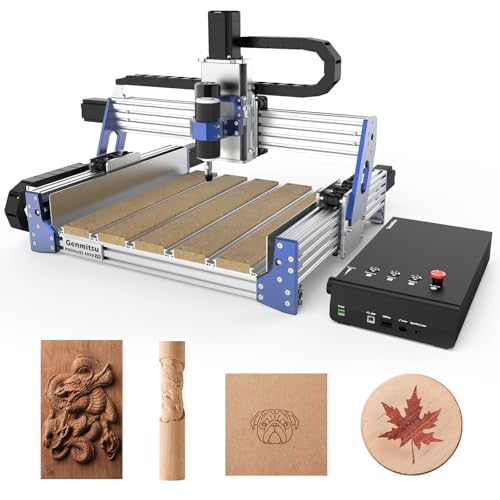
- 400 x 300 x 110 mm working area
- Closed-loop stepper motors reduce step loss
- 400-watt spindle and T-slot hybrid table
Best For: Small businesses and medium-sized maker projects
Best Expandable Frame
FoxAlien Masuter Pro CNC Router

- All-aluminum frame with linear-rail Z-axis
- Generous 400 x 400 x 60 mm work area
- Supports spindle upgrades and optional Y-axis expansion
Best For: Larger hobby projects and upgrade-minded DIY users
Power-Ready Precision

- 710W trimmer for cutting and engraving
- Reinforced spoilboard with integrated T-track
- 100mm pass height for taller materials
Best For: Makers who need power, rigidity, and flexible workholding
Large-Format Workhorse

- 33 x 33-inch workspace for large projects
- Closed-loop motors help prevent step loss
- Spindle ecosystem supports multiple tool options
Best For: Workshops needing a large, rigid, expandable CNC platform
Compact Metal-Cutting Specialist
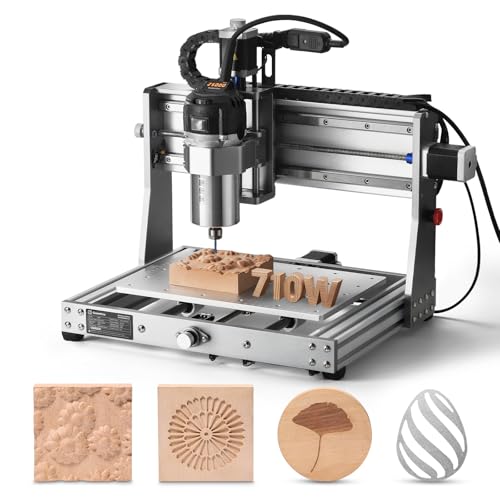
- 710W spindle reaches 30,000 RPM
- All-metal construction for stable cutting
- Compatible with several spindle and laser sizes
Best For: Compact workshops tackling small metal and mixed-material projects
Best Compact Metal-Capable Pick

- 500W spindle with upgradeable 52mm/65mm clamps
- GRBL and Candle USB control support
- Full accessory kit included
Best For: Hobbyists working with wood, acrylic, and selected milling projects
Best Large-Format Upgradeable Pick
Twotrees TTC450 Pro CNC Router

- 18.1-inch square working area
- Touchscreen and 4th-axis/laser expansion ports
- All-metal frame with XYZ limit switches
Best For: Makers and small workshops tackling larger panels and signage
Best Precision Ready-to-Use Pick

- Ball screws and linear guides on every axis
- 800W spindle for varied materials
- Mostly assembled with pre-connected wiring
Best For: Users wanting precise, mixed-material desktop fabrication with minimal setup
Best Beginner Pick – Genmitsu CNC 3018-PRO
The Genmitsu CNC 3018-PRO is a practical entry point for anyone comparing desktop CNC routers. Its compact footprint, 300 x 180 x 45 mm working area, GRBL control, and included offline controller make it suitable for learning CNC carving, engraving, and milling without taking over a workbench.
Best For: Beginners, home workshops, classrooms, and small maker projects involving wood, acrylic, PVC, plastic, PCB, and soft aluminum.
Pros:
- Beginner-friendly assembly and raised base for improved stability.
- Supports several materials, including wood, acrylic, PCB, PVC, and soft aluminum.
- GRBL control and Candle compatibility provide an approachable learning workflow.
- Offline controller allows basic operation without a continuously connected computer.
Cons:
- The 300 x 180 x 45 mm work area is intended for small projects.
- Its 120-watt motor is better suited to light-duty maker work than demanding production.
Choose this model if you want an accessible desktop CNC router for learning and prototyping. Its modest size is a limitation for large workpieces, but it keeps the machine manageable for home and educational use.
Best Compact Metal-Axis Option – TTC3018 Pro CNC Router
The TTC3018 Pro stands out among desktop CNC routers for its all-metal Z-axis and compact, 15-pound design. With a 300 x 180 x 40 mm working area, a 0.1 mm positioning accuracy claim, and a wired GRBL connection, it is built for small engraving and milling projects.
Best For: DIY users, STEM education, maker training, and small nameplates or production projects using wood, acrylic, MDF, nylon, and some sheet aluminum or brass.
Pros:
- All-metal Z-axis with T8 backlash-eliminating lead screws for added stability.
- Includes cutters, an ER11 collet, a spindle motor, and assembly tools.
- Compact size fits desk corners while retaining a 300 x 180 x 40 mm work area.
- Compatible with GRBL, ArtCAM, Fusion 360, and Windows or Mac workflows.
Cons:
- Uses a USB wired connection only; it has no Bluetooth, Wi-Fi, or built-in TF card slot.
- The 9,000 RPM maximum spindle speed limits its positioning compared with faster machines.
This is a sensible choice when a compact footprint and sturdier Z-axis matter more than wireless convenience. Expect a hands-on setup and wired workflow, but the included kit supports a quick start for educational and hobby use.
Best for Larger Projects – Genmitsu PROVerXL 4030 V2
The Genmitsu PROVerXL 4030 V2 is a larger desktop CNC router designed for makers who need more capacity and a more capable motion system. Its 400 x 300 x 110 mm work area, closed-loop stepper motors, ball screws, and 400-watt spindle suit small to medium-sized projects.
Best For: Hobbyists, DIY users, and small businesses working with wood, plastics, soft metals, acrylic, PCB, and MDF.
Pros:
- Closed-loop motors help reduce step loss and operating noise.
- 400 x 300 x 110 mm working area accommodates larger projects than 3018-size machines.
- 1204 ball screws and an improved Z-axis support precision and stability.
- T-slot hybrid table helps secure irregularly shaped materials.
Cons:
- Its larger work area requires more bench space than compact desktop models.
- Operation relies on a USB-connected GRBL workflow and compatible control software.
For buyers who have outgrown a mini router, the PROVerXL 4030 V2 offers a meaningful increase in workspace and motion performance. It is a stronger fit for repeat hobby work or small-business projects than for occasional, space-constrained use.
Best Expandable Frame – FoxAlien Masuter Pro CNC Router
The FoxAlien Masuter Pro is an appealing desktop CNC router for users who want an all-aluminum frame and room to expand. Its 400 x 400 x 60 mm engraving area, pre-wired components, and support for multiple spindle sizes make it well suited to woodworking and other hobby applications.
Best For: Beginners and DIY users who want a stable machine for wood, acrylic, MDF, nylon, and larger engraving projects.
Pros:
- All-aluminum structure and linear-rail Z-axis provide a sturdy foundation.
- Large 400 x 400 x 60 mm working area supports bigger pieces.
- Pre-wired components and a detailed manual simplify assembly.
- Includes 52 mm and 65 mm spindle clamps, with optional expansion paths.
Cons:
- The optional Y-axis extension and 69 mm spindle clamp require separate purchases.
- The 60-watt included spindle is less suited to demanding cutting than higher-power upgrades.
- Its 26-inch width needs more bench space than compact 3018-style routers.
The Masuter Pro makes sense when workspace and upgrade flexibility are priorities. Its larger aluminum frame is useful for woodworking, while the optional accessories let users build toward more advanced capabilities over time.
Power-Ready Precision – Genmitsu 4040-PRO MAX
The SainSmart Genmitsu 4040-PRO MAX is a strong choice among desktop CNC routers for users who want a reinforced work surface, stable motion, and enough power for demanding wood, metal, and acrylic projects. Its 410 x 405 x 77mm work area, 710W trimmer, and 100mm pass height make it well suited to taller workpieces and fast cutting jobs.
Best For: DIY makers and small workshops needing a rigid, high-power desktop CNC router with flexible clamping options.
Pros:
- 710W digital-display compact router supports engraving and cutting.
- Linear guideway structures on the X and Z axes improve motion stability.
- Reinforced MDF spoilboard includes an integrated aluminum T-track for versatile fixturing.
- 100mm pass height accommodates taller materials.
Cons:
- The 24kg machine is less portable than smaller desktop models.
- Its 410 x 405mm work area may not suit oversized projects.
Choose this model if rigidity, clamping flexibility, and cutting power matter more than a compact footprint. GRBL control and reduced vibration add practical value for repeatable workshop work.
Large-Format Workhorse – FoxAlien XE-Ultra 8080
The FoxAlien XE-Ultra 8080 stands out among desktop CNC routers for its expansive 33 x 33 x 4.72-inch XYZ workspace. Its rigid aluminum frame, ball screws, linear rails, and closed-loop motors are designed for large projects that require stable, accurate movement across wood, aluminum, acrylic, carbon fiber, and similar materials.
Best For: Makers and small workshops handling large panels, detailed designs, and demanding benchtop milling projects.
Pros:
- Large 33 x 33 x 4.72-inch workspace supports ambitious projects.
- 16mm and 12mm ball screws with HG-15 linear rails promote smooth, accurate movement.
- Closed-loop NEMA 23 motors provide 2.6 N.m torque and step-loss protection.
- Smart 32-bit control box includes motor diagnostics and a reserved fourth-axis port.
Cons:
- Spindle is not included, so the cutting setup requires an additional purchase.
- The 40kg aluminum machine needs a sturdy, dedicated workspace.
- Its large footprint may be impractical for compact benches.
This is the most capable option here for size and expandability, especially if you want to choose your own router, spindle, or engraving module. Budget for the cutting head and enough bench space before buying.
Compact Metal-Cutting Specialist – Genmitsu 3020-PRO Ultra
The Genmitsu 3020-PRO Ultra is a compact all-metal option among desktop CNC routers, with a 710W spindle, 30,000 RPM maximum speed, and reinforced axis construction. Its 11.8 x 8.1 x 3.1-inch work area keeps the machine manageable while its 60mm stepper motors and stated aluminum-cutting capability support tougher small-format jobs.
Best For: DIY users who prioritize compact metal, wood, acrylic, PCB, and carbon-fiber work with room for spindle or laser upgrades.
Pros:
- 710W spindle offers adjustable 6,500-30,000 RPM operation with constant torque control.
- All-metal construction and reinforced X-axis backplate support stable cutting.
- 60mm stepper motors deliver 7.3 Nm of torque for deeper cuts.
- Included spindle holder and adapter support multiple spindle and laser-module sizes.
Cons:
- The compact work area limits the size of projects it can handle.
- Its 15.3kg weight is lighter than larger machines but still requires a stable bench.
- Small-format cutting may require multiple setups for larger parts.
Pick the 3020-PRO Ultra when a compact footprint and metal-capable construction are more important than a large cutting envelope. Its modular mounting options also make it a practical platform for future tool changes.
Best Compact Metal-Capable Pick – 4040-PRO 500W CNC Router
For shoppers comparing desktop cnc routers, the 4040-PRO offers a compact 15.7-by-15.7-inch work area, a 500W spindle, and a GRBL-based USB workflow. Its included accessories and pre-wired design make it a practical option for hobby woodworking, acrylic work, and selected milling tasks.
Best For: Hobbyists who want a ready-to-use desktop CNC for wood, acrylic, and light metal-oriented projects.
Pros:
- 500W spindle with 52mm and 65mm clamp options for upgrades.
- GRBL and Candle support with USB control and 3D preview features.
- Includes clamps, a Z-probe, test board, tools, cables, and manual.
- V-wheel, linear-guide, and lead-screw components support stable motion.
Cons:
- The 15.7-by-15.7-inch work area is smaller than larger desktop models.
- Laser functionality requires an optional laser rather than being included.
The 4040-PRO is a sensible entry point when accessory completeness and compact size matter. Its 500W spindle and flexible clamp system add useful room for future upgrades.
Best Large-Format Upgradeable Pick – Twotrees TTC450 Pro CNC Router
Among desktop cnc routers, the Twotrees TTC450 Pro stands out for its 18.1-inch square work area, all-metal construction, and expansion ports. It is designed for makers who want a stable platform that can grow into 4-axis or laser-enabled workflows.
Best For: Makerspaces, small workshops, educators, and home users handling larger signs, panels, and batch projects.
Pros:
- Large 460-by-460-by-80mm working area for panels and signage.
- Touchscreen and ports for a 4th axis, laser module, and spindle control.
- Aluminum and stainless-steel structure with XYZ limit switches.
- Compatible with GRBL software including Fusion 360, Easel, and Carveco Maker.
Cons:
- CH340 or CH341 driver installation is required before computer connection.
- The supplied 775 brushed spindle motor is less powerful than dedicated higher-wattage spindle setups.
The TTC450 Pro makes the most sense if capacity and expansion potential matter more than the simplest setup. Its broad software compatibility and sturdy frame support more demanding maker workflows.
Best Precision Ready-to-Use Pick – LUNYEE 3020 Nova CNC Router
The LUNYEE 3020 Nova is one of the more convenience-focused desktop cnc routers, arriving mostly assembled with pre-connected wiring. Its ball screws, linear guides, and 800W trimmer router are aimed at precise work across wood, acrylic, plastics, and certain metals.
Best For: Users seeking a mostly assembled, precision-oriented desktop CNC for mixed-material projects.
Pros:
- 1204 ball screws and HG-15 linear guides on all three axes.
- 800W spindle with 6,000–30,000 RPM range and six speed settings.
- Supports materials including aluminum, brass, wood, acrylic, MDF, and plastics.
- Works with GRBL software such as UGS, Fusion 360, Easel, and Candle.
Cons:
- The Z-axis module still needs to be installed after unboxing.
- Its listed dimensions and fixed base may require dedicated bench space.
Choose the 3020 Nova when reduced setup time and motion precision are priorities. The 800W spindle and broad material support give it strong versatility for desktop fabrication.
How We Picked the Best Desktop Cnc Routers
We evaluated these Desktop Cnc Routers by comparing their usable work area, frame construction, drive systems, spindle or trim-router power, control features, upgrade potential, and intended materials. We also considered setup difficulty and whether each machine makes sense for beginners, experienced makers, or small production environments.
Because specifications and included accessories can vary by seller or package, verify the current listing before ordering. Pay particular attention to whether software, wasteboards, clamps, limit switches, dust collection parts, and emergency-stop controls are included.
Quick Comparison
| Priority | Look for | Best fit |
|---|---|---|
| Lowest entry cost | Compact 3018-style frame and beginner-friendly controller | Learning, small signs, and light engraving |
| Larger projects | At least a 4040 work area, rigid frame, and stronger motion components | Furniture parts, larger signs, and repeatable panels |
| Metal capability | All-metal construction, rigid guides, low backlash, and conservative feeds | Light milling and engraving in suitable metals |
| Faster routing | Higher-power spindle or trim router with secure workholding | Wood, acrylic, MDF, and other sheet materials |
Key Buying Factors for Desktop Cnc Routers
Work Area and Machine Footprint
Choose a cutting envelope larger than your most common project whenever possible. A compact machine saves bench space but limits signs, panels, and joinery. Also measure clearance for the gantry, cables, dust shoe, and material loading.
Frame Rigidity and Motion System
Aluminum frames, linear guides, lead screws, ball screws, and closed-loop steppers can improve stability and positioning, but they do not eliminate the need for correct feeds, sharp tooling, and solid workholding. More rigid machines are generally better suited to harder materials and deeper cuts.
Spindle Power and Materials
Match power to the material rather than assuming a larger number guarantees better results. Wood, MDF, plastics, and aluminum each require different cutters, speeds, feeds, and chip evacuation. Confirm that the machine supports the collet sizes and tooling you plan to use.
Controls, Safety, and Software
Look for reliable GRBL or equivalent control, limit switches, an emergency stop, clear status indicators, and a controller or USB workflow that suits your computer. Always use eye protection, dust extraction, appropriate ventilation, and a secure enclosure when cutting dusty, noisy, or hazardous materials.
Who Should Buy Which Desktop Cnc Routers?
Beginners and space-conscious makers should start with a compact 3018-class router if their projects are small and mainly involve engraving or light cutting. Choose a 3020 or 4040 machine for a useful balance of bench footprint, rigidity, and working area. Buyers making larger signs or batch parts should prioritize the 4040, 450, or 8080-size options, provided they have enough room and a stable bench. For light metal work, select the most rigid all-metal design with dependable linear motion, then plan on shallow passes and careful workholding. If you expect to upgrade over time, favor a machine with accessible replacement parts, standard tooling, expandability, and an active user community.