Compact desktop computers can deliver full PC convenience in a fraction of the space, making them a smart fit for home offices, media centers, and desks with limited room.
From budget-friendly everyday machines to faster models for multitasking, this roundup focuses on practical choices that balance size, performance, connectivity, and value.
Best 10 Compact Desktop Computers Picks for 2026
H-series performance pick
ACEMAGIC M5 Mini PC Windows 11 Pro
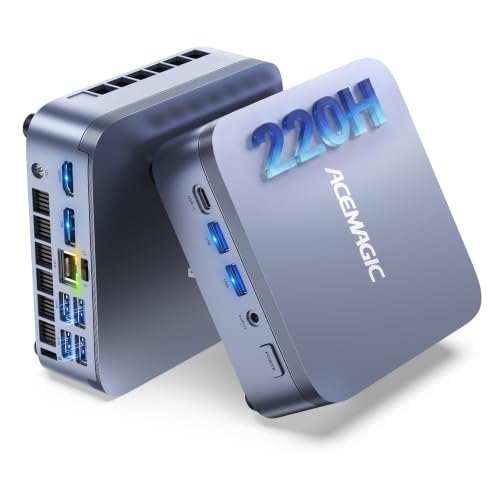
- Intel Core 5 220H with 12 cores and 16 threads
- 24GB LPDDR5 memory and dual SSD slots
- Triple 4K display support with USB-C, DP, and HDMI
Best For: Heavy multitasking, coding, and trading in a small Windows Pro desktop
Quiet budget all-rounder
ACEMAGIC K1 Mini PC Windows 11 Pro

- Ryzen 7330U for everyday office and home use
- Built-in power supply keeps the desk tidy
- Triple-display output with HDMI, DP 1.4, and USB-C
Best For: Light productivity users who want a clean, quiet mini PC setup
Networking and homelab pick

- Ryzen 3 5300U for solid everyday multitasking
- Dual 2.5GbE LAN ports for networking projects
- Triple 4K display support and flexible storage expansion
Best For: Homelab, router, and office users who need advanced connectivity
Compact Office Pick
Lenovo ThinkCentre M710q Tiny for Everyday Work
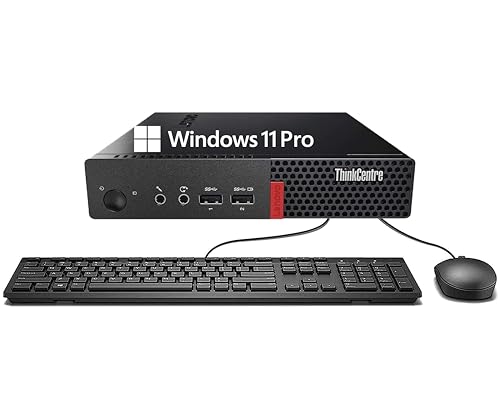
- Tiny footprint for desk-saving placement
- 8GB RAM and 256GB SSD for everyday use
- Includes WiFi, Bluetooth, keyboard, and mouse
Best For: Basic productivity and education
Best for Multitasking
Getorli Ryzen 5 Mini PC with Triple Display

- 16GB RAM and 512GB SSD improve everyday responsiveness
- Triple-display support via dual HDMI and USB-C
- WiFi 6, BT 5.3, and upgrade-friendly design
Best For: Multitasking, home office, and triple-monitor setups
Reliable Business Choice
Dell OptiPlex 3070 Micro for Compact Workspaces

- Intel Core i5-9500 for dependable everyday performance
- 8GB RAM and 250GB SSD keep tasks moving
- Ultra-small design with WiFi, Bluetooth, and Windows 11 Pro
Best For: Space-saving office and general-use computing
Renewed Business Tiny PC

- Certified refurbished and tested to look and work like new
- Ryzen 5 Pro with Windows 11 Pro suits business tasks
- 8GB RAM and 256GB SSD cover everyday productivity
Best For: Budget office buyers who want a renewed mini desktop
Ultra-Compact Entry Mini PC

- Tiny chassis fits behind a monitor with the included VESA bracket
- Dual HDMI supports 4K dual-display setups
- Dual M.2 expansion allows storage growth up to 2TB
Best For: Light office work, study, and simple everyday computing
H-series performance pick – ACEMAGIC M5 Mini PC Windows 11 Pro
If you want compact desktop computers that still feel like a real productivity machine, the ACEMAGIC M5 is built for heavier day-to-day work. Its Intel Core 5 220H, 24GB LPDDR5 memory, dual SSD slots, and 45W power release make it a strong fit for multitasking, coding, and office workloads where sustained performance matters.
Best For: Power users who want a small Windows 11 Pro desktop for demanding multitasking, coding, and trading setups.
Pros:
- Intel Core 5 220H H-series CPU with 12 cores and 16 threads for strong sustained performance.
- 24GB LPDDR5-5200 memory plus dual M.2 slots for flexible storage expansion up to 4TB total.
- Triple-display support with USB-C, DP1.4, HDMI, and a 100W PD-capable USB-C port.
- Windows 11 Pro, WiFi 6, Bluetooth 5.2, Gigabit Ethernet, and plenty of USB ports for business use.
Cons:
- Factory RAM is soldered and not upgradable.
- Higher-performance hardware is more than you need for basic browsing or light office tasks.
Overall, this is one of the more capable compact desktop computers in the group if you need steady performance in a small footprint. It is especially appealing when desk space is tight but workloads are not.
Quiet budget all-rounder – ACEMAGIC K1 Mini PC Windows 11 Pro
The ACEMAGIC K1 is a practical choice if you want compact desktop computers for everyday office use without a lot of clutter. Its Ryzen 7330U processor, built-in power supply, and compact 5 x 5 x 1.6-inch chassis make it easy to place on a desk or mount behind a monitor while still handling light office and entertainment tasks smoothly.
Best For: Everyday home, school, and light office users who want a tidy, space-saving mini PC.
Pros:
- AMD Ryzen 7330U offers a clear step up from entry-level chips like N150 and N95/N100-class systems.
- Built-in power supply means one less external adapter and a cleaner desk setup.
- Triple-display support with HDMI, DP 1.4, and USB-C video output.
- Quiet cooling and VESA mount support suit shared rooms and compact workspaces.
Cons:
- 16GB DDR4 and 256GB SSD are modest if you store lots of files locally.
- WiFi 5 and Bluetooth 4.2 are less modern than newer wireless standards.
As a compact desktop computer, the K1 keeps the focus on simplicity, low noise, and practical connectivity. It is a sensible fit when you want dependable basics rather than top-end performance.
Best low-cost office pick – KAMRUI AK1PLUS Mini PC Computer
If your goal is to buy compact desktop computers for basic work at a reasonable price, the KAMRUI AK1PLUS focuses on the essentials. Its Intel N5030 processor, 12GB RAM, and dual 4K output support make it suitable for browsing, online meetings, email, and simple office tasks without taking much space.
Best For: Budget-conscious users who need a small desktop for everyday computing, classes, and light office work.
Pros:
- Intel N5030 is positioned for everyday computing and is faster than the Intel Celeron N4500.
- 12GB RAM and a 256GB SSD give you a responsive start for common tasks.
- Dual HDMI 2.0 ports support two 4K@60Hz displays for a broader workspace.
- Storage can expand with M.2 SSD and 2.5-inch drive support for up to 4TB total.
Cons:
- The N5030 is aimed at light workloads, not demanding productivity or creative apps.
- Windows 10 Pro is preinstalled, which may not match buyers who want Windows 11 out of the box.
For the money, this is a straightforward compact desktop computer that covers the basics well. It makes sense for users who prioritize affordability, simple expansion, and dual-monitor support.
Networking and homelab pick – BOSGAME E5 11 Pro Mini PC
The BOSGAME E5 stands out among compact desktop computers when networking flexibility matters as much as general productivity. With a Ryzen 3 5300U, dual 2.5GbE LAN ports, triple 4K display support, and dual M.2 storage expansion, it is aimed at users who want a small machine that can also play a role in a homelab or router-style setup.
Best For: Tech users who want a compact PC for office multitasking, lab projects, or network-focused setups.
Pros:
- Ryzen 3 5300U offers strong everyday multitasking performance over lower-end entry chips.
- Dual 2.5GbE LAN ports make it useful for home NAS, pfSense, OpnSense, and other networking projects.
- Triple 4K display support helps traders, programmers, and office users manage more at once.
- Dual M.2 storage layout and up to 64GB RAM support give it solid upgrade flexibility.
Cons:
- 8GB RAM is serviceable, but heavier multitasking may benefit from an upgrade.
- Networking features are more specialized than many casual buyers need.
This is a compact desktop computer for buyers who like practical expandability and advanced I/O. If your use case includes networking or lab work, the E5 offers a lot of capability in a small chassis.
Compact Office Pick – Lenovo ThinkCentre M710q Tiny for Everyday Work
For shoppers comparing compact desktop computers, the Lenovo ThinkCentre M710q Tiny is a practical, no-frills option for office tasks, browsing, and light multimedia use. Its 6th Gen Intel Core i3-6100T, 8GB DDR4 RAM, and 256GB SSD are aimed at dependable everyday performance in a very small footprint.
Best For: Basic productivity, education, and users who want a compact Windows 11 Pro desktop with included keyboard and mouse.
Pros:
- Small mini PC design fits easily on crowded desks or in a simple workspace setup.
- 8GB DDR4 RAM and 256GB SSD support smooth multitasking and fast boot times.
- Includes DisplayPort, USB, WiFi, Bluetooth, keyboard, and mouse for straightforward setup.
- Windows 11 Pro adds business-friendly security and management features.
Cons:
- Older 6th Gen Core i3 processor is best suited to lighter workloads.
- 256GB storage may feel limited if you keep many large files locally.
- Renewed condition and 90-day warranty may not suit buyers wanting a new unit.
Overall, this ThinkCentre is a sensible choice if you want a compact desktop computer for reliable daily use rather than high-performance computing. It focuses on essentials, making it a solid fit for simple home, school, or office setups.
Best for Multitasking – Getorli Ryzen 5 Mini PC with Triple Display
If you need compact desktop computers with more room to multitask, the Getorli Mini PC stands out with its Ryzen 5 3501U processor, 16GB RAM, and 512GB NVMe SSD. It is built for everyday home office use, streaming, online learning, and light gaming while still keeping a very small footprint.
Best For: Users who want a compact desktop with stronger memory, triple-display support, and flexible upgrade options.
Pros:
- 16GB DDR4 RAM and 512GB PCIe NVMe SSD provide solid day-to-day responsiveness.
- Supports up to three displays through dual HDMI and a full-function USB-C port.
- WiFi 6, Bluetooth 5.3, and Gigabit Ethernet offer modern connectivity options.
- Expandable design allows RAM up to 32GB and storage expansion up to 2TB plus a 2.5-inch HDD.
Cons:
- Ryzen 5 3501U is geared more toward everyday computing than heavier creative workloads.
- Small size means limited native room compared with larger desktops.
- Designed for business/home use, so it is not positioned as a dedicated gaming machine.
This model is a strong pick if you want a small desktop that feels more capable than entry-level options. The triple-display support and upgrade flexibility make it especially appealing for practical work setups.
Reliable Business Choice – Dell OptiPlex 3070 Micro for Compact Workspaces
Among compact desktop computers, the Dell OptiPlex 3070 Micro is a straightforward option for business, school, or everyday use where space is tight. With an Intel Core i5-9500, 8GB RAM, and a 250GB SSD, it is set up for smooth productivity and quick access to commonly used files and apps.
Best For: Buyers who want a space-saving Windows 11 Pro desktop for dependable office and general-use performance.
Pros:
- 6-core Intel Core i5-9500 provides stronger everyday performance than entry-level mini PCs.
- 8GB DDR4 RAM and 250GB SSD support fast load times and responsive multitasking.
- Ultra-small form factor works well for minimal or space-conscious desk setups.
- WiFi, Bluetooth, Windows 11 Pro, keyboard, and mouse are included for easy start-up.
Cons:
- 250GB storage is functional but modest for users with larger local libraries.
- Renewed unit includes a 30-day warranty, which is shorter than some alternatives.
- Integrated graphics are suitable for general tasks, not demanding visual workloads.
This OptiPlex micro PC is a practical buy if you want a compact, low-noise system from a well-known business line. It balances small size with dependable performance for work-focused use.
Performance-Focused Mini PC – Ryzen 5 3500U for Work and Study
If you want compact desktop computers that can handle everyday productivity without crowding your desk, the C4 SE is a practical fit. Its Ryzen 5 3500U processor, triple-display support, and upgrade-friendly design make it well suited for home office setups, study spaces, and light business use.
Best For: Remote workers, students, and home-office users who want a small PC with strong multitasking and upgrade potential.
Pros:
- Ryzen 5 3500U 4-core, 8-thread processor for smooth multitasking and everyday computing
- Triple display output via HDMI, DisplayPort, and USB-C for a more efficient workspace
- Two SODIMM slots with support for up to 32GB RAM, plus an extra M.2 SSD expansion slot
- Dual Gigabit Ethernet, WiFi 5, and Bluetooth 5.0 for flexible connectivity
Cons:
- Comes with 8GB RAM and 256GB SSD, so heavier users may want to upgrade sooner
- Integrated graphics are best for office work rather than demanding creative workloads
The C4 SE stands out for buyers who want a small desktop that can grow with them. It is a solid choice if you value expandability, wired networking options, and multi-monitor productivity in a compact footprint.
Renewed Business Tiny PC – HP EliteDesk 705 G4 Mini
For shoppers comparing compact desktop computers for office or education use, this renewed HP EliteDesk 705 G4 Mini keeps the focus on business-ready basics. It pairs a Ryzen 5 Pro processor with Windows 11 Pro, a 256GB SSD, and a small footprint that fits neatly into tight workspaces.
Best For: Budget-minded buyers who want a certified refurbished mini desktop for business or school tasks.
Pros:
- Certified refurbished and tested to look and work like new
- Ryzen 5 Pro 2400GE processor with Windows 11 Pro for everyday business tasks
- Compact mini PC design saves desk space
- Includes 8GB RAM and 256GB SSD for basic multitasking and fast startup
Cons:
- Listed RAM maximum is 8GB, which limits future memory expansion
- Renewed product includes a 90-day limited warranty, shorter than many new systems
This HP mini desktop makes sense if you want a proven business PC in a small form factor and do not need a lot of upgrade headroom. It is a straightforward option for office software, web use, and general productivity.
Ultra-Compact Entry Mini PC – Bmax B1 Plus for Everyday Use
If your goal is a very small desktop for basic productivity, this Bmax model is one of the most space-saving compact desktop computers in the group. It is built for web browsing, document editing, and simple office tasks, while still offering dual HDMI output and easy storage expansion.
Best For: Users who want an affordable ultra-compact PC for light office work, study, or media use.
Pros:
- Very small 4.2 x 4.1 x 1.4 inch design that can mount behind a monitor
- Dual HDMI supports two 4K displays at 60Hz for basic multi-monitor use
- Dual M.2 SSD expansion design allows storage growth up to 2TB
- Includes WiFi, Bluetooth 5.0, Gigabit Ethernet, and VESA bracket
Cons:
- Intel Celeron J3355 is best for light tasks, not demanding workloads
- 6GB RAM and 128GB onboard storage are modest for heavier multitasking
The B1 Plus is a sensible pick when size and simplicity matter more than raw performance. It fits well as a secondary PC, student machine, or low-power desktop for everyday basics.
How We Picked the Best Compact Desktop Computers
We focused on Compact Desktop Computers that offer the best mix of size, speed, and real-world usability. Priority went to models with enough memory and storage for smooth everyday use, plus the ports and wireless features buyers actually need. We also considered processor class, upgrade potential, and whether a system is better suited to office work, light multitasking, or simple home use.
Quick Comparison Guide
If you want the easiest shortlist, think in tiers. Higher-end mini PCs are better for heavier multitasking, larger apps, and multiple displays. Midrange systems are often the sweet spot for office work, browsing, video calls, and streaming. Entry-level Compact Desktop Computers make sense for basic web use, schoolwork, point-of-sale tasks, and simple media playback.
Key Buying Factors for Compact Desktop Computers
Processor and Everyday Speed
Choose the CPU based on your workload. Faster modern chips are worth paying for if you keep many tabs open, use productivity apps all day, or want smoother responsiveness over time. Lower-power processors are fine for light use but can feel limited under heavier multitasking.
Memory and Storage
For most buyers, 8GB RAM is the practical minimum, while 16GB or more is better for long-term comfort. SSD storage is strongly preferred because it improves boot times and app loading. If you plan to store lots of files or install larger programs, check whether the system supports expansion.
Ports, Displays, and Wireless
One advantage of Compact Desktop Computers is flexibility. Look for enough USB ports, HDMI or DisplayPort output, and support for dual monitors if you work across multiple windows. Wi-Fi and Bluetooth are essential for a cleaner setup, while faster networking can matter in busy home or office environments.
Noise, Power, and Upgradeability
Smaller systems often use less power and run quietly, which is ideal for desks, bedrooms, and shared spaces. If you want longer usable life, consider whether RAM or storage can be upgraded later. That can make a modest system more future-proof.
Who Should Buy Which Compact Desktop Computers?
If you need a budget-friendly machine for browsing, email, and basic apps, an entry-level model is usually enough. If you work from home or want a dependable everyday PC, a midrange option with more RAM and SSD space is the safer choice. If your setup includes multiple monitors or more demanding multitasking, prioritize stronger processors and higher memory capacity. The best Compact Desktop Computers are the ones matched to your workload, not just the smallest or cheapest option.