A missing or unreliable projector remote can make streaming, adjusting settings, and navigating apps unnecessarily difficult. The right replacement should match your projector closely, support its control method, and provide dependable access to essential functions.
This roundup compares 10 smart remote controls for projectors, including voice-enabled, Bluetooth, air-mouse, and model-specific replacements. Use the buying guide below to narrow your options before ordering.
Best 10 Smart Remote Controls for Projectors Picks for 2026
Best Samsung-Compatible Pick
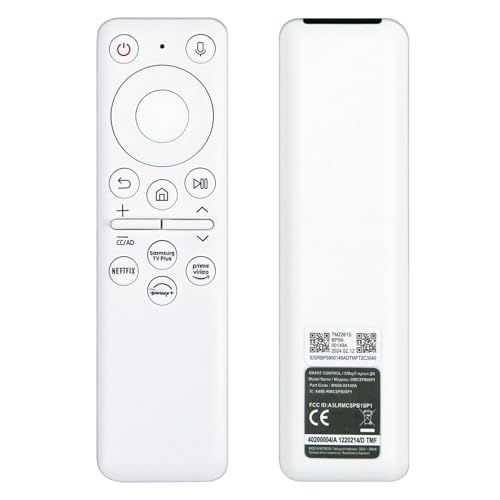
- Designed for listed Samsung Freestyle models
- Voice, gaming, and ambient-mode shortcuts
- Compact design with stated 20-foot range
Best For: Samsung Freestyle owners wanting smart shortcuts and voice control
Best Plug-and-Play Option

- No programming or pairing required
- Supports numerous listed HY300Pro variants
- 40-foot stated infrared range
Best For: Owners of compatible HY300Pro-style mini projectors
Best Aurzen Roku Replacement

- Made for listed Aurzen Roku projectors
- No programming required
- 10-meter stated infrared range
Best For: Aurzen EAZZE D1R and related projector owners
Best for Dark Rooms

- Three-level adjustable button backlighting
- Designed for listed HY320/300Pro systems
- 8-meter stated infrared range
Best For: Compatible mini projector owners watching in low light
Best Direct-Fit Pick

- No pairing or programming required
- 26-foot-plus infrared range
- Ergonomic design for listed models
Best For: VOPLLS Q5 4K, VISSPL H86, and Futuzen P30 owners
Best Voice-Control Option

- Google Voice Assistant support
- Pairs with listed GTV projectors
- 26-foot infrared control range
Best For: PUTRIMS K12 and WiMiUS K13 owners using Google TV
Best Simple E2 Replacement
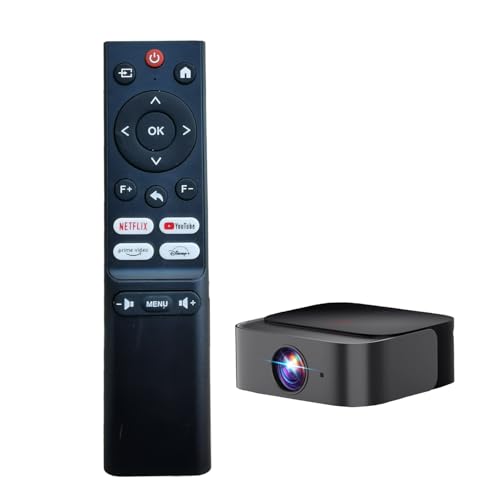
- Made for the DBPOWER E2 projector
- No matching or pairing required
- 15-meter infrared range
Best For: DBPOWER E2 Smart Home Mini Projector owners
Easy IR Replacement

- Fits GC357, JY821, and A9 models
- 32-foot infrared range
- No programming or pairing
Best For: Compatible projector owners needing a simple replacement
Voice-Ready Backup

- Supports voice search
- Pairs with Home and Return buttons
- 26-foot-plus range
Best For: Compatible projector users wanting a voice-capable backup
Bluetooth Air Mouse

- Fits HY300Pro-series projectors
- Bluetooth range up to 10 meters
- Voice control and air mouse
Best For: HY300-series owners needing Bluetooth voice control
Best Samsung-Compatible Pick – Freestyle Voice Remote
For Samsung owners comparing smart remote controls for projectors, this replacement remote is designed around The Freestyle and adds voice-oriented shortcuts alongside standard control. Its compact design and USB-C rechargeable setup suit portable projector and gaming spaces, though compatibility should be confirmed carefully.
Best For: Samsung The Freestyle users who want voice commands, gaming shortcuts, and a rechargeable remote.
Pros:
- Compatible with Samsung The Freestyle 1st- and 2nd-generation models listed by the seller.
- Supports voice control, gaming hub access, ambient screen modes, and one-touch game mode on compatible devices.
- Compact ABS construction and a stated 20-foot RF range are practical for portable setups.
- Pairing is designed to require holding Return and Play/Pause for three seconds.
Cons:
- It is intended for specific Samsung devices rather than general projector use.
- The listing contains conflicting power details, mentioning USB-C charging while also listing AAA batteries.
- Compatibility and feature support vary by Samsung model.
This is the most feature-focused option in the group for compatible Samsung equipment. Verify the exact projector model and charging details before ordering.
Best Plug-and-Play Option – HY300Pro Replacement Remote
This infrared replacement is a straightforward choice among smart remote controls for projectors when the original remote for a supported HY300Pro-style mini projector stops working. It requires no programming, but it is model-specific and does not include batteries.
Best For: Owners of the listed HY300Pro, Gimbal, and compatible mini projector models seeking a ready-to-use backup remote.
Pros:
- Works with the broad model list provided, including Magcubic HY300Pro, Xgody, Aubor, Maypug, and others.
- No programming or pairing is required; install batteries and use it.
- Infrared 3.0 is described as providing a strong, responsive signal.
- The stated maximum range is 40 feet.
Cons:
- It is explicitly not compatible with the Magcubic HY300 or other unlisted brands.
- Batteries and instructions are not included.
- It supports one device and uses basic button control.
This remote makes sense as an inexpensive replacement or spare for a precisely matching mini projector. Check the exact model number first, especially if you own the standard HY300 rather than the HY300Pro.
Best Aurzen Roku Replacement – EAZZE D1R Remote
Designed for Aurzen Roku projector systems, this infrared model is a simple option for shoppers seeking smart remote controls for projectors without a complicated setup. It uses two AAA batteries and is limited to the compatible models listed by the seller.
Best For: Aurzen EAZZE D1R, A02A11, D1R Cube, and A01A11 owners who need a direct replacement.
Pros:
- Designed for the listed Aurzen Roku projector models and also identified as compatible with TCL Roku TV.
- No programming is required after installing the batteries.
- Promises quick button response and precise control.
- Offers a stated maximum range of 10 meters.
Cons:
- It is not a universal projector remote and will not suit all mini projectors.
- Two AAA batteries are required but not included.
- The warranty is listed as 90 days.
Choose this model when your projector matches one of the specified Aurzen systems. Its uncomplicated infrared operation is convenient, but model verification matters more than broad compatibility.
Best for Dark Rooms – Backlit HY320/300Pro Remote
This backlit infrared remote stands out among smart remote controls for projectors for its illuminated buttons and stated compatibility with HY300Pro, HY320, and Gimbal 3/5 systems. It is aimed at users who need easier navigation in a dark home theater.
Best For: Compatible Magcubic, Xgody, Aubor, Maypug, HIPPUS, Mentech, and LYNCAST projector owners who watch in low light.
Pros:
- Designed for the listed HY320/300Pro and Gimbal 3/5-compatible projector systems.
- Backlit buttons offer three adjustable brightness levels.
- Provides a stated 8-meter operating range.
- Includes a claimed 2-year warranty and lifetime technical support.
Cons:
- Compatibility is limited to the specified projector families.
- The seller describes pairing with a button combination, so setup may not be entirely plug-and-play.
- Battery inclusion is not specified in the supplied details.
Its illuminated controls are the main reason to choose this remote over a basic replacement. Confirm the projector family before purchase and follow the listed pairing instructions if needed.
Best Direct-Fit Pick – PZL Mini Projector Remote
If your VOPLLS Q5 4K, VISSPL H86, or Futuzen P30 remote has stopped working, this PZL replacement is a straightforward option among smart remote controls for projectors. It uses infrared connectivity, requires no programming or pairing, and is designed for quick setup after inserting batteries.
Best For: Owners of compatible Q5 4K, H86, or P30 projectors who want a simple replacement remote.
Pros:
- No programming or pairing required
- Infrared signal reaches over 26 feet with a 120-plus-degree angle
- Ergonomic design and responsive buttons
- Designed specifically for listed compatible models
Cons:
- Batteries and instructions are not included
- Supports one projector device only
- Compatibility is limited to the listed models
This is a practical backup or replacement for the specified projectors, especially if you value immediate setup and comfortable button control. Confirm your projector model before ordering.
Best Voice-Control Option – HZIME Voice Projector Remote
For compatible PUTRIMS K12, WiMiUS K13, and other listed projector models, this HZIME replacement adds voice-assistant functionality to the usual button controls. It is a strong candidate among smart remote controls for projectors if you use Google TV features and want hands-free searching and commands.
Best For: Compatible Google TV projector owners who want voice search and a replacement remote with pairing instructions.
Pros:
- Supports Google Voice Assistant in GTV mode
- Compatible with several listed projector models
- Infrared control reaches up to 26 feet at over a 120-degree angle
- Ergonomic construction with responsive controls
Cons:
- Batteries are not included
- Initial pairing and Google TV setup are required
- Voice features depend on GTV mode and network-based setup
The voice button is the main advantage here, making searches and commands more convenient from the sofa. Buyers should verify the exact projector model and be prepared to complete the first-use pairing process.
Best Simple E2 Replacement – RUOYINKE DBPOWER E2 Remote
This RUOYINKE remote is made specifically for the DBPOWER E2 Smart Home Mini Projector, offering a basic infrared replacement without a pairing process. Among smart remote controls for projectors, it is best suited to shoppers who need a model-specific controller rather than a broad universal remote.
Best For: DBPOWER E2 owners seeking a direct replacement with simple battery-powered operation.
Pros:
- Designed specifically for the DBPOWER E2
- Works after installing new 1.5V AAA batteries
- Infrared range extends up to 15 meters
- Compact 18-button layout
Cons:
- Not compatible with other brands or models
- Batteries are required and may not be included
- Shorter stated warranty period of 30 days
This is a focused replacement rather than a flexible remote-control solution. Confirm that your projector is the DBPOWER E2 before purchase, and remove the batteries during extended storage to help prevent damage.
Easy IR Replacement – KOGATA GC357 Remote
This HZIME replacement is a straightforward option among smart remote controls for projectors when you need a compatible infrared remote for the KOGATA GC357, iSinbox JY821, or related A9 projector models. It requires no programming or pairing—just add batteries and use it.
Best For: Owners of compatible GC357, JY821, or A9 smart projectors who want a simple IR replacement.
Pros:
- Designed for KOGATA GC357, iSinbox JY821, and A9 projector models.
- Uses infrared 3.0 technology with a stated range of up to 32 feet.
- No programming or pairing required.
- Ergonomic design and a control angle of more than 120 degrees.
Cons:
- Batteries are not included.
- Supports one device only.
- Infrared control requires line-of-sight operation.
If your projector matches the listed models, this remote emphasizes easy setup, responsive button control, and useful room-scale range without pairing steps.
Voice-Ready Backup – PZL Projector Remote
This PZL replacement is worth considering among smart remote controls for projectors if you need a compatible remote for select Aurzen, EAZZE, GooDee, VOPLLS, or Optoma models. It includes voice-search support and pairs by holding the Home and Return buttons simultaneously.
Best For: Users with compatible D1G, D002, GD500PLUS, or G3 Pro projectors who want a voice-capable backup remote.
Pros:
- Listed compatibility includes EAZZE D1G D002, GooDee GD500PLUS, and VOPLLS G3 Pro.
- Supports voice search.
- Pairing uses a clearly specified Home-and-Return button combination.
- Offers more than 26 feet of range and a control angle above 120 degrees.
Cons:
- Batteries and instructions are not included.
- Pairing is required.
- Supports one device only.
This model makes the most sense when your projector is on the compatibility list and you value voice search, though the missing batteries and pairing step add a little setup.
Bluetooth Air Mouse – HY300Pro Voice Remote
This Magcubic replacement stands out among smart remote controls for projectors with Bluetooth connectivity, voice control, and air-mouse functionality. It is designed for HY300Pro, HY300Pro+, and HY300F portable smart projectors, but compatibility depends on the projector having originally used a Bluetooth voice remote and supporting the required system function.
Best For: HY300Pro-series owners seeking Bluetooth voice control and air-mouse operation.
Pros:
- Compatible with HY300Pro, HY300Pro+, and HY300F projectors.
- Uses Bluetooth with a maximum connection distance of 10 meters.
- Provides voice control and air-mouse functionality.
- Plug-and-play setup after installing batteries.
Cons:
- Batteries are not included.
- Requires a projector that originally supported a Bluetooth voice remote.
- Functionality depends on system support for Bluetooth voice control.
For a compatible HY300-series projector, this remote offers a more flexible control style than a basic IR replacement, but checking the original remote type and system support is essential before buying.
How We Picked These Smart Remote Controls for Projectors
We focused on replacement remotes designed for the projector models listed by each manufacturer or seller. Compatibility was the first priority, followed by useful features such as voice control, Bluetooth connectivity, air-mouse navigation, dedicated smart-TV buttons, and straightforward setup.
Because projector remotes can look nearly identical while using different pairing protocols, we treated exact model matching as more important than appearance. Buyers should still verify the projector model, remote layout, and any listed limitations before purchasing.
Quick Comparison
| Remote type | Best for | What to check |
|---|---|---|
| Model-specific replacement | Restoring the original experience | Exact projector compatibility |
| Voice remote | Searching apps and navigating hands-free | Bluetooth pairing and voice-platform support |
| Air-mouse remote | Android-style projector menus | Motion control, batteries, and pairing |
| Basic infrared remote | Simple power and menu control | Line-of-sight range and button layout |
Key Buying Factors for Smart Remote Controls for Projectors
Compatibility Comes First
Check the complete model list, not just the brand name. HY300 variants, Aurzen EAZZE models, Samsung The Freestyle versions, and similar projectors may require different remotes despite sharing a similar design.
Choose the Right Connection
Infrared remotes generally work by pointing toward the projector, while Bluetooth remotes may need an initial pairing process. Voice and air-mouse functions commonly depend on Bluetooth, so confirm that the replacement supports those features on your specific projector.
Consider the Controls You Actually Use
For streaming, look for voice search, navigation controls, volume buttons, and dedicated home or back keys. If you mainly operate the projector manually, a simpler replacement may be easier and less expensive. Air-mouse controls can be useful for Android interfaces but may require a short adjustment period.
Check Setup and Included Accessories
Review whether batteries are included and whether the remote requires pairing, a USB receiver, or an unobstructed line of sight. Replacement remotes may not reproduce every shortcut on the original, so compare product images with your existing layout when possible.
Who Should Buy Which Smart Remote Controls for Projectors?
Samsung The Freestyle owners: Choose the Samsung-compatible voice remote listed specifically for the SP-LFF3CLA, SP-LSP38LA, or matching model number.
HY300 and similar mini-projector owners: Select the replacement that names your exact HY300, HY300Pro, HY300F, or HY300Pro+ variant. An air-mouse voice model is the better choice for app-heavy use.
Aurzen and EAZZE users: Match the remote to the exact D1R, D1G, D002, or Boom model. Do not assume that a remote for one EAZZE projector will operate another.
Owners of less common brands: The DBPOWER, KOGATA, iSinbox, PUTRIMS, WiMiUS, VOPLLS, VISSPL, and Futuzen-specific options are best when their compatibility list explicitly includes your projector.
When uncertain, compare the model number printed on the projector or its original packaging with the listing before ordering. That simple check is the most reliable way to avoid receiving a remote that looks right but cannot pair or control your device.