A dependable router is essential for clear video calls, responsive cloud apps, secure remote access, and uninterrupted workdays. The right choice depends on your home’s size, internet plan, connected devices, and need for advanced controls.
We selected 10 WiFi 6, WiFi 6E, and WiFi 7 routers across multiple price points, with options for compact apartments, busy households, gaming setups, and demanding home offices.
Best 10 Wifi Routers for Home Offices Picks for 2026
Best Value Wi-Fi 6

- Wi-Fi 6 with up to 1.8 Gbps combined bandwidth
- OFDMA and beamforming support busy home networks
- VPN server support and WPA3 security
Best For: Dependable home-office connectivity at a practical price
Power User Pick
GL.iNet Flint 2 Wi-Fi 6 Router

- Up to 6 Gbps Wi-Fi 6 throughput
- Two 2.5G ports for multi-gig connections
- Fast WireGuard and OpenVPN support
Best For: Power users and demanding home offices
Best for 6 GHz Devices
TP-Link Archer AXE75 Wi-Fi 6E Router

- Tri-band Wi-Fi 6E reaches up to 5,400 Mbps
- Dedicated 6 GHz band for compatible devices
- EasyMesh and VPN server/client support
Best For: Home offices using newer Wi-Fi 6E equipment
Future-Ready Pick
NETGEAR Nighthawk Wi-Fi 7 Router

- Tri-band Wi-Fi 7 reaches up to 9.3 Gbps
- 2.5G WAN and two 2.5G LAN ports
- Rated for 2,500 square feet and 100 devices
Best For: High-demand home offices planning for newer devices and multi-gig internet
Reliable Wi-Fi 6 Pick
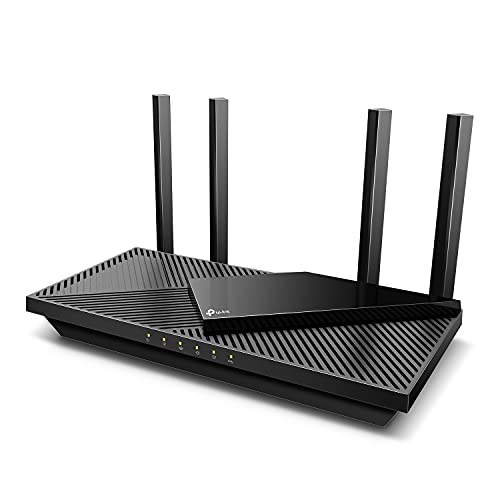
- Wi-Fi 6 speeds up to 2,976 Mbps combined
- OFDMA supports multiple busy devices
- Four antennas plus Beamforming extend coverage
Best For: Home offices wanting balanced Wi-Fi 6 performance and coverage
Future-Ready Wired Pick

- Wi-Fi 7 speeds up to 3.6 Gbps
- Two 2.5 Gbps ports support multi-gig networking
- EasyMesh and coverage for up to 60 devices
Best For: Home offices prioritizing Wi-Fi 7 and fast wired connections
Best Value WiFi 6 Pick

- WiFi 6 with OFDMA and MU-MIMO
- Five Gigabit Ethernet ports
- Security, parental controls, and VPN features
Best For: Everyday home offices and connected households
Best High-Capacity Upgrade

- Tri-band WiFi 7 with 6 GHz support
- Up to 2,600 sq. ft. and 120 devices
- 10 Gbps and 2.5 Gbps wired ports
Best For: Large, demanding homes with newer WiFi 7 devices
Best Balanced WiFi 7 Router

- WiFi 7 with Multi-Link Operation
- Up to 2,400 sq. ft. and 90 devices
- 2.5 Gbps plus Gigabit Ethernet ports
Best For: Remote workers upgrading to WiFi 7 on a mixed-device network
Best Value Wi-Fi 6 – Reliable Home Office Router
The TP-Link Archer AX21 is a practical choice for shoppers comparing wifi routers for home offices. Its dual-band Wi-Fi 6 design supports up to 1.8 Gbps of combined bandwidth, while OFDMA, beamforming, and four high-gain antennas help maintain stable connections for work devices, streaming, and everyday browsing. A separate modem is required.
Best For: Home offices needing dependable Wi-Fi 6 performance and broad compatibility without moving to a premium multi-gig router.
Pros:
- Wi-Fi 6 and OFDMA help connect multiple devices efficiently.
- Up to 1.8 Gbps combined dual-band bandwidth.
- Beamforming, four antennas, and an advanced FEM support wide coverage.
- Includes OpenVPN and PPTP VPN server support plus WPA3 security.
Cons:
- Dual-band design does not include the 6 GHz band.
- Requires a separate modem for internet access.
- Actual performance varies with distance, walls, and network conditions.
The Archer AX21 is a sensible all-around option for a typical home office, particularly when stable coverage and straightforward compatibility matter more than the newest wireless standard or multi-gig wired networking.
Power User Pick – GL.iNet Flint 2 Wi-Fi 6 Router
The GL.iNet Flint 2 is aimed at demanding wifi routers for home offices, combining 8-stream Wi-Fi 6 with dual 2.5G ports and OpenWrt-based flexibility. It supports up to 6 Gbps of wireless throughput, more than 100 connected devices, and high-speed WireGuard and OpenVPN connections for remote work, streaming, and advanced network management.
Best For: Power users, busy households, and home offices that need multi-gig wired networking, VPN performance, and extensive configuration options.
Pros:
- Wi-Fi 6 speeds are rated up to 6 Gbps.
- Dual 2.5G ports support multi-gig internet or local devices.
- WireGuard and OpenVPN speeds are rated up to 900 Mbps and 880 Mbps.
- OpenWrt, AdGuard Home, QoS, guest mode, and access-point mode provide flexibility.
Cons:
- Firmware should be updated during initial setup for best performance.
- Advanced features may require more networking knowledge than a basic router.
- It is dual-band rather than a 6 GHz tri-band model.
Flint 2 stands out when a home office has high bandwidth demands or a technically inclined owner. Its multi-gig ports and VPN capabilities offer substantial headroom, though casual users may not need its deeper configuration options.
Best for 6 GHz Devices – TP-Link Archer AXE75 Wi-Fi 6E Router
The TP-Link Archer AXE75 is a strong candidate among wifi routers for home offices with newer laptops and phones that support Wi-Fi 6E. Its tri-band design adds a 6 GHz band with up to 2,402 Mbps, alongside 5 GHz and 2.4 GHz bands, helping compatible devices access a less congested lane for video calls, downloads, and responsive work applications.
Best For: Home offices with Wi-Fi 6E devices that want tri-band capacity, whole-home coverage, and room to expand through EasyMesh.
Pros:
- Tri-band Wi-Fi 6E delivers up to 5,400 Mbps combined wireless speed.
- The 6 GHz band supports faster, lower-latency connections for compatible devices.
- OFDMA increases capacity for simultaneous device use.
- Supports EasyMesh, VPN server and client functions, WPA3, and basic HomeShield features.
Cons:
- The 6 GHz benefits require compatible Wi-Fi 6E devices.
- Gigabit LAN ports may limit wired performance with faster-than-gigabit plans.
- A modem is required for most internet providers.
The Archer AXE75 makes the most sense when a home office already uses Wi-Fi 6E hardware or plans to upgrade. Its third band can reduce congestion, while EasyMesh provides a path to extend coverage later.
Future-Ready Pick – NETGEAR Nighthawk Wi-Fi 7 Router
The NETGEAR Nighthawk BE9300 is designed for home offices that want current-generation connectivity and room for a growing number of devices. Its dedicated tri-band Wi-Fi 7 system offers up to 9.3 Gbps across the 2.4 GHz, 5 GHz, and 6 GHz bands, with coverage rated for up to 2,500 square feet and 100 devices. It connects to an existing modem or gateway through Ethernet.
Best For: Busy homes and home offices with Wi-Fi 7-capable devices, multi-gig internet, video calls, streaming, and smart-home equipment.
Pros:
- Wi-Fi 7 tri-band performance is rated up to 9.3 Gbps.
- Includes a 2.5G WAN port, two 2.5G LAN ports, and two 1G LAN ports.
- Coverage is rated up to 2,500 square feet for up to 100 devices.
- Nighthawk app supports guided setup, speed tests, device controls, and guest networks.
Cons:
- Wi-Fi 7 and 6 GHz advantages depend on compatible devices.
- NETGEAR Armor requires a subscription after its 30-day trial.
- Large or multistory homes may need a separate Orbi mesh system for better coverage.
The Nighthawk is a forward-looking choice for a high-demand home office, especially with a multi-gig plan and newer client devices. Its app and wired ports make setup and expansion straightforward, but the premium features may be excessive for modest internet service.
Reliable Wi-Fi 6 Pick – Archer AX55
The TP-Link Archer AX55 is a practical choice for home offices that need dependable Wi-Fi 6 performance without moving to a newer Wi-Fi 7 setup. Its dual-band speeds, OFDMA support, VPN features, and four external antennas make it well suited to video calls, streaming, downloads, and several connected devices.
Best For: Home offices seeking balanced Wi-Fi 6 speed, coverage, and network-management features.
Pros:
- Up to 2,402 Mbps on 5 GHz and 574 Mbps on 2.4 GHz.
- OFDMA helps multiple devices share bandwidth with less latency and jitter.
- Four high-gain antennas and Beamforming support broader coverage.
- Includes VPN server and client support, USB 3.0, WPA3, and HomeShield features.
Cons:
- It is a dual-band Wi-Fi 6 router rather than a Wi-Fi 7 model.
- A separate modem is required for most internet providers.
Choose the Archer AX55 if you want a well-rounded router for everyday office work and home connectivity. Its gigabit wired ports and strong feature set offer useful flexibility, though users with a multi-gig internet plan may prefer a router with faster wired ports.
Multi-Device Wi-Fi 7 Choice – Nighthawk RS90
The NETGEAR Nighthawk RS90 is one of the more future-ready wifi routers for home offices, combining Wi-Fi 7 with up to 3.6 Gbps of dual-band throughput. It is designed for busy households handling video calls, streaming, gaming, and smart-home traffic at the same time.
Best For: Busy home offices with many connected devices and a multi-gig internet connection.
Pros:
- Wi-Fi 7 performance reaches up to 3.6 Gbps across the two bands.
- MU-MIMO and OFDMA help multiple devices transmit simultaneously.
- 2.5 Gig WAN and four Gigabit LAN ports support flexible wired connections.
- The Nighthawk app provides guided setup, speed tests, device controls, and guest-network management.
Cons:
- Coverage is rated for up to 2,000 square feet, and walls or floors can reduce range.
- NETGEAR Armor protection requires a subscription after the 30-day trial.
- It requires an existing modem or gateway.
The RS90 makes sense when your home office shares bandwidth with demanding household use and you have compatible Wi-Fi 7 devices or a multi-gig plan. For larger or multi-story homes, NETGEAR notes that an Orbi mesh system may be a better fit.
Future-Ready Wired Pick – Archer BE230
The TP-Link Archer BE230 pairs Wi-Fi 7 features with unusually capable wired connectivity for a compact home-office network. Its dual-band wireless design supports up to 3.6 Gbps, while two 2.5 Gbps ports can help connect a multi-gig modem and a high-speed wired workstation or device.
Best For: Home offices that want Wi-Fi 7 features, 2.5 Gbps ports, and room to expand.
Pros:
- Wi-Fi 7 features include Multi-Link Operation, Multi-RUs, and 4K-QAM.
- Wireless speeds reach up to 2,882 Mbps on 5 GHz and 688 Mbps on 2.4 GHz.
- Includes one 2.5G WAN/LAN port, one 2.5G LAN port, and three Gigabit LAN ports.
- Supports up to 2,000 square feet and 60 devices, with EasyMesh compatibility.
Cons:
- It is dual-band and does not support the 6 GHz band.
- A separate modem is required.
- Actual wireless performance varies with distance, obstacles, and network conditions.
The Archer BE230 is especially appealing if your home office benefits from fast wired transfers or a multi-gig internet plan. Its Wi-Fi 7 capabilities and EasyMesh support add longevity, while the lack of 6 GHz may matter to shoppers specifically seeking tri-band Wi-Fi 7.
Best Value WiFi 6 Pick – ASUS RT-AX1800S
For shoppers comparing wifi routers for home offices, the ASUS RT-AX1800S is a practical WiFi 6 option for everyday work, streaming, and smart-home use. Its dual-band design, OFDMA, and MU-MIMO help manage multiple connected devices, while five Gigabit ports provide flexible wired connections.
Best For: Home offices needing dependable WiFi 6 performance, wired connectivity, and built-in security without a subscription.
Pros:
- WiFi 6 features including OFDMA, MU-MIMO, and 1024-QAM.
- Four Gigabit LAN ports plus one Gigabit WAN port.
- AiProtection Classic security, parental controls, and Instant Guard VPN access.
- AiMesh compatibility supports future network expansion.
Cons:
- Dual-band design lacks a dedicated 6 GHz band.
- Actual coverage and throughput vary with building materials, traffic, and other conditions.
The RT-AX1800S suits a typical home office that wants modern wireless efficiency and useful network controls without stepping up to a higher-cost multi-gig router.
Best High-Capacity Upgrade – TP-Link Archer BE600
The TP-Link Archer BE600 is a strong choice among wifi routers for home offices when you need WiFi 7 capacity, multi-gig wired networking, and coverage for many devices. Its tri-band design adds a 6 GHz band and supports high-bandwidth work, streaming, and gaming setups.
Best For: Larger homes and advanced home offices with WiFi 7 devices, multi-gig internet, and numerous connected clients.
Pros:
- WiFi 7 features include Multi-Link Operation, Multi-RUs, 4K-QAM, and 320 MHz channels.
- Tri-band speeds are rated up to 5,765 Mbps on 6 GHz, 2,882 Mbps on 5 GHz, and 1,032 Mbps on 2.4 GHz.
- Coverage is rated up to 2,600 square feet for up to 120 devices.
- Includes one 10 Gbps port and four 2.5 Gbps ports.
Cons:
- Older devices may not take full advantage of WiFi 7 features.
- Advanced features and multi-gig speeds require compatible devices and networking equipment.
With tri-band WiFi 7 and extensive multi-gig connectivity, the Archer BE600 is built for demanding households that want headroom for future devices and high-throughput applications.
Best Balanced WiFi 7 Router – TP-Link Archer BE400
The TP-Link Archer BE400 offers a balanced WiFi 7 upgrade for home offices that want faster wireless performance without moving to a tri-band model. It combines Multi-Link Operation with coverage for up to 90 devices, 2.5 Gbps networking, and EasyMesh compatibility.
Best For: Remote workers and families seeking WiFi 7 performance, strong coverage, and a mix of multi-gig and standard Ethernet ports.
Pros:
- WiFi 7 supports Multi-Link Operation, Multi-RUs, and 4K-QAM.
- Rated speeds reach 5,764 Mbps on 5 GHz and 688 Mbps on 2.4 GHz.
- Coverage is rated up to 2,400 square feet for up to 90 devices.
- Includes a 2.5 Gbps WAN/LAN port, a 2.5 Gbps LAN port, and three Gigabit LAN ports.
Cons:
- Dual-band design does not include a 6 GHz band.
- It requires a separate modem and is not compatible with Deco mesh systems.
The Archer BE400 is a sensible middle ground for a home office: it brings WiFi 7 features and 2.5 Gbps connectivity while retaining standard Gigabit ports for existing equipment.
How We Picked the Best Wifi Routers for Home Offices
We focused on features that affect everyday remote work rather than headline speed alone. Our comparison considers wireless standard, coverage claims, wired port speeds, band configuration, security tools, parental controls, VPN support, mesh compatibility, and overall value. We also included a range of models so shoppers can match a router to their internet plan and household demands.
WiFi 6 remains a practical choice for many homes, while WiFi 6E adds access to the less congested 6 GHz band. WiFi 7 models are better suited to newer devices and high-throughput connections, but they can cost more and deliver less benefit when most client devices use older standards.
Quick Comparison
| Best For | Recommended Type | Why It Makes Sense |
|---|---|---|
| Budget home office | Dual-band WiFi 6 | Strong everyday performance without paying for unused features |
| Many nearby WiFi 6E devices | Tri-band WiFi 6E | Adds a faster, less crowded 6 GHz connection |
| Newer laptops and phones | Dual-band WiFi 7 | Provides newer standards and improved handling of busy networks |
| Large or demanding homes | High-end WiFi 7 or mesh-ready router | Better capacity, faster wired links, and room to expand coverage |
Key Buying Factors for Wifi Routers for Home Offices
Speed and WiFi Generation
Match the router to your broadband plan and devices. A premium WiFi 7 router will not automatically make an older laptop faster, while a capable WiFi 6 router can handle video meetings, cloud storage, and normal streaming for many households.
Coverage and Placement
Coverage estimates are useful for comparison but depend on walls, floors, interference, and router placement. Put the router in a central, elevated location. For large homes or dead zones, prioritize mesh compatibility or choose a model designed for expansion.
Wired Ports
Gigabit Ethernet is sufficient for many plans, but 2.5Gbps ports are valuable for multi-gig internet, fast network storage, wired workstations, and gaming PCs. Count the ports you need before buying a compact router.
Security and Management
Look for automatic firmware updates, WPA3 support, guest networking, device controls, and clear administration tools. Built-in VPN features can help with remote access or privacy, but check whether any security service requires a subscription.
Who Should Buy Which Wifi Routers for Home Offices?
Choose an affordable dual-band WiFi 6 model if you need reliable connectivity for one or two people and have a standard broadband plan. A tri-band WiFi 6E router is a better fit when several newer devices support 6 GHz or your local wireless environment is crowded.
Move to WiFi 7 if you are buying new laptops and phones, use multi-gig internet, transfer large files over a local network, or want more capacity for a busy household. Gamers and home-office power users should pay particular attention to 2.5Gbps ports, VPN options, traffic controls, and mesh support. Finally, prioritize coverage and expansion over maximum advertised speed if your main problem is a weak signal in distant rooms.