Experienced flight sim players need more than a basic controller. A responsive yoke, dependable throttle setup, and thoughtfully placed switches can make takeoffs, approaches, and long-haul flights feel far more precise.
We’ve compared 10 standout options across PC and console platforms, from dedicated yokes and modular systems to complete flight-control packages. Use the guide below to narrow your choice by compatibility, realism, customization, and cockpit space.
Best 10 Flight Simulator Yokes for Experienced Gamers Picks for 2026
Complete Cockpit Bundle
Alpha Flight Controls Yoke Bundle

- Combines Alpha yoke with Bravo throttle quadrant
- Supports configurable single- to four-engine throttle setups
- Adds gear, flap, trim, autopilot, and annunciator controls
Best For: Experienced Windows PC simmers wanting a broad cockpit setup
Force-Feedback Specialist

- Delivers 9Nm force feedback
- Provides 34 programmable inputs
- Uses a reinforced high-strength steel chassis
Best For: PC simmers seeking customizable force-feedback control
Console-Ready Full Kit
T-Flight HOTAS With Rudder Pedals

- Works with PC and Xbox Series X|S
- Includes throttle, stick, and rudder pedals
- Adds 14 programmable buttons and five axes
Best For: Console and PC gamers wanting a complete flight-control kit
Realistic Yoke Control
Honeycomb Alpha Yoke & Switch Panel

- Offers 180-degree rotation and a steel shaft
- Includes integrated aircraft switch panel
- Supports clamps or clamp-free micro-suction mounting
Best For: PC simmers wanting a focused yoke and switch-panel setup
Best All-in-One PS5 Yoke

- Seven-axis yoke with throttle, trim, and rudder controls
- Hall Effect sensing with 16-bit resolution
- Works with PS5, PC, iOS, and Android
Best For: PS5 and PC pilots wanting integrated controls
Best Professional Windows Setup
Logitech G PRO Flight Yoke System
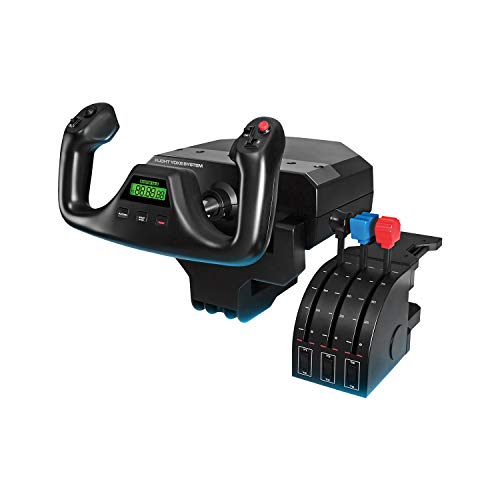
- Includes yoke and separate throttle quadrant
- At least 54 programmable controls
- Desk clamps and stainless-steel yoke shaft
Best For: Windows users building a dedicated desktop cockpit
Best Xbox All-in-One Yoke
Thrustmaster TCA SKY YOKE for Xbox

- Designed for Xbox Series X|S and PC
- Seven axes with built-in throttle, trim, and rudder
- 24 buttons with Hall Effect precision
Best For: Xbox pilots wanting an integrated plug-and-play setup
Advanced HOTAS Control
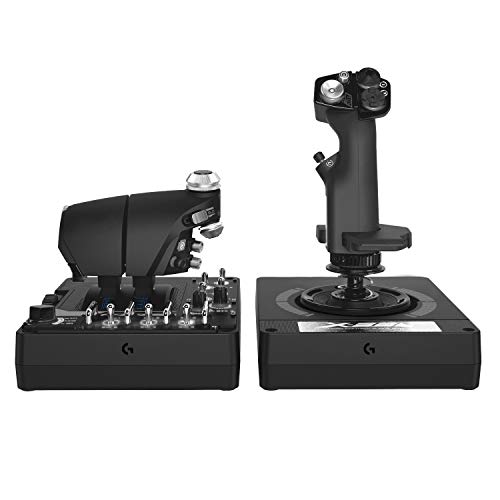
- 189 programmable controls for complex setups
- Twin throttles with friction adjustment
- Hall-effect axes and adjustable spring force
Best For: Experienced PC combat and space-sim gamers
Airliner Realism Pick
Thrustmaster TCA Boeing Edition

- Officially licensed 1:1 Boeing 787-inspired design
- Pendular yoke motion with adjustable spring tension
- Quadrant includes Boeing-style autopilot controls
Best For: Experienced Boeing and airliner simulation players
All-in-One Yoke Setup
Turtle Beach VelocityOne Flight
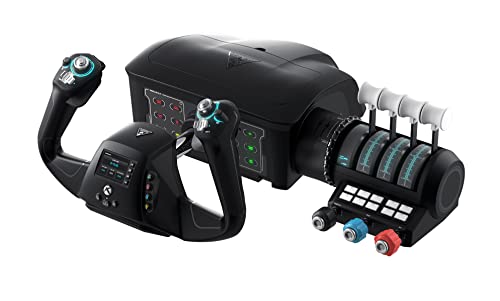
- Yoke, throttle, trim, rudder, and brake controls included
- 180-degree Hall-effect yoke handle rotation
- Compatible with Xbox and Windows flight titles
Best For: Experienced Xbox and PC players wanting a complete setup
Complete Cockpit Bundle – Alpha Flight Controls Yoke Bundle
Honeycomb Alpha Flight Controls Yoke Bundle | Bravo throttle quadrant, (2 items)
Check Price On AmazonFor experienced gamers seeking flight simulator yokes for experienced gamers, this bundle pairs Honeycomb’s Alpha yoke and switch panel with the Bravo throttle quadrant. It is a practical choice for PC pilots who want a broader cockpit setup rather than a standalone yoke.
Best For: Experienced PC simmers building a general aviation or commercial-style cockpit.
Pros:
- Includes both the Alpha yoke and Bravo throttle quadrant.
- Configurable throttle setup supports single-engine through four-engine aircraft.
- Includes autopilot, annunciator, gear, flap, and trim controls.
- Landing-gear lever includes LED indicator lights.
Cons:
- Large 23.8 x 17.8 x 19-inch footprint may require substantial desk space.
- Listed compatibility is Windows-based.
This is the most comprehensive option here for users who want multiple cockpit controls in one purchase. Its size and PC-focused compatibility make it better suited to a dedicated simulator station than a compact gaming desk.
Force-Feedback Specialist – MOZA AY210 Yoke Base
The MOZA AY210 is aimed at experienced PC players who want a more advanced yoke platform. Its 9Nm force feedback, 34 inputs, and steel chassis put emphasis on control authority, rigidity, and customization.
Best For: PC flight simmers prioritizing force feedback and a highly configurable yoke.
Pros:
- Provides 9Nm of force feedback for a more physical control experience.
- Offers 34 inputs for extensive cockpit mapping.
- Reinforced high-strength steel chassis emphasizes rigidity and durability.
- MOZA Cockpit software supports programmable controls and telemetry synchronization.
Cons:
- Designed for PC rather than console use.
- Supplied listing includes the yoke only, with no additional cockpit components specified.
The AY210 stands out for technically minded simmers who want strong feedback and software-based customization. It is less of an all-in-one cockpit bundle and more of a focused control base for a dedicated PC setup.
Console-Ready Full Kit – T-Flight HOTAS With Rudder Pedals
Although it is a flight stick rather than a traditional yoke, this Thrustmaster kit gives experienced gamers a complete hands-on setup for PC and Xbox Series X|S. It combines a throttle, stick, and rudder pedals for combat, space, and civil flight simulations.
Best For: PC and Xbox players who want a complete HOTAS-and-pedals package.
Pros:
- Official Xbox integration includes dedicated Guide, View, and Menu buttons.
- Includes smooth TFRP rudder pedals with a S.M.A.R.T. slide rail system.
- Offers five axes, 14 programmable buttons, a trigger, and a hat switch.
- Detachable throttle and adjustable resistance support varied flight styles.
Cons:
- It is a flight-stick HOTAS, not a yoke.
- The full kit may occupy considerable space at 18.7 x 14.21 x 12.68 inches.
This is the flexible pick for gamers who value console compatibility and complete control coverage over yoke-style handling. The included pedals also make it a practical entry into more coordinated turns and directional control.
Realistic Yoke Control – Honeycomb Alpha Yoke & Switch Panel
For experienced gamers comparing flight simulator yokes for experienced gamers, the Honeycomb Alpha focuses on realistic yoke movement and cockpit-style switching. Its 180-degree rotation, steel shaft, and integrated panel suit PC pilots who want precise, conventional flight controls.
Best For: Dedicated PC simmers wanting a realistic yoke with built-in aircraft switches.
Pros:
- Uses 180-degree rotation with a solid steel shaft and linear ball bearings.
- Dampened self-centering design has no center detent and minimal deadzone.
- Integrated panel includes power, alternator, avionics, light, and ignition switches.
- Provides 33 buttons and two mounting options, including heavy-duty clamps.
Cons:
- Listed as PC-only, limiting console compatibility.
- Does not include a throttle quadrant or rudder pedals.
The Alpha is a focused yoke solution for users who already own—or plan to add—other cockpit controls. Its switch panel and mounting flexibility make it especially suitable for a dedicated desktop simulator arrangement.
Best All-in-One PS5 Yoke – Thrustmaster TCA SKY YOKE
For experienced gamers seeking flight simulator yokes for experienced gamers, the Thrustmaster TCA SKY YOKE is a flexible all-in-one option for PS5 and PC setups. It combines a yoke with throttle, trim, and rudder controls, while Hall Effect sensing and 16-bit resolution support precise input across seven axes.
Best For: PS5 or PC players who want an integrated yoke with broad compatibility and built-in aircraft controls.
Pros:
- Seven axes include throttle, trim wheel, and rudder controls.
- Hall Effect magnetic technology and 16-bit resolution provide consistent control.
- Offers 24 action buttons and supports dual-controller instructor or co-pilot use.
- Compatible with PS5, PC, iOS, and Android, with plug-and-play recognition in supported titles.
Cons:
- Additional TFRP rudder pedals and TCA SKY QUADRANT features are sold separately.
- The listed one-year warranty is shorter than some competing options.
Its integrated controls make this a practical choice when you want a capable cockpit controller without immediately buying several separate components. The PS5 compatibility also gives it an advantage for console-focused pilots.
Best Professional Windows Setup – Logitech G PRO Flight Yoke System
The Logitech G PRO Flight Yoke System is a strong candidate for experienced gamers comparing flight simulator yokes for experienced gamers on Windows. It pairs a stainless-steel yoke shaft with a separate throttle quadrant and provides extensive programmable control through buttons, a POV hat, and a three-position mode switch.
Best For: Windows sim pilots who want a traditional yoke-and-throttle setup with extensive programmable controls and desk mounting.
Pros:
- Includes both the flight yoke and flight throttle quadrant.
- Provides at least 54 programmable controls through its button and mode-switch layout.
- Stainless-steel yoke shaft is designed for robust, smooth, and accurate control.
- Two-position desk clamps offer flexible mounting on a range of desks.
Cons:
- Compatibility is focused on Windows systems.
- Optional software download is required for listed simulators.
- The system is larger and heavier than a compact standalone controller.
For a dedicated desktop cockpit, the included throttle quadrant and high number of programmable inputs make this a feature-rich choice. It is best suited to players comfortable with a Windows-based setup and a more substantial desk footprint.
Best Xbox All-in-One Yoke – Thrustmaster TCA SKY YOKE for Xbox
For Xbox pilots evaluating flight simulator yokes for experienced gamers, the Thrustmaster TCA SKY YOKE provides a console-ready control package with seven axes and built-in throttle, trim, and rudder functions. Its 180-degree rotation, 24 action buttons, and Hall Effect technology are designed for smooth, precise aircraft control.
Best For: Xbox Series X|S and PC players who want plug-and-play access to an integrated flight yoke.
Pros:
- Supports Xbox Series X|S, PC, iOS, and Android.
- Includes throttle, trim wheel, and rudder controls across seven axes.
- Hall Effect magnetic technology and 16-bit resolution support precise inputs.
- Dual Control allows two yokes to share control on Xbox or PC in supported setups.
Cons:
- Extra rudder pedals and the three-axis throttle quadrant are sold separately.
- Its one-year warranty is relatively limited.
This model is particularly appealing to Xbox users who want a straightforward, recognized controller for Microsoft Flight Simulator 2024 and Infinite Flight. Its built-in controls also reduce the need for an immediate collection of accessories.
Advanced HOTAS Control – Logitech G X56
For experienced gamers looking beyond a traditional yoke, the Logitech G X56 delivers a highly configurable HOTAS setup for space and combat flight simulation. Its dual throttles, adjustable stick force, Hall-effect sensors, and extensive programmable controls suit demanding PC users who want detailed control over complex aircraft or spacecraft.
Best For: Experienced PC gamers who prioritize extensive customization, VR-friendly control placement, and combat or space simulation precision.
Pros:
- Offers 189 programmable controls and 24 buttons for detailed setup customization.
- Includes twin throttles with friction adjustment and a throttle-lock cable.
- Features a 16-bit aileron and elevator axis with Hall-effect sensors.
- Provides four spring options and RGB backlighting.
Cons:
- Designed for PC rather than Xbox compatibility.
- Requires two USB 2.0 ports.
- Its extensive controls may be more than casual players need.
The X56 is a strong choice when programmable inputs and HOTAS flexibility matter more than a yoke-style layout. It is especially compelling for experienced gamers who fly complex combat or space-simulation missions.
Airliner Realism Pick – Thrustmaster TCA Boeing Edition
The Thrustmaster TCA Yoke & Quadrant Boeing Edition is a focused option for experienced gamers who want a realistic airliner cockpit. Its officially licensed 1:1 Boeing 787-inspired design, pendular yoke motion, adjustable spring tension, and matching throttle quadrant make it a natural fit for Microsoft Flight Simulator on PC or Xbox.
Best For: Experienced flight-sim players who want authentic Boeing-style controls and a dedicated airliner setup.
Pros:
- Uses a 1:1 Boeing 787-inspired yoke and officially licensed design.
- PENDUL_R mechanism provides an 8.3-inch range of smooth pendular movement.
- Includes a throttle quadrant with Boeing-style autopilot controls for altitude, airspeed, and heading.
- Offers 35 action buttons, two additional axes, and a metal internal structure.
Cons:
- Rudder pedals are compatible but sold separately.
- The Boeing-focused layout may be less versatile for players seeking a general-purpose HOTAS.
- Its large 19-by-15-by-19-inch listed dimensions require dedicated setup space.
With its airline-specific layout and pendular movement, this pack emphasizes immersion over broad genre flexibility. It is a particularly suitable pick for experienced gamers who regularly fly airliners and want Xbox support alongside PC compatibility.
All-in-One Yoke Setup – Turtle Beach VelocityOne Flight
The Turtle Beach VelocityOne Flight is an all-in-one choice for experienced gamers who want yoke control without assembling a separate throttle, trim, and rudder setup. It combines a 180-degree yoke with a modular throttle quadrant, trim wheel, integrated rudder and brake controls, and broad Xbox and Windows compatibility.
Best For: Experienced PC and Xbox players who want a consolidated flight-sim control system with trim, throttle, and rudder functions built in.
Pros:
- Combines yoke, throttle quadrant, trim wheel, rudder, and brake controls in one system.
- Uses 180-degree yoke rotation with a non-contact Hall-effect sensor.
- Provides 12 analog axes, two POV switches, and two four-way HAT switches.
- Includes a full-color flight-management display and status indicator panel.
Cons:
- Its all-in-one design may offer less specialized control than separate premium components.
- The listed 10-pound weight and approximately 19-inch dimensions may require a sturdy setup.
- The product notes specify Xbox and Windows support, not broader platform compatibility.
VelocityOne Flight stands out for convenience and coverage: it supplies the major controls needed for Microsoft Flight Simulator in a single system. Choose it when a complete yoke-centered cockpit is more important than building a modular collection of individual peripherals.
How We Picked the Best Flight Simulator Yokes for Experienced Gamers
We focused on the features that matter most after you have outgrown a gamepad: control accuracy, smooth travel, mounting stability, throttle and switch integration, programmable inputs, platform support, and long-term usability. The lineup includes dedicated yoke systems, complete flight packs, HOTAS alternatives, and console-friendly controls so different sim setups are represented.
We also considered how easily each system can fit into an existing cockpit. Some products are best as a complete starter-to-advanced package, while others make more sense for experienced gamers who already own pedals, a throttle quadrant, or a dedicated mounting solution.
Quick Comparison
| Best For | Recommended Type | What to Prioritize |
|---|---|---|
| Authentic general aviation control | Dedicated yoke and throttle | Smooth movement, solid mounting, switch access |
| Airliner-focused simulation | Aircraft-inspired yoke and quadrant | Layout familiarity, programmable controls, compatibility |
| Console and PC flexibility | Universal or platform-specific system | Supported console generation and connection method |
| Maximum customization | Modular yoke base or HOTAS | Input mapping, adjustability, expansion options |
Key Buying Factors for Flight Simulator Yokes for Experienced Gamers
Compatibility and Software Support
Check the exact platform before buying. Xbox, PlayStation, Windows, iOS, and Android support can vary by model, and some games recognize only selected peripherals. Confirm compatibility with your preferred simulator and whether configuration software is required.
Control Feel and Range of Motion
Experienced users should look for smooth pitch and roll movement, predictable centering, and enough resistance to make small corrections without feeling loose. A yoke that feels precise is usually more valuable than one with the largest number of buttons.
Throttle, Switches, and Expansion
Integrated throttle quadrants and switch panels reduce keyboard use and improve workload management. Count the controls you actually need, including landing gear, trim, autopilot, radios, and engine functions. Extra programmable inputs are useful only if the software and simulator support practical mappings.
Mounting and Cockpit Space
Measure your desk or cockpit before choosing a system. A sturdy clamp or broad base helps prevent movement during aggressive inputs, while a large integrated panel may require more clearance. Consider cable routing and whether the unit can be removed easily when the desk is used for other tasks.
Who Should Buy Which Flight Simulator Yokes for Experienced Gamers?
Choose a dedicated Honeycomb or Logitech-style yoke system if you mainly fly general aviation aircraft and want a focused, desk-friendly setup. Aircraft-inspired Thrustmaster packs suit players who want a more specialized airliner experience or a bundled throttle solution.
MOZA is worth considering for experienced gamers who value a modular, premium-feeling base and plan to build around it. The Turtle Beach universal system is a practical choice for players who want broad Xbox and Windows compatibility. If you regularly switch between space, combat, and civilian flight games, a Logitech X56 HOTAS may be more versatile than a traditional yoke.
Finally, include rudder pedals in your budget if realistic ground steering and coordinated turns matter. The best Flight Simulator Yokes for Experienced Gamers are the ones that match your aircraft preferences, platform, available space, and willingness to expand—not necessarily the one with the most buttons.