The best flight simulator pedals with toe brakes make taxiing, braking, crosswind correction, and coordinated turns feel more natural than keyboard or twist-stick controls.
We compare 10 options across PC, Xbox, and PlayStation compatibility, helping you match pedal travel, sensors, construction, adjustability, and price to your simulator setup.
Best 10 Flight Simulator Pedals with Toe Brakes Picks for 2026
Balanced PC Control
Logitech G Pro Flight Rudder Pedals
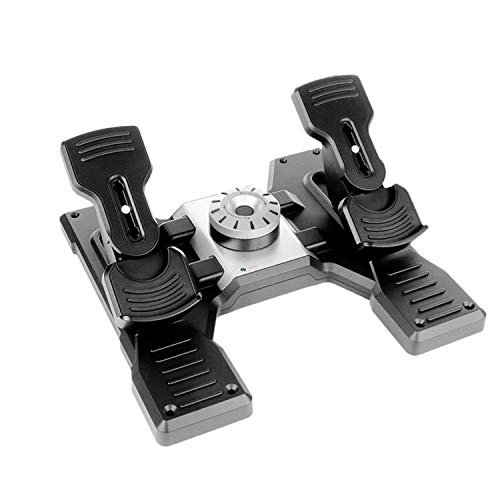
- Self-centering rudder control
- Differential toe brakes
- Adjustable tension dial
Best For: Windows flight sim users wanting adjustable pedal feel
Complete Starter Setup
Thrustmaster T16000M FCS Flight Pack

- Includes stick, throttle, and pedals
- Ambidextrous flightstick design
- Custom profiles via T.A.R.G.E.T
Best For: PC users wanting a bundled flight-control system
Cross-Platform Braking
Turtle Beach VelocityOne Rudder Pedals
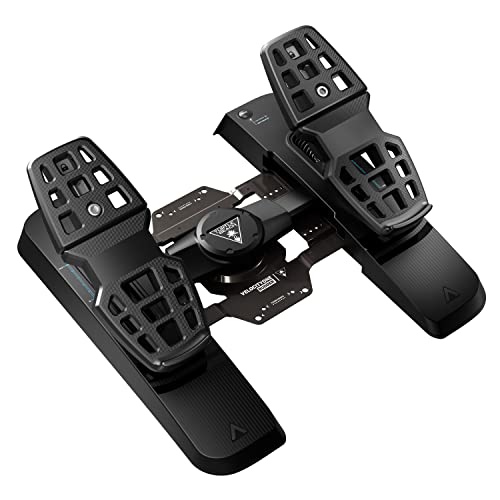
- Differential adjustable brakes
- Swappable rudder springs
- PC and Xbox compatibility
Best For: PC and Xbox pilots needing adjustable pedals
Premium Metal Stability
Honeycomb Charlie Rudder Pedals

- Aluminum construction
- Hall Effect sensors and belt drive
- Grip pads and carpet spikes
Best For: PC and Mac users wanting stable, adjustable pedals
Versatile Console Pick
Thrustmaster TFRP Rudder Pedals

- PC, PS5, PS4, and Xbox compatibility
- Long-travel self-centering rudder axis
- Aluminum rails and differential braking
Best For: Multi-platform flight sim users seeking stable, adjustable control
Premium Metal Control

- Full-metal aluminum and stainless-steel construction
- Three switchable control modes
- Hall sensors and adjustable damper design
Best For: Windows sim pilots wanting configurable, durable pedals
Complete Flight Control Bundle
Logitech Pro Pedals and Throttle

- Self-centering pedals with adjustable tension
- Differential toe brakes for runway control
- Includes throttle quadrant with levers and switches
Best For: Windows users building a broader aircraft-control setup
Premium Precision
Thrustmaster TPR Rudder Pedals

- Suspended Pendul_r mechanism for realistic motion
- H.E.A.R.T magnetic sensors resist mechanical wear
- Adjustable spring resistance for customized feel
Best For: Serious PC flight sim enthusiasts
Adjustable Helicopter Control
SN-2 Adjustable Damper Rudder Pedals

- Adjustable damping, stroke, and pedal positioning
- Non-contact Hall sensor with plug-and-play USB
- Aluminum-alloy frame and dust-proof bearings
Best For: Helicopter sim users who prefer tunable resistance
Complete HOTAS Value
Thrustmaster TFRP & T16000M HOTAS

- TFRP pedals include large differential brake pedals
- Smooth S.M.A.R.T. aluminum slide rails
- Bundle adds a 16-button Hall Effect joystick
Best For: PC pilots building a complete flight-control setup
Balanced PC Control – Logitech G Pro Flight Rudder Pedals
For PC pilots seeking flight simulator pedals with toe brakes, the Logitech G Pro Flight Rudder Pedals combine smooth self-centering rudder control with differential braking. An adjustable tension dial lets you tailor the pedal feel for lighter aircraft or heavier jets.
Best For: Windows-based flight sim users who want adjustable rudder resistance and dedicated toe brakes.
Pros:
- Self-centering rudder pedals provide smooth, accurate control.
- Differential toe brakes support controlled runway maneuvering.
- Adjustable tension dial changes the pedal response.
- USB connectivity and compatibility with Windows 7, 8, 8.1, and 10.
Cons:
- Compatibility details are limited to Windows systems in the supplied specifications.
- The toe brake axis uses 7-bit resolution.
This is a straightforward PC-focused option for pilots who prioritize adjustable feel and reliable differential braking without needing console compatibility.
Complete Starter Setup – Thrustmaster T16000M FCS Flight Pack
The Thrustmaster T16000M FCS Flight Pack is a practical PC bundle for shoppers comparing flight simulator pedals with toe brakes alongside a stick and throttle. It includes the flightstick, throttle, and pedals, with USB connectivity and configurable controls through T.A.R.G.E.T software.
Best For: PC pilots who want a bundled flight-control setup rather than pedals alone.
Pros:
- Includes a flightstick, throttle, and pedals in one pack.
- USB-compatible with 32-bit and 64-bit Windows PCs.
- Ambidextrous joystick can be configured for left- or right-handed use.
- T.A.R.G.E.T software supports custom game profiles.
Cons:
- The supplied notes do not specifically identify toe brakes on the included pedals.
- It is designed for PC rather than listed console platforms.
Choose this pack when building a complete entry-level control station matters more than selecting a standalone pedal system with clearly specified differential brakes.
Cross-Platform Braking – Turtle Beach VelocityOne Rudder Pedals
The Turtle Beach VelocityOne is a versatile choice for flight simulator pedals with toe brakes, offering differential braking, adjustable pedal width, and swappable springs. It connects to Windows PCs and supports Xbox consoles when used with the required VelocityOne Flight Control System.
Best For: PC and Xbox pilots who want adjustable pedal spacing and a configurable rudder feel.
Pros:
- Differential brakes provide independent braking control.
- Ultra-smooth rudder axis uses swappable springs.
- Pedal width is adjustable for different setups.
- Hall Effect sensors are used across all axes.
Cons:
- Xbox use requires a VelocityOne Flight Control System.
- Its 13.3-pound weight may make it less convenient to move frequently.
With broad platform support and multiple physical adjustments, this model suits pilots who want toe-brake functionality that can carry across PC and compatible Xbox setups.
Premium Metal Stability – Honeycomb Charlie Rudder Pedals
The Honeycomb Charlie Rudder Pedals focus on durable construction and precise control for pilots shopping for flight simulator pedals with toe brakes. Aluminum pedals, Hall Effect sensors, a belt drive system, and adjustable pedal angle and tension support a more customizable setup, while grip pads and deployable spikes help limit movement.
Best For: PC and Mac sim pilots who value metal construction, sensor precision, and secure floor placement.
Pros:
- Durable aluminum construction with metal pedals.
- Hall Effect sensors support precise coordination.
- Adjustable pedal angle and tension accommodate different preferences.
- Grip pads and carpet spikes help prevent slipping.
Cons:
- The supplied notes do not specifically confirm toe-brake functionality.
- Xbox Series X or S compatibility requires the Honeycomb Xbox Hub.
- The listed 10 kg weight makes it a substantial piece of hardware.
This is a strong fit for users who prioritize stable, adjustable hardware and broad PC/Mac simulator compatibility, but buyers specifically requiring confirmed toe brakes should verify the control layout before purchasing.
Versatile Console Pick – Thrustmaster TFRP Rudder Pedals
For flight simulator pedals with toe brakes across PC and console setups, the Thrustmaster TFRP focuses on smooth rudder input, long travel, and stable foot control. Its self-centering axis and aluminum rail system are designed for precise, consistent maneuvers.
Best For: Multi-platform flight sim users who want adjustable, self-centering rudder control.
Pros:
- Compatible with PC, PS5, PS4, Xbox Series X|S, and Xbox One systems.
- Long rudder-axis travel supports smooth, accurate turns.
- Four aluminum rails provide smooth sliding motion and added rigidity.
- Includes differential braking and adjustable resistance.
Cons:
- Its listed dimensions may require careful cockpit or desk planning.
- USB connectivity and console compatibility should be checked against the specific game setup.
The TFRP is a practical choice when broad platform compatibility matters. It combines a self-centering rudder, long travel, and differential toe braking in a sturdy design intended for extended sessions.
Premium Metal Control – WINCTRL Orion Rudder Pedals
The WINCTRL Orion is aimed at PC pilots looking for flight simulator pedals with toe brakes and a more substantial mechanical design. Its full-metal frame, Hall sensors, quick-swap springs, and damper system support multiple control modes.
Best For: Windows users who prioritize metal construction, configurable resistance, and adaptable flight controls.
Pros:
- Full-metal frame uses aviation-grade aluminum alloy and stainless-steel components.
- Hall sensors are used on the main and pedal shafts for precise input detection.
- Quick-disconnect springs support three control modes, including self-centering and no-centering options.
- Oversized anti-slip pads and a support structure help stabilize desktop use.
Cons:
- Compatibility is listed for Windows only.
- The advanced damper and mounting features may be more than casual users need.
This model stands out for its configurable feel and heavy-duty materials. It is especially suited to pilots who want to switch between fixed-wing, rotorcraft, and ground-vehicle control styles without tools.
Complete Flight Control Bundle – Logitech Pro Pedals and Throttle
This Logitech bundle pairs flight simulator pedals with toe brakes and a flight throttle quadrant for a broader control setup. The pedals provide self-centering rudder input, adjustable tension, and differential toe brakes, while the quadrant adds levers and rocker switches.
Best For: Windows users who want rudder, braking, throttle, and additional aircraft controls in one package.
Pros:
- Differential toe brakes provide control when maneuvering onto the runway stand.
- Adjustable tension dial lets users tune the pedal response.
- Throttle quadrant adds three axis levers and three two-way rocker switches.
- Quadrant can be mounted on top of or in front of a desk.
Cons:
- Compatibility is listed for Windows systems.
- The bundle may be unnecessary for users who only need rudder pedals.
Choose this package when expanding beyond basic rudder control is a priority. The adjustable pedals handle steering and braking, while the included quadrant provides flexible controls for throttle, flaps, mixture, and propeller pitch.
Premium Precision – Thrustmaster TPR Rudder Pedals
For serious sim pilots seeking flight simulator pedals with toe brakes, the Thrustmaster TPR emphasizes smooth, realistic rudder control and precise yaw adjustments. Its suspended Pendul_r mechanism, H.E.A.R.T magnetic sensors, and adjustable spring resistance are designed for demanding PC flight sessions.
Best For: PC users who want professional-grade rudder precision and customizable pedal resistance.
Pros:
- Pendular suspended mechanism delivers fluid, natural rudder movement.
- H.E.A.R.T HallEffect sensors provide frictionless, wear-resistant input.
- Adjustable spring system helps tailor resistance to different flying styles.
Cons:
- At 20.2 pounds, it is a substantial setup.
- Designed for PC compatibility rather than broad console use.
The TPR is a premium choice when subtle yaw corrections and long-session durability matter more than portability or a compact footprint.
Adjustable Helicopter Control – SN-2 Adjustable Damper Rudder Pedals
These SN-2 flight simulator pedals with toe brakes combine Hall-sensor input with adjustable damping for pilots who want to tune pedal response. The aluminum-alloy construction, multi-angle adjustments, and differential brake system support helicopter and fixed-wing simulation setups.
Best For: Flying enthusiasts who want adjustable damping, pedal travel, and positioning for helicopter-focused simulation.
Pros:
- Adjustable damping and tension dial allow a lighter or more robust feel.
- 8,192-bit non-contact Hall sensor supports stable, driver-free USB operation.
- Five pedal holes, rocker height positions, and adjustable stroke offer flexible setup.
- 6061 and 6063 aluminum-alloy construction with 18 dust-proof bearings.
Cons:
- The product dimensions require a relatively large installation area.
- Its feature set may be more specialized than necessary for casual users.
With extensive mechanical adjustment and a damper-focused design, the SN-2 suits users who want to fine-tune control feel rather than rely on a fixed pedal setup.
Complete HOTAS Value – Thrustmaster TFRP & T16000M HOTAS
This Thrustmaster bundle pairs TFRP flight simulator pedals with toe brakes and differential braking with the T16000M FCS HOTAS joystick. It is a practical option for PC pilots who want a coordinated rudder-and-stick setup, with smooth aluminum slide rails, heel rests, and multiple joystick controls.
Best For: PC users seeking a combined flight-control package for combat, space, or civil simulation.
Pros:
- Includes TFRP pedals with two large differential brake pedals.
- S.M.A.R.T. aluminum slide rails provide smooth steering motion.
- Removable heel rests support two ergonomic foot positions.
- T16000M joystick adds 16 action buttons and Hall Effect precision.
Cons:
- The joystick and pedals may be unnecessary for buyers who need pedals only.
- Primary compatibility is PC, with console use requiring specified compatible HOTAS hardware.
This bundle makes the most sense when building a broader flight-control station, especially for users who value differential braking and an included precision joystick.
How We Picked the Best Flight Simulator Pedals with Toe Brakes
We selected these pedals based on control design, toe-brake functionality, sensor type, platform compatibility, adjustability, construction, and suitability for common flight simulators. We also considered whether each model makes sense for beginners, regular desktop users, serious enthusiasts, or cockpit builders.
Compatibility matters because support can vary by simulator, console, USB setup, and HOTAS ecosystem. Before buying, confirm the manufacturer’s current platform list and check whether your simulator recognizes separate rudder and brake axes.
Quick Comparison
| Best For | What to Prioritize |
|---|---|
| First-time buyers | Simple USB setup, broad compatibility, and adjustable resistance |
| Frequent PC sim pilots | Smooth sensors, stable construction, and comfortable spacing |
| Console users | Explicit Xbox or PlayStation support |
| Enthusiast cockpits | Metal construction, mounting options, and customizable damping |
| Helicopter pilots | Accurate center control, adjustable resistance, and long-term durability |
Key Buying Factors for Flight Simulator Pedals with Toe Brakes
Toe-Brake Layout and Travel
Separate toe brakes allow left and right braking while taxiing and can improve directional control during landing rollout. Look for comfortable pedal spacing and enough travel to make small inputs predictable rather than abrupt.
Sensors and Precision
Hall-effect sensors generally avoid physical contact at the sensing point and can provide smooth, consistent readings. Calibration software and simulator settings still matter, so adjustable curves, dead zones, and sensitivity are useful features.
Resistance and Adjustability
Adjustable damping, spring tension, pedal angle, and spacing help fit different feet, seating positions, and aircraft types. A firmer center can benefit helicopter and coordinated-turn practice, while lighter resistance may suit casual users.
Stability and Installation
Pedals that slide during braking can undermine otherwise precise controls. Check for rubber feet, a wide base, mounting holes, or a cockpit-compatible design. Measure your available floor space before choosing a larger metal unit.
Platform and Simulator Support
Verify support for Windows, Xbox, or PlayStation before ordering. Also check USB requirements, available axis assignments, and whether the pedals can be used alongside your joystick, yoke, throttle, or HOTAS.
Who Should Buy Which Flight Simulator Pedals with Toe Brakes?
Choose an entry-level USB model if you are building your first flight setup or mainly fly casually. A mid-range pedal set is a better fit for regular PC pilots who want smoother inputs, more stable construction, and useful adjustment options. Console users should prioritize models explicitly listed for their system rather than relying on generic PC compatibility.
For dedicated simulator users, premium metal pedals with adjustable damping and mounting options can justify their higher cost through better stability and long-term flexibility. Helicopter enthusiasts should focus on center feel and resistance adjustment, while fixed-wing pilots should give extra attention to toe-brake travel and comfortable spacing. Whatever you choose, leave room for calibration after installation; properly configured axes often make as much difference as the hardware itself.