Choosing the best 3D scanner for miniatures means balancing fine-detail capture, tracking stability, color handling, and software that can turn a small object into a usable digital model. The right scanner can simplify reverse engineering, tabletop customization, prop making, and 3D printing.
These ten options cover compact scanners, portable wireless models, and more advanced blue-laser systems. Use the buying guide below to narrow your choice by miniature size, surface type, accuracy needs, workflow, and budget.
Best 10 3d Scanner for Miniatures Picks for 2026
Best Detail Specialist
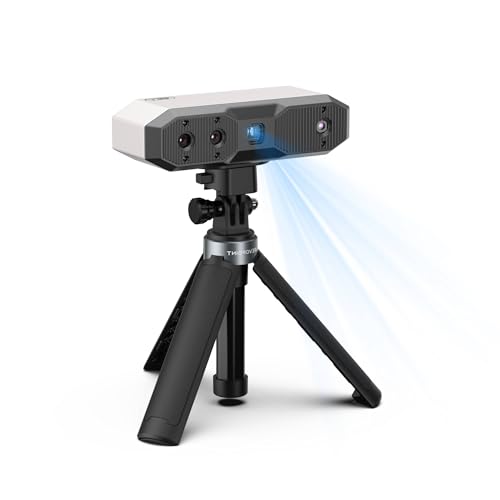
- Up to 0.02 mm single-frame precision
- RGB color and texture capture
- Lightweight USB-C and Wi-Fi 6 design
Best For: Detailed miniatures and small collectibles
Best All-Rounder

- Up to 0.03 mm accuracy in blue laser mode
- 110 fps capture and marker-free PC scanning
- Handles miniature to life-size objects
Best For: Mixed-size projects and portable scanning
Best for Mixed Surfaces

- Dual infrared and multi-line laser modes
- Up to 0.03 mm precision
- Optical zoom and full-color RGB capture
Best For: Detailed objects with dark or reflective surfaces
Best for Large-to-Small Projects

- 0.05 mm precision and up to 30 fps
- Scans objects from 0.8 to 78 inches
- Full-color capture without spray on dark or metallic surfaces
Best For: Mixed-size scanning from miniatures to large objects
Precision Pick

- Up to 0.01 mm single-frame precision
- Five modes for detailed and varied scans
- No-spray scanning for dark or shiny surfaces
Best For: Precision modeling and demanding miniature workflows
Budget-Friendly Starter

- 0.07 mm accuracy for small-to-medium objects
- Markerless tracking with anti-shake support
- JMStudio exports STL, OBJ, PLY, and ASC
Best For: Beginners, DIY projects, and STEM education
Advanced Detail Choice

- Up to 0.01 mm single-frame precision
- Blue-laser and marker-free scanning modes
- Automatic turntable and real-time mobile streaming
Best For: Advanced makers and precision-focused 3D workflows
Best Wireless Option

- 0.1mm accuracy with 30FPS scanning
- WiFi 6 wireless scanning support
- Exports OBJ, STL, and PLY files
Best For: Wireless, full-color scanning with compatible mobile devices
Best Lightweight Choice

- 0.1mm precision with anti-shake scanning
- 24-bit full-color capture
- Lightweight 105g design
Best For: Beginners using a simple Mac or Windows workflow
Best Value Handheld

- Dual modes for wide and fine-detail scans
- 0.1mm accuracy and 30FPS capture
- Full-color textures with portable power options
Best For: Versatile handheld scanning with Android or PC support
Best Detail Specialist – Revopoint MINI 2
If you need a 3d scanner for miniatures, the Revopoint MINI 2 is built around capturing tiny, intricate details. Its blue-light system offers up to 0.02 mm single-frame precision, while the RGB camera and flash LEDs help record color and texture for detailed models.
Best For: Small figurines, collectibles, and miniature parts where fine geometry and color capture matter most.
Pros:
- Up to 0.02 mm single-frame precision and capture speeds up to 16 fps.
- RGB camera and six flash LEDs support detailed color, texture, and marker recognition.
- Compact 175 g design with USB-C and Wi-Fi 6 connectivity.
- Exports to formats including STL, OBJ, PLY, 3MF, GLTF, and FBX.
Cons:
- Scanning results can vary with object material and color; scanning spray may improve results.
- Designed for objects from 10 × 10 × 10 mm up to 0.5 × 0.5 × 0.5 m, so it is not intended for extremely tiny or very large subjects.
- Revo Design scan-to-CAD software is paid separately and Windows-only.
The MINI 2 is the most miniature-focused option here, particularly for users prioritizing fine detail in a portable scanner. Plan for surface preparation when working with difficult materials or colors.
Best All-Rounder – Creality Pika Portable
The Creality Pika is a versatile 3d scanner for miniatures that combines seven-line blue laser scanning with NIR structured light. It can capture small figurines and parts at up to 0.03 mm accuracy, while its larger scanning range also supports full-body subjects.
Best For: Users who want one portable scanner for miniatures, larger objects, and occasional full-body scanning.
Pros:
- Blue laser mode provides up to 0.03 mm accuracy and 0.1 mm 3D resolution.
- Captures up to 110 frames per second for smooth scanning.
- Scans dark and metallic surfaces without scanning spray, according to the supplied product notes.
- Includes Wi-Fi 6, a touchscreen, dual swappable batteries, and exports STL, OBJ, PLY, and ASC.
Cons:
- Its 0.1 mm 3D resolution is a different specification from the advertised 0.03 mm accuracy.
- Some advanced capabilities, such as body scanning and AI tools, may be unnecessary for miniature-only workflows.
- Wireless operation depends on battery power and compatible CrealityScan devices.
Pika stands out for flexibility: it offers miniature-friendly precision without limiting you to small subjects. It is a strong choice if your scanning projects may expand beyond models and collectibles.
Best for Mixed Surfaces – Revopoint INSPIRE 2
The Revopoint INSPIRE 2 is a flexible 3d scanner for miniatures when projects include dark, reflective, or mixed-geometry surfaces. Its infrared structured-light and multi-line laser modes, adjustable optical zoom, and full-color RGB capture are designed for varied scanning conditions.
Best For: Miniatures and detailed objects made from challenging materials, especially when color and texture are important.
Pros:
- Offers accuracy up to 0.05 mm and precision up to 0.03 mm.
- Infrared laser mode can capture reflective or dark surfaces without scanning spray.
- Adjustable 1.5x and 2x optical zoom helps focus on surface detail.
- Lightweight 190 g body with Wi-Fi 6, RGB color capture, and outdoor scanning up to 20,000 lux.
Cons:
- Its listed accuracy is lower than the MINI 2’s advertised 0.02 mm single-frame precision.
- Outdoor capability is specified for shaded or semi-bright conditions up to 20,000 lux, not unrestricted sunlight.
- Revo Design is paid separately and supports Windows only.
INSPIRE 2 is a practical middle ground for users who need miniature detail but do not want to be limited to ideal, matte surfaces. The optical zoom and dual scanning modes add useful flexibility.
Best for Large-to-Small Projects – Creality Otter Lite
The Creality Otter Lite is a 3d scanner for miniatures that also accommodates substantially larger subjects. Its quad-camera design combines detail-focused and wide-coverage lenses, while full-color capture helps preserve the appearance of figurines, artwork, and collectibles.
Best For: Makers who scan miniatures alongside larger props, mechanical parts, vehicles, or other varied-size objects.
Pros:
- Advertised precision reaches 0.05 mm with scanning speeds up to 30 fps.
- Scans objects from 0.8-inch cubes up to 78-inch cubes.
- Can scan dark and metallic surfaces without powder or spray, according to the supplied notes.
- 24-bit color capture, Wi-Fi support, and exports including PLY, OBJ, STL, 3MF, GLTF, and FBX.
Cons:
- The 0.8-inch minimum object size may be too large for extremely tiny miniatures.
- Optional Scan Bridge handle is sold separately.
- Its broad size range may be more capability than miniature-only users need.
Otter Lite is the most size-flexible pick in this group, making it appealing for a mixed workshop. Choose it when miniature scanning is only one part of a broader 3D capture workflow.
Precision Pick – Revopoint MetroY Ultra
The Revopoint MetroY Ultra is a strong choice when a 3d scanner for miniatures needs to capture fine geometry with tight tolerances. Its blue-laser modes, 0.01 mm single-frame precision, and support for dark or shiny surfaces make it particularly capable for detailed parts and demanding 3D-printing workflows.
Best For: Experienced makers, reverse engineering, industrial inspection, and highly detailed miniature components.
Pros:
- Up to 0.01 mm single-frame precision and 0.015 + 0.04 mm × L (m) volumetric accuracy.
- Five scanning modes cover fine details, deep holes, larger areas, and turntable scanning.
- Can scan dark, glossy, and metallic surfaces without scanning spray.
- Wi-Fi 6, a 5,500 mAh battery grip, and exports including STL, OBJ, and 3MF support flexible workflows.
Cons:
- Requires a powerful computer, including 32GB RAM and an RTX 3060-class GPU on Windows.
- The precision-focused feature set may be more than casual miniature users need.
The MetroY Ultra stands out for users who prioritize accuracy, speed, and surface versatility over simplicity. Its demanding system requirements should be considered before purchase, but it offers a well-equipped path from detailed scanning to printable files.
Budget-Friendly Starter – 3DMakerpro Fox
The 3DMakerpro Fox offers an accessible starting point for shoppers seeking a 3d scanner for miniatures and other small-to-medium objects. Its markerless tracking, anti-shake technology, and NIR light help simplify setup, though users should expect a learning curve when preparing scans for 3D printing.
Best For: DIY projects, STEM education, desktop miniature scanning, and budget-conscious beginners willing to learn mesh refinement.
Pros:
- Designed for objects from 40mm to 1200mm, including desktop miniatures.
- Up to 0.07 mm accuracy captures useful structural detail.
- Markerless tracking and anti-shake technology reduce setup and handling demands.
- JMStudio supports scanning, editing, fusion, and OBJ, STL, PLY, and ASC exports.
Cons:
- Achieving strong results requires patience and some CAD or 3D-modeling knowledge.
- A capable PC with a dedicated GPU is strongly recommended.
- The included turntable is manual rather than automatic.
The Fox is a practical entry-level option for experimenting with miniature digitization without immediately moving to an industrial scanner. Its value depends on your willingness to learn the software and refine meshes before slicing or printing.
Advanced Detail Choice – Revopoint MetroX Pro
The Revopoint MetroX Pro is built for shoppers who want a 3d scanner for miniatures with industrial-grade precision and advanced tracking options. Its blue-laser modes, marker-free structured light, and automatic turntable can handle detailed, shiny, dark, and complex objects, making it suited to demanding modeling and inspection work.
Best For: Advanced makers, precision miniature reproduction, reverse engineering, and professional 3D-printing workflows.
Pros:
- Offers up to 0.01 mm single-frame precision and 0.02 mm single-frame accuracy.
- Multiple laser and structured-light modes support fine features, flat surfaces, and marker-free scanning.
- Scans shiny or dark surfaces without spray in its cross-line and parallel-line modes.
- Automatic dual-axis turntable scanning and real-time PC-to-mobile streaming improve workflow control.
Cons:
- Its advanced, industrial-oriented design may be excessive for casual users.
- Revo Design and Revo Measure are paid software sold separately and support Windows only.
- Some scanning situations require markers or selecting the appropriate tracking mode.
The MetroX Pro is the most feature-rich option here for users who need precision and flexibility across challenging surfaces. It makes the most sense when your miniature work overlaps with measurement, reverse engineering, or professional prototyping.
Best Wireless Option – CR-Scan Ferret Pro
If you want a flexible 3d scanner for miniatures, the Creality CR-Scan Ferret Pro combines up to 0.1mm accuracy, 0.16mm resolution, and 30FPS scanning. Its WiFi 6 bridge supports wireless scanning with compatible Android phones and iPhone 11-or-newer models, while OBJ, STL, and PLY export suits 3D-printing workflows.
Best For: Makers who want wireless, full-color scanning across supported phones, computers, and outdoor settings.
Pros:
- Up to 0.1mm accuracy and 30FPS scanning capture detailed shapes smoothly.
- WiFi 6 transmission supports a more mobile scanning workflow.
- Anti-shake tracking can help maintain stability during handheld scanning.
- Exports OBJ, STL, and PLY files for printing and design software.
Cons:
- Highly reflective, transparent, and extremely dark surfaces may scan poorly.
- Wireless mobile use requires the dedicated bridge and compatible devices.
- Computer and mobile use have specific operating-system and RAM requirements.
The Ferret Pro is the most connectivity-focused choice here. It is a strong fit when portability and flexible device support matter, though surface limitations and system requirements should be checked before buying.
Best Lightweight Choice – CR-Ferret SE
The Creality CR-Ferret SE is a compact 3d scanner for miniatures aimed at straightforward desktop scanning. It offers 0.1mm precision, anti-shake technology, 24-bit full-color capture, and one-click operation, making it approachable for users who want a simple Mac or Windows workflow.
Best For: Beginners and creators who prioritize a lightweight scanner, simple operation, and full-color desktop modeling.
Pros:
- Anti-shake technology helps produce stable models with unsteady hands.
- 24-bit color capture records vibrant, detailed textures.
- One-click scanning provides a beginner-friendly workflow.
- At 105g, it is especially easy to carry between workspaces.
Cons:
- The supplied compatibility information focuses on Mac and Windows rather than mobile scanning.
- Although marketed for dark and metallic objects, results can still depend on object shape and setup.
- Its feature set is more desktop-focused than the Ferret Pro’s wireless setup.
The Ferret SE stands out for portability and ease of use. Choose it when a lightweight, computer-based scanner is more important than wireless phone scanning or broader connectivity.
Best Value Handheld – CR-Scan Ferret
The Creality CR-Scan Ferret is a practical 3d scanner for miniatures with dual scanning modes for broader objects or finer detail. It combines up to 0.1mm accuracy, 0.16mm resolution, 30FPS point-cloud capture, and full-color texture scanning in a portable handheld design.
Best For: Makers who want a versatile handheld scanner with fine-detail mode, color textures, and Android or PC support.
Pros:
- High-accuracy mode reaches up to 0.1mm precision and 0.16mm resolution.
- Wide-range and fine-detail modes support different object sizes and scanning needs.
- Full-color capture preserves the object’s original appearance in the model.
- Can be powered through a 5V power bank or compatible Android device.
Cons:
- Mobile scanning is supported on Android, while iOS support is listed for the Pro model.
- Windows, macOS, and Android use require specific hardware, software, or RAM levels.
- Full results may depend on updating the firmware through Creality’s official website.
The original Ferret offers a useful balance of detail, portability, and scanning modes. It is a sensible option for users who need fine-object capture but do not require the Pro model’s iPhone wireless support.
How We Picked the Best 3d Scanner for Miniatures
We compared the selected scanners by advertised accuracy, scanning technology, tracking performance, capture speed, color capability, supported object sizes, portability, and intended user level. For miniature work, we placed particular emphasis on the scanner’s ability to preserve small contours and edges while maintaining a stable scan of compact objects.
Specifications such as accuracy and frame rate are useful starting points, but real results also depend on lighting, surface texture, scanning distance, calibration, and post-processing software. A scanner designed for larger objects may be convenient, yet a small-object specialist can be easier to control when detail matters most.
Quick Comparison
- Best for fine detail: Revopoint MINI 2 and Revopoint MetroX Pro are strong candidates for users prioritizing precision.
- Best portable versatility: Creality Pika, Revopoint INSPIRE 2, and Creality CR-Scan Ferret Pro suit mobile or mixed-size scanning.
- Best beginner value: 3DMakerpro Fox and the original Creality CR-Scan Ferret offer approachable entry points.
- Best for speed: Revopoint MetroY Ultra and several Creality models advertise high-speed capture for efficient workflows.
- Best desktop-oriented option: Creality CR-Ferret SE is worth considering when a more controlled setup is preferred.
Key Buying Factors for a 3d Scanner for Miniatures
Accuracy and Resolution
Look for the highest practical accuracy within your budget, but do not judge performance by one number alone. Resolution, tracking, calibration, and the quality of the exported mesh all affect whether tiny facial features, panel lines, or sculpted textures survive the scan.
Scanning Technology
Blue-laser systems can be attractive for detailed, controlled work, while structured-light and infrared systems may offer easier general-purpose scanning. Consider whether you will scan only static miniatures or also larger props, people, and outdoor objects.
Surface and Color Handling
Glossy, transparent, dark, or highly uniform surfaces can challenge many scanners. Full-color capture may reduce the need for separate texture photography, but it does not automatically improve geometry. Matte spray, markers, or removable tracking aids may still be necessary.
Software and Workflow
Check compatibility with your computer or phone, export formats, alignment tools, mesh repair features, and any required subscription. A scanner with simpler software can be the better choice if you want to move quickly from capture to slicing or sculpting.
Who Should Buy Which 3d Scanner for Miniatures?
Choose a compact precision scanner if you mainly digitize small miniatures and need clean geometry for detailed prints. Choose a versatile portable scanner if you scan miniatures alongside props, household objects, or people. Choose a fast wireless model if convenience and mobility matter more than maximum refinement. Choose an advanced laser scanner if you regularly perform professional reverse engineering or demand the greatest control over fine surface detail.
Before buying, confirm the included accessories, operating-system support, minimum scan size, and whether your computer meets the software requirements. For the best results, use consistent lighting, secure the miniature on a stable surface, and plan for light cleanup in a 3D editor after scanning.