Choosing the right wireless HDMI system can make a multi-camera workflow faster, cleaner, and far less cable-heavy. For live streaming, event coverage, and studio production, the best units balance range, latency, and receiver support.
Below, we focus on practical options for buyers who need dependable signal sharing across several displays or cameras, with an emphasis on real-world use, setup simplicity, and value.
Best 10 Video Transmitters for Multi Camera Setups Picks for 2026
Dual-Band Stability for Small Crews
Accsoon CineView HE Wireless HDMI

- Dual-band 2.4GHz + 5GHz transmission
- Up to 1200ft range with low latency
- Sends video to up to 4 devices
Best For: filmmakers and livestream teams needing stable multi-device monitoring
Easy Multi-Screen Casting
AIMIBO 1 TX to 4 RX Wireless HDMI

- Pre-paired plug-and-play setup
- Supports up to 8 receivers or touchscreens
- Dual-band with 0.1s delay
Best For: conference rooms and multi-screen spaces
All-in-One On-Set Monitoring
1 TX to 5 RX System with 7" Screen

- Built-in 7-inch receiver monitor
- Supports up to 5 receivers
- 1080p@60Hz with under 0.05s latency
Best For: film crews wanting an all-in-one monitoring hub
Simple 6-Screen Sharing
WELUSOPU 5.8G Wireless HDMI Extender

- Supports up to 6 receivers
- Plug-and-play with no app needed
- Dual-band with 4K input and 1080p output
Best For: users needing easy multi-display mirroring
Long-Range Pick
Wireless HDMI 1080P Extender with Loop Out

- 1300 ft range in open field
- 0.05s latency at 1080p/60Hz
- Loop out plus dual HDMI out
Best For: Long-range wireless monitoring and camera-to-display setups
Multi-Display Upgrade
Wireless HDMI Sender with 2 Receivers

- Supports up to 6 receivers
- Dual-band 5.8GHz/2.4GHz stability
- Plug-and-play with included adapters
Best For: One-to-many wireless display sharing in rooms or venues
Most Flexible
Wireless HDMI Transmitter with 2 Receivers

- Supports up to 6 receivers
- 165 ft dual-band wireless range
- 4K input with 1080p output
Best For: Simple one-to-many wireless casting across multiple displays
Scalable Multi-Screen Pick
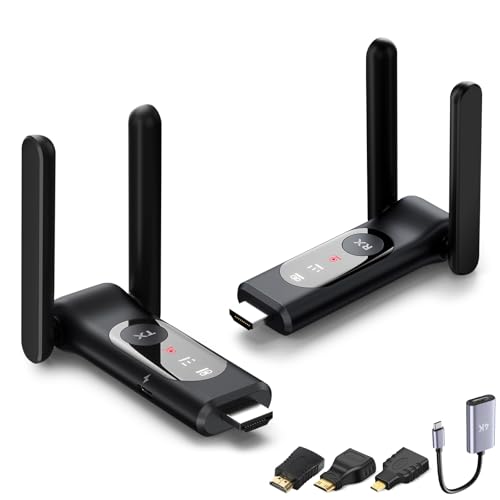
- Up to 8 receivers from one transmitter
- Dual-band 2.4GHz/5.8GHz with LED diagnostics
- Includes USB-C, Micro, and Mini HDMI adapters
Best For: Teams that need one source on many screens
Most Diagnostic-Friendly
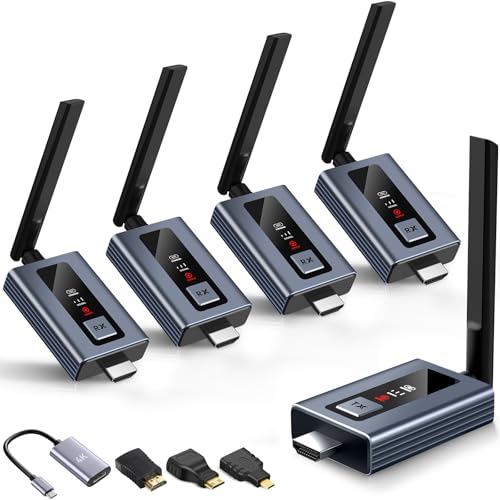
- Real-time LED display for signal and power
- Up to 6 screens with extra receivers
- Plug-and-play with HDMI, USB-C, mini, and micro adapters
Best For: Setups where live status feedback saves time
Portable Multi-Display Option

- Feeds up to 4 receivers from one transmitter
- Pre-paired setup with fast automatic pairing
- Compact design with fold-out antennas
Best For: Mobile setups that need quick, simple mirroring
Dual-Band Stability for Small Crews – Accsoon CineView HE Wireless HDMI
If you need video transmitters for multi camera setups that can keep a whole crew synced, the Accsoon CineView HE is built around practical production features: dual-band transmission, low latency, and support for sending one feed to multiple monitoring devices. It’s a good fit when you want stable wireless video for filmmaking, events, or live streaming without adding a complicated workflow.
Best For: Filmmakers, livestreamers, and crews that need reliable wireless monitoring across several devices
Pros:
- 2.4GHz + 5GHz dual-band design helps reduce interference in crowded shooting environments.
- Sub-0.06s latency and up to 1200ft range support longer wireless monitoring runs.
- Can transmit to up to 4 devices, including iOS and Android receivers.
- HDMI in plus zero-latency HDMI loop-out make on-camera monitoring easier.
Cons:
- Receivers, batteries, and charging cables are not included in the package.
- Maximum practicality depends on compatible Accsoon app and device setup.
Overall, the CineView HE is a strong option if you want a broadcast-style wireless monitoring tool that emphasizes stability and multi-device viewing. It’s especially appealing for teams that value long range and flexible power options over bare-minimum simplicity.
Easy Multi-Screen Casting – AIMIBO 1 TX to 4 RX Wireless HDMI
For buyers comparing video transmitters for multi camera setups or shared-screen workflows, the AIMIBO wireless HDMI kit focuses on simple plug-and-play mirroring to multiple displays. It ships pre-paired and supports up to 8 receivers, making it a straightforward choice for rooms or setups where several screens need the same feed.
Best For: Conference rooms, retail displays, and multi-screen environments that need easy wireless mirroring
Pros:
- Pre-paired kit is plug-and-play with no Bluetooth or Wi-Fi setup required.
- Supports up to 8 receivers or touchscreens for expanded viewing.
- Dual-band 2.4GHz/5.8GHz design and 0.1s delay help keep playback smooth.
- 4K decode with 1080p@60Hz output works with many HDMI devices.
Cons:
- Range is rated at 656ft in open areas, but walls and obstacles can reduce performance.
- This is more of a multi-display extender than a camera-production monitoring system.
In practice, this AIMIBO kit is best when you want simple wireless distribution to multiple screens without a complicated install. It offers a flexible display-sharing approach, but it’s most convincing for presentation and signage use rather than dedicated film-set monitoring.
All-in-One On-Set Monitoring – 1 TX to 5 RX System with 7" Screen
This wireless HDMI system is aimed squarely at crews that need flexible monitoring in multi-camera production setups. With a built-in 7-inch receiver display, HDMI loop out, and support for up to five receivers, it reduces the amount of extra gear you need on set while still giving multiple people a view of the feed.
Best For: Film crews, live production teams, and creators who want an all-in-one wireless monitoring kit
Pros:
- Built-in 7-inch monitor on the receiver removes the need for a separate screen.
- 1-to-5 receiver support is useful for shared on-set collaboration.
- 1080p@60Hz transmission with under 0.05s latency and up to 1312ft range.
- Includes HDMI loop out, IR remote support, and multiple power options.
Cons:
- Smartphone and tablet compatibility requires a Type-C to HDMI cable.
- Bulkier than simpler transmitter-receiver kits because of the built-in display.
If you want one wireless video kit that doubles as a monitoring station, this model stands out. It’s designed to streamline set workflows by combining range, low latency, and a built-in screen into a single package.
Simple 6-Screen Sharing – WELUSOPU 5.8G Wireless HDMI Extender
The WELUSOPU wireless HDMI kit is built for easy multi-display sharing, making it a practical option when you need video transmitters for multi camera setups or other source-to-screen workflows. It supports up to 6 receivers, uses dual-band wireless transmission, and aims to keep setup simple with no app, Wi-Fi, or Bluetooth required.
Best For: Users who want straightforward wireless mirroring to multiple displays with minimal setup
Pros:
- Supports up to 6 receivers for broad multi-display mirroring.
- Plug-and-play design avoids Bluetooth, Wi-Fi, and app setup.
- 5.8G/2.4G dual-band with auto frequency hopping helps resist interference.
- 4K input and 1080p output deliver solid picture quality for shared viewing.
Cons:
- Listed range is 165ft in open spaces, which is shorter than some pro-oriented systems.
- Touchscreen use is limited to mirroring; reverse control is not supported.
For buyers who value ease of use over advanced production tools, this WELUSOPU set gets the job done cleanly. It’s a sensible pick for multi-screen viewing environments where fast setup matters more than specialized film features.
Long-Range Pick – Wireless HDMI 1080P Extender with Loop Out
If you need video transmitters for multi camera setups or live monitoring, this wireless HDMI kit is built around long-distance point-to-point transmission and low-latency output. It keeps setup simple with plug-and-play operation while adding useful monitoring extras like loop out, dual HDMI out, and IR control for more flexible workflows.
Best For: Crews that need a long-range wireless HDMI link for cameras, projectors, or monitor feeds.
Pros:
- Up to 1300 ft range in open field with dual-antenna 2.4/5G transmission
- 0.05s latency and 1080p/60Hz support for real-time viewing
- Loop out on the transmitter and dual HDMI out on the receiver for easier monitoring
- Multiple power options, including NP-F series batteries and USB-C power
Cons:
- Walls, metal, bricks, or glass can reduce range significantly
- Best range is dependent on open, low-interference conditions
For users prioritizing reach and flexible monitoring, this model stands out for practical field use. It is a straightforward option when you want wireless HDMI without giving up local preview or remote control support.
Multi-Display Upgrade – Wireless HDMI Sender with 2 Receivers
For video transmitters for multi camera setups that need the same feed on several screens, this wireless HDMI kit focuses on multi-display casting and easy expansion. It supports multiple receivers, works with a broad set of source devices, and uses dual-band wireless transmission for a more stable viewing setup.
Best For: Environments that need one wireless HDMI source sent to multiple TVs or displays.
Pros:
- Can send video to up to 6 receivers in open environments
- Dual-band 5.8GHz/2.4GHz transmission with dual antennas for stability
- Plug-and-play design with no app required for basic setup
- Includes adapters for HDMI, micro HDMI, mini HDMI, and USB-C use
Cons:
- Range may drop to about 50 ft when passing through walls
- Not designed for TV-to-TV transmission
This is a practical choice when your priority is distributing one source to several displays instead of building a point-to-point link. Its strong compatibility and receiver expansion make it a good fit for classrooms, venues, and shared presentation spaces.
Most Flexible – Wireless HDMI Transmitter with 2 Receivers
If you’re comparing video transmitters for multi camera setups or multi-screen casting, this wireless HDMI transmitter is designed to send one source to several displays with minimal setup. It supports up to 6 receivers, uses dual-band transmission, and keeps the workflow simple with plug-and-play operation.
Best For: Users who want one transmitter to feed several receivers for monitoring, presentations, or shared viewing.
Pros:
- Supports up to 6 receivers simultaneously
- 165 ft range with 5.8G/2.4G dual-band and auto frequency hopping
- 4K input and 1080p output with stereo sound
- No app, Bluetooth, or WiFi required for basic operation
Cons:
- Open-space range is the stated best-case scenario
- Mobile device mirroring is app-based and limited to mirroring only
This model is a strong fit when you need broad receiver support without complicated configuration. Its combination of long-range wireless output, dual-band stability, and simple setup makes it well suited to practical multi-display use.
Scalable Multi-Screen Pick – 8-Screen Scale-Up Kit
If you’re comparing video transmitters for multi camera setups, this wireless HDMI kit stands out for scaling a single source to as many as 8 receivers. It’s built for plug-and-play use, with dual-band wireless, LED diagnostics, and included adapters that help simplify camera, laptop, and monitor connections in practical production or presentation setups.
Best For: Users who need one transmitter feeding multiple screens, with flexible device input options and simple setup.
Pros:
- Supports expansion from 1 transmitter to up to 8 receivers.
- Dual-band 2.4GHz/5.8GHz transmission with up to 165 ft range in open space.
- Plug-and-play design with smart LED status indicators.
- Includes USB-C, Micro HDMI, and Mini HDMI adapters for broader compatibility.
Cons:
- Range can drop through walls or glass.
- Requires recommended 5V/1A power for best stability.
- Not compatible with Dish Wally satellite receivers.
Overall, this is a strong choice when your priority is spreading a live HDMI feed to multiple displays without adding much setup complexity. The combination of receiver expansion, dual antennas, and clear status LEDs makes it especially practical for shared viewing or distributed screen monitoring.
Most Diagnostic-Friendly – LED Status 6-Screen Set
For buyers comparing video transmitters for multi camera setups, this upgraded wireless HDMI set is aimed at fast switching and easy monitoring. The LED display shows connection, signal, output, and power status in real time, while the plug-and-play design helps you get a feed from cameras, laptops, or projectors onto multiple screens with minimal effort.
Best For: Multi-screen setups that benefit from visible connection feedback and quick deployment.
Pros:
- LED screen shows connection, signal, output, and power status.
- Can expand to up to 6 screens/TVs with additional receivers.
- Claims 5-second plug-and-play setup with no apps or Bluetooth.
- Includes adapters for HDMI, USB-C, mini HDMI, and micro HDMI sources.
Cons:
- An antenna must be installed for proper operation.
- Wireless range can be affected by walls.
- Expansion requires a separately added receiver.
This model is a sensible pick if you want more visibility into what the system is doing while it’s running. With its status display and multi-screen expansion, it fits well in spaces where quick troubleshooting and dependable mirroring matter.
Portable Multi-Display Option – Portable 4-RX HDMI Extender
If you want video transmitters for multi camera setups that stay simple and portable, this wireless HDMI extender focuses on quick pairing and multi-screen output. It’s pre-paired, works without apps or Wi-Fi, and supports up to 4 receivers, making it useful when you need to mirror a camera or laptop feed to several displays.
Best For: Portable multi-display streaming where fast setup and compact hardware matter.
Pros:
- Supports transmission from 1 transmitter to up to 4 receivers.
- Pre-paired design with 5-10 second automatic pairing.
- Dual-band 2.4GHz/5GHz operation with up to 165 ft open-range claims.
- Compact body with unfoldable antennas for easier transport and setup.
Cons:
- Walls and ceilings reduce effective range.
- Recommended 5V/1A power is needed for stable operation.
- Only one transmitter can feed the receiver set at a time.
This is a practical option if mobility is part of the job and you want a transmitter that gets going fast. The compact design and automatic pairing make it appealing for quick deployments, especially when you’re moving between rooms or event spaces.
How We Picked These Video Transmitters for Multi Camera Setups
We prioritized systems that are actually useful in real production environments: stable wireless performance, low delay, support for multiple receivers, and easy setup. We also looked for clear HDMI compatibility, useful range claims, and features that matter on set such as loop out, dual-band operation, and plug-and-play pairing.
For Video Transmitters for Multi Camera Setups, the most important difference is not just distance. It is whether the unit can keep multiple monitors, switchers, or assistants in sync without introducing frustrating lag or dropouts.
Quick Comparison: What Matters Most
- Latency: Lower delay is better for live switching, on-camera monitoring, and talent feedback.
- Receiver count: Choose based on how many monitors or viewing stations you need now and later.
- Range: Published maximum range is useful, but walls, interference, and line-of-sight affect real performance.
- Resolution and frame rate: Make sure the system supports your source and display needs, especially if you work in 1080p or need cleaner decode.
- Connectivity: Loop out, dual-band support, and UVC/livestreaming features can simplify a production chain.
Key Buying Factors for Video Transmitters for Multi Camera Setups
Receiver Expansion
If your workflow may grow, look for systems that support additional receivers. That gives you flexibility for director views, client monitors, and secondary camera positions without replacing the entire kit.
Signal Stability
Stable wireless performance matters more than a big headline range. Dual-band or 5.8GHz operation can help reduce congestion, but the best choice depends on your venue and how crowded the wireless environment is.
Delay and Monitoring Use
For switching and live monitoring, low latency is critical. If the system will be used mainly for reference viewing, slightly higher delay may be acceptable, but for production work, lower is always preferable.
Ease of Setup
Plug-and-play systems are usually the safest choice for teams that need speed and consistency. Clear pairing, visible status indicators, and straightforward power options reduce mistakes during setup.
Outputs and Workflow Features
Loop out can let you feed a local monitor while transmitting wirelessly. That is especially helpful when the operator needs a direct display alongside remote receivers.
Who Should Buy Which Video Transmitters for Multi Camera Setups?
Live streamers and small production teams: Choose a low-latency system with strong receiver support and dependable range.
Event videographers: Prioritize stability, quick setup, and enough receivers for clients, directors, or stage monitors.
Studio users: Look for smoother integration, loop out, and the ability to expand the system as your camera count grows.
Budget-focused buyers: A simpler plug-and-play transmitter can be the right fit if you only need basic wireless monitoring and short-range use.
In short, the best pick is the one that matches your camera count, monitoring needs, and working environment—not just the one with the largest range number on the box.