Vertical mice can provide a more natural hand position while still offering the buttons, sensitivity, and customization gamers need. The best choice depends on your grip, preferred genres, desk setup, and tolerance for extra weight or adjustment time.
We compared 10 vertical gaming mice across wired and wireless designs, programmable controls, DPI ranges, joystick-style features, and ergonomic support to help you find a comfortable fit for long sessions.
Best 10 Vertical Mice for Gaming Picks for 2026
Rocker-Control Precision

- Five-direction thumb rocker
- 11 programmable buttons with onboard memory
- 10,000 DPI and customizable lighting
Best For: Right-handed FPS, MOBA, and MMO players needing extensive thumb controls
Ergonomic Wireless Comfort

- 57-degree vertical handshake angle
- Wireless operation with up to four months of battery life
- 4,000 DPI sensor with cursor-speed switch
Best For: Comfort-focused users who also want occasional gaming capability
MMO Command Center
Redragon M811 MMO Gaming Mouse

- 15 programmable buttons with eight side buttons
- Five DPI levels and software adjustment options
- Customizable RGB lighting and controls
Best For: MMO players and multitaskers who need many accessible commands
Tri-Mode Rocker Flexibility
Wireless Vertical Gaming Mouse

- Bluetooth, 2.4GHz wireless, and USB-C wired modes
- 12 programmable buttons and five-direction rocker
- Up to 24,000 DPI with RGB effects
Best For: Right-handed gamers needing flexible connectivity and extensive controls
Feature-Rich Wireless Gaming Pick

- 24,000 DPI sensor with gaming-focused performance specifications
- Five-direction rocker plus 11 programmable buttons
- Bluetooth, 2.4GHz wireless, and wired connectivity
Best For: Right-handed FPS, MOBA, and MMO players needing many customizable controls
Simple RGB Wired Value Pick

- 57-degree ergonomic grip with lightweight construction
- Four DPI settings up to 3,200 and plug-and-play USB setup
- RGB lighting, metal scroll wheel, and two-year warranty
Best For: Right-handed users seeking a simple wired mouse for casual gaming and everyday comfort
Best for Immersive FPS Play
ErgoStrike7 Vertical Gun-Grip Mouse

- 65° vertical pistol-style grip
- Mechanical trigger with recoil feedback
- PAW3395 sensor and tri-mode connectivity
Best For: FPS players seeking an immersive trigger-based design
Best Joystick Controls
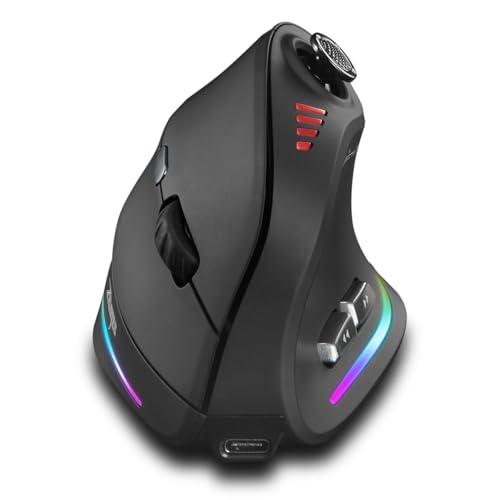
- Built-in five-way joystick
- 12 programmable buttons and 24,000 DPI
- Rechargeable battery with dual wireless modes
Best For: Users wanting joystick input and extensive customization
Rocker-Control Precision – TRELC Wired Gaming Mouse
For gamers comparing vertical mice for gaming, the TRELC stands out with a thumb-operated five-direction rocker and a wired connection. Its ergonomic handshake grip, programmable controls, adjustable DPI, and onboard memory make it suited to players who want extensive customization without wireless charging concerns.
Best For: Right-handed FPS, MOBA, and MMO players who want a vertical design with rocker-based controls.
Pros:
- Five-direction rocker can replace five traditional keys for thumb control.
- All 11 buttons support customization through the included software.
- Programmable settings are saved onboard for use with another computer.
- Offers five DPI levels from 1,500 to 10,000 and customizable lighting effects.
Cons:
- Wired design does not provide wireless or Bluetooth flexibility.
- Right-hand orientation limits its suitability for left-handed users.
- Button and software customization may require setup time.
The TRELC is a specialized option for gamers who can make practical use of its rocker and 11-button layout. It is especially compelling for command-heavy genres, though its wired, right-handed design is less universal.
Ergonomic Wireless Comfort – Logitech MX Vertical
The Logitech MX Vertical is a comfort-focused choice among vertical mice for gaming, although its four-button layout and 4,000 DPI sensor are better suited to general computer use than button-heavy competitive play. Its 57-degree angle, thumb rest, wireless operation, and textured grip emphasize reduced wrist pressure and relaxed control.
Best For: Right-handed users who prioritize ergonomic comfort and wireless convenience over extensive gaming controls.
Pros:
- 57-degree vertical angle encourages a natural handshake position.
- Ergonomist-approved design is intended to reduce wrist pressure and muscle strain.
- Wireless range reaches up to 10 meters, with a rechargeable battery rated for up to four months.
- Cursor-speed switch and 4,000 DPI sensor support quick sensitivity changes.
Cons:
- Only four buttons provide less gaming customization than MMO-oriented models.
- Designed for right-handed use.
- Its ergonomic focus may not satisfy players seeking high-button-count controls.
The MX Vertical is best viewed as an ergonomic everyday mouse that can handle casual gaming. Choose it when posture, grip comfort, and wireless use matter more than macros and numerous game commands.
MMO Command Center – Redragon M811 MMO Gaming Mouse
The Redragon M811 is a strong contender for players comparing vertical mice for gaming who need many accessible commands. Its 15 programmable buttons, including eight side buttons, combine with adjustable DPI levels and RGB lighting to support MMO keybinds, work shortcuts, and long sessions.
Best For: MMO players and multitaskers who want a high-button-count wired mouse with software customization.
Pros:
- 15 programmable buttons provide extensive access to hotkeys and macros.
- Eight dedicated side buttons are useful for MMO keybinds.
- Five DPI levels can be switched for different game needs, with software options up to 12,400 DPI.
- Software supports button assignments, media controls, DPI settings, and 16.8-million-color lighting.
Cons:
- Wired connection offers no wireless flexibility.
- Right-handed design is not intended for left-handed users.
- Its 15-button layout may feel excessive for users wanting a simple mouse.
The M811 makes the most sense when your games or workflows benefit from numerous immediate commands. Its wired construction and dense button layout trade simplicity for control, particularly in MMO play.
Tri-Mode Rocker Flexibility – Wireless Vertical Gaming Mouse
For shoppers seeking versatile vertical mice for gaming, this model combines a five-direction rocker with 12 programmable buttons and three connection modes. Bluetooth, 2.4GHz wireless, and USB-C wired operation make it adaptable across computers and tablets, while its ergonomic shape targets right-handed users who want a more natural grip.
Best For: Right-handed gamers who want rocker controls, extensive button programming, and wireless or wired connectivity.
Pros:
- Supports Bluetooth 5.0, 2.4GHz wireless, and USB-C wired connections.
- Five-direction rocker provides forward, backward, left, right, and click inputs.
- 12 programmable buttons support macros, with settings saved onboard.
- Offers five DPI presets up to 24,000 and five dynamic RGB effects.
Cons:
- Right-handed shape is unsuitable for left-handed users.
- Button programming requires the included software.
- Wireless use depends on recharging, while the supplied details do not specify battery life.
This is the most connectivity-flexible option in the group, balancing gaming controls with Bluetooth and wireless convenience. It is a practical fit for players who move between devices and want a vertical grip without giving up wired operation.
Large-Hand RGB Comfort Pick – DELUX M618PLUS RGB
For shoppers comparing vertical mice for gaming, the DELUX M618PLUS RGB combines a large-hand ergonomic shape with adjustable sensitivity, programmable controls, and a wired connection. Its vertical grip is designed for hands measuring about 6.7–7.5 inches long and 3.1–3.9 inches wide, though new users may need a few days to adapt.
Best For: Right-handed users with large hands who want a stable wired mouse for gaming, work, and everyday use.
Pros:
- Six DPI levels from 400 to 4,000, with up to 12,800 DPI available through the driver.
- Six programmable buttons, removable wrist rest, and a 1.6-meter USB cable.
- RGB backlighting, silent primary clicks, and plug-and-play Windows compatibility.
Cons:
- The large 210-gram body may feel bulky for smaller hands or users who prefer lightweight mice.
- It is wired rather than wireless.
- Side buttons and the driver are unavailable on Mac/iOS systems.
The DELUX is a comfort-focused option with useful gaming features, but its large right-handed design makes hand-size fit especially important. Choose it if you prioritize wrist support, quiet clicks, and consistent wired performance over portability.
Feature-Rich Wireless Gaming Pick – TRELC 5D Rocker Mouse
The TRELC 5D Rocker is one of the more gaming-oriented vertical mice for gaming, pairing a 24,000 DPI sensor with an integrated five-direction rocker and 11 programmable buttons. Tri-mode connectivity also lets it switch among Bluetooth, 2.4GHz wireless, and wired USB connections.
Best For: Right-handed FPS, MOBA, and MMO players who want extensive controls and flexible connectivity.
Pros:
- PMW3311 sensor supports up to 24,000 DPI, 300 IPS movement speed, and 35G acceleration.
- Five-direction rocker provides front, rear, left, right, and downward thumb inputs.
- Supports Bluetooth 5.0, 2.4GHz wireless, and wired USB modes.
- All 11 buttons can be customized through software, with settings saved to the mouse.
Cons:
- The advanced button layout and vertical grip may require an adjustment period.
- It is designed for right-handed users only.
- Software customization is required to configure the programmable controls.
With its rocker, high DPI ceiling, onboard profile storage, and three connection modes, the TRELC is the strongest gaming-first choice in this roundup. It makes the most sense for players who will actively use its extra controls rather than seeking a simple ergonomic office mouse.
Simple RGB Wired Value Pick – Nulea M504
The Nulea M504 offers a straightforward entry point for shoppers seeking vertical mice for gaming, with a 57-degree ergonomic grip, four DPI settings, and plug-and-play USB operation. It is better suited to casual gaming and general computer use than to players who need extensive button customization.
Best For: Right-handed users who want an affordable, lightweight wired vertical mouse with RGB lighting for everyday use and casual gaming.
Pros:
- 57-degree vertical design aims to keep the forearm in a more natural position.
- Four DPI settings from 800 to 3,200 cover browsing, editing, and general use.
- Plug-and-play USB setup, 5.9-foot cable, RGB lighting, and a metal non-slip scroll wheel.
- Two-year warranty and lightweight 0.18-kilogram construction.
Cons:
- Buttons are non-programmable, limiting gaming customization.
- Forward and backward buttons are not compatible with Mac OS.
- The 3,200 DPI maximum is lower than the other listed options.
The Nulea keeps the feature set simple and accessible, making it a practical choice for comfort-focused users who do not need macros or high sensitivity. Its modest DPI range and fixed controls make it less suitable for competitive gaming.
Best MMO Button Density – SOLAKAKA E9 Vertical MMO Gaming Mouse
For gamers comparing vertical mice for gaming, the SOLAKAKA E9 stands out with a 45° ergonomic grip and 10 programmable side buttons. Its PAW3311 sensor, tri-mode connectivity, onboard memory, and RGB controls make it especially adaptable for MMO play and extended sessions.
Best For: MMO players and users who want many remappable controls in a wrist-friendly vertical design.
Pros:
- 45° handshake-style grip is designed to reduce wrist pressure during long sessions.
- Ten fully programmable side buttons provide extensive MMO and macro control.
- Supports 2.4GHz, Bluetooth 5.0, and USB-C wired connections.
- Onboard memory lets you save settings for use across Windows, Mac, Linux, and ChromeOS after configuration on Windows.
Cons:
- Browser-based configuration requires a Windows PC.
- The dense side-button layout may take time to learn.
- It is designed for right-handed use.
The E9 is a strong choice when button quantity matters as much as ergonomic positioning. It offers useful flexibility for MMO commands and multi-device setups, though users without Windows access may be limited when changing settings.
Best for Immersive FPS Play – ErgoStrike7 Vertical Gun-Grip Mouse
The ErgoStrike7 takes a distinctive approach to vertical mice for gaming with a 65° pistol-style grip and a mechanical trigger. Its PAW3395 sensor, tri-mode connection options, and adjustable recoil feedback target players who want a more immersive FPS experience rather than a conventional mouse feel.
Best For: Right-handed FPS and action-game players who value trigger feedback and a gun-grip design.
Pros:
- 65° vertical grip is designed around a natural handshake position.
- Mechanical trigger and adjustable linear motor add recoil feedback.
- PAW3395 sensor supports sensitivity up to 26,000 DPI.
- Offers 2.4GHz wireless, Bluetooth 5.1, and wired USB-C connections.
Cons:
- The 190 g weight may feel substantial compared with lighter gaming mice.
- Its specialized pistol shape may not suit users seeking a conventional design.
- Customization software requires Windows 10 or later.
This is the most specialized option in the group. The ErgoStrike7 makes sense for players who actively want recoil immersion and a vertical gun grip, while its weight and unusual shape may be less appealing for general-purpose gaming.
Best Joystick Controls – TKMARS Vertical Gaming Mouse
Among vertical mice for gaming, the TKMARS model combines a natural-grip design with a built-in five-way joystick and 12 programmable buttons. It also offers adjustable sensitivity up to 24,000 DPI, dual wireless connectivity, rechargeable power, and RGB lighting for a versatile desktop setup.
Best For: Gamers and productivity users who want joystick input, extensive button customization, and rechargeable wireless operation.
Pros:
- Five-way joystick adds directional and press controls for games and software.
- Twelve programmable buttons offer substantial customization potential.
- Bluetooth 5.0 and 2.4GHz support allow connections to two devices.
- Built-in 800mAh rechargeable battery, RGB lighting, and USB-C charging add convenience.
Cons:
- The listed 0.3 kg weight may feel heavy for users who prefer lightweight mice.
- Compatibility is listed for Windows and macOS rather than a wider range of operating systems.
- Its many controls may require adjustment before they feel intuitive.
The TKMARS is a feature-rich pick for buyers who want more than standard mouse buttons. The joystick and rechargeable battery broaden its usefulness, while the relatively substantial build and right-handed shape are worth considering before purchase.
How We Picked the Best Vertical Mice for Gaming
We evaluated these Vertical Mice for Gaming based on the features that matter most during real PC use: hand comfort, control layout, sensor adjustability, connection type, customization, and compatibility with different gaming styles. We also considered whether each mouse’s shape and button placement suit smaller, average, or larger hands.
High button counts can benefit MMO and productivity users, while FPS players may prefer a simpler layout that keeps essential controls easy to reach. Wireless models were judged for connection flexibility and desk convenience, while wired options may appeal to buyers who want consistent power without charging.
Quick Comparison
| Best For | Features to Prioritize | Likely Best Fit |
|---|---|---|
| MMO and strategy gaming | Many programmable side buttons, onboard profiles, and high customization | Multi-button vertical models |
| FPS gaming | Stable tracking, manageable weight, quick-access controls, and a secure grip | Simpler ergonomic or recoil-focused designs |
| Mixed gaming and work | Comfort, wireless flexibility, adjustable DPI, and reliable software | Wireless hybrid models |
| Large hands | Taller shell, longer body, and generous palm support | Large-hand ergonomic designs |
| Budget-conscious buyers | Wired connectivity, essential programmable buttons, and solid sensor adjustment | Feature-rich wired mice |
Key Buying Factors for Vertical Mice for Gaming
Shape and Hand Fit
A vertical mouse should let your hand rest in a handshake-like position without forcing your wrist outward. Check the manufacturer’s dimensions and hand-size guidance, and pay attention to thumb and pinky support. A shell that is too small can create finger tension, while an oversized design may reduce precision.
Buttons and Control Layout
Count more than the headline button total. Consider whether the side buttons are reachable without shifting your palm and whether the layout suits your games. MMO players may benefit from 10 or more remappable controls, whereas competitive FPS players often prefer fewer buttons that are easy to distinguish.
DPI and Sensor Behavior
A high maximum DPI does not automatically mean better performance. Look for adjustable sensitivity, consistent tracking, and settings that match your display and play style. Very high DPI ranges are useful mainly for customization rather than as a quality guarantee.
Wired Versus Wireless
Wired mice avoid charging and usually offer straightforward plug-and-play setup. Wireless models provide a cleaner desk and more freedom of movement, but confirm whether they use Bluetooth, 2.4GHz, or both and check how charging is handled.
Software, Memory, and Compatibility
Programmable buttons are most useful when the software is dependable and profiles can be saved. Onboard memory is valuable if you move between computers or want settings to remain available without running background software. Verify operating-system support before buying.
Who Should Buy Which Vertical Mice for Gaming?
Choose a multi-button vertical mouse if you play MMOs, use complex shortcuts, or want to combine gaming with productivity macros. Pick a wireless model if desk space, cable freedom, and switching between devices matter most. A wired option is a practical choice for stationary setups, frequent long sessions, or buyers who do not want to manage battery life.
FPS players should prioritize a comfortable, stable grip and predictable tracking over maximum button count or headline DPI. Buyers with large hands should focus on body length and palm support, while those new to vertical mice should expect a short adjustment period and select a model with an easy-to-reach core button layout.