A mobile TV cart can turn one display into a flexible teaching tool, making it easier to share lessons, demonstrations, presentations, and video content across classrooms or activity areas.
These 10 options cover common classroom needs, from compact carts for smaller screens to heavy-duty stands for large displays. Before choosing, confirm TV compatibility, weight capacity, VESA fit, height range, wheel performance, and available storage.
Best 10 TV Rolling Carts for Classrooms Picks for 2026
Best Overall

- Supports 23-65 inch TVs up to 99 lb
- Adjustable shelf and 5° down/10° up tilt
- Locking casters and 10-year warranty
Best For: Flexible classroom and office presentations
Best Warranty

- Supports 23-65 inch TVs up to 88 lb
- Five-year manufacturer warranty
- Adjustable shelf, tilt, and locking wheels
Best For: Portable classroom displays with warranty coverage
Best for Easy Setup

- No-drill fit for 23-65 inch TVs up to 88 lb
- Shelf adjusts from 6.8 to 35.2 inches
- Lockable 360° casters and cable management
Best For: Frequently moved classroom and presentation setups
Best Heavy-Duty Option
ECOTINY Heavy-Duty Rolling TV Stand

- Supports 32-85 inch TVs up to 154 lb
- 33 lb reinforced equipment tray
- Three heights, ±12° tilt, and locking wheels
Best For: Large displays and equipment-heavy classroom setups
Best Classroom Storage Pick
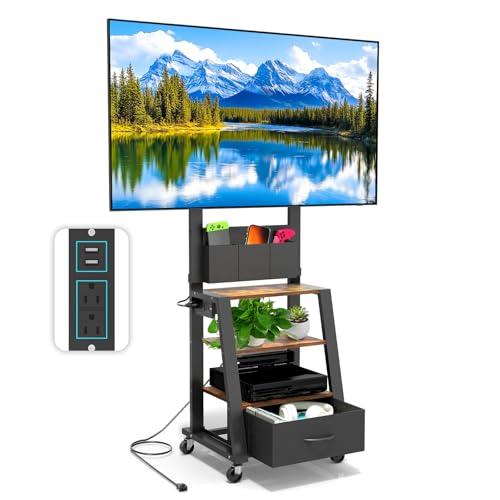
- Three shelves plus a hidden drawer
- Built-in USB and AC power outlets
- Supports TVs up to 60 inches and 160 pounds
Best For: Classrooms needing organized storage and convenient device charging
Best Large-Screen Classroom Pick

- Supports 49- to 80-inch TVs
- Lockable 360-degree wheels
- Includes wood shelves and cable management
Best For: Shared classrooms using large presentation or media displays
Best for Comfort

- Supports displays up to 100 inches
- Up to 220-pound stated capacity
- 55- to 72-inch adjustable height
Best For: Classrooms using large TVs, smartboards, or interactive displays
Large-Screen Classroom Mobility
ONKRON 32-75-Inch Rolling TV Stand

- Supports 32-75-inch TVs with broad VESA compatibility
- Adjusts from 39.3 to 57.6 inches
- Includes AV and webcam shelves plus locking wheels
Best For: Large classroom displays, presentations, and video conferencing
Versatile Schoolroom Value
BONTEC 23-65-Inch Rolling TV Stand
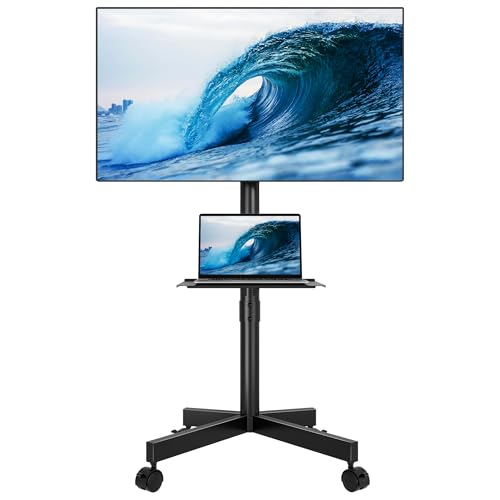
- Fits 23-65-inch TVs up to 88 pounds
- Provides an adjustable mount and media shelf
- Uses smooth wheels with locking brakes
Best For: Everyday classroom presentations and movable media setups
Compact Flexible Setup
Xyndyx 23-60-Inch Mobile TV Cart

- Supports 23-60-inch TVs up to 88 pounds
- Offers height-adjustable brackets and a shelf
- Includes locking wheels and a 10-year manufacturer warranty
Best For: Compact classrooms and shared instructional spaces
Best Overall – PERLESMITH Rolling TV Cart
For classrooms needing a flexible display setup, the PERLESMITH is a well-rounded choice among tv rolling carts for classrooms. It supports 23- to 65-inch TVs up to 99 pounds, includes an adjustable media shelf, and offers useful tilt and cable-management features.
Best For: Classrooms, offices, and presentation spaces that need a strong, adjustable cart for standard-size TVs.
Pros:
- Supports TVs up to 99 pounds and VESA patterns through 400x400mm.
- Adjustable AV shelf sits 12 to 24 inches from the floor.
- Locking casters, cable management, and a 10-year warranty add practical value.
Cons:
- Its listed screen-size range stops at 65 inches.
- The shelf adjustment range may be limited for unusually tall presentation setups.
With its higher weight capacity, adjustable shelf, tilt range, and long warranty, this cart is a strong all-purpose option for moving a classroom display between rooms.
Best Warranty – Rfiver Mobile TV Stand
The Rfiver Mobile TV Stand is a practical pick for tv rolling carts for classrooms where easy relocation and straightforward setup matter. Its all-metal frame supports TVs up to 88 pounds, while the adjustable shelf, tilt function, and cable management help keep lessons organized.
Best For: Schools seeking a portable TV cart with a five-year manufacturer warranty and a compact, movable design.
Pros:
- Fits 23- to 65-inch TVs with VESA support up to 400x400mm.
- Includes an adjustable shelf for a laptop or other AV equipment.
- Offers locking wheels, no-drill assembly, cable management, and a five-year warranty.
Cons:
- Its 88-pound capacity is lower than the PERLESMITH option.
- The product notes do not specify the shelf’s height range.
This cart balances portability, classroom-friendly features, and warranty coverage. It is especially appealing when a school wants a movable display without wall drilling.
Best for Easy Setup – BONTEC Rolling TV Stand
The BONTEC Rolling TV Stand is designed for classrooms that frequently move a display between teaching areas. Among tv rolling carts for classrooms, it stands out for organized assembly instructions, lockable 360-degree casters, a broad shelf-height range, and integrated cable routing.
Best For: Classrooms, meeting rooms, and temporary presentation areas where simple setup and frequent movement are priorities.
Pros:
- Fits 23- to 65-inch TVs up to 88 pounds with VESA support through 400x400mm.
- Four lockable 360-degree casters support movement and stability.
- Media shelf adjusts from 6.8 to 35.2 inches and includes cable management.
Cons:
- Its one-year warranty is shorter than the warranty on the PERLESMITH and Rfiver carts.
- It supports less weight than the PERLESMITH model.
The BONTEC is a sensible choice for everyday classroom use when the cart may need to roll between rooms, fold into different teaching arrangements, or hold a laptop and other presentation equipment.
Best Heavy-Duty Option – ECOTINY Heavy-Duty Rolling TV Stand
For classrooms using a large or heavy display, the ECOTINY offers substantially more capacity than typical tv rolling carts for classrooms. It supports TVs up to 154 pounds, carries up to 33 pounds on its reinforced tray, and accommodates screens from 32 to 85 inches.
Best For: Large classrooms, auditoriums, training rooms, and schools with heavier TVs or multiple AV components.
Pros:
- Supports 32- to 85-inch TVs with a 154-pound TV capacity.
- Reinforced tray holds up to 33 pounds for presentation equipment.
- Offers three height levels, ±12-degree tilt, locking 360-degree wheels, and cable management.
Cons:
- It does not support smaller TVs below 32 inches.
- Its one-year warranty is relatively limited.
- The heavier-duty design may be more capacity than a small classroom needs.
This is the strongest fit for schools prioritizing load capacity and large-screen compatibility. Its height settings and tilt range also make it suitable for both seated instruction and standing presentations.
Best Classroom Storage Pick – Power-Ready Rolling TV Cart
For classrooms needing tv rolling carts for classrooms with built-in organization, this Hellsehen model combines a mobile TV mount with three open shelves, a hidden drawer, and an integrated power outlet. It supports 23- to 60-inch screens weighing up to 160 pounds, though you should confirm the TV’s VESA pattern and measurements before buying.
Best For: Classrooms that need storage for media accessories, books, or presentation equipment alongside a movable display.
Pros:
- Three open shelves and a hidden drawer help keep classroom equipment organized.
- Built-in power outlet includes two USB ports and two AC ports for compatible devices.
- Four 360-degree wheels, including two lockable casters, support room-to-room movement.
- Each shelf is described as supporting up to 110 pounds.
Cons:
- The stated screen range tops out at 60 inches, limiting compatibility with larger classroom displays.
- Assembly is required.
- The 4.7-foot power cord may require thoughtful placement near a wall outlet.
This is a practical choice when storage and charging access matter as much as mobility. Its relatively compact design can fit smaller classroom areas, while the locking wheels help secure it once positioned.
Best Large-Screen Classroom Pick – Rolling Easel TV Stand
Among tv rolling carts for classrooms, the ECOTINY rolling easel stand is suited to larger displays, supporting most 49- to 80-inch TVs up to 110 pounds. Its lockable wheels, media shelves, and cable-management system make it useful for classrooms that regularly move a presentation screen between rooms.
Best For: Classrooms, studios, and shared learning spaces using a large TV with streaming or presentation accessories.
Pros:
- Fits many 49- to 80-inch LCD, LED, and OLED TVs with VESA patterns from 200x200mm to 600x400mm.
- Four 360-degree wheels include brakes for mobility and positioning.
- Wood shelves provide space for consoles, set-top boxes, and streaming devices.
- Integrated cable management helps reduce visible cord clutter.
Cons:
- Its 49-inch minimum screen size may be excessive for small classrooms or compact displays.
- The 110-pound capacity is lower than some heavy-duty classroom carts.
- Assembly is likely needed, though the supplied notes do not specify assembly details.
The easel-inspired frame offers a less bulky alternative to a traditional console while still providing useful media storage. Check both the TV’s VESA dimensions and weight before selecting it for a classroom installation.
Best for Comfort – Adjustable Mobile TV Cart
For classrooms using a large interactive display or smartboard, this Hellsehen cart emphasizes capacity and adjustability. It supports screens from 42 to 100 inches, offers a 55- to 72-inch height range, and includes a large middle shelf for substantial AV equipment.
Best For: Classrooms, conference rooms, and training spaces with large, heavy displays or interactive boards.
Pros:
- Heavy-duty metal construction is designed for large displays and demanding setups.
- Supports screens from 42 to 100 inches and up to 220 pounds, according to the supplied notes.
- Height adjusts from 55 to 72 inches for different viewing situations.
- Large middle shelf is listed with a 176-pound capacity for AV equipment.
Cons:
- The larger, heavy-duty design may take more floor space than a compact classroom cart.
- Its broad compatibility still requires checking the display’s VESA pattern before installation.
- Assembly and disassembly are required.
This is the strongest fit for classrooms that need a substantial mobile base rather than a lightweight TV stand. The high weight capacity, adjustable height, and locking casters make it especially appropriate for interactive displays and large presentation screens.
Large-Screen Classroom Mobility – ONKRON 32-75-Inch Rolling TV Stand
For classrooms that use larger displays, the ONKRON TS1571-B is one of the more capable tv rolling carts for classrooms. It supports 32- to 75-inch TVs, offers a height range from 39.3 to 57.6 inches, and uses locking wheels for moving between rooms or securing the screen during lessons.
Best For: Classrooms, training rooms, and shared spaces using large TVs or video-conferencing equipment.
Pros:
- Supports TVs up to 75 inches and 110 pounds, with a stated maximum load capacity of 132 pounds.
- Adjustable height helps position the display for presentations, training, and video calls.
- Includes a height-adjustable AV shelf, webcam shelf, cable channels, and locking wheels.
Cons:
- The larger size and alloy-steel frame may be more than needed for small classrooms or compact displays.
- TV size, weight, and VESA pattern must be checked before installation.
This is the strongest option here for classrooms needing broad screen-size support and extra equipment storage. Its five-year warranty and cable-management features add practical value for frequently used shared spaces.
Versatile Schoolroom Value – BONTEC 23-65-Inch Rolling TV Stand
The BONTEC is a practical choice among tv rolling carts for classrooms when you need a movable stand for a small- or medium-sized display. It supports TVs from 23 to 65 inches, holds up to 88 pounds, and combines height adjustment, a media shelf, cable management, and locking wheels.
Best For: Classrooms and school spaces that move a TV between lessons, presentations, or rooms.
Pros:
- Works with many 23- to 65-inch TVs and VESA patterns up to 400x400mm.
- Adjustable mount and media shelf support flexible viewing and accessory storage.
- Heavy-duty steel construction, smooth wheels, and locking brakes suit frequent movement.
Cons:
- Its 88-pound capacity and 400x400mm maximum VESA pattern limit compatibility with some larger or heavier TVs.
- The supplied details list a 12-month warranty, shorter than the ONKRON option.
Choose this model if your classroom uses a standard-size display and benefits from a shelf for a laptop, console, or media player. It offers a useful balance of mobility and everyday functionality without targeting the largest screens.
Compact Flexible Setup – Xyndyx 23-60-Inch Mobile TV Cart
The Xyndyx mobile cart is a straightforward option for classrooms needing tv rolling carts for classrooms that can move between teaching areas. It supports 23- to 60-inch TVs up to 88 pounds, includes height-adjustable brackets and a shelf, and uses lockable caster wheels for mobility and stationary use.
Best For: Classrooms, conference rooms, and compact spaces that need a flexible 23- to 60-inch display stand.
Pros:
- Supports common LCD, LED, OLED, and curved TVs up to 60 inches and 88 pounds.
- Height-adjustable brackets help tailor the viewing position for work, gaming, or instruction.
- Locking wheels, a compact design, included hardware, and a stated 10-year manufacturer warranty add convenience.
Cons:
- The maximum 60-inch screen size is less than the ONKRON and slightly below the BONTEC listing.
- VESA support is limited to patterns up to 400x400mm.
This cart makes sense when space efficiency and easy repositioning matter more than maximum screen capacity. Its included shelf and long stated warranty make it a practical fit for classrooms that share one display across multiple areas.
How We Picked the Best TV Rolling Carts for Classrooms
We focused on features that matter in schools and other shared learning environments: supported screen sizes, maximum load, VESA compatibility, height adjustment, tilt capability, wheel design, locking mechanisms, shelves, cable management, and overall versatility. Because classroom layouts vary, the selection includes compact carts for everyday mobility, heavy-duty models for large displays, and units with shelves or integrated power access.
Always compare the cart’s specifications with your television’s exact model. A listed screen-size range is only a starting point; the mounting pattern, total weight, center of gravity, and connector placement also affect fit and stability.
Quick Comparison
| What to Compare | Why It Matters | Best For |
|---|---|---|
| Screen and weight rating | Prevents overloading and improves stability | Large displays or frequent relocation |
| VESA range | Determines whether the mounting brackets fit your TV | Mixed-brand classroom fleets |
| Height and tilt adjustment | Helps reduce glare and improve viewing angles | Flexible seating and presentations |
| Locking casters | Keeps the cart in place during instruction | Busy classrooms and shared spaces |
| Shelves or storage | Holds players, remotes, laptops, or accessories | Media-heavy teaching setups |
Key Buying Factors for TV Rolling Carts for Classrooms
Fit, Capacity, and Stability
Choose a cart rated comfortably above your TV’s actual weight rather than matching the limit exactly. Large screens need a wide, sturdy base, while smaller classrooms may benefit from a narrower footprint. Check the VESA mounting pattern and whether the hardware supplied suits your display.
Mobility and Positioning
Look for smooth-rolling casters that can cross the flooring used in your building. Locking wheels are essential when students are moving nearby. Height adjustment is useful for switching between seated instruction, standing presentations, and different room layouts; tilt can help manage overhead lighting and glare.
Cable Management and Equipment Storage
Built-in cable routing keeps cords away from wheels and reduces trip hazards. A shelf is useful for a streaming device, laptop, game console, or presentation accessories, but verify its weight rating. If the cart includes a power outlet, check its electrical rating and place the unit where cords will not create a walkway obstruction.
Assembly and Daily Safety
Prioritize clear instructions, secure mounting hardware, and a frame that does not wobble after assembly. For a school or district purchase, establish a simple policy: lock the casters during use, route cables safely, avoid pushing the cart with equipment unsecured, and use two people when relocating a large screen.
Who Should Buy Which TV Rolling Carts for Classrooms?
Choose a compact, adjustable cart if the display moves between smaller classrooms or activity stations. A shelf-equipped model is better for teachers who regularly connect laptops, media players, or accessories. For 75-inch-and-larger TVs, prioritize a heavy-duty frame, generous weight capacity, and a broad base over extra storage. If your rooms have variable seating or strong overhead lighting, prioritize height and tilt adjustment. For a shared fleet with different television brands, select the model with the widest verified VESA range and enough capacity for future upgrades.