Finding the right headphones for calls is about more than sound quality. A clear microphone, comfortable fit, and reliable connection matter most when you’re on meetings, customer calls, or long conversations.
Below, we’ve narrowed the field to 10 practical options for different needs, from wired USB headsets to wireless models with noise-canceling mics and easy mute controls.
Best 10 Headphones for Calls Picks for 2026
Wired USB Reliability
Logitech H390 USB-A Headset for Calls

- USB-A plug-and-play setup
- Noise-canceling rotating mic
- In-line mute and volume controls
Best For: PC and Chromebook users who want a simple wired call headset
Noise-Canceling Wireless Pick
ANC & ENC Work Headset with Dongle

- ANC for listening and ENC for voice pickup
- Qualcomm USB-A dongle for PC/Mac
- Flip-to-mute mic with long battery life
Best For: Remote work and busy environments where call clarity matters
Simple USB-C Earbud Choice

- USB-C wired connection
- Built-in mic and remote controls
- Comfort-focused earbud shape
Best For: USB-C users who want compact earbuds for everyday calls
Compact Single-Ear Option
HEIBAS Bluetooth Earpiece for Work Calls
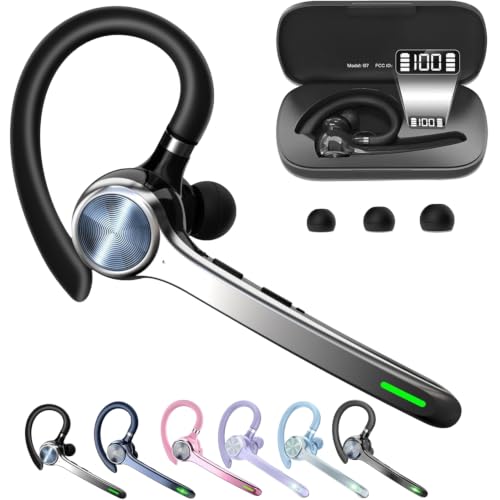
- Lightweight single-ear fit
- Charging case with power display
- Long talk time with mute button
Best For: Hands-free callers who want a compact earpiece
Clear Call Headset
JIAMQISHI USB Headset with Mic

- Noise-cancelling boom mic helps reduce background noise.
- USB + 3.5mm connection works with many devices.
- Memory foam earpads and adjustable headband improve comfort.
Best For: Home office, online class, and everyday office calls
Classic Budget Call Headset

- Noise-cancelling mic reduces room noise for calls.
- Rotating boom can be worn on either side.
- Adjustable headband offers a custom fit.
Best For: Budget buyers who need a basic wired call headset
Lightweight Call Earbuds

- Lightweight in-ear design is built for comfort.
- Noise-filtering mic supports clearer calls.
- Inline remote handles calls and media controls.
Best For: Portable calling, online classes, and travel
Wireless Work Call Headset
Wireless Headset for Clear Work Calls

- Noise reduction targets busy environments and meetings.
- One-click mute supports quick privacy during calls.
- Up to 35 hours of use suits long workdays.
Best For: Remote work, PC meetings, and call-center style use
Wired Office Call Headset
Lightweight Call Headset for PC

- AI noise canceling is supported through Lenovo software.
- 140 g design keeps it lightweight for long sessions.
- USB-A plug-and-play works with major meeting apps.
Best For: PC and laptop users who want simple wired call audio
Long-Talk Bluetooth Earpiece
Long-Talk Wireless Earpiece for Calls

- Up to 72 hours of talk/play time with the case.
- Noise-canceling mic targets noisy environments.
- Mute button and hands-free controls simplify calls.
Best For: Drivers and mobile users who need long battery life
Wired USB Reliability – Logitech H390 USB-A Headset for Calls
If you want dependable headphones for calls on a computer, the Logitech H390 keeps things simple: plug in the USB-A connector and start talking. It adds a rotating noise-canceling mic, in-line volume and mute controls, and padded on-ear comfort for long meetings without much fuss.
Best For: People who want a straightforward wired USB headset for PC or Chromebook calls.
Pros:
- Plug-and-play USB-A connection works without installing software.
- Rotating noise-canceling mic helps reduce background noise during calls.
- In-line controls make it easy to adjust volume or mute quickly.
- Padded headband and swivel-mounted leatherette ear cushions are built for long wear.
Cons:
- Wired design limits movement compared with wireless headsets.
- No active noise cancellation in the headphones themselves.
- USB-A only, so it may not suit devices without that port.
For routine work calls, meetings, and support chats, this is a practical no-drama option. It focuses on clear voice pickup, simple controls, and comfort rather than extra features.
Noise-Canceling Wireless Pick – ANC & ENC Work Headset with Dongle
For headphones for calls in louder spaces, this wireless headset is built around clear voice pickup and background reduction. It combines ANC for what you hear with ENC in the microphone for what other people hear, plus a Qualcomm USB-A dongle for a stable plug-and-play computer connection.
Best For: Remote workers, office users, and travelers who need clearer calls and flexible wireless use.
Pros:
- Hybrid ANC helps block outside noise while ENC helps your voice come through clearly.
- USB-A dongle offers plug-and-play connectivity for PC and Mac use.
- Flip-to-mute mic is fast and physical, which is handy during live calls.
- Bluetooth 5.4, 33-foot range, and up to 35 hours of talk time support all-day use.
Cons:
- USB dongle is not compatible with landlines, desk phones, or VoIP phones.
- It may be more feature-rich than needed for very basic calling.
- Wireless setup can be unnecessary if you only need a simple wired solution.
This model is a strong choice if call clarity matters more than keeping things minimal. The mix of ANC, ENC, and flip-to-mute makes it especially useful for busy work environments.
Simple USB-C Earbud Choice – Apple EarPods USB-C for Calls
If you prefer lightweight headphones for calls, these Apple EarPods are a straightforward wired option with a USB-C plug and built-in microphone. The shape is designed for comfort for more people, and the remote lets you answer calls, control playback, and adjust volume without reaching for your device.
Best For: USB-C device users who want compact wired earbuds for phone and FaceTime calls.
Pros:
- USB-C connection works with devices that have a USB-C port.
- Built-in microphone is designed to capture your voice clearly on calls.
- Built-in remote supports volume control and answering or ending calls.
- Lightweight earbud design may feel more comfortable for many users.
Cons:
- Wired earbuds may not be ideal if you want more freedom to move around.
- Only compatible with USB-C devices.
- No extra call-focused features like active noise cancellation.
These EarPods are a practical pick when you want a compact, easy-to-use option for everyday calling. They keep the focus on comfort, simple controls, and clear voice pickup.
Compact Single-Ear Option – HEIBAS Bluetooth Earpiece for Work Calls
For people who want one-ear headphones for calls, this HEIBAS Bluetooth earpiece keeps things compact and practical. It includes a mute button, a digital display on the charging case, and long battery life that can support extended talking time without frequent charging.
Best For: Users who want a lightweight single-ear Bluetooth earpiece for phone calls and basic computer use.
Pros:
- Single-ear design is small, light, and aimed at comfortable all-day wear.
- Charging case display shows remaining power at a glance.
- Long battery life supports up to 18-23 hours of talking time per headset charge.
- Mute button makes it easier to silence calls on the phone.
Cons:
- Mute control is only listed for phone calls.
- No active or environmental noise cancellation is listed.
- Single-ear format is less immersive for music than full headphones.
This is a strong pick if you value portability and voice-focused convenience over stereo sound. It is built for call handling, easy charging, and a low-profile fit.
Clear Call Headset – JIAMQISHI USB Headset with Mic
If you need headphones for calls in a home office, classroom, or call-heavy workday, this JIAMQISHI headset is built around clear voice pickup and easy wired compatibility. Its unidirectional boom mic is designed to capture your voice while cutting down background noise, and the USB plus 3.5mm setup gives you flexibility across laptops, PCs, tablets, and phones with the right port.
Best For: People who want a comfortable wired headset for online meetings, classes, and daily office calls.
Pros:
- Noise-cancelling unidirectional microphone helps isolate your voice.
- USB and 3.5mm connections support a wide range of devices.
- Memory foam earpads and adjustable headband are made for all-day comfort.
- In-line controls include mic mute, speaker mute, and volume control.
Cons:
- On-ear design may not suit users who prefer over-ear coverage.
- Wired connection limits movement compared with wireless headsets.
Overall, this is a practical pick if your priority is reliable call clarity with simple plug-and-play use. It focuses on the essentials for work and study rather than extra features, which makes it a straightforward option for everyday communication.
Classic Budget Call Headset – Logitech H111 Stereo Headset
The Logitech H111 is a simple, wired choice for headphones for calls when you want a basic headset that gets the job done. Its noise-cancelling microphone is meant to reduce room noise for clearer internet calls, and the 3.5 mm connection makes it easy to use with a broad range of computers and mobile devices that support a headset jack.
Best For: Budget-minded users who need a no-fuss headset for internet calls, meetings, and everyday use.
Pros:
- Noise-cancelling microphone helps make calls clearer.
- Rotating boom mic can be worn on either side.
- Adjustable headband supports a customized fit.
- Works with many operating systems and 3.5 mm devices.
Cons:
- There is no advanced noise control beyond the mic.
- No inline controls are listed in the supplied specs.
This headset is best viewed as a straightforward communication tool rather than a feature-packed accessory. If you want dependable call audio, broad compatibility, and simple design, it covers the basics without much complexity.
Lightweight Call Earbuds – Antool Wired Earbuds 2-Pack
If you prefer a compact option among headphones for calls, these Antool wired earbuds are designed to stay light in the ear while still supporting clear voice conversations. The built-in mic is described as noise-filtering for clearer calls, and the 3.5 mm plug makes them easy to use with phones, laptops, tablets, and other compatible devices without charging or pairing.
Best For: Users who want lightweight wired earbuds for calls, online classes, and travel.
Pros:
- Very lightweight in-ear design is made for long listening sessions.
- Mic is designed to filter noise for clearer conversations.
- Inline remote supports call handling and media control.
- Two-pack value adds an extra set for backup or sharing.
Cons:
- Passive noise cancellation is less isolating than active systems.
- In-ear fit may not be as comfortable for users who dislike earbuds.
These earbuds are a good fit if you want call-ready portability more than bulky headset features. They keep things simple with wired plug-in use, practical controls, and a design aimed at comfort during everyday movement.
Wireless Work Call Headset – Wireless Headset for Clear Work Calls
If you want headphones for calls that stay clear in noisy spaces, this PrancyBt wireless headset is built around strong voice pickup and stable wireless use. It’s aimed at work-from-home users, PC meetings, and call-heavy days, with a one-click mute and a dongle option for computers without built-in Bluetooth.
Best For: Remote workers, call center use, and anyone who needs dependable call clarity with a wireless setup.
Pros:
- Noise reduction claims to filter out 99.9% of surrounding interference for clearer calls.
- Includes one-click mute for privacy during active calls and meetings.
- Up to 35 hours of continuous operation helps it last through long workdays.
- Adjustable headband, soft protein-foam ear pads, and 270-degree rotatable earcups improve comfort.
Cons:
- The USB dongle works only with Windows systems.
- Not compatible with desk phones or landline telephones.
- Mute only works during active calls or meetings.
This is a practical pick if your priority is clearer voice pickup for meetings and business calls, especially on a Windows PC. Just make sure the compatibility limits match your setup before buying.
Wired Office Call Headset – Lightweight Call Headset for PC
For shoppers comparing headphones for calls on a PC or laptop, this Lenovo wired headset focuses on simple setup and clear conversations. It uses USB-A plug-and-play connectivity, in-line controls, and app-assisted noise canceling designed to help in busy work environments.
Best For: Office and home users who want a lightweight wired headset with easy call controls.
Pros:
- AI noise canceling via Lenovo Accessories and Device Manager helps improve call clarity.
- At 140 g, it’s lightweight enough for extended wear.
- In-line controls make mute, volume, and call handling easy to reach.
- USB-A plug-and-play works with Teams, Zoom, Google Meet, Slack, and Webex.
Cons:
- Requires USB-A, so it is best suited to PCs and laptops with that port.
- Noise canceling depends on Lenovo’s software support.
This is a straightforward choice if you prefer a wired headset with minimal setup and easy call controls. It’s especially appealing for productivity-focused users who want reliable day-to-day voice chat without charging concerns.
Long-Talk Bluetooth Earpiece – Long-Talk Wireless Earpiece for Calls
If you need headphones for calls that can go the distance, this Bluetooth earpiece centers on battery life, portability, and hands-free use. The charging case, noise-canceling mic, and rotating fit make it a practical option for office work, driving, and other on-the-go calling.
Best For: Drivers, mobile professionals, and users who want a compact headset with long talk time.
Pros:
- Up to 72 hours of music playback/talking time with the charging case.
- Noise-canceling microphone claims to eliminate up to 99.98% of ambient noise.
- Mute button offers quick privacy during phone calls.
- Lightweight design with rotating ear and mic parts helps improve fit.
Cons:
- Mute only works during calls on a phone.
- Battery average life is listed as 12 hours, so full runtime depends on the charging case.
- In-ear hook style may not suit everyone’s comfort preference.
This is a strong pick if your calling routine is mobile and you value extended use between charges. It’s especially appealing for drivers and busy users who want a compact headset with easy controls and wide device compatibility.
How We Picked These Headphones for Calls
We focused on call clarity, microphone performance, comfort, connectivity, and convenience features that actually help in daily use. That includes noise-reducing mics, stable wired or wireless connections, easy mute controls, and designs that can handle long work sessions.
We also favored models that fit common use cases: laptop and desktop calling, hybrid work, mobile calls, and setups where plug-and-play simplicity matters more than premium audio extras.
Quick Comparison
Wired USB headsets are usually the safest choice for office and PC calling because they’re simple, consistent, and often deliver strong mic clarity. Bluetooth headsets are better if you want freedom to move around during calls, while wired earbuds can be a compact, budget-friendly option for casual use or travel.
If your day includes frequent meetings, look for a boom microphone and on-headset mute. If you take shorter calls on a phone, lightweight earbuds or a single-ear Bluetooth earpiece may be more comfortable.
Key Buying Factors for Headphones for Calls
Microphone Quality
For calls, the microphone matters as much as the headphones. Noise-canceling or ENC microphones help reduce background noise, which is especially useful in shared offices, homes with kids or pets, and busy environments.
Comfort and Fit
Over-ear and on-ear headsets tend to work best for long sessions because they spread pressure more evenly. Lightweight earbuds and earpieces are better if you want something less bulky or need to stay mobile.
Connection Type
USB-A headsets are ideal for computers and give dependable performance without charging. 3.5 mm wired options are versatile across many devices. Bluetooth models add mobility, but battery life and pairing stability should be checked carefully.
Controls and Features
Mute buttons, flip-to-mute booms, volume controls, and dongle-based wireless connections can make a big difference during work calls. These features are especially useful if you join meetings all day.
Who Should Buy Which Headphones for Calls?
Choose wired USB Headphones for Calls if you want dependable performance at a desk, especially for work-from-home or office use. Pick Bluetooth if you need to move around frequently or prefer a cleaner setup without cables.
If you want the simplest low-cost option, wired earbuds or a basic 3.5 mm headset can cover everyday calling needs. For the longest battery life and maximum convenience, look at wireless models with a charging case and strong noise-canceling mic support.