Replacing, deploying, or sanitizing storage drives is easier when your team has the right duplicator. The best models let small businesses clone multiple HDDs or SSDs without tying up a workstation, while secure erase functions help protect retired data.
This roundup compares 10 standalone duplicators, docking stations, and tower systems across drive compatibility, copy speed, port count, and business-friendly features. Use the guide below to match capacity and workflow to your daily needs.
Best 10 Hard Drive Duplicators for Small Businesses Picks for 2026
Best for Drive Sanitization

- 1:3 standalone cloning
- Secure erase with NIST support
- USB/eSATA dock with IDE adapters
Best For: Small-business IT teams handling recurring SATA drive cloning and sanitization
Best Value Dual-Bay Dock

- Standalone 1:1 SATA cloning
- Up to 28 GB/min advertised speed
- Also works as a USB-to-SATA dock
Best For: Small offices performing occasional SATA drive migrations
Best for USB Batch Jobs

- 1-to-15 USB duplication
- Four copy and four erase modes
- Supports USB media above 2TB
Best For: Teams duplicating or sanitizing USB drives in larger batches
Best for Mixed Drive Types

- Clones NVMe, M.2 SATA, and SATA drives
- Multiple duplication and erase modes
- On-screen drive and error information
Best For: IT teams supporting mixed SSD and HDD generations
Best Standalone Workhorse
Systor SYS101HS-DP HDD/SSD Duplicator

- Standalone copying and erasing
- Supports 2.5-inch and 3.5-inch SATA drives
- DoD 5220.22-M sanitization support
Best For: Routine business duplication and drive sanitization
Best Budget Dock
SABRENT EC-HD2B Dual-Bay Cloner

- Offline cloning in a dual-bay dock
- Supports 2.5-inch and 3.5-inch SATA drives
- USB 3.0 connectivity and up to 10TB support
Best For: Occasional cloning and everyday drive access
Best Multi-Drive Recovery Tool
Vinpower HDDMINI 1-to-3 Duplicator

- Copies one drive to three targets
- Skips read errors during recovery copying
- Includes raw duplication and secure erase modes
Best For: Technicians handling batch duplication or troubled drives
High-Volume Choice
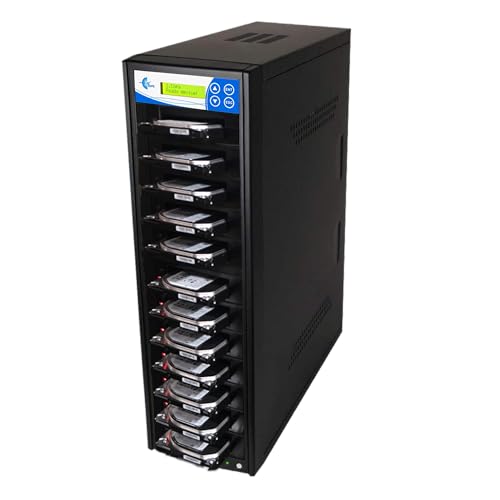
- Copies to up to 11 SATA drives
- Supports 2.5-inch and 3.5-inch drives without adapters
- Includes multiple copy and erase modes
Best For: High-volume drive deployment and sanitization
Versatile Sanitizing Pick

- Duplicates to five SATA drives
- Supports multiple Windows and Linux formats
- Offers verified and DoD 7-pass sanitization
Best For: Small-office cloning and secure drive reuse
Speed-Focused Choice

- Copies to seven drives at up to 300 MB/s
- Supports 2.5-inch and 3.5-inch drives without adapters
- Includes whole-drive copying and DoD sanitization
Best For: Fast multi-drive cloning and erasure
Best for Drive Sanitization – StarTech 4-Bay HDD Duplicator
For small businesses that need hard drive duplicators for small businesses with added data-wiping capability, this four-bay StarTech dock combines standalone 1:3 cloning, drive erasure, and USB or eSATA access. It supports 2.5- and 3.5-inch SATA drives and includes adapters for IDE drives.
Best For: IT teams that regularly clone, erase, back up, or inspect several SATA drives and need NIST SP 800-88 Rev. 1 Purge support.
Pros:
- Clones up to three target drives without a computer.
- Supports quick erase and secure erase modes, including NIST SP 800-88 Rev. 1 Purge.
- Works as a USB or eSATA docking station and includes IDE adapters.
- Four top-loading bays include drive doors, eject buttons, and status LEDs.
Cons:
- Target drives must be equal to or larger than the source.
- Designed for SATA and IDE media rather than M.2 drives.
This is a versatile choice when a small business needs both duplication and controlled drive retirement. Its four-bay layout is especially useful for batch workflows, while the standalone operation keeps routine jobs independent of an operating system.
Best Value Dual-Bay Dock – StarTech SATA Duplicator Dock
This dual-bay StarTech is a straightforward option for small businesses shopping for hard drive duplicators for small businesses. It performs standalone, sector-by-sector cloning of 2.5- and 3.5-inch SATA HDDs or SSDs, while also serving as a USB-to-SATA docking station.
Best For: Offices that need occasional one-to-one SATA cloning, drive recovery, or quick access to bare drives without installing software.
Pros:
- Clones SATA drives without a connected computer.
- Supports SATA III, 4Kn drives, TRIM, and backward compatibility with SATA I and II.
- Advertised cloning speed reaches up to 28 GB per minute.
- Tool-less, tray-less design includes drive doors and eject buttons.
Cons:
- Only duplicates one source drive to one target at a time.
- Target capacity must be equal to or larger than the source.
- IDE adapter is sold separately.
With two bays and a simple standalone workflow, this dock fits routine workstation migrations and replacement-drive jobs. It is less suited to high-volume duplication or mixed M.2 environments, but its dual-purpose docking function adds everyday utility.
Best for USB Batch Jobs – EZ DUPE USB Cyclone
The EZ DUPE USB Cyclone is built for high-volume USB media work, making it a useful alternative among hard drive duplicators for small businesses that handle external USB drives or flash media. Its 1-to-15 layout supports standalone copying, comparison, erasing, and formatting.
Best For: Businesses that duplicate USB flash drives or powered USB external HDDs in batches and need multiple copy and erase modes.
Pros:
- Duplicates up to 15 USB devices simultaneously.
- Supports USB 1.0 through USB 3.1 and capacities above 2TB.
- Offers essential-files, full, partitioned, and percentage copy modes.
- Includes quick, full, DoD 3-pass, and DoD 7-pass erase modes.
Cons:
- USB media speed is specified at up to 45 MB per second.
- Designed for USB devices rather than direct SATA or M.2 drive cloning.
- Weighs 7 pounds and has a one-year manufacturer warranty.
This model makes the most sense for repeatable USB distribution or sanitization tasks where throughput volume matters more than SATA compatibility. Independent bandwidth design and slow-drive alerts are useful when processing mixed USB media.
Best for Mixed Drive Types – StarTech M.2/SATA Duplicator
For businesses managing newer laptops alongside traditional hard drives, this StarTech provides broad compatibility in the hard drive duplicators for small businesses category. It can clone between M.2 NVMe, M.2 SATA, and 2.5- or 3.5-inch SATA drives without a PC or software.
Best For: IT departments migrating mixed generations of SSDs and HDDs, especially when secure erasure and configurable partition handling are important.
Pros:
- Supports M.2 NVMe, M.2 SATA, and 2.5/3.5-inch SATA drives.
- Offers system/file, all-partitions, whole-drive, and percentage duplication modes.
- Provides five erase modes, including secure erase options aligned with NIST SP 800-88 Rev. 1.
- On-screen display reports drive information and errors.
Cons:
- It is a one-to-one duplicator rather than a multi-target unit.
- Some IDE and mSATA use requires separately sold adapters.
- Drive compatibility requires matching the supported M.2 key and physical size.
This is the most flexible pick of the group for mixed hardware environments. Its configurable duplication, HPA controls, and erase features support more specialized migration and retirement workflows than a basic SATA dock.
Best Standalone Workhorse – Systor SYS101HS-DP HDD/SSD Duplicator
For small businesses evaluating hard drive duplicators for small businesses, the Systor SYS101HS-DP is a practical standalone option for copying or sanitizing SATA drives without a computer or software. It supports both 2.5-inch and 3.5-inch HDDs and SSDs, with speeds up to 90MB per second.
Best For: Businesses that need repeatable drive duplication and DoD 5220.22-M-compliant erasure in a dedicated standalone unit.
Pros:
- Operates without a computer or software.
- Supports both 2.5-inch and 3.5-inch SATA HDDs and SSDs without an adapter.
- Can copy drives or erase them using a DoD 5220.22-M sanitization process.
- Includes three years of labor coverage, one year of parts coverage, and lifetime technical support.
Cons:
- Its 90MB-per-second transfer speed is slower than the advertised USB 3.0 interface speed of some dock-style alternatives.
- Designed for SATA drives rather than a broad range of drive interfaces.
The Systor is a strong fit when reliability, standalone operation, and secure erasure matter more than maximum throughput. Its hot-swappable, metal construction also suits recurring business workflows.
Best Budget Dock – SABRENT EC-HD2B Dual-Bay Cloner
The SABRENT EC-HD2B offers a straightforward approach to hard drive duplicators for small businesses, combining offline cloning with a USB 3.0 dual-bay docking station. It accepts standard 2.5-inch and 3.5-inch SATA HDDs or SSDs and supports drives up to 10TB.
Best For: Small offices that want an affordable drive dock for occasional offline cloning and USB-based storage access.
Pros:
- Supports offline cloning without requiring a computer during the cloning process.
- Accepts both 2.5-inch and 3.5-inch SATA hard drives and SSDs.
- Plug-and-play setup requires no drivers.
- Provides USB 3.0 transfer speeds up to 5Gbps and supports drives up to 10TB.
Cons:
- Offline cloning is rated at up to 60Mbps, which is slower than its USB 3.0 connection speed.
- Offers two drive bays, so it is less suited to higher-volume multi-drive duplication.
- Its warranty is one year unless the product is registered for extended two-year coverage.
The EC-HD2B is a sensible choice for businesses that need occasional cloning and a general-purpose drive reader rather than a dedicated high-throughput duplicator. Its dual-bay design keeps the workflow simple and compact.
Best Multi-Drive Recovery Tool – Vinpower HDDMINI 1-to-3 Duplicator
For teams comparing hard drive duplicators for small businesses, the Vinpower HDDMINI stands out with one-to-three SATA duplication, standalone operation, and recovery-oriented features. It supports 2.5-inch and 3.5-inch HDDs and SSDs, including smart copy, raw bit-by-bit duplication, and read-error skipping.
Best For: IT staff and field technicians who need to duplicate several SATA drives or recover as much data as possible from drives with bad sectors.
Pros:
- Duplicates one source drive to up to three targets without a PC.
- Offers both smart copy for accessible data and raw mode for bit-by-bit duplication.
- Read-error skip can continue copying around bad sectors to preserve recoverable data.
- Includes secure erasure modeled on DoD 5220.22-M standards.
Cons:
- Its 90MB-per-second media speed may not suit users prioritizing the fastest possible duplication.
- Optional CompactFlash support requires an additional interface module.
- It is focused on SATA HDD and SSD workflows rather than broad interface compatibility.
The HDDMINI is particularly capable for migration, field service, and recovery tasks where error handling matters. Its one-to-three design can also reduce time spent repeating the same duplication job.
High-Volume Choice – EZ DUPE 1:11 SATA Duplicator
For small businesses that need to prepare many drives at once, this EZ DUPE tower is a high-capacity option among hard drive duplicators for small businesses. It copies to up to 11 SATA HDDs or SSDs at up to 150 MB/s per slot and works as a standalone unit without a computer or software.
Best For: IT teams handling batch drive deployment, backups, or drive replacement.
Pros:
- Supports up to 11 targets simultaneously.
- Works with 3.5-inch and 2.5-inch SATA drives without an adapter.
- Offers system/file, full-drive, partitioned, and percentage copying.
- Includes seven erase modes, including DoD 3-pass and 7-pass options.
Cons:
- Its 150 MB/s rate is lower than the Systor model listed here.
- It is a dedicated standalone unit rather than a computer-connected device.
Choose this model when throughput capacity matters more than maximum copy speed. The 11-target layout and broad copy and erase modes make it well suited to repeatable small-business workflows.
Versatile Sanitizing Pick – DupliM 1:5 SATA Duplicator
DupliM 1:5 SSD HDD SATA Duplicator and Hard Drive Sanitizer Stand-Alone Cloner Copier Burner
Check Price On AmazonThis DupliM unit is a practical mid-capacity choice for hard drive duplicators for small businesses. It copies one source to five SATA targets as a standalone device, supports drives over 8 TB, and includes several sanitization options for reuse or disposal workflows.
Best For: Small offices that need five-drive duplication with flexible erasure settings.
Pros:
- Duplicates to five SATA HDDs or SSDs without a computer.
- Supports FAT16/32, Linux ext2/3/4, and NTFS copy formats.
- Provides quick, secure erase, verified 3-pass, and DoD 7-pass options.
- Accepts 3.5-inch SATA drives directly and supports 2.5-inch drives with optional adapters.
Cons:
- 2.5-inch drive adapters are not included.
- Its 120 MB/s transfer rate is the slowest among these three options.
- It weighs 19 pounds, which may limit portability.
The DupliM balances duplication and sanitization features in a five-target format. It is a sensible fit when format compatibility and erase controls are more important than the highest transfer speed.
Speed-Focused Choice – Systor 1:7 HDD/SSD Duplicator
Businesses prioritizing speed should consider this Systor model among hard drive duplicators for small businesses. It copies to seven drives at up to 300 MB/s, maintains that stated speed as the number of loaded drives increases, and operates without a computer or software.
Best For: IT departments that need fast, repeatable seven-drive cloning and erasure.
Pros:
- Copies to up to seven HDDs or SSDs at up to 300 MB/s.
- Supports 2.5-inch and 3.5-inch drives without an adapter.
- Copies system files or entire drives.
- Includes DoD 5220.22-M-compliant drive sanitization.
Cons:
- Has fewer target slots than the 11-drive EZ DUPE.
- The supplied notes list a 3 TB digital storage capacity.
With the highest stated transfer rate in this group and seven target bays, the SYS307DP is a strong choice for time-sensitive cloning work. Its standalone design also helps keep routine duplication tasks independent of office computers.
How We Picked the Best Hard Drive Duplicators for Small Businesses
We focused on duplicators that can simplify routine IT work without requiring a full server or specialized imaging platform. The selection includes compact one-to-one and dual-bay docks, multi-target standalone units, and tower duplicators designed for higher-volume deployments.
Key criteria included support for 2.5-inch and 3.5-inch SATA drives, SSD compatibility, stated copy speed, target-drive count, standalone operation, erase or sanitization options, and connection standards. Models with M.2 support were also considered for businesses managing newer NVMe or SATA solid-state storage.
Quick Comparison
| Best For | Look For | Typical Format |
|---|---|---|
| Occasional upgrades | Simple controls and dual-bay operation | Docking station |
| Routine workstation deployment | Multiple targets and standalone cloning | 1:3 to 1:5 duplicator |
| Frequent IT or repair work | High throughput and broad drive support | Multi-bay tower |
| Data retirement | Verified erasure or overwrite modes | Duplicator/eraser |
| Mixed modern storage | SATA and M.2/NVMe compatibility | Hybrid duplicator |
Key Buying Factors for Hard Drive Duplicators for Small Businesses
Drive Compatibility
Confirm whether the unit supports 2.5-inch SATA, 3.5-inch SATA, M.2 SATA, NVMe, or a combination. A SATA-only duplicator may be sufficient for older office PCs, but a hybrid model can reduce replacement costs as your hardware fleet changes.
Copy Speed and Workload
Advertised speeds are maximums and depend on the source drive, target drives, interface, and data type. For occasional cloning, convenience may matter more than peak throughput. For ten or more drives per week, faster multi-target systems can save substantial staff time.
Target Count and Scalability
A 1:1 unit is easier to manage and often more compact. Three-, five-, seven-, or fifteen-target systems are better for batch deployments, but they cost more and need a stable workspace. Choose based on your actual queue, not a rarely used maximum.
Erasure and Verification
If drives leave your business, look for dedicated erase modes, supported sanitization standards, and clear completion indicators. Cloning verification is equally useful when deploying production drives, since a successful-looking copy is not enough if the destination contains errors.
Standalone Operation and Connectivity
Standalone duplicators work without a computer, which can keep cloning separate from normal office tasks. USB 3.0, eSATA, or other host connections are useful when the device also functions as a dock, but check whether the listed speed applies to standalone copying or computer-connected transfers.
Who Should Buy Which Hard Drive Duplicators for Small Businesses?
Choose a dual-bay dock if you handle occasional drive upgrades, diagnostics, or backups and want a small, flexible tool.
Choose a 1:3 or 1:5 standalone duplicator if you regularly prepare several replacement drives or standardize systems for a small office.
Choose a tower duplicator if your repair desk or IT team clones drives in batches and values throughput over compact size.
Choose a hybrid M.2/SATA model if your business is moving from traditional hard drives to SSDs and NVMe storage.
Before buying, confirm drive-size support, destination capacity requirements, erase behavior, warranty coverage, and the number of drives your team processes in a typical week. Those details matter more than headline speed alone.