A docking station with a detachable cable can make your laptop setup easier to replace, pack, and adapt. If the included USB-C lead is damaged or too short, you can often swap it without replacing the entire dock.
These 10 options cover compact travel hubs, dual-monitor docks, high-power charging, Ethernet, memory-card readers, and broad compatibility. The right choice depends on your laptop ports, display needs, and preferred desk setup.
Best 10 Docking Station with Detachable Cable Picks for 2026
Best Overall
Anker Nano 13-in-1 Detachable Dock

- Detachable 6-in-1 hub for travel
- Supports up to three displays
- 100W PD with 140W adapter
Best For: Multi-monitor Windows workstations and hybrid work
Best Travel Pick
Lenovo Dual Display Travel Dock

- Lightweight 4.8-ounce travel design
- Supports two 4K displays
- Includes Ethernet and always-on USB
Best For: Mobile professionals with dual-monitor needs
Best Mac-Friendly Value

- Detachable 3.3-foot USB-C cable
- 4K HDMI at 60Hz
- Five USB ports and separate audio
Best For: Single-monitor MacBook and USB-C setups
Best for Lenovo Workstations

- Supports 4K external displays
- Includes HDMI and DisplayPort cables
- 90W AC adapter included
Best For: Compatible Lenovo ThinkPad desk setups
Best Future-Ready Pick

- Includes an extra USB-C cable
- Up to 100W laptop charging
- HDMI 2.1 with 120Hz support
Best For: Durable desktop setups needing high-power charging and modern display connectivity
Best Compact Dual-Monitor Hub

- Dual HDMI with up to 4K output
- 85W pass-through charging
- Ethernet and SD/microSD readers
Best For: Portable workstations requiring dual displays and media-card access
Best Port Variety

- 10-in-1 connectivity
- Dual 4K HDMI outputs
- Up to 85W pass-through charging
Best For: Users connecting multiple peripherals, storage cards, Ethernet, and two displays
Best Dual-4K Value

- Dual HDMI supports 4K@60Hz
- 100W input with up to 90W laptop charging
- USB-A, USB-C, SD, and MicroSD connectivity
Best For: Dual-monitor laptop workstations
Best Detachable-Cable Pick
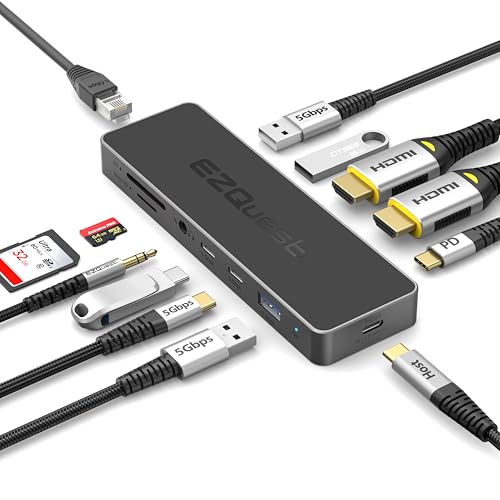
- Detachable 19.6-inch braided cable
- 4K@60Hz HDMI output
- 100W PD input with 80W laptop delivery
Best For: Flexible single-monitor desk setups
Best Port Selection
MOKiN 14-in-1 Multi-Display Dock

- Two HDMI and two DisplayPort outputs
- Gigabit Ethernet and 100W PD charging
- 14 ports for displays, USB, and cards
Best For: Multi-monitor workstations with wired networking
Best Overall – Anker Nano 13-in-1 Detachable Dock
The Anker Nano is a strong choice if you want a docking station with detachable cable functionality for both a permanent desk setup and mobile work. Its detachable 6-in-1 hub, triple-display support, and broad port selection make it especially versatile.
Best For: Windows laptop users, multi-monitor workstations, and professionals who regularly switch between desk and travel setups.
Pros:
- Detachable 6-in-1 hub supports convenient travel use.
- Supports up to three external displays, with 4K single-display output.
- Includes Gigabit Ethernet, SD/TF card slots, audio, and multiple USB ports.
- Provides up to 100W laptop charging and includes a 140W power adapter.
Cons:
- macOS mirrors multiple external displays rather than providing independent extended screens.
- The dock requires an upstream laptop connection before its ports activate.
Choose this model when flexibility matters more than a compact travel-only design. It offers the most comprehensive connectivity in this roundup, though Mac users should confirm the display limitations first.
Best Travel Pick – Lenovo Dual Display Travel Dock
The Lenovo USB-C Dual Display Travel Dock is a compact docking station with detachable cable appeal for professionals who need dual-monitor connectivity on the move. Its seven-port layout keeps the setup focused while supporting two 4K displays.
Best For: Remote professionals and travelers who want a lightweight dock with dual-display support and Gigabit Ethernet.
Pros:
- Compact 4.8-ounce design suits travel bags.
- Supports two external displays at up to 4K.
- Includes DisplayPort, HDMI, USB, and Gigabit Ethernet connectivity.
- Always-On USB port can charge a device when the laptop is disconnected.
Cons:
- Only seven ports are included, fewer than the larger desktop-oriented docks here.
- The included 100W USB-C charger provides 65W laptop power; 100W delivery requires an optional 135W charger.
This is a practical minimalist option for mobile users who prioritize display expansion and portability. It is less suitable if you need card readers, audio, or a large number of USB connections.
Best Mac-Friendly Value – LENTION 4K USB-C Dock
The LENTION CB-D53 is a useful docking station with detachable cable functionality for home offices, travel, and flexible desk layouts. It combines a 3.3-foot removable cable, 4K HDMI output, five USB ports, Ethernet, and separate audio connections in a compact aluminum chassis.
Best For: MacBook, Chromebook, Windows, and other full-function USB-C users who need versatile single-monitor connectivity.
Pros:
- Detachable 3.3-foot cable provides flexible placement.
- Supports 4K output at 60Hz through HDMI.
- Offers five USB ports, Gigabit Ethernet, and separate audio input and output.
- Includes a removable stand for vertical or horizontal positioning.
Cons:
- Provides one HDMI display output rather than a multi-monitor setup.
- 100W power delivery is pass-through power, not a power supply.
The LENTION is a well-rounded choice when you want a flexible cable arrangement and broad device compatibility without moving to a larger desktop dock. Its single-display design is the main limitation for advanced workstation setups.
Best for Lenovo Workstations – ThinkPad Dual-Monitor Dock
The ThinkPad 40AY0090US is a workstation-focused docking station with included USB-C, HDMI, and DisplayPort cables. It supports dual-monitor connectivity and comes with a 90W AC adapter, making it a convenient option for compatible Lenovo ThinkPad systems.
Best For: Owners of listed Lenovo ThinkPad models who want a ready-to-use dual-display desk setup.
Pros:
- Supports external 4K display connectivity.
- Includes HDMI and DisplayPort cables in the package.
- Comes with a 90W AC adapter for stable dock power.
- Provides HDMI, DisplayPort, USB-C, USB, and Ethernet connections.
Cons:
- Compatibility is presented primarily around specific Lenovo ThinkPad models and USB-C or Thunderbolt support.
- Firmware updates may be needed for compatibility with some computers.
- Its supplied notes do not describe a detachable host cable.
This dock makes sense for a compatible ThinkPad desk, especially when you value included display cables and a dedicated power adapter. Verify your laptop’s port and model compatibility before buying, particularly if a detachable cable is essential.
Best Future-Ready Pick – HP USB-C 100W G6 Dock
The HP USB-C 100W G6 Dock is a strong choice if you want a docking station with detachable cable flexibility and a clean, modern workspace. Its included extra USB-C cable, 100W laptop power delivery, HDMI 2.1, and broad USB-C or Thunderbolt compatibility make it suitable for evolving setups.
Best For: Users who want a durable, compact dock with high-power charging, modern display support, and a spare USB-C cable.
Pros:
- Includes an extra USB-C cable and uses a replaceable rear USB-C cable design.
- Delivers up to 100W of laptop power through a single USB-C connection.
- Offers HDMI 2.1, extra USB-C ports, and support for up to 120Hz.
- Compact build includes ambient LED lighting and on-screen status notifications.
Cons:
- Windows 11 is listed as the minimum required operating system version.
- A 1.5-pound dock may be less travel-friendly than smaller hub-style options.
Choose this HP model when long-term usability and a replaceable cable matter more than having the lightest possible accessory. Its 100W charging and HDMI 2.1 support give it a more workstation-oriented profile.
Best Compact Dual-Monitor Hub – Anker PowerExpand 8-in-1
The Anker PowerExpand 8-in-1 is a compact option for shoppers seeking a docking station with detachable cable convenience in a small hub format. It combines dual HDMI outputs, Ethernet, card readers, USB data ports, and up to 85W pass-through charging from one USB-C connection.
Best For: Laptop users who need dual-display connectivity and useful media ports without carrying a full-size desktop dock.
Pros:
- Supports one 4K display at 60Hz or two displays at 4K and 30Hz.
- Includes dual HDMI, Ethernet, SD and microSD card readers, and two USB-A data ports.
- Provides up to 85W USB-C Power Delivery pass-through charging.
- Compact 3.2-ounce design supports USB-C, USB4, and Thunderbolt connections.
Cons:
- 100W wall charger and USB-C-to-C cable are required but not included.
- On macOS, both external monitors show identical content.
- It is not compatible with Linux.
This Anker hub is a practical choice for a portable dual-monitor workstation, especially when SD, microSD, and Ethernet access are important. Confirm your laptop supports DisplayPort Alt Mode and Power Delivery before buying.
Best Port Variety – Anker 364 10-in-1 USB-C Hub
The Anker 364 is a versatile docking station with detachable cable-style USB-C connectivity for users who need many ports in a relatively slim hub. Its 10-in-1 layout includes dual HDMI, Ethernet, SD storage, multiple USB data ports, and up to 85W pass-through charging.
Best For: MacBook, Windows, and ChromeOS users who need broad peripheral connectivity and dual-display support from one USB-C port.
Pros:
- Provides 10 connections, including dual HDMI, Ethernet, SD, USB-A, and USB-C data ports.
- Supports one 4K display at 60Hz or two displays at 4K and 30Hz.
- Offers 5Gbps file transfers through selected USB-C and USB-A ports.
- Supports up to 85W pass-through charging when paired with a separate charger.
Cons:
- Pass-through charging requires a charger, which is not included.
- The USB-C 5Gbps port is for data only and does not charge devices.
- macOS mirrors the same content on both external monitors, and Linux is unsupported.
The Anker 364 stands out when port count is the priority. It is particularly useful for desks with several USB accessories, wired networking, storage cards, and two displays, provided the host laptop supports the required display and charging modes.
Best Dual-4K Value – Acer 9-in-1 Dual HDMI Dock
The Acer 9-in-1 is a practical docking station with detachable cable alternative for users who need dual-monitor support, fast USB connections, card readers, and laptop charging in one compact aluminum hub. Its 0.66-foot built-in cable keeps the setup tidy, though it is not detachable.
Best For: Laptop users building a dual-4K monitor workstation with USB-A, USB-C, and SD card connectivity.
Pros:
- Supports two HDMI displays at up to 4K@60Hz.
- Includes three USB-A and one USB-C 5Gbps data ports.
- Provides up to 90W laptop charging from a 100W PD input.
- Includes SD and MicroSD readers, plus a security lock button.
Cons:
- The cable is built in rather than detachable.
- Video output requires a full-featured USB-C port with display support.
This Acer dock is a strong fit for a desk-based setup where two 4K screens and broad peripheral support matter more than a replaceable host cable. Check your laptop’s USB-C capabilities before buying.
Best Detachable-Cable Pick – EZQuest 12-in-1 USB-C Hub
The EZQuest Pro Series is the clearest match for shoppers seeking a docking station with detachable cable. Its 19.6-inch nylon-braided cable can be replaced or positioned more flexibly than a short fixed lead, making it useful for laptop stands, iPads, and cleaner desk layouts.
Best For: Users who prioritize a long, flexible detachable cable along with 4K video, wired accessories, and pass-through charging.
Pros:
- Includes a detachable 19.6-inch nylon-braided USB-C cable.
- Supports 4K@60Hz HDMI output.
- Offers up to 100W PD input and delivers 80W to the laptop.
- Combines USB-A, USB-C charging, card-reader, and peripheral connectivity in a 12-in-1 design.
Cons:
- The supplied notes list one HDMI output rather than dual-monitor video.
- Two USB-A ports are limited to USB 2.0 speeds.
Choose this model when cable flexibility is the main requirement. The detachable lead is its standout advantage, while the single 4K HDMI output makes it better suited to a straightforward one-monitor workstation.
Best Port Selection – MOKiN 14-in-1 Multi-Display Dock
The MOKiN 14-in-1 is designed for demanding multi-display desks, with HDMI, DisplayPort, Ethernet, USB, card-reader, and 100W charging connections. It is not presented as a docking station with detachable cable, but its extensive port selection can make it a compelling alternative when connectivity matters most.
Best For: Users who need a flexible multi-monitor workstation with wired networking and many simultaneous peripherals.
Pros:
- Provides two HDMI and two DisplayPort outputs for multi-display configurations.
- Includes Gigabit Ethernet for stable wired networking.
- Offers multiple USB-C and USB-A ports, SD/MicroSD readers, and 100W PD charging.
- Features a screen lock button for quickly turning off connected displays.
Cons:
- The supplied notes do not specify a detachable host cable.
- Display configurations and capabilities depend on the laptop and operating system.
- Some USB-A ports are USB 2.0 rather than 5Gbps.
This is the most expansive option for users who need several display connectors and wired networking in one dock. If a replaceable cable is essential, verify the cable design before purchase; otherwise, its 14-port layout offers substantial workstation flexibility.
How We Picked the Best Docking Station with Detachable Cable
We focused on docks and USB-C hubs that offer practical connectivity for modern laptops, with particular attention to detachable or replaceable host-cable designs, display support, power delivery, and everyday usability. We also considered port variety, including USB-A, USB-C, Ethernet, audio, SD, and microSD connections.
Because laptop compatibility varies, specifications should be checked before purchase. A dock may advertise dual displays but still depend on your computer’s USB-C video support, operating system, DisplayLink software, or available bandwidth.
Quick Comparison
- Best for travel: Compact multiport hubs with integrated or replaceable USB-C cables.
- Best for dual monitors: Docks offering two HDMI ports, HDMI plus DisplayPort, or DisplayLink support.
- Best for charging: Models rated for up to 90W or 100W Power Delivery, subject to the laptop’s charging limits.
- Best for peripherals: Docks with multiple USB-A and USB-C ports, Ethernet, and audio.
- Best for creators: Options that add SD and microSD card readers alongside high-speed USB ports.
Key Buying Factors for a Docking Station with Detachable Cable
Host Cable and Compatibility
Confirm that the detachable cable uses the connector your laptop requires, usually USB-C, and supports both data and video rather than charging alone. A replaceable cable is useful for travel and long-term maintenance, but it does not automatically increase performance.
Display Support
Check the maximum resolution and refresh rate for each output. “Dual 4K” claims can vary by operating system, port combination, and whether the dock uses native USB-C video or DisplayLink. Mac and Windows multi-monitor behavior may also differ.
Power Delivery
A 100W PD rating does not always mean 100W reaches the laptop; the dock may reserve power for its own operation. Compare the dock’s maximum input and output with your laptop’s charger requirements, especially for performance notebooks.
Ports and Desk Layout
Choose front-facing ports for frequently used accessories and rear-facing ports for permanent cables. Ethernet is valuable for stable home-office connections, while card readers and audio ports can reduce the need for extra adapters.
Who Should Buy Which Docking Station with Detachable Cable?
Frequent travelers should prioritize a compact dock, a durable detachable cable, pass-through charging, and the ports they actually use. Home-office users should favor dual-display support, Ethernet, reliable power delivery, and enough USB ports for a keyboard, mouse, webcam, and storage.
Choose a higher-output model if you regularly connect demanding peripherals or charge a larger laptop. Creators should look for SD and microSD readers plus fast USB connectivity. If you only need one external display and a few accessories, a smaller USB-C hub may be more convenient and less expensive than a full desktop dock.