If you want a 3d printer for beginners, the best choices make setup simple, reduce calibration headaches, and help you get clean prints fast. That matters whether you’re buying for a hobbyist, student, or first-time maker.
Below, we’ve focused on models that are easier to start with, more forgiving for newcomers, and better suited to learning the basics without constant tinkering.
Best 10 3d Printer for Beginners Picks for 2026
Fast, Easy Multicolor Pick

- Full-auto calibration reduces setup hassle.
- Fast printing with active flow rate compensation.
- AMS lite adds optional multicolor printing.
Best For: Beginners who want speed, automation, and future multicolor support.
Simple High-Speed Starter

- Auto leveling and Z-offset calibration simplify setup.
- Direct drive extruder supports PLA, PETG, and TPU.
- Up to 250mm/s printing for faster projects.
Best For: New users who want fast setup and dependable everyday printing.
Ultra-Compact Easy Starter
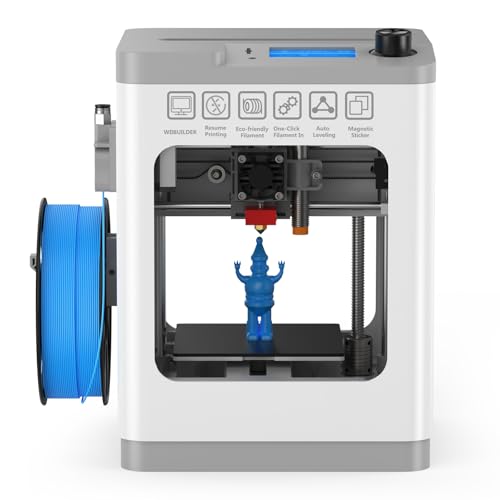
- Fully assembled and ready to use out of the box.
- One-touch auto leveling keeps setup simple.
- Compact size fits desks, classrooms, and offices.
Best For: Beginners, kids, and small spaces that need a ready-to-use printer.
Kids’ Creative Starter

- One-tap app printing for beginners
- Enclosed, quiet, kid-friendly design
- 8,000+ models plus AI creation tools
Best For: Families and kids who want a guided, safe starter printer
Easy High-Speed Pick

- One-click automatic bed leveling
- CoreXY design for fast, stable printing
- Quick-swap nozzles for easier upkeep
Best For: Beginners who want automation, speed, and a printer they can grow with
Compact Beginner Mini

- Fully assembled and starts in about 8 minutes
- Auto leveling plus power-loss recovery
- WiFi, offline printing, and STEM tools
Best For: First-time users and small spaces needing a simple mini printer
Speed-First Beginner Pick

- One-click auto leveling for easier first layers
- Up to 600mm/s printing with fast acceleration
- Run-out sensor and power-loss recovery included
Best For: Beginners who want a fast, auto-leveling printer with low setup friction.
Fast Home-Ready Option

- 600mm/s hyper-speed printing with CoreXY motion
- 25-point auto bed leveling for easier setup
- Filament sensor and remote monitoring support
Best For: Beginners who want speed, stability, and a feature set that can scale up with experience.
Fast, Easy Multicolor Pick – Bambu Lab A1 3D Printer
If you want a 3d printer for beginners that feels modern and low-stress, the Bambu Lab A1 is built around convenience. It combines full-auto calibration, quiet operation, and fast printing, while also offering multicolor capability with the AMS lite if you want to expand later.
Best For: Beginners who want speed, automation, and an easy upgrade path to multicolor printing.
Pros:
- Full-auto calibration handles Z-offset and bed leveling automatically.
- High acceleration and active flow rate compensation support fast, accurate prints.
- Quiet design with active motor noise canceling makes it more comfortable to use.
- 1-Clip quick swap nozzle adds convenience for maintenance and versatility.
Cons:
- AMS lite is required for multicolor printing and is sold separately unless bundled.
- Its feature set may be more than needed if you only want very basic printing.
This is a strong pick if you value a beginner-friendly experience but still want advanced features as your skills grow. It leans toward ease of use without giving up speed or print quality.
Simple High-Speed Starter – Creality Ender 3 V3 SE
The Creality Ender 3 V3 SE is a practical 3d printer for beginners who want a straightforward setup with useful automation. Its auto leveling, automatic Z-offset calibration, and fast assembly make it easier to get printing without a long learning curve.
Best For: New users who want a quick setup, reliable first layers, and broad filament support.
Pros:
- CR Touch auto leveling and automatic Z-offset calibration simplify first-layer setup.
- Sprite Direct Drive Extruder supports PLA, PETG, and TPU with consistent feeding.
- High-speed printing up to 250mm/s helps finish projects faster.
- Silent mainboard and flexible build plate improve everyday usability.
Cons:
- High-speed results depend on compatible materials and recommended settings.
- It is aimed at convenience, so advanced manual tweaking may still be part of ownership.
Overall, this is a balanced starter machine that focuses on the basics beginners care about most: easy setup, dependable leveling, and simple print removal. It is a sensible choice for getting started without unnecessary complexity.
Ultra-Compact Easy Starter – TINA2 Mini 3D Printer
The TINA2 is a compact 3d printer for beginners that keeps things simple right out of the box. It arrives fully assembled, includes sample PLA filament and model files, and uses one-touch auto leveling to make the first prints feel approachable.
Best For: Beginners, kids, and small spaces where compact size and easy setup matter most.
Pros:
- Fully assembled design means you can start quickly.
- One-touch auto leveling reduces manual adjustment.
- Pause and resume function helps recover from power loss or interruptions.
- Compact, lightweight build suits home, school, and office use.
Cons:
- Smaller desktop footprint also means a more compact build area.
- Best suited to PLA, PLA Pro, and TPU rather than a wide material range.
This model is a good fit if you want the least intimidating path into 3D printing. It emphasizes simplicity, portability, and easy operation over larger-scale output.
Reliable All-Round Beginner Choice – ELEGOO Neptune 3 Pro
The ELEGOO Neptune 3 Pro is a dependable 3d printer for beginners who want a larger build volume and helpful automation. With pre-assembled main parts, 36-point auto bed leveling, and a direct drive extruder, it aims to make daily printing smoother and less stressful.
Best For: Beginners who want a quiet, versatile printer with strong everyday reliability.
Pros:
- 36-point auto bed leveling helps improve first-layer consistency.
- Direct drive extruder supports PLA, TPU, PETG, and ABS.
- Silent stepper motors keep operation relatively quiet.
- Filament runout sensing and power-loss resume add practical protection for long prints.
Cons:
- It is larger and heavier than mini beginner models.
- Advanced features may be more than casual users need for simple prints.
For beginners who want a solid all-around machine, this model offers a good mix of ease and capability. It is especially appealing if you want more room to grow without stepping into a highly complex setup.
Kids’ Creative Starter – AOSEED AI 3D Printer for Kids
If you want a 3d printer for beginners that feels more like a guided creative kit than a complicated machine, the AOSEED AI model is built for that role. It focuses on simple one-tap printing, kid-friendly safety features, and a large model library, so families can jump into STEM projects, toys, and DIY builds without a steep learning curve.
Best For: Families, kids, and first-time makers who want a safe, app-guided starter printer with lots of ready-to-print ideas.
Pros:
- One-tap printing in the app makes it easy for beginners to start projects quickly.
- Enclosed, pinch-resistant design and quiet operation are tailored for home use.
- Includes 8,000+ human-reviewed models plus AI tools like voice, text, and image prompts.
- Comes with 8 rolls of PLA filament, tools, a magnetic build plate, and DIY stickers.
Cons:
- Supports single-color printing only, so multi-color projects require assembling separate parts.
- Best suited to small toy and beginner projects rather than larger builds.
This is a strong pick if your main goal is to make beginner 3D printing simple, safe, and engaging from the first day. The AI features and bundled materials reduce setup friction, while the compact enclosed design helps it fit family spaces better than a more advanced machine.
Easy High-Speed Pick – FLASHFORGE AD5M 3D Printer
The FLASHFORGE AD5M is a practical 3d printer for beginners who want automatic setup without giving up speed or print quality. Its one-click leveling, quick-swap nozzle system, and CoreXY motion structure are designed to remove common frustrations while still giving you room to grow into more advanced printing.
Best For: Beginners and hobbyists who want a fast, low-maintenance printer with automated calibration and flexible upgrade potential.
Pros:
- Fully automatic one-click leveling helps deliver a reliable first layer with less setup work.
- Core XY all-metal motion structure supports high-speed printing with stable, low-noise performance.
- Quick-release nozzles can be swapped in about 3 seconds for easier maintenance.
- App and slicer support make remote monitoring and device management more convenient.
Cons:
- Its speed-focused design may be more machine than some absolute first-timers need.
- Nozzle and software features are more advanced than the simplest entry-level options.
If you want a beginner-friendly machine that also feels future-proof, the AD5M strikes a smart balance. It reduces the usual learning pain points while offering faster performance, power-loss recovery, and maintenance features that can serve you well as your skills improve.
Compact Beginner Mini – Entina Tina2C 3D Printer
For shoppers looking for a compact 3d printer for beginners, the Entina Tina2C keeps the experience simple with a fully assembled body, guided app setup, and fast startup time. It is aimed at first-time users, kids, and small home or classroom projects, with convenience features that make learning the basics feel less intimidating.
Best For: First-time users, kids, and small-space buyers who want an easy, quiet mini printer for simple learning projects.
Pros:
- Fully assembled and designed to start first prints in as fast as 8 minutes.
- Auto leveling and power-loss recovery help improve print success for beginners.
- Supports both WiFi and TF card offline printing for flexible workflows.
- Includes a model library, AI search/photo-to-print tools, and STEM learning content.
Cons:
- Very small 3.9 × 3.9 × 3.9 inch build volume limits project size.
- Better for small educational builds than larger functional parts.
The Tina2C is a straightforward entry point if you want the smallest possible learning curve and footprint. Its assembled design, automatic leveling, and beginner-oriented software tools make it a reassuring choice for home classrooms and simple creative projects.
Speed-First Beginner Pick – FLASHFORGE Adventurer 5M
If you want a 3d printer for beginners that still feels fast and modern, the FLASHFORGE Adventurer 5M is built around easy setup and strong first-layer success. Its one-click auto leveling, quick-start workflow, and high-speed Core XY motion make it appealing for users who want less tinkering and more printing.
Best For: Beginners who want a fast, auto-leveling printer with low setup friction.
Pros:
- Full-auto one-click leveling helps dial in the first layer with less manual setup.
- Up to 600mm/s printing and 20,000mm/s² acceleration support very fast jobs.
- Quick heating and a flow-focused nozzle are aimed at smoother, faster printing.
- Includes filament run-out detection and power-loss recovery for more reliable prints.
Cons:
- Open-frame design is better suited to open, well-ventilated spaces.
- It is a full-size machine, so it takes more desk space than mini starter printers.
Overall, this model is a strong choice if you want beginner-friendly automation without giving up speed. It fits users who are comfortable with an open printer and want a more capable machine from the start.
Simple Starter Kit – Fully Assembled Mini 3D Printer
This 3d printer for beginners is designed to remove the usual setup stress by arriving fully assembled and ready to use out of the box. The included filament, SD card, auto-leveling, and one-touch loading make it a practical starter choice for kids, schools, and first-time home users.
Best For: First-time users who want a compact, ready-to-print starter kit.
Pros:
- Fully assembled design means there is no build process before printing.
- Starter kit includes filament, an SD card, and accessories to get going quickly.
- One-button auto-leveling and one-touch filament loading simplify everyday use.
- Compact size and PEI heated bed help it fit small spaces and release prints more easily.
Cons:
- Smaller build size may limit the size of models you can print.
- It is positioned as a mini printer, so it may not suit users planning larger projects.
For beginners who want the least intimidating entry into 3D printing, this is the most straightforward option in the group. The bundled extras and simple controls make it especially appealing for classrooms or family use.
Fast Home-Ready Option – Flashforge Adventurer 5M
If you are shopping for a 3d printer for beginners but want room to grow, the Flashforge Adventurer 5M offers fast printing, auto bed leveling, and a sturdy CoreXY frame. It is geared toward users who want a more capable home or school printer without diving into a complicated setup.
Best For: Beginners who want speed, stability, and a feature set that can scale up with experience.
Pros:
- 600mm/s hyper-speed printing with 20,000mm/s² acceleration for quick turnaround.
- Auto bed leveling with 25-point detection helps improve first-layer adhesion.
- CoreXY frame with dual linear rails is built for reduced vibration and more consistent motion.
- Filament sensor, remote monitoring, and quick-change parts add convenience for regular use.
Cons:
- It is an open printer, so it is not the best fit for every environment.
- Some advanced setup options, like enclosure use, require optional additions.
This is a good pick if you want a beginner-friendly machine that also feels like a serious printer. It balances speed, automation, and upgrade potential better than many entry-level models.
How We Picked the Best 3d Printer for Beginners
We prioritized printers that lower the learning curve: automatic bed leveling, straightforward assembly, stable extrusion, clear software support, and helpful safety or convenience features. We also looked for models that are practical for real first-time use, not just impressive on paper.
Quick Comparison: What Matters Most
For most buyers, the best 3d Printer for Beginners is the one that balances ease of use with dependable print quality. Fast print speed is nice, but not if it comes at the cost of failed prints or constant tuning. Entry-level users should pay close attention to setup time, leveling automation, build volume, and whether the printer is fully assembled or only partially assembled.
Key Buying Factors for a 3d Printer for Beginners
Setup and Assembly
Fully assembled or nearly ready-to-use printers are usually the easiest starting point. If you want to print the same day, choose a model with minimal assembly and clear first-run guidance.
Auto Leveling and Calibration
Automatic bed leveling is one of the most valuable features for beginners because it reduces one of the most common causes of print failure. Auto calibration also helps if you don’t want to spend time manually adjusting settings.
Print Speed Vs. Reliability
High-speed machines can be appealing, but beginners often benefit more from consistent, reliable output than from the fastest possible print times. A balanced machine is usually easier to learn on.
Build Volume and Project Size
Smaller printers are better for compact desks, kid-friendly use, and simple learning projects. Larger build areas are worth it if you plan to print practical parts, multi-piece models, or bigger classroom projects.
Safety and Ease of Use
Enclosed designs, app control, Wi-Fi support, and simple interfaces can make a big difference for new users. These features are especially helpful in homes, shared spaces, and family settings.
Who Should Buy Which 3d Printer for Beginners?
If you want the smoothest start, choose a printer with strong automation, fast setup, and reliable out-of-the-box performance. If you’re shopping for a child or classroom, look for safe, enclosed, easy-to-manage models. If your goal is to learn the basics without overspending, a simpler printer with auto leveling and a straightforward setup is often the smartest pick.
For most first-time buyers, the best choice is the model that gives you the fewest obstacles between opening the box and making a successful first print.