A reliable power strip can simplify a computer workstation while helping protect desktops, monitors, peripherals, and chargers from electrical surges. The best choice depends on more than outlet count.
We compared these 10 power strips for computers by surge protection, outlet layout, charging features, cord design, safety certifications, and practical desk usability.
Best 10 Power Strips for Computers Picks for 2026
Best High-Capacity Pick
Amazon Basics 12-Outlet Surge Protector

- 12 AC outlets for crowded computer setups
- 4000-joule surge protection
- 8-foot cord with wall-mount option
Best For: Large desks, gaming rooms, and offices
Best for USB-C Charging

- 10 AC outlets and four USB ports
- Two USB-C ports with up to 3A output
- Wide-spaced outlets for bulky adapters
Best For: Computer desks with mixed AC and USB charging needs
Best Compact Desk Option
Anker 351 12-Outlet Power Strip

- 12 AC outlets with USB-C and USB-A ports
- 20W USB-C charging
- Extra-spaced outlets and mounting hardware
Best For: Home-office desks and compact workstations
Best Value USB-C Pick
Nuetsa 8-Outlet Surge Protector
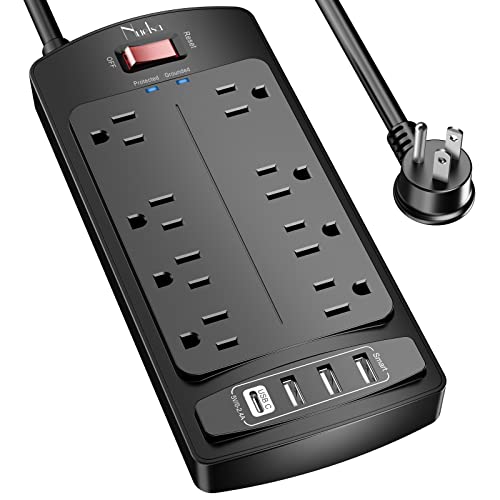
- Eight AC outlets and four USB ports
- 2700-joule surge protection
- 6-foot cord with flat plug and mounting option
Best For: Smaller computer stations and mixed-device charging
Best for Easy Setup
SUPERDANNY 28-Outlet Power Strip

- 22 AC outlets plus six USB ports
- Wide spacing for bulky adapters
- Mountable body with 2,100J surge protection
Best For: Gaming rooms, media centers, and large computer workstations
Best Heavy-Duty Choice
Belkin 12-Outlet Surge Protector

- 12 widely spaced AC outlets
- 3,940J surge protection rating
- 8-foot cord with angled flat plug
Best For: Home-office desks and conventional computer workstations
Best USB-C Value

- 12 AC outlets with three USB-A and three USB-C ports
- 1.7-inch spacing for bulky chargers
- 2,400J protection with a slim flat plug
Best For: Home offices, dorms, and mixed USB-C desktop setups
Maximum Capacity
24-Outlet Computer Power Strip

- 24 AC outlets plus four USB ports
- 4100-joule surge protection
- 6-foot flat-plug cord and ETL listed
Best For: Large computer desks and gaming setups
Long-Reach Choice
12-Outlet Power Strip with USB-C

- 10-foot extension cord
- 4800-joule surge protection
- Thin 0.31-inch flat plug
Best For: Dorm rooms and desks far from wall outlets
Balanced Desk Pick
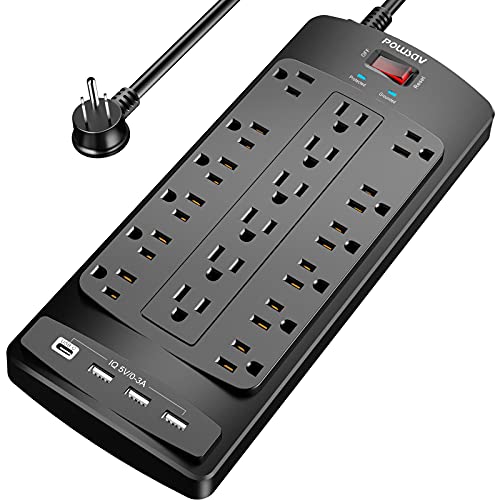
- 18 AC outlets and four USB ports
- 2100-joule surge protection
- Flat plug with reusable cable ties
Best For: Crowded computer and gaming desks
Best High-Capacity Pick – Amazon Basics 12-Outlet Surge Protector
For computer setups with numerous peripherals, this Amazon Basics model is a straightforward choice among power strips for computers. It provides 12 AC outlets, 4000 joules of surge protection, and an 8-foot cord for flexible placement in a home office or gaming room.
Best For: Large computer desks, gaming rooms, and offices needing many AC outlets.
Pros:
- 12 outlets accommodate computers, monitors, printers, routers, and other equipment.
- 4000-joule surge protection offers a high stated protection rating.
- 8-foot cord, safety shutters, circuit breaker, and keyhole wall mount add practical utility.
Cons:
- It does not include USB charging ports.
- The 1.8-pound rectangular design may take more desk or wall space than smaller strips.
Choose this model when outlet quantity and surge rating matter more than USB charging. Its long cord and mounting option also make it useful for organizing a busy computer station.
Best for USB-C Charging – Addtam 10-Outlet Power Strip
The Addtam combines 10 AC outlets with four USB ports, including two USB-C ports, making it a versatile option among power strips for computers. Its two widely spaced outlets are especially useful for bulky adapters used with computers, printers, and home-theater equipment.
Best For: Computer workspaces that need AC power plus convenient USB-A and USB-C charging.
Pros:
- Offers 10 AC outlets and four USB ports, including two USB-C ports.
- Two outlets have extra spacing for oversized power adapters.
- Provides 2700 joules of surge protection, overload protection, and a mountable design.
Cons:
- Its 6-foot cord is shorter than the 8-foot cord on the Amazon Basics option.
- USB-C output is limited to 3A maximum rather than a stated USB-C power-delivery rating.
This is a practical all-in-one choice for desks with several electronics and mobile devices. The wide outlet spacing and USB-C support give it an edge when bulky plugs and charging cables compete for space.
Best Compact Desk Option – Anker 351 12-Outlet Power Strip
Anker’s 351 power strip is designed for desks and side tables, with 12 AC outlets, a 5-foot cord, and dedicated USB-C and USB-A charging. For power strips for computers, it offers a balanced layout for a workstation while adding a stated 20W USB-C charging port.
Best For: Home-office desks and compact setups that need many outlets and device charging.
Pros:
- Provides 12 AC outlets plus one USB-C and two USB-A ports.
- The 20W USB-C port supports fast charging for compatible devices.
- Extra outlet spacing, mounting hardware, and an eight-point safety system improve usability.
Cons:
- Its 5-foot cord offers less placement flexibility than longer-cord alternatives.
- The 2100-joule surge rating is lower than the 2700- and 4000-joule options here.
- Total USB output is shared and limited to 15W across the USB ports.
Anker’s model suits a tidy workstation where the outlet count and charging features are more important than maximum cord reach or the highest surge rating. The included mounting screws can also help keep a desk area organized.
Best Value USB-C Pick – Nuetsa 8-Outlet Surge Protector
The Nuetsa power strip delivers eight AC outlets, four USB charging ports, and a 6-foot cord in a relatively compact design. It is a practical contender among power strips for computers when you want USB-C charging and surge protection without needing 10 or 12 AC outlets.
Best For: Smaller computer stations, office equipment, and mixed AC/USB charging setups.
Pros:
- Combines eight AC outlets with four USB ports, including one USB-C port.
- 2700 joules of surge protection and overload protection help safeguard connected electronics.
- Includes a flat plug, 6-foot cord, protected indicator light, and mounting capability.
Cons:
- Eight AC outlets provide less capacity than the other listed models.
- The USB-C port does not support devices requiring 9–22V charging.
- Its stated maximum current is 13A.
This Nuetsa model is a sensible fit for a moderate-size workstation that still needs several USB charging ports. Its 2700-joule rating and 6-foot cord provide a useful middle ground for office or apartment use.
Best for Easy Setup – SUPERDANNY 28-Outlet Power Strip
For computer setups that need to power many devices in one place, this SUPERDANNY model stands out among power strips for computers. It combines 22 AC outlets with six USB ports, wide outlet spacing, a 6.5-foot cord, and 2,100 joules of surge protection.
Best For: Gaming rooms, media centers, offices, and computer workstations with numerous plugs and USB devices.
Pros:
- Provides 22 grounded AC outlets plus five USB-A and one USB-C port.
- Wide spacing helps accommodate bulky adapters and power bricks.
- Mountable design, angled flat plug, and 6.5-foot heavy-duty cord support flexible placement.
- Includes overload, short-circuit, overheat, and 2,100-joule surge protection.
Cons:
- Its large footprint may be more than a small desk setup needs.
- The side outlets cannot be rotated.
- USB-C charging is rated up to 5V/3A, so it is not a high-wattage laptop charger.
This is the most expansive option here for a crowded computer or gaming setup. Choose it when outlet count and mounting flexibility matter more than a compact form factor.
Best Heavy-Duty Choice – Belkin 12-Outlet Surge Protector
The Belkin 12-outlet model is a practical choice among power strips for computers when you want substantial surge protection without adding USB charging ports. Its widely spaced outlets, 8-foot cord, safety indicator, and wall-mountable design fit home-office and workstation use.
Best For: Computer desks, home offices, workstations, and setups with monitors, hard drives, and other AC-powered equipment.
Pros:
- Offers 12 AC outlets with widely spaced positions for larger plugs.
- Provides a 3,940-joule surge protection rating.
- The 8-foot cord and angled three-prong plug work well in tight spaces.
- Includes a protection indicator, UL certification, two-year limited warranty, and connected-equipment coverage.
Cons:
- It has no USB-A or USB-C charging ports.
- It provides fewer outlets than the SUPERDANNY option.
- The listed compatible-device details emphasize AC equipment rather than USB-powered accessories.
Belkin’s strengths are straightforward AC expansion, a long cord, and a high surge rating. It is a strong fit for a conventional computer workstation that already uses separate USB chargers.
Best USB-C Value – QKP 12-Outlet Power Strip
This QKP model balances computer-ready outlet capacity with modern charging options. Among power strips for computers, it is especially useful for desks that need 12 AC outlets, three USB-A ports, and three USB-C ports in a compact, flat-plug design.
Best For: Home offices, dorm rooms, and desktop setups with laptops, monitors, phones, tablets, and other USB devices.
Pros:
- Combines 12 AC outlets with three USB-A and three USB-C ports.
- 1.7-inch outlet spacing accommodates laptop chargers and bulky adapters.
- Provides 2,400-joule surge protection, overload protection, and a resettable circuit breaker.
- The slim 45-degree flat plug fits behind desks, beds, cabinets, and TV stands.
Cons:
- The USB-A and USB-C outputs are each specified at 5V/3.1A total, limiting charging power.
- Its 12 AC outlets may be insufficient for exceptionally large setups.
- The supplied details list a one-year warranty, shorter than Belkin’s two-year limited warranty.
With equal numbers of USB-A and USB-C ports, this QKP strip is a versatile middle-ground option. It makes the most sense when modern USB charging and tight-space placement are priorities.
Maximum Capacity – 24-Outlet Computer Power Strip
For busy workstations and gaming setups, this option stands out among power strips for computers with 24 AC outlets, four USB ports, and a 6-foot flat-plug cord. Its 4100-joule surge rating and overload protection add a useful layer of protection for connected electronics.
Best For: Large computer desks with many peripherals, chargers, and gaming accessories.
Pros:
- Provides 24 AC outlets plus two USB-A and two USB-C ports.
- Offers 4100 joules of surge protection and an illuminated protected indicator.
- Includes a heavy-duty 6-foot cord, flat plug, mounting capability, and ETL certification.
- USB ports automatically adjust charging output; USB-C supports up to 3A.
Cons:
- The USB-C port does not support devices requiring 9–22V charging.
- Its large outlet count may be more than a compact desk needs.
This is the strongest fit when outlet capacity is the priority. The combination of 24 outlets, 4100 joules, and USB charging makes it particularly practical for expansive computer and gaming stations.
Long-Reach Choice – 12-Outlet Power Strip with USB-C
This LeZone model is a practical choice among power strips for computers when the wall outlet is far from the desk. It combines 12 AC outlets, four USB charging ports, a 10-foot cord, and a slim 0.31-inch flat plug for tight spaces behind furniture.
Best For: Dorm rooms, desks positioned away from the wall, and setups needing extra cable reach.
Pros:
- Includes 12 AC outlets, two USB ports, and two USB-C ports.
- Provides 4800 joules of surge protection.
- The 10-foot extension cord reaches farther than many standard options.
- Ultra-thin flat plug helps fit behind furniture with minimal clearance.
Cons:
- Offers fewer AC outlets than the 18- and 24-outlet alternatives.
- USB-C power delivery is rated at 15W, which may not suit higher-power charging needs.
Choose this strip for reach and placement flexibility rather than maximum outlet capacity. Its long cord and thin plug are especially useful when a computer desk cannot sit directly beside the wall outlet.
Balanced Desk Pick – 18-Outlet Surge Protector
For computer desks that need substantial capacity without moving to a 24-outlet design, this 18-outlet strip offers a useful middle ground. It has four USB ports, a 6-foot right-angle flat-plug cord, 2100 joules of surge protection, and an overload protection switch.
Best For: Computer and gaming desks needing many outlets plus straightforward cable organization.
Pros:
- Provides 18 AC outlets and four USB ports.
- Includes 2100 joules of surge protection and a protected indicator light.
- Right-angle flat plug and reusable cable ties help with placement and cord management.
- ETL listed with fire-resistant housing, mounting capability, and overload protection.
Cons:
- Its 2100-joule rating is lower than the other two products here.
- It does not list USB-C ports.
- The 6-foot cord may be limiting where the outlet is farther from the desk.
This is a sensible balanced option for a crowded workstation. It supplies plenty of AC outlets and USB charging while adding practical cable-management features, though users seeking the highest surge rating or USB-C should look elsewhere.
How We Picked the Best Power Strips for Computers
We focused on features that matter in real computer setups: surge-energy rating, number and spacing of AC outlets, USB and USB-C charging, cord length, plug shape, mounting flexibility, and published safety information. Higher joule ratings generally indicate more capacity to absorb transient surges, but they do not replace a properly grounded wall outlet or a UPS for systems that need battery backup.
We also considered whether each design suits a desk, home office, gaming room, studio, or shared charging area. Products with many outlets can be useful, but only when their layout leaves enough room for bulky adapters and their total electrical load stays within the stated limits.
Quick Comparison
| Priority | Look for | Best suited to |
|---|---|---|
| Maximum surge capacity | Approximately 2,700–4,800 joules | Desktops and equipment-heavy workstations |
| Many connected devices | 12–24 AC outlets with wide spacing | Gaming rooms, studios, and shared desks |
| USB charging | USB-A and USB-C ports with stated output | Phones, tablets, accessories, and small electronics |
| Neater installation | Flat plug, longer cord, or wall-mount holes | Desks positioned away from wall outlets |
| Critical computer uptime | A UPS rather than a standard power strip | Servers, workstations, and networking equipment |
Key Buying Factors for Power Strips for Computers
Surge Rating and Electrical Limits
Check the joule rating, clamping or protection specifications when provided, and the strip’s maximum amperage or wattage. Never exceed the rating by connecting high-draw heaters, power tools, or appliances. A power strip is intended for distributing power, not multiplying the available circuit capacity.
Outlet Layout and Capacity
Count the plugs you actually use, then allow room for future devices. Widely spaced outlets are more valuable than a crowded row when desktop power bricks, monitor adapters, and laptop chargers are involved. Confirm that the total load remains within the listed 15-amp or wattage limit.
USB Ports, Cord Length, and Placement
USB-C is convenient for newer devices, but compare the advertised output rather than assuming every USB-C port supports laptop charging. A six- to 10-foot cord can improve placement, while a flat plug helps furniture sit closer to the wall. Wall-mounting holes are useful for keeping cables off the floor.
Safety and Build Quality
Prefer products with clear ETL or UL listing information, an accessible reset or circuit breaker, and a sturdy housing. Replace any strip showing heat damage, cracked plastic, loose outlets, or a damaged cord.
Who Should Buy Which Power Strips for Computers?
Home-office users: Choose a moderately sized strip with spaced outlets, a long cord, and USB charging for monitors, computers, lamps, and accessories.
Gamers and creators: Prioritize higher surge capacity, substantial outlet spacing, and enough AC outlets for a desktop, displays, speakers, consoles, and networking gear.
Shared workspaces and charging stations: Models with numerous outlets and multiple USB ports can reduce adapter clutter, provided the circuit and strip load are carefully managed.
Servers or outage-sensitive computers: Buy a UPS with battery backup and automatic shutdown support. Even the best Power Strips for Computers only provide surge protection and distribution; they cannot keep equipment running during a blackout.