The best USB hubs make it easier to connect keyboards, mice, storage drives, displays, and other peripherals when your computer lacks enough ports. The right choice depends on more than port count: speed, power delivery, cable length, and connector type all affect everyday usability.
We compared 10 USB hubs ranging from compact USB-A splitters to powered desktop hubs and USB-C docking-style adapters, so you can find a practical match for your setup and budget.
Best 10 USB Hubs Picks for 2026
Best Compact USB Hub

- Four USB-A ports with 5Gbps data speeds
- Slim, lightweight, heat-resistant design
- Data transfer only; charging is not supported
Best For: Everyday USB-A peripheral expansion
Best Desktop USB Hub

- Seven USB-A ports for multiple peripherals
- 4-foot cable supports flexible desktop placement
- Aluminum body and 5Gbps data speeds
Best For: Organized desktop workstations with many USB devices
Best Travel USB Hub

- Compact 33-gram design for travel
- Four USB-A ports with 5Gbps transfers
- Plug-and-play support across major operating systems
Best For: Portable USB-A expansion for travel and mobile work
Best USB-C Docking Hub

- Dual HDMI, Ethernet, USB-A, and card-reader ports
- Supports up to 85W pass-through charging
- Single 4K60 or dual 4K30 display support
Best For: USB-C laptop workstations and multi-display setups
Best High-Capacity Pick
Wenter 11-Port Powered USB Hub

- 10 USB 3.0 data ports plus one charging port
- Up to 5Gbps transfer speeds
- Individual switches with LED indicators
Best For: Busy desktop workstations needing extensive USB expansion
Best USB-C Laptop Pick
Anker 5-in-1 USB-C Hub with 4K HDMI

- 4K HDMI output at up to 30Hz
- Two USB-A and one USB-C 5Gbps data ports
- Up to 85W pass-through charging
Best For: Compatible USB-C laptops needing display and port expansion
Best Mid-Size Powered Pick
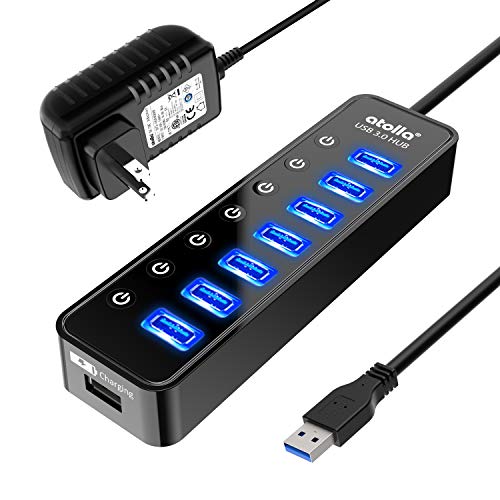
- Seven USB 3.0 data ports and one charging port
- Up to 5Gbps data syncing
- Individual switches and LED indicators
Best For: Workstations needing several controlled, powered USB connections
Best Long-Cable USB Hub

- Four USB ports with 5Gbps data speeds
- Two-foot cable improves placement flexibility
- Compact, lightweight, and plug-and-play
Best For: USB-C users who need portable peripheral expansion
Best USB-A Expansion Hub

- Four USB-A ports with 5Gbps transfers
- Two-foot cable and slim travel-friendly design
- Optional 5V USB-C power improves stability
Best For: Adding USB-A peripherals to laptops, desktops, and consoles
Best Full-Featured USB Hub

- Adds HDMI, USB, SD, and TF connectivity
- Supports 4K at 60Hz through HDMI
- Pass-through charging up to 85W
Best For: USB-C workstations needing display, card, and peripheral support
Best Compact USB Hub – Anker 4-Port USB 3.0 Hub
This compact Anker USB hub is a straightforward way to expand one USB-A port into four. With USB 3.0 speeds up to 5Gbps and a slim, lightweight design, it suits everyday data connections for laptops and desktops.
Best For: Users who need four additional USB-A data ports for peripherals and flash drives.
Pros:
- Four USB-A ports with transfer speeds up to 5Gbps.
- Lightweight, slim design with heat-resistant construction.
- Compatible with desktops, laptops, keyboards, mice, and USB flash drives.
- Includes an 18-month warranty.
Cons:
- Supports data transfer only; it is not designed to charge devices.
- Expands USB-A connectivity but does not add HDMI, Ethernet, or card readers.
Choose this USB hub if you want a simple, portable four-port expansion solution from an established brand. Its main limitation is that it is intended for data connections rather than charging.
Best Desktop USB Hub – 7-Port Aluminum USB 3.0 Hub
This 7-port USB hub is designed for desktop setups that need substantial USB-A expansion. Its 4-foot cable provides flexible placement, while the aluminum housing and USB 3.0 connectivity support organized, high-speed data access.
Best For: Desktop users connecting several USB-A peripherals, storage devices, or accessories at once.
Pros:
- Seven USB-A ports provide extensive connectivity.
- USB 3.0 data transfer speeds reach up to 5Gbps.
- 4-foot cable allows flexible placement away from the computer.
- Aluminum housing helps with heat dissipation and stability.
Cons:
- Supports data transmission, not device charging.
- The larger port count and long cable may be less convenient for travel.
- The listed Type-C port is intended to provide power for high-power devices, not general charging functionality.
For a fixed workstation, this USB hub offers more ports and placement flexibility than compact four-port models. It is best suited to data-heavy desktop use where charging support is not the priority.
Best Travel USB Hub – UGREEN Ultra-Slim 4-Port Hub
The UGREEN USB hub is a portable four-port USB-A splitter for laptops, desktops, game consoles, and other compatible equipment. At just 0.4 inches thick and 33 grams, it adds USB 3.0 connectivity without taking up much space in a travel bag.
Best For: Travelers and mobile workers who need a lightweight USB-A hub for everyday peripherals.
Pros:
- Four USB-A ports support data speeds up to 5Gbps.
- Compact 0.4-inch-thick design weighs 33 grams.
- Plug-and-play compatibility with Windows, macOS, Linux, and Chrome OS.
- Works with compatible laptops, desktops, Xbox Series, PS5, and car systems.
Cons:
- Provides USB-A expansion only, without video, Ethernet, or card-reader ports.
- Designed for peripherals and data transfer rather than device charging.
This USB hub is a strong choice when portability matters more than maximum port variety. Its four USB-A ports and broad compatibility cover common travel needs, while its compact build keeps your setup light.
Best USB-C Docking Hub – Anker 8-in-1 Dual HDMI Hub
This Anker USB-C hub is a full-featured docking solution for compatible laptops. It combines dual HDMI, Ethernet, USB-A data ports, SD and microSD readers, and USB-C Power Delivery pass-through in one compact unit, making it suitable for a more complete workstation setup.
Best For: USB-C laptop users who need external displays, wired networking, card readers, and pass-through charging.
Pros:
- Includes dual HDMI, Ethernet, SD/microSD readers, and two USB-A data ports.
- Supports one 4K display at 60Hz or two displays at 4K 30Hz.
- Pass-through charging supports up to 85W with a suitable charger and cable.
- Compatible with USB-C, USB4, and Thunderbolt connections on supported systems.
Cons:
- Requires a 100W PD wall charger and USB-C cable for pass-through charging.
- Not compatible with Linux.
- On macOS, both external monitors display identical content.
Among these USB hubs, this is the most capable option for turning a compatible USB-C laptop into a broader desktop workstation. Verify DP Alt Mode, Power Delivery, operating-system, and display requirements before buying.
Best High-Capacity Pick – Wenter 11-Port Powered USB Hub
If you need many connections at a desktop workstation, this powered USB hub provides 10 USB 3.0 data ports plus a dedicated smart-charging port. It supports transfer speeds up to 5Gbps and includes individual switches for controlling connected devices.
Best For: Desktop users who need extensive USB expansion, per-port controls, and dedicated device charging.
Pros:
- Offers 10 USB 3.0 data ports and one charging port.
- Supports data transfers up to 5Gbps.
- Individual on/off switches and LED indicators simplify device management.
- Includes a power adapter and relatively long connection cables.
Cons:
- Its powered design and 11-port layout are likely more than needed for a compact setup.
- The charging port is dedicated to charging rather than general data transfer.
With the most ports in this roundup, the Wenter is a practical choice for peripherals, storage devices, and charging needs in one organized hub. It also includes a 24-month warranty.
Best USB-C Laptop Pick – Anker 5-in-1 USB-C Hub with 4K HDMI
This compact USB hub is designed for USB-C laptops that need additional ports and an external display connection. It combines 4K HDMI, USB-C and USB-A data ports, and up to 85W pass-through charging in a lightweight format.
Best For: USB-C laptop users who want a portable hub with 4K HDMI and pass-through charging.
Pros:
- Provides 4K HDMI output at up to 30Hz.
- Includes two USB-A ports and one USB-C data port with speeds up to 5Gbps.
- Supports up to 85W pass-through charging.
- Compact 1.44-ounce design is convenient for travel.
Cons:
- A charger is required for pass-through charging but is not included.
- The USB-C data port does not support video output.
- It is not compatible with Linux according to the supplied notes.
The Anker is the most display-focused option here, making it a strong fit for compatible MacBook, Windows, ChromeOS, USB4, and Thunderbolt systems. Confirm that your laptop supports DP Alt Mode and Power Delivery before buying.
Best Mid-Size Powered Pick – Atolla 8-Port USB 3.0 Hub
For a balanced desktop setup, this powered USB hub adds seven USB 3.0 data ports and one dedicated smart-charging port. Individual switches, LED indicators, and included power make it easier to manage peripherals without repeatedly unplugging them.
Best For: Users who need several powered USB connections without stepping up to an extra-large hub.
Pros:
- Provides seven USB 3.0 data ports plus a charging port.
- Supports data syncing up to 5Gbps.
- Individual on/off switches help control connected devices.
- Works with Windows, Mac OS X, and Linux systems listed in the notes.
Cons:
- The charging port is separate from the seven data ports.
- It has fewer total ports than the 11-port Wenter model.
- The supplied power adapter uses a 120cm cable, which may limit placement in some setups.
The Atolla offers a useful middle ground between basic hubs and high-capacity desktop models. Its powered design, switches, and 18-month warranty make it well suited to a workstation with several peripherals.
Best Long-Cable USB Hub – Compact 4-in-1 USB-C Hub
If you need a simple way to expand a USB-C laptop or tablet, this compact 4-in-1 hub provides four additional USB connections and 5Gbps data transfers. Its two-foot cable is especially practical when a short, built-in connector would be inconvenient.
Best For: USB-C laptop users who want portable peripheral expansion with a longer connection cable.
Pros:
- Four USB ports support data transfers up to 5Gbps.
- Two-foot cable offers more flexible placement.
- Compact, lightweight design is easy to carry.
- Plug-and-play setup works with a range of computers, tablets, and smartphones with USB-C.
Cons:
- Charging is not supported.
- Designed for USB-C host devices, so it is not the most suitable choice for USB-A-only computers.
This Anker USB hub is a straightforward choice for adding USB connectivity without adding much bulk. Choose it when data access and cable reach matter more than video output, card readers, or laptop charging.
Best USB-A Expansion Hub – Acer 4-Port USB 3.0 Hub
This Acer hub is a practical USB-A splitter for adding four USB 3.0 ports to a laptop, desktop, or gaming setup. It supports up to 5Gbps transfers, works with multiple operating systems, and includes a two-foot cable for easier positioning.
Best For: Users who need extra USB-A ports for peripherals such as keyboards, mice, flash drives, printers, or external storage.
Pros:
- Adds four USB 3.0 ports with transfer speeds up to 5Gbps.
- Two-foot cable and slim design suit travel or desk use.
- Plug-and-play operation requires no driver installation.
- Compatible with Windows, macOS, ChromeOS, and Linux, plus selected gaming consoles.
Cons:
- Separate wall charger or power adapter is not included.
- The USB-C port is for supplying power to the USB-A ports, not data transfer or device charging.
- Powered operation may be needed for stable hard-drive transfers.
The Acer USB hub makes sense for expanding a USB-A workstation on a budget-conscious, practical setup. Its optional 5V USB-C power input adds stability for demanding storage devices, but remember that the required power source is sold separately.
Best Full-Featured USB Hub – Anker 7-in-1 USB-C Adapter
For a broader desktop or mobile-workstation setup, this 7-in-1 USB-C hub combines USB expansion, HDMI, memory-card readers, and laptop power input. It supports 4K at 60Hz video through HDMI and provides 5Gbps data speeds for its USB-A and USB-C data ports.
Best For: USB-C laptop users who need one hub for displays, peripherals, SD or TF cards, and pass-through charging.
Pros:
- Seven functions include HDMI, two USB-A ports, USB-C data, SD, TF, and USB-C PD input.
- HDMI supports 4K at 60Hz for compatible USB-C devices with DP Alt Mode.
- USB data ports support transfers up to 5Gbps.
- Pass-through charging delivers up to 85W to a laptop when paired with a suitable charger.
Cons:
- Charger is not included.
- Only the HDMI port supports video output; the USB-C data port does not.
- Requires a compatible USB-C device with DisplayPort Alt Mode for video projection.
This Anker adapter is the most versatile option here for users who want to consolidate several accessories into one USB hub. It offers strong connectivity for workstations and presentations, provided your computer supports the required video and power features.
How We Picked These USB Hubs
We focused on the specifications that have the greatest impact on real-world use: available ports, USB generation, connector compatibility, power design, display support, cable reach, and physical controls. The selection includes compact models for travel, longer-cable hubs for desktops, powered options for several peripherals, and USB-C adapters with HDMI for newer laptops.
We also considered whether a hub suits a specific role rather than treating a high port count as automatically better. A basic four-port hub can be ideal for a keyboard, mouse, and flash drive, while a powered model is more appropriate for multiple hard drives or power-hungry accessories.
Quick Comparison
| Best For | Recommended Type | What to Look For |
|---|---|---|
| Travel and basic peripherals | Compact USB-A hub | Four ports, USB 3.0 or 5Gbps, short integrated cable |
| Desktop setups | Long-cable multiport hub | Seven or more ports and convenient placement |
| Multiple drives and accessories | Powered USB hub | External power, individual switches, and adequate output |
| USB-C laptops | USB-C multiport adapter | USB-C host connector, HDMI, and compatible data speeds |
| Dual-screen productivity | USB-C docking station | Display support, power delivery, and operating-system compatibility |
Key Buying Factors for USB Hubs
Port Type and Compatibility
Check whether your computer has USB-A, USB-C, or both. A USB-A hub cannot connect directly to a USB-C-only laptop without an adapter. Also confirm that the hub’s included cable is long enough and that its connector matches the host device.
Data Speed
USB 3.0 and 5Gbps ports are suitable for many external SSDs, flash drives, webcams, and other fast peripherals. A hub shares its upstream connection across active devices, so several simultaneous transfers may be slower than the headline maximum.
Power and Charging
Bus-powered hubs draw energy from the computer and work well for low-power devices. Choose a powered hub with an included AC adapter when connecting several drives, optical accessories, or other devices that may exceed the host port’s available power. A charging port does not always provide data, so check the specification carefully.
Video Output
USB-C hubs with HDMI can add an external display, but resolution and refresh-rate support vary. Confirm the laptop supports video over USB-C, and verify whether the adapter supports the resolution, refresh rate, and number of screens you need.
Layout and Controls
Individual on/off switches can simplify desktop cable management and reduce unnecessary power draw. Longer cables help position a hub where ports are accessible, while slim short-cable models are easier to carry.
Who Should Buy Which USB Hubs?
Choose a compact four-port hub if you mainly need extra connections for a mouse, keyboard, controller, or occasional flash drive. Choose a seven- or eight-port desktop hub if several accessories need to remain connected at once. Choose a powered hub for multiple storage devices or peripherals that may draw significant power.
Choose a USB-C HDMI hub for a modern laptop that needs legacy USB-A ports and one external display. For a more complete workstation, a USB-C docking station is the better fit when you need display connectivity, several peripherals, and potentially laptop charging in one unit. Before buying, compare your computer’s ports and operating-system requirements with the hub’s detailed specifications.