The best game controllers under $200 can deliver reliable wireless play, precise sticks, comfortable ergonomics, and compatibility across multiple platforms without reaching premium-console pricing.
This roundup compares 10 standout options for PC, Xbox, Nintendo Switch, mobile devices, and cloud gaming, with attention to connectivity, controls, durability, and everyday value.
Best 10 Game Controllers Under 200 Picks for 2026
Best Overall
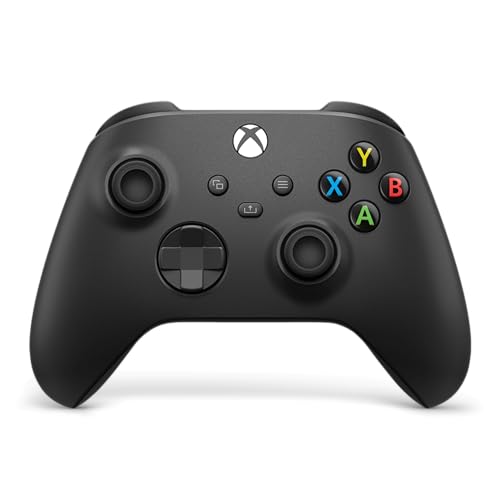
- Textured grips and hybrid D-pad
- Xbox Wireless, Bluetooth, and USB-C
- Share button and app-based remapping
Best For: Multi-platform Xbox and PC gaming
Best Budget Switch Pick
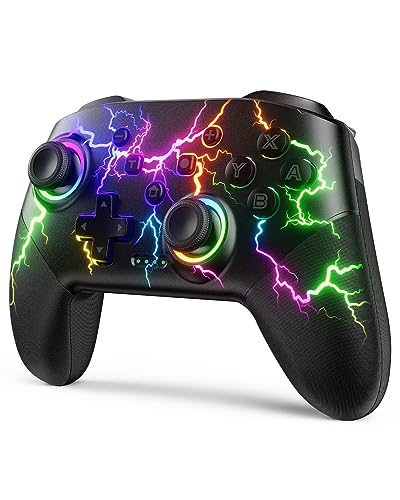
- RGB lighting with four modes
- Programmable buttons and three turbo speeds
- 10–15-hour runtime with motion control
Best For: Feature-packed Switch gaming on a budget
Best for Customization

- TMR joysticks and 1000Hz polling
- Switchable Hall Effect or tactile triggers
- Rear controls and charging dock included
Best For: Competitive-style PC and Android setups
Best for Competitive PC Play

- TMR sticks with 1000Hz polling
- Three connection modes and charging dock
- Remappable buttons and switchable triggers
Best For: Responsive PC and Switch gameplay
Best Budget PC Pick

- Familiar console-style layout
- Six-foot wired USB connection
- Programmable controls via Profiler software
Best For: Affordable PC gaming with simple plug-and-play setup
Most Customizable Wireless Pick

- Three connection modes
- Adjustable-tension joystick
- Rear buttons, gyro, and charging dock
Best For: Multiplatform gaming with extensive control customization
Best Xbox and PC Performance Pick

- TMR sticks and Hall Effect triggers
- 1000Hz PC polling
- Charging station and four extra buttons
Best For: Responsive Xbox and PC gaming with advanced customization
Quiet Hall-Effect Pick

- Hall Effect joysticks with up to 1000Hz polling
- Quiet buttons for late-night play
- Works with PC, Switch, Android, and iOS
Best For: Quiet multi-platform and competitive gaming
RGB Switch Favorite
MYSTILUCK Wireless Pro Controller

- Seven-color RGB lighting with four modes
- Hall Effect joysticks and six-axis gyroscope
- Up to seven hours of battery life
Best For: Feature-rich Switch and Switch 2 gaming
Best Overall – Xbox Wireless Controller
For shoppers comparing game controllers under 200, the Xbox Wireless Controller is a straightforward choice for console and PC gaming. Its sculpted design, textured controls, wireless options, and USB-C connectivity make it adaptable for everyday play.
Best For: Xbox, PC, cloud, and mobile gamers who want a familiar, versatile controller.
Pros:
- Comfortable modernized design with textured triggers, bumpers, and rear grips.
- Supports Xbox Wireless, Bluetooth, and USB-C connections.
- Includes a Share button, 3.5mm headset jack, and customizable controls through the Xbox Accessories app.
Cons:
- Uses batteries as its power source.
- Warranty coverage is listed as 90 days.
This is a well-rounded pick if you move between Xbox, Windows, and compatible mobile devices. The hybrid D-pad and textured surfaces add useful control without making the design complicated.
Best Budget Switch Pick – VOYEE RGB Switch Controller
Among game controllers under 200, the VOYEE Switch Controller stands out for adding programmable controls, motion sensing, turbo settings, and colorful lighting at an accessible feature level. It works wirelessly with Switch models and supports wired PC use.
Best For: Switch players who want RGB lighting, turbo controls, and customizable buttons.
Pros:
- Compatible with Switch, Switch Lite, Switch OLED, and Windows PC through wired connection.
- Offers programmable M1/M2 buttons, three turbo speeds, and one-key pairing or wake-up.
- Provides six-axis motion control, four vibration levels, and 10–15 hours of runtime.
Cons:
- PC support is limited to wired operation.
- Charging takes approximately three to four hours.
The VOYEE is a feature-focused option for Switch owners who enjoy customization and visual flair. Its RGB effects are optional, while the motion controls, turbo modes, and programmable buttons add practical flexibility.
Best for Customization – 8Bitdo Ultimate 2
For buyers seeking game controllers under 200 with advanced control options, the 8Bitdo Ultimate 2 combines TMR joysticks, switchable trigger modes, a high polling rate, and rear controls. It also includes a charging dock and USB-C adapter.
Best For: PC, Apple, Steam, and Android players who want precise inputs and extensive customization.
Pros:
- TMR joysticks are designed for sensitivity, precision, and durability.
- Switches between linear Hall Effect triggers and non-linear tactile triggers.
- Includes two rear paddle buttons, extra bumpers, motion control, turbo, and rumble.
- Supports 1000Hz polling over 2.4G and wired connections.
Cons:
- The supplied details list compatibility primarily for Android and Windows.
- Its extensive controls may be more than casual players need.
The Ultimate 2 is aimed at players who want to tune their setup rather than use a basic gamepad. The dock, adapter, trigger modes, and rear inputs make it especially appealing for desk-based PC gaming.
Best for Competitive PC Play – GameSir Cyclone 2
The GameSir Cyclone 2 is a strong contender among game controllers under 200 for PC players who prioritize quick response and control customization. It combines TMR sticks, 1000Hz polling in wired and 2.4G modes, three connection methods, and a charging dock.
Best For: PC and Switch players who want precise controls, remappable rear buttons, and low-latency connectivity.
Pros:
- TMR joysticks and 1000Hz polling support responsive, precise control.
- Offers 2.4G wireless, Bluetooth, and USB-C wired connectivity.
- Features switchable Hall Effect and hair-trigger modes for different game genres.
- Includes microswitch face buttons, two remappable back buttons, RGB lighting, and a charging dock.
Cons:
- Not compatible with Xbox consoles.
- The extensive customization features may require setup through the GameSir software.
With multiple connection modes and customizable profiles, the Cyclone 2 is built for players who switch between genres and platforms. Its dock and stored 2.4G receiver also help keep a desktop setup organized.
Best Budget PC Pick – Logitech F310 Gamepad
Logitech G F310 Wired Gamepad Controller Console - Blue/Black | Console-like layout, 4-switch D-pad
Check Price On AmazonIf you want a straightforward option among game controllers under 200, the Logitech F310 is a practical wired gamepad for PC gaming. Its familiar console-style layout, six-foot cable, and broad game support make it easy to use without a wireless setup or charging.
Best For: PC players who want an affordable, plug-and-play wired controller with a familiar layout.
Pros:
- Console-like layout with 10 buttons and an 8-way programmable D-pad.
- Six-foot USB cable supports comfortable distance from the monitor.
- Profiler software can program keyboard and mouse commands for unsupported games.
- Works with both newer titles and older favorites.
Cons:
- Wired USB connection limits mobility.
- Profiler customization requires software installation.
- Its supplied compatibility is centered on Windows PCs and selected devices.
The F310 is best suited to buyers who value simplicity over wireless features. It delivers the essential controls for PC gaming at a typically accessible price, while the programmable buttons add flexibility when a game lacks native gamepad support.
Most Customizable Wireless Pick – leadjoy Xeno Pro Controller
For shoppers comparing game controllers under 200 across several platforms, the leadjoy Xeno Pro stands out for its broad connectivity and extensive customization. It supports wired, Bluetooth, and 2.4G wireless modes, with a charging dock and responsive controls aimed at competitive play.
Best For: Multiplatform players who want adjustable joystick tension, remappable controls, motion features, and wireless flexibility.
Pros:
- Works with PC, Nintendo Switch, TV, Android, iOS, laptop, and Xbox host expansion through the included receiver.
- Offers wired, Bluetooth, and 2.4G wireless connection modes.
- 1000Hz polling is available in wired and 2.4G modes for responsive input.
- Includes adjustable-tension joystick, four rear buttons, four mapping keys, gyroscope, and charging dock.
Cons:
- Its many customization options may be more than casual players need.
- Some high-speed features depend on using wired or 2.4G connectivity rather than Bluetooth.
- Battery-powered operation requires charging.
The Xeno Pro is a feature-heavy choice for gamers who want to tailor both control feel and button mapping. Its mix of connection modes and included accessories makes it especially versatile, though buyers should be comfortable spending time configuring the controller.
Best Xbox and PC Performance Pick – GameSir G7 Pro Controller
The GameSir G7 Pro is a strong contender among game controllers under 200 for players moving between Xbox, PC, and Android. It combines TMR sticks, Hall Effect triggers, multiple connection modes, PC-focused 1000Hz polling, and extra programmable controls in a single gamepad.
Best For: Xbox and PC players who prioritize responsive input, durable stick technology, and customizable controls.
Pros:
- Supports wired Xbox play, 2.4G and wired PC use, plus Bluetooth for Android.
- TMR sticks and Hall Effect analog triggers are designed for smooth, precise input.
- 1000Hz polling is available on PC through wired and 2.4G connections.
- Includes gyro aiming, four customizable extra buttons, a 1200mAh battery, and charging station.
Cons:
- Xbox connectivity is wired rather than wireless according to the supplied modes.
- Gyro aiming is limited to PC use.
- Its advanced features may require setup in the GameSir Nexus app.
The G7 Pro makes the most sense for players who want competitive responsiveness and deeper configuration without giving up Xbox compatibility. Its charging station and built-in battery add convenience, while the app expands options for stick curves, gyro behavior, and button mapping.
Quiet Hall-Effect Pick – EasySMX X05Pro
If you want game controllers under 200 for quiet, multi-platform play, the EasySMX X05Pro combines Hall Effect joysticks, adjustable triggers, and several connection options. It works with PC, Switch, Android, and iOS, but not Xbox, PlayStation, Luna, or GeForce.
Best For: Late-night gaming, competitive PC play, and users who switch between supported platforms.
Pros:
- 11-bit Hall Effect joysticks and up to 1000Hz polling through wired or 2.4G modes
- Ultra-quiet silicone-damped buttons for less noise
- Programmable top buttons, adjustable dual-stage triggers, and rumble motors
- 1000mAh rechargeable battery and sweat-resistant silicone grip
Cons:
- Not compatible with Xbox, PlayStation, Luna, or GeForce
- Bluetooth mode uses a lower 125Hz polling rate
The X05Pro is a strong all-rounder when quiet operation and responsive control matter. Its broad compatibility is useful, provided your devices are within the supported list.
RGB Switch Favorite – MYSTILUCK Wireless Pro Controller
Among game controllers under 200, the MYSTILUCK Wireless Pro Controller stands out for Switch-focused features, colorful RGB lighting, and motion controls. It supports Switch 2, Switch, Switch Lite, Switch OLED, Switch Pro, and PC.
Best For: Switch players who want RGB lighting, gyroscopic control, turbo, and adjustable vibration.
Pros:
- Hall Effect joystick technology for precise control
- Seven RGB colors with four lighting modes
- Dual vibration, six-axis gyroscope, and three turbo speeds
- 800mAh battery rated for up to seven hours of play
Cons:
- The HOME button cannot wake the Switch 2
- It does not include the Switch 2 C button for voice chat
- Battery life is listed at up to seven hours
This controller offers a feature-rich Switch experience with strong customization and motion support. The Switch 2 wake and voice-chat limitations are important considerations before buying.
Back-Button Versatility – AceGamer Aurora II
The AceGamer Aurora II is a versatile option among game controllers under 200, offering 2.4G wireless and Bluetooth connectivity for PC, Android, Switch, iOS, Switch 2, and Steam Deck. Its Hall Effect joysticks and programmable rear buttons target players who want more control options.
Best For: PC and multi-platform players who use rear buttons and prefer long wireless sessions.
Pros:
- Two programmable back buttons with lock switches
- Hall Effect joysticks designed for precise input and reduced drift
- Upgraded receiver and encryption dongle for more stable 2.4G connectivity
- 1000mAh battery for extended playtime
Cons:
- Not compatible with Xbox systems
- 2.4G pairing requires a specific button sequence
- Automatically enters sleep mode after five minutes of inactivity
The Aurora II is appealing for players who value rear-button customization and broad device support. Its pairing process takes a little attention, but the upgraded wireless receiver and large battery support convenient longer sessions.
How We Picked the Best Game Controllers Under 200
We evaluated this selection by comparing platform compatibility, wired and wireless connection options, stick technology, button layout, ergonomics, customization, and likely use cases. Models with Hall Effect or TMR sticks can be especially appealing because their contactless designs may help reduce traditional stick-drift concerns, while wired controllers often provide a simpler, lower-latency setup.
We also considered whether each controller makes sense for its intended platform. A strong PC gamepad may not offer the right button mapping for Switch, and an Xbox-focused controller may have limited value for someone who mainly plays on mobile. Features such as vibration, motion controls, RGB lighting, rapid polling, and companion software were treated as useful extras rather than automatic reasons to buy.
Quick Comparison
- Best for Xbox: The official Xbox Wireless Gaming Controller is a dependable all-purpose choice with familiar controls and broad Windows compatibility.
- Best for PC flexibility: Look for models supporting Bluetooth, 2.4GHz wireless, wired USB, or multiple device types.
- Best for Switch: Switch-oriented Pro-style controllers can add motion control, vibration, wireless play, and system-specific button layouts.
- Best for competitive play: TMR or Hall Effect sticks, adjustable features, and high polling rates may suit fast PC games.
- Best budget simplicity: A wired gamepad avoids charging, pairing, and wireless interference.
Key Buying Factors for Game Controllers Under 200
Compatibility and Connection
Check the exact platforms before buying. “PC compatible” does not always mean plug-and-play on every operating system, and mobile support may depend on Bluetooth, a wired adapter, or a specific device. Wireless models may use Bluetooth, a 2.4GHz receiver, or both; wired models are usually the easiest to configure.
Stick and Trigger Technology
Hall Effect and TMR sticks are increasingly common in this price range and can offer smooth control with less reliance on rubbing contacts. They are not a guarantee against every failure, so also check reviews, warranty coverage, calibration options, and replacement-part support.
Layout, Comfort, and Battery Life
Choose an Xbox-style offset layout or symmetrical PlayStation-style arrangement based on familiarity and the games you play. Grip shape, weight, button travel, trigger resistance, and cable length matter during long sessions. For wireless controllers, confirm battery type, charging method, expected runtime, and whether play continues while charging.
Extra Features
Back buttons, remapping, motion controls, adjustable triggers, vibration, RGB lighting, and companion apps can improve convenience, but they may add setup complexity. Prioritize features you will actually use rather than paying for decorative extras.
Who Should Buy Which Game Controllers Under 200?
Choose an Xbox controller if you want familiar ergonomics, dependable everyday operation, and a straightforward option for Xbox or Windows. Choose a Switch Pro-style controller if Nintendo Switch compatibility, motion controls, and a larger handheld-console alternative are priorities.
Choose a TMR or Hall Effect model if you play frequently and value precise sticks or added durability features. Choose a wired controller if you want the lowest-maintenance setup, do not need couch-distance play, or prefer avoiding battery management.
Finally, consider your main platform first, then narrow the list by connection type, layout, and comfort. The best Game Controllers Under 200 are the ones that match your devices and playing habits—not simply the model with the longest feature list.