The best game controllers for PC make racing games, platformers, sports titles, and many Steam games feel more natural than a keyboard and mouse. This roundup compares 10 options across wired and wireless designs, with features such as Hall Effect sticks, adjustable connectivity, RGB lighting, and broad Windows compatibility.
Whether you want a low-cost backup controller, a dependable Xbox-style gamepad, or a more responsive wireless option, the right choice depends on comfort, connection type, layout, and the games you play most.
Best 10 Game Controllers for PC Picks for 2026
Best High-Response Pick

- 1000Hz polling over 2.4G or wired
- Hall Effect joysticks and triggers
- Remappable L4/R4 bumpers without software
Best For: PC gamers seeking fast response and durable controls
Best Budget Wired Pick

- Plug-and-play USB connection
- Six-foot cable for flexible seating
- Programmable controls through Profiler software
Best For: PC players who want a simple, corded gamepad
Best RGB Multiplatform Pick

- RGB lighting with five modes
- Programmable M1/M2 buttons and turbo
- Six-axis gyro and 10- to 15-hour runtime
Best For: PC and Switch players who want colorful extras
Best Mainstream Wireless Pick
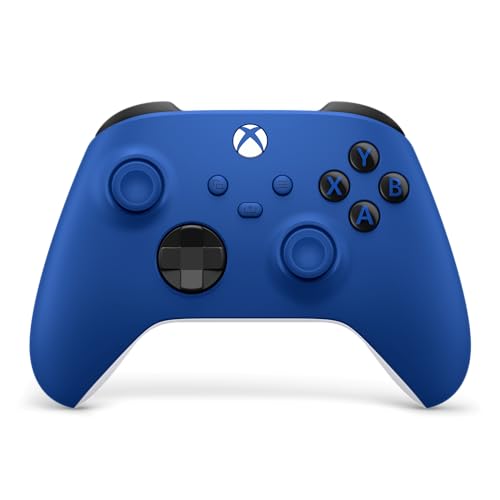
- USB-C, Bluetooth, and Xbox Wireless
- Textured grips and hybrid D-pad
- 3.5mm headset jack and app-based remapping
Best For: PC gamers wanting a familiar cross-device controller
Reliable Wireless Pick
Logitech F710 Wireless Gamepad

- 2.4 GHz wireless connection with USB Nano receiver
- Dual vibration motors for supported games
- Profiler software supports custom control mapping
Best For: PC gamers seeking a familiar wireless gamepad
Best for Everyday Use
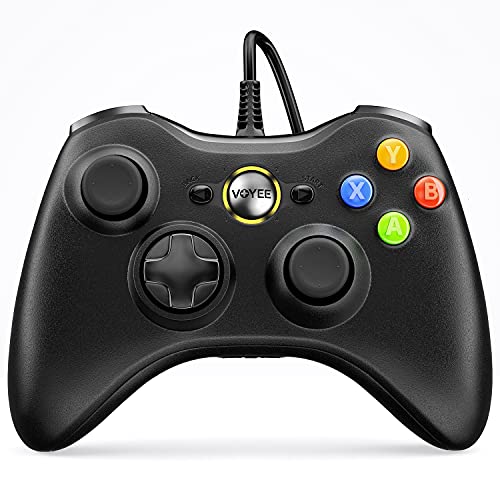
- Plug-and-play USB connection for compatible Windows PCs
- 7.2-foot cord and ergonomic contoured grips
- Rumble feedback with upgraded joysticks and triggers
Best For: Casual PC gaming on a budget
Feature-Rich Performance Pick
GameSir Nova Lite 2 Controller

- Hall Effect sticks with anti-drift-focused design
- Wired, Bluetooth, and wireless dongle connectivity
- 1000Hz polling, trigger locks, and remappable back buttons
Best For: Players wanting responsive controls and customization
Best Wired Xbox Pick
PowerA Wired Controller for Xbox Series X|S

- 10-foot USB-C cable for flexible desk setups
- Rumble and Impulse Trigger feedback
- Works with Xbox and Windows 10/11
Best For: PC and Xbox players who prefer a long wired connection
Best Multi-Mode PC Controller
EasySMX X15 Wireless Gaming Controller

- 2.4G, Bluetooth, and USB-C connectivity
- Hall Effect sticks and triggers
- Up to 20 hours of battery life
Best For: PC and Steam players wanting wireless flexibility and rear buttons
Best Hall Effect Wired Pick

- Hall Effect joysticks and triggers
- Plug-and-play wired Windows support
- Two custom back keys and 3.5mm audio
Best For: PC and Xbox players prioritizing precise wired control
Best High-Response Pick – 8Bitdo Ultimate 2C
For PC players who want responsive wireless control, the 8Bitdo Ultimate 2C is a strong option among game controllers for PC. It supports Windows and Android, offers a 1000Hz polling rate over 2.4G or wired connections, and uses Hall Effect joysticks and triggers.
Best For: PC gamers who prioritize fast response, durable controls, and extra remappable bumpers.
Pros:
- 1000Hz polling rate over 2.4G and wired connections
- Hall Effect joysticks and triggers help reduce concerns about traditional wear
- Extra L4/R4 bumpers and button mapping without software
- Turbo function and tactile bumpers and D-pad
Cons:
- Compatibility is limited to Windows and Android in the supplied specifications
- Wireless features are paired with a battery-powered design that requires charging
The Ultimate 2C stands out for players who want modern control hardware and quick input response without relying on mapping software. Its lightweight 280-gram design and additional rear bumpers add flexibility for supported PC games.
Best Budget Wired Pick – Logitech G F310
Logitech G F310 Wired Gamepad Controller Console - Blue/Black | Console-like layout, 4-switch D-pad
Check Price On AmazonThe Logitech G F310 is a straightforward wired choice for shoppers comparing game controllers for PC. Its USB plug-and-play connection, familiar console-style layout, and broad game support make it easy to use with both older favorites and newer titles.
Best For: PC players who prefer a simple wired controller with programmable buttons and no battery charging.
Pros:
- Simple USB plug-and-play connection
- Six-foot cord allows comfortable distance from the monitor
- Profiler software supports programmable keyboard and mouse commands
- Console-like layout with a four-switch floating D-pad
Cons:
- Profiler customization requires software installation
- Wired design does not provide wireless flexibility
- Supplied Windows compatibility notes specifically list XP, Vista, and 7
The F310 is a practical fit for users who want dependable wired operation and a familiar control scheme. Its corded design avoids battery management, while the programmable features can extend compatibility to games without native gamepad support.
Best RGB Multiplatform Pick – VOYEE S08 Switch Controller
The VOYEE S08 brings colorful lighting and flexible features to the game controllers for PC category. It works with Windows and Nintendo Switch systems, includes programmable M1/M2 buttons, and offers wireless play with a stated 10- to 15-hour runtime when LED lighting is on.
Best For: PC and Switch players who want RGB lighting, motion control, turbo functionality, and programmable buttons.
Pros:
- Windows and Switch compatibility with wireless pairing
- Eight colors, rainbow lighting, and five lighting modes
- Programmable M1/M2 keys and three turbo speeds
- Six-axis gyro, adjustable vibration, and 10- to 15-hour runtime with LEDs on
Cons:
- PC use requires a cable according to the supplied notes
- Lighting features may require more frequent charging
- Full charging takes approximately three to four hours
The S08 is a feature-rich choice for players who enjoy visual customization and extra controls. Its ergonomic non-slip grips, adjustable vibration, and gyro sensor make it especially versatile for compatible PC and Switch games.
Best Mainstream Wireless Pick – Xbox Wireless Controller
The Xbox Wireless Controller is a familiar, versatile option among game controllers for PC. It connects through USB-C, Xbox Wireless, or Bluetooth, and adds a hybrid D-pad, textured grips, a Share button, and headset support through its 3.5mm jack.
Best For: PC gamers who want a conventional Xbox layout with wireless connectivity and cross-device support.
Pros:
- USB-C, Bluetooth, and Xbox Wireless connectivity
- Works with Windows, Xbox consoles, Android, iOS, and cloud devices
- Textured triggers, bumpers, and back case support grip
- 3.5mm headset jack and customizable controls through the Xbox Accessories app
Cons:
- Battery-powered design requires ongoing battery management
- Supplied warranty information lists a 90-day manufacturer warranty
- Some customization features require the Xbox Accessories app
This controller is a well-rounded pick for PC users who also play across Xbox and mobile devices. Its modernized shape, familiar layout, wireless options, and direct headset connection make it an adaptable everyday gamepad.
Reliable Wireless Pick – Logitech F710 Wireless Gamepad
The Logitech F710 is a practical choice for shoppers comparing game controllers for PC and wanting wireless freedom without a complicated setup. Its 2.4 GHz connection uses a compact USB Nano receiver, while the familiar console-style layout works across a broad range of games.
Best For: PC gamers who want a traditional wireless controller with vibration feedback and customizable controls.
Pros:
- 2.4 GHz wireless connection with a compact plug-and-forget Nano receiver.
- Broad game support, including older favorites and newer titles.
- Dual vibration motors provide feedback in supported games.
- Profiler software can map keyboard and mouse commands to the controller.
Cons:
- Profiler customization requires software installation.
- Uses two AA batteries rather than a rechargeable battery.
The F710 emphasizes familiar controls and dependable wireless connectivity. It is a solid fit for general PC gaming, especially if you prefer a battery-powered gamepad and do not need newer premium features such as Hall Effect sticks.
Best for Everyday Use – VOYEE PC 360 Controller
The VOYEE PC Controller is a straightforward option for shoppers seeking game controllers for PC with plug-and-play USB connectivity. Its 7.2-foot cord, ergonomic grips, responsive controls, and rumble feedback make it suited to casual desktop gaming.
Best For: Players who want an affordable wired controller compatible with Windows PCs and Xbox 360 systems.
Pros:
- USB wired connection supports plug-and-play use on compatible Windows PCs.
- Long 7.2-foot cord provides flexibility at a desk or from a nearby seat.
- Upgraded joysticks, triggers, and buttons are designed for responsive input.
- Rumble feedback and contoured grips add comfort and immersion.
Cons:
- Wired design does not provide wireless freedom.
- The supplied notes state it is not intended for FPS games.
This controller keeps things simple: connect it by USB and start playing on a supported PC or Xbox 360. It is best considered a practical secondary or budget gamepad rather than a feature-rich competitive controller.
Feature-Rich Performance Pick – GameSir Nova Lite 2 Controller
The GameSir Nova Lite 2 stands out among game controllers for PC with Hall Effect sticks, multiple connection options, and a 1000Hz polling rate. It also adds trigger locks, back buttons, and software customization for players who want more control over their setup.
Best For: PC players who value responsive input, anti-drift-focused stick design, and extensive customization.
Pros:
- Hall Effect joysticks are designed for smoother recentering and improved anti-drift capability.
- Supports wired, Bluetooth, and wireless dongle connections across PC and other platforms.
- 1000Hz polling rate is designed to minimize input delay.
- Two back buttons support remapping and macro recording.
Cons:
- Advanced customization requires the GameSir mobile or PC app.
- Its feature set may be more than casual players need.
The Nova Lite 2 is the most configurable option in this group. Its Hall Effect sticks, trigger modes, back buttons, and software controls make it appealing for players who want to tune both feel and functionality, while the multi-platform support adds flexibility.
Best Wired Xbox Pick – PowerA Wired Controller for Xbox Series X|S
If you want a straightforward option among game controllers for PC, this wired PowerA model connects to Windows 10/11 and Xbox consoles. Its long cable, rumble features, and familiar ergonomic design make it practical for desk gaming without battery management.
Best For: PC and Xbox players who prefer a long wired connection and headset support.
Pros:
- 10-foot USB-C cable provides extra room for comfortable play.
- Dual rumble motors and Impulse Triggers add tactile feedback.
- 3.5mm headset jack, precision-tuned sticks, and anti-friction rings support everyday play.
- Includes a two-year limited warranty and PowerA Gamer HQ testing app.
Cons:
- Wired connectivity does not provide wireless flexibility.
- Designed for Xbox and Windows 10/11 rather than broad multi-platform use.
This is a sensible choice if dependable plug-in play, a generous cable, and Xbox compatibility matter more to you than wireless features.
Best Multi-Mode PC Controller – EasySMX X15 Wireless Gaming Controller
The EasySMX X15 stands out among game controllers for PC with three connection options: 2.4G wireless, Bluetooth, and wired USB-C. Hall Effect sticks and triggers, programmable back buttons, and a large battery make it a versatile fit for PC, Steam, and several other platforms.
Best For: PC and Steam players who want wireless flexibility, Hall Effect controls, and customizable rear buttons.
Pros:
- Supports 2.4G wireless, Bluetooth, and wired USB-C connections.
- Hall Effect joysticks and triggers are designed to reduce stick drift and dead zones.
- Two programmable back buttons, 1000Hz polling, turbo, and adjustable RGB offer customization.
- 1000mAh battery provides up to 20 hours of playtime.
Cons:
- Does not include a microphone jack or gyro sensor.
- Device compatibility should be checked before purchase, especially across non-PC platforms.
With broad connectivity and a feature-rich control layout, the X15 is a strong option for players who switch between wired and wireless PC gaming or use multiple devices.
Best Hall Effect Wired Pick – GameSir G7 SE Controller
For PC gamers seeking a plug-and-play option, the GameSir G7 SE combines a detachable wired connection with Hall Effect joysticks and triggers. It supports Windows 10 and newer, Xbox consoles, Steam, headset audio, and two customizable back keys.
Best For: PC and Xbox players who prioritize precise wired control, low-maintenance setup, and headset compatibility.
Pros:
- Hall Effect joysticks and triggers provide precise control and are built for long life.
- Detachable USB wired connection enables plug-and-play setup without extra drivers.
- Two custom back keys add control options for compatible games.
- Includes a 3.5mm audio jack, vibration feedback, and a textured ergonomic grip.
Cons:
- Wired-only connectivity limits placement flexibility.
- Compatibility is focused on Xbox consoles and Windows 10 or newer.
The G7 SE is a practical match for competitive or long-session players who value Hall Effect hardware and direct wired performance over wireless convenience.
How We Picked the Best Game Controllers for PC
We focused on controllers that offer practical PC compatibility, recognizable layouts, useful connection options, and strong value across different budgets. The lineup includes wired and wireless models, Xbox-style and Switch-inspired designs, and controllers with Hall Effect sticks or triggers that can help reduce traditional analog-stick drift.
We also considered setup simplicity, button placement, polling performance where advertised, included receivers or cables, platform support, and whether each controller suits everyday gaming or a more specific use case. Compatibility details can vary by game and operating system, so check the manufacturer’s specifications before buying.
Quick Comparison
| Controller type | Best for | Connection | Notable feature |
|---|---|---|---|
| 8BitDo Ultimate 2C | Fast wireless PC gaming | Wireless | Hall Effect controls and high polling rate |
| Logitech G F310 | Simple budget gaming | Wired | Familiar XInput-style layout |
| Xbox Wireless Controller | General PC and Xbox use | Wireless | Official Xbox design and broad support |
| Logitech G F710 | Cable-free budget play | Wireless | USB nano receiver |
| GameSir G7 SE | Wired competitive play | Wired | Hall Effect sticks and triggers |
Key Buying Factors for Game Controllers for PC
Wired or Wireless Connection
Wired controllers usually provide the simplest setup, consistent input, and no battery charging. They are a strong choice for desk-based gaming and competitive play. Wireless models provide a cleaner setup and more freedom, but may require batteries, charging, Bluetooth pairing, or a dedicated USB receiver.
PC Compatibility and Input Mode
Look for Windows support and, when possible, XInput compatibility. XInput is widely recognized by modern PC games and often reduces configuration work. Some controllers support multiple platforms, but features such as vibration, remapping, or wireless audio may work only on specific systems.
Hall Effect Sticks and Triggers
Hall Effect sensors use magnetic detection rather than the same contact-based mechanism found in many conventional analog controls. They can offer improved durability and resistance to common drift issues, although they do not eliminate every possible failure.
Comfort, Layout, and Controls
Check the controller’s size, grip shape, stick arrangement, trigger feel, and button placement. Xbox-style asymmetrical sticks suit many PC and console games, while Switch-style layouts may appeal to players who prefer symmetrical controls. Extra buttons, vibration, RGB lighting, and trigger locks are useful only if they match your play style.
Polling Rate and Battery Needs
A higher advertised polling rate may appeal to competitive players, but real-world benefit depends on the game, connection, and system. For wireless controllers, also check battery life, charging method, and whether the controller can be used while charging.
Who Should Buy Which Game Controllers for PC?
- For the best all-around wireless experience: Choose the Xbox Wireless Controller or 8BitDo Ultimate 2C, depending on whether you prioritize official Xbox integration or Hall Effect features and high polling performance.
- For affordable wired gaming: The Logitech G F310 or VOYEE wired controller can provide a straightforward option for casual PC play.
- For drift-resistant controls: Consider the GameSir G7 SE, GameSir Nova Lite 2, EasySMX X15, or 8BitDo Ultimate 2C with Hall Effect controls.
- For couch gaming: A wireless model such as the Logitech G F710, Xbox Wireless Controller, or EasySMX X15 avoids a cable running across the room.
- For Xbox and Windows users: The Xbox Wireless Controller, PowerA wired controller, and GameSir G7 SE offer familiar Xbox-style layouts and platform support.
Before ordering, confirm the exact Windows version, connection method, included accessories, and any platform limitations. A controller that fits your preferred games and setup is usually a better buy than one with the longest feature list.