Choosing your first controller can be confusing when prices, platforms, layouts, and features vary so widely. The best game controllers for beginners make setup simple while offering comfortable controls that are easy to learn.
This roundup covers wired and wireless options for PC, Nintendo Switch, Xbox, Android, iOS, and Steam Deck. Use the guide below to match each controller’s connectivity, design, and features to the way you play.
Best 10 Game Controllers for Beginners Picks for 2026
Best Wired Starter

- Familiar console-style controls
- Six-foot wired USB connection
- Programmable buttons via Profiler software
Best For: Beginner PC players who want simple wired control
Best Feature-Rich Switch Pick

- Wireless Switch compatibility
- One-key pairing and wake-up
- Programmable buttons and motion control
Best For: Switch beginners wanting extra customization
Best for PC Longevity

- Hall Effect joysticks and triggers
- 1000Hz polling on 2.4G and wired modes
- Remappable bumpers without software
Best For: PC and Android beginners planning to keep learning
Best Budget Switch Features
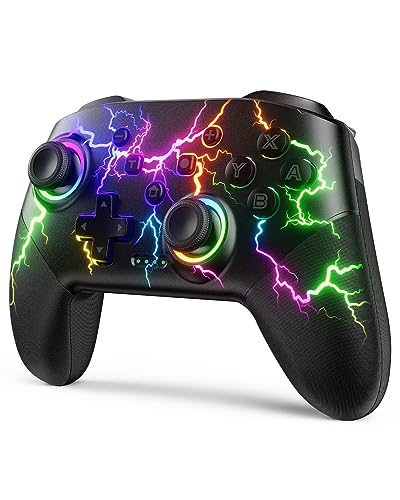
- Wireless support for Switch consoles
- 10–15-hour rechargeable battery
- Motion sensing, turbo, and programmable buttons
Best For: Switch beginners who want lighting and extra functions
Best Wired Xbox Pick

- Plug-and-play USB connection
- Hall Effect joysticks and triggers
- Xbox and Windows compatibility
Best For: Xbox and Windows players who prefer a simple wired controller
Best Quiet Wireless Pick

- Works with PC, Switch, Android, and iOS
- Quiet silicone-damped buttons
- Wireless, Bluetooth, and USB-C modes
Best For: Multi-platform players who value quiet, flexible gaming
Best Customizable PC Pick

- PC, Switch, Android, and iOS support
- Hall Effect sticks with 1000Hz polling
- Trigger locks and remappable back buttons
Best For: Players who want a beginner-friendly controller with upgradeable customization
Best Pocket Pick
AceGamer Wireless Pocket Controller

- Works with Switch, Switch 2, PC, mobile, and Steam Deck
- Compact design with lift-and-lock joysticks
- Includes gyro, vibration, turbo, and 1000Hz polling
Best For: Beginners who prioritize portability and multi-platform use
Best RGB Upgrade
MYSTILUCK Wireless Pro Controller

- Compatible with Switch family consoles and PC
- Hall effect sticks for precise, durable control
- Adds RGB lighting, gyro, vibration, and turbo
Best For: Beginners wanting a customizable wireless Switch controller
Best Wired Value
GameSir Tegenaria Lite Controller

- USB connection delivers low-latency play
- Hall effect sticks support precise control
- Adds back buttons, rumble, and turbo
Best For: Beginners who prefer wired reliability over wireless freedom
Best Wired Starter – Logitech F310 Gamepad
Logitech G F310 Wired Gamepad Controller Console - Blue/Black | Console-like layout, 4-switch D-pad
Check Price On AmazonThe Logitech F310 is a practical pick for beginners seeking game controllers for beginners on a Windows PC. Its familiar Xbox-style layout, plug-and-play USB connection, and six-foot cable make it easy to start playing without learning an unusual control scheme.
Best For: PC players who prefer a straightforward wired controller with broad game support.
Pros:
- Familiar console-like layout with 10 buttons and an 8-way programmable D-pad
- Six-foot cord allows comfortable distance from the monitor
- Profiler software can map keyboard and mouse commands for unsupported games
- Works with older favorites and newer popular titles
Cons:
- Requires a wired USB connection
- Profiler customization requires software installation
- Supplied Windows compatibility details focus on older Windows versions
The F310 keeps the learning curve low and offers useful customization for PC gaming. Choose it if reliability and simplicity matter more to you than wireless freedom.
Best Feature-Rich Switch Pick – VOYEE RGB Star Controller
For beginners who want game controllers for beginners with wireless convenience and extra features, this VOYEE model supports Switch consoles and Windows PC. One-key pairing, wake-up support, adjustable lighting, and an ergonomic non-slip design make it approachable for everyday play.
Best For: Switch, Switch Lite, and Switch OLED users who want wireless play, motion controls, and customizable functions.
Pros:
- Supports Switch, Switch Lite, Switch OLED, and Windows PC with a cable
- One-key pairing and console wake-up simplify setup
- Includes programmable M1/M2 buttons, turbo, vibration, and six-axis gyro control
- Rechargeable battery offers about 10–15 hours with LED lighting on
Cons:
- PC use requires a cable
- Full charging takes about three to four hours
- Multiple lighting and control features may be more than a beginner needs
This controller is a versatile starting point for Switch owners who want room to experiment with customization. Its broad feature set is useful, though the simpler controls may be preferable if you want a minimalist experience.
Best for PC Longevity – 8Bitdo Ultimate 2C
The 8Bitdo Ultimate 2C suits beginners looking for game controllers for beginners that can remain useful as their skills develop. It works with Windows and Android, combines Hall Effect joysticks and triggers with a 1000Hz polling rate, and adds remappable L4/R4 bumpers without requiring software for custom button mapping.
Best For: Windows PC and Android players who want a modern wireless controller with durable-feeling control hardware.
Pros:
- Compatible with Windows and Android
- Hall Effect joysticks and triggers are designed to resist the wear associated with traditional components
- 1000Hz polling rate is available over 2.4G and wired connections
- Offers remappable L4/R4 bumpers, turbo, and custom mapping without software
Cons:
- Not listed as compatible with Nintendo Switch consoles
- Advanced remapping and extra bumpers may take time for beginners to learn
- The supplied notes do not specify battery runtime
The Ultimate 2C is a strong choice if you want beginner-friendly basics plus hardware and customization features for longer-term use. It is best suited to PC or Android players rather than multi-console households.
Best Budget Switch Features – VOYEE Light-up Pro Controller
This VOYEE Pro Controller is aimed at beginners who want game controllers for beginners with wireless Switch support and a colorful design. It offers one-key pairing, a 10–15-hour battery estimate, motion sensing, vibration, programmable buttons, and wired PC compatibility.
Best For: Switch players who want an affordable-feeling feature mix with lighting and customizable controls.
Pros:
- Compatible with Switch, Switch Lite, Switch OLED, and Windows PC
- One-key pairing can wake the Switch console
- Includes programmable M1/M2 buttons, three turbo speeds, and six-axis motion control
- Rechargeable battery provides about 10–15 hours of runtime
Cons:
- PC operation is wired according to the supplied notes
- Full charging takes about three to four hours
- Lighting and programmable controls may feel unnecessary for basic play
This is a sensible option for Switch beginners who enjoy visual extras and want more functions than a basic gamepad provides. Its wired-only PC detail is worth noting if you plan to use it across platforms.
Best Wired Xbox Pick – GameSir G7 SE
For beginners seeking game controllers for beginners, the GameSir G7 SE is a straightforward wired option for Xbox and Windows gaming. Its plug-and-play USB connection avoids pairing steps, while Hall Effect joysticks and triggers provide precise control.
Best For: Xbox and Windows players who want a simple, responsive wired controller.
Pros:
- Works with Xbox Series X|S, Xbox One, and Windows 10/11.
- Hall Effect joysticks and triggers support accurate, durable-feeling control.
- Includes programmable back keys, vibration feedback, and a 3.5mm headset jack.
Cons:
- Wired connection limits mobility compared with wireless models.
- Not designed for Switch, Android, or iOS compatibility.
The G7 SE keeps setup uncomplicated and adds useful customization without overwhelming new players. It is a particularly practical choice if you primarily play on Xbox or Windows and do not mind a cable.
Best Quiet Wireless Pick – EasySMX X05Pro
The EasySMX X05Pro is a flexible choice for beginners comparing game controllers for beginners across PC, Switch, Android, and iOS. It offers wireless and wired connection options, quiet silicone-damped buttons, and a rechargeable battery for relaxed everyday play.
Best For: Multi-platform players who want quiet operation and wireless flexibility.
Pros:
- Supports PC, Switch, Android, and iOS through Bluetooth, 2.4G wireless, or USB-C.
- Ultra-quiet buttons are suitable for late-night gaming.
- Hall Effect joysticks, adjustable triggers, programmable buttons, and a 1000mAh battery add versatility.
Cons:
- Not compatible with Xbox, PlayStation, Luna, or GeForce.
- Bluetooth polling is lower than the wired and 2.4G modes.
With several connection methods and an emphasis on quiet play, the X05Pro is easy to adapt to different setups. Beginners should simply confirm their platform is supported before buying.
Best Customizable PC Pick – GameSir Nova Lite 2
The GameSir Nova Lite 2 suits beginners who want game controllers for beginners with room to grow. It supports PC, Switch, Android, and iOS, while Hall Effect sticks, trigger locks, back buttons, and app-based adjustments provide more control as your skills develop.
Best For: Newer players who want broad compatibility and advanced customization options.
Pros:
- Connects through Bluetooth, wired mode, or a wireless dongle across several platforms.
- Hall Effect joysticks and a 1000Hz polling rate support responsive control.
- Offers trigger locks, two remappable back buttons, vibration adjustment, and software customization.
Cons:
- The range of customization features may be more than a beginner initially needs.
- Supplied details identify it mainly as a PC, Switch, Android, and iOS controller rather than an Xbox model.
The Nova Lite 2 is a strong learning-friendly option: basic controls are accessible, but the controller can accommodate more demanding play later. Its multiple connection methods also make it useful across devices.
Best Pocket Pick – AceGamer Wireless Pocket Controller
For beginners shopping for game controllers for beginners, the AceGamer stands out as a compact wireless option that works across Switch, Switch 2, PC, mobile devices, and Steam Deck. Its simple mode switching, one-button Switch wake-up, and travel-friendly design make it practical for players who use more than one platform.
Best For: Beginners who want a small, versatile controller for console, PC, and mobile gaming.
Pros:
- Broad compatibility, including Switch, Switch 2, PC, iOS, Android, and Steam Deck.
- Pocket-sized 4.7-by-2.6-by-1.2-inch design with lift-and-lock joysticks for travel.
- Includes motion sensing, vibration, turbo controls, and a 1000Hz polling rate.
Cons:
- Its compact size may feel less spacious than a full-size controller.
- Turbo and mode-switching features may require consulting the included manual.
The AceGamer is a flexible starter choice when portability and cross-device compatibility matter most. It offers a useful feature set without being tied to a single gaming platform.
Best RGB Upgrade – MYSTILUCK Wireless Pro Controller
The MYSTILUCK is a beginner-friendly wireless choice for Switch and PC players who want a more traditional pro-controller shape with extra features. Hall effect sticks, adjustable vibration, motion controls, and colorful RGB lighting give new players room to personalize their setup.
Best For: Beginners seeking a feature-rich Switch controller with lighting and ergonomic controls.
Pros:
- Compatible with Switch, Switch 2, Switch Lite, Switch OLED, Switch Pro, and PC.
- Hall effect joystick technology is designed for precise control and resistance to stick drift.
- Offers seven RGB colors, three vibration levels, gyro controls, and adjustable turbo speeds.
Cons:
- The HOME button cannot wake Switch 2, and the controller lacks the C button for voice chat.
- Battery life is rated for up to seven hours, which may require regular charging during extended use.
With its familiar layout and adjustable features, the MYSTILUCK gives beginners an approachable way to explore more advanced controller functions. Switch 2 owners should be comfortable with its stated HOME-button and voice-chat limitations.
Best Wired Value – GameSir Tegenaria Lite Controller
For game controllers for beginners, the wired GameSir Tegenaria Lite offers a straightforward setup: connect it by USB and play on compatible Switch, Android, iOS, PC, or Steam devices. Its Hall effect sticks, 1000Hz polling rate, and ergonomic retro design make it a practical pick for players who do not need wireless connectivity.
Best For: Beginners who prefer a low-latency wired controller with customizable buttons.
Pros:
- USB connection provides ultra-low latency without wireless pairing.
- Hall effect sticks are designed for precise control and resistance to wear-related drift.
- Includes dual rumble motors, two mappable back buttons, and customizable turbo controls.
Cons:
- Wired operation limits mobility and requires a cable connection while playing.
- Its supplied details identify Nintendo Switch compatibility, while platform support should be verified for each device.
The Tegenaria Lite is a sensible starter controller for desk or docked gaming. Choose it if reliable wired responsiveness and extra programmable buttons are more important than wireless convenience.
How We Picked the Best Game Controllers for Beginners
We focused on controllers that are approachable for new players and useful beyond a single game. Our evaluation criteria included platform compatibility, connection setup, button layout, ergonomics, control responsiveness, durability features, and overall value. Wired models can be especially practical for beginners because they avoid pairing and battery concerns, while wireless controllers offer a cleaner setup and greater freedom of movement.
Features such as Hall Effect sticks, adjustable vibration, motion controls, RGB lighting, and high polling rates were treated as useful extras rather than requirements. A beginner-friendly controller should first be comfortable, compatible, and straightforward to use.
Quick Comparison
- Best for simple PC gaming: Logitech G F310, thanks to its familiar layout and wired plug-and-play design.
- Best for Xbox and Windows: GameSir G7 SE, with a wired connection and Hall Effect controls.
- Best wireless all-rounders: 8Bitdo Ultimate 2C, GameSir Nova Lite 2, and EasySMX X05Pro.
- Best for Nintendo Switch: the VOYEE, AceGamer, and MYSTILUCK Pro Controller options.
- Best retro-style choice: GameSir Tegenaria Lite, with a distinctive classic-inspired design.
Key Buying Factors for Game Controllers for Beginners
Compatibility and Connection
Confirm the controller supports your exact platform before buying. Windows compatibility does not automatically mean Xbox compatibility, and Nintendo Switch controllers may require a particular wireless mode or wired setup. Bluetooth is convenient, but 2.4GHz wireless or USB connections may offer simpler pairing and more consistent performance.
Wired Versus Wireless
Wired controllers are usually the easiest starting point: connect the cable and play. They do restrict seating distance and require a suitable USB port. Wireless models are better for living-room play, but remember to check battery life, charging methods, and whether a receiver is included.
Comfort and Layout
Look for a shape that suits your hand size and a familiar button arrangement. Lightweight controllers can be easier for younger or casual players, while larger grips may feel more comfortable during long sessions. Extra buttons are useful only if you are comfortable learning them.
Stick and Trigger Technology
Hall Effect joysticks and triggers are designed to reduce common physical wear issues, making them appealing for frequent players. They are not essential for learning, but can improve long-term value. Adjustable triggers, vibration, and motion controls matter most when supported by your preferred games.
Who Should Buy Which Game Controllers for Beginners?
Choose the Logitech F310 or GameSir Tegenaria Lite if you want a straightforward wired introduction. Pick the GameSir G7 SE if Xbox or Windows is your main platform and you want modern stick technology. For flexible wireless PC and Android use, consider the 8Bitdo Ultimate 2C, GameSir Nova Lite 2, or EasySMX X05Pro. Switch owners should prioritize the VOYEE, AceGamer, or MYSTILUCK models based on desired wireless features, lighting, and ergonomics.
Before ordering, verify the listed platform, connector type, included accessories, and current software requirements. The right first controller is the one that works immediately with your system and feels comfortable enough to keep using.