The right rudder pedals can make flight simulation feel more controlled, natural, and immersive. They improve yaw accuracy, ground steering, braking, and coordinated turns in ways a joystick alone cannot fully replicate.
We’ve selected 10 options for PC pilots, including standalone pedals, HOTAS bundles, and premium systems with adjustable resistance and durable construction. Use the guide below to match your simulator, cockpit space, and budget with the right setup.
Best 10 Flight Simulator Pedals for PC Picks for 2026
Precision Pick
Thrustmaster TFRP Rudder Pedals

- Long-travel self-centering rudder axis
- Four aluminum rails for smooth movement
- PC, PS5, and Xbox compatibility
Best For: Serious sim pilots wanting precise, adjustable rudder control
Complete Starter Set
Thrustmaster T16000M FCS Flight Pack

- Includes stick, throttle, and pedals
- Ambidextrous joystick with 16 buttons
- USB PC compatibility with mapping software
Best For: PC users building a complete flight-control setup
Adjustable Comfort Choice
Turtle Beach VelocityOne Rudder Pedals
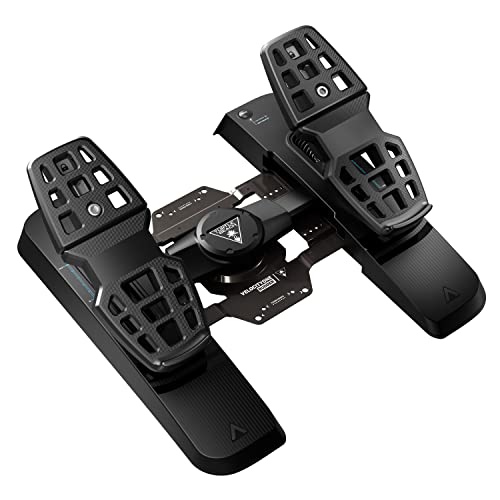
- Swappable springs and pedal sets
- Adjustable pedal width and differential brakes
- Hall effect sensors on all axes
Best For: PC and Xbox pilots wanting extensive adjustability
Balanced Control Pick
Logitech G Pro Flight Rudder Pedals
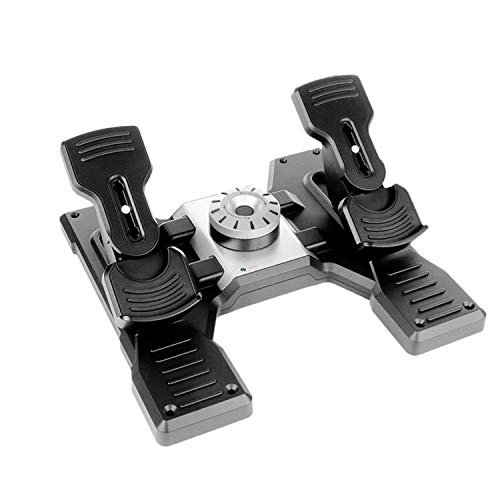
- Adjustable tension dial
- Self-centering rudder axis
- Differential toe brakes via USB
Best For: Windows pilots wanting customizable resistance and braking control
Premium Precision
Honeycomb Charlie Rudder Pedals

- Aluminum construction with belt drive
- Precise Hall-effect sensors
- Adjustable angle, tension, and anti-slip grip
Best For: PC pilots seeking durable, adjustable rudder pedals
Versatile Entry Choice
ThrustMaster TFRP Rudder Pedals

- Smooth aluminum slide-rail steering
- Large differential-braking pedals
- Removable heel-rests for two foot positions
Best For: PC users wanting ergonomic pedals with braking control
Configurable Metal Control

- Full-metal aviation-grade construction
- Three quick-switch control modes
- Hall sensors with adjustable damping
Best For: Cockpit builders seeking customizable, heavy-duty controls
Best All-in-One Setup
Logitech G X56 H.O.T.A.S. Bundle

- Includes HOTAS controls and rudder pedals
- Adjustable tension and differential toe brakes
- RGB lighting and VR-friendly control layout
Best For: PC pilots building a complete, customizable flight-simulation station
Best Complete Xbox-and-PC Kit
Thrustmaster T-Flight Full Kit

- Combines HOTAS controls with rudder pedals
- Supports PC and Xbox Series X|S
- Smooth slide-rail pedals with full-foot support
Best For: Players wanting a complete setup across PC and compatible Xbox consoles
Best Premium Rudder Pedals
Thrustmaster TPR Rudder Pedals

- Suspended Pendul_R mechanism for smooth motion
- H.E.A.R.T. magnetic sensors resist mechanical wear
- Adjustable spring resistance and positioning
Best For: Serious PC sim users upgrading to precise, customizable rudder control
Precision Pick – Thrustmaster TFRP Rudder Pedals
For PC pilots seeking flight simulator pedals for PC with a more authentic feel, the Thrustmaster TFRP emphasizes long rudder travel, smooth movement, and secure cockpit control. Its self-centering axis and aluminum rail system are designed for precise, consistent inputs.
Best For: Serious flight sim enthusiasts who want smooth rudder control and broad platform compatibility.
Pros:
- Long rudder-axis travel supports smooth, accurate turns.
- Four aluminum rails provide smooth, rigid sliding motion.
- Self-centering rudder and adjustable resistance help tailor control feel.
- Includes differential braking and works with PC, PS5, and Xbox platforms.
Cons:
- At 4.9 pounds, it may be heavier than simpler pedal sets.
- Its larger listed footprint may require careful cockpit space planning.
The TFRP is a strong choice when realistic rudder travel, stable construction, and console flexibility matter as much as PC compatibility.
Complete Starter Set – Thrustmaster T16000M FCS Flight Pack
The Thrustmaster T16000M FCS Flight Pack is a practical all-in-one option for PC users who need flight simulator pedals for PC alongside a joystick and throttle. It connects through USB on Windows and combines the pedals with a highly configurable flight-control setup.
Best For: PC newcomers and pilots who want a bundled joystick, throttle, and pedal solution.
Pros:
- Includes the flightstick, throttle, and pedals in one package.
- H.E.A.R.T. technology is designed to maintain joystick precision over time.
- Ambidextrous joystick supports left- or right-handed configurations.
- Offers 16 buttons, four axes, and T.A.R.G.E.T. mapping software.
Cons:
- Compatible with PC only, rather than consoles.
- The pedals are part of a bundled system, so it may be less suitable for buyers seeking pedals alone.
This pack makes the most sense for building a complete PC flight setup at once, especially if you also need a stick and throttle.
Adjustable Comfort Choice – Turtle Beach VelocityOne Rudder Pedals
For pilots comparing flight simulator pedals for PC, the Turtle Beach VelocityOne stands out for its adjustable pedal width, swappable springs, and smooth rudder axis. Hall effect sensors cover all axes, while the non-slip base is designed to stay planted during use.
Best For: PC and Xbox users who want customizable pedal spacing, resistance, and braking control.
Pros:
- Ultra-smooth rudder axis uses swappable springs.
- Adjustable pedal width helps fit different preferences.
- Non-contact Hall effect sensors are used across all axes.
- Includes two sets of swappable pedals and differential brakes.
Cons:
- At 13.3 pounds, it is substantially heavier than several alternatives.
- Xbox use requires the VelocityOne Flight Control System.
- Its broad feature set may be more than casual PC users need.
The VelocityOne is a feature-rich option for users who value adjustability and a stable base, particularly those who also fly on Xbox.
Balanced Control Pick – Logitech G Pro Flight Rudder Pedals
The Logitech G Pro Flight Rudder Pedals deliver the core features many PC pilots want from flight simulator pedals for PC: self-centering rudder control, adjustable tension, and differential toe brakes. USB connectivity and Windows support make them straightforward to add to a desktop flight setup.
Best For: Windows users who want adjustable resistance and separate toe-brake control.
Pros:
- Adjustable tension dial changes the pedal response from lighter to more robust.
- Self-centering rudder supports consistent directional control.
- Differential toe brakes provide added runway control.
- Uses USB connectivity and includes a part-metal construction.
Cons:
- Listed compatibility is limited to Windows 7, 8, 8.1, and 10.
- It lacks the broader console compatibility offered by some alternatives.
This Logitech set is a sensible middle ground for Windows pilots who want adjustable feel and toe brakes without buying a complete flight-control bundle.
Premium Precision – Honeycomb Charlie Rudder Pedals
For flight simulator pedals for PC, the Honeycomb Charlie emphasizes durable construction and precise input. Its aluminum pedals, Hall-effect sensors, belt drive system, and adjustable settings make it a strong choice for Microsoft Flight Simulator and other supported simulators.
Best For: PC pilots who want adjustable, premium-feeling rudder pedals for civil flight simulation.
Pros:
- Durable aluminum construction with metal pedals and a belt drive system.
- Hall-effect sensors provide precise coordination and reduce correction effort.
- Adjustable pedal angle and tension accommodate different pilot preferences.
- Grip pads and deployable carpet spikes help prevent unwanted movement.
Cons:
- Its listed 10 kg weight and large 21 x 11 x 22-inch dimensions may require substantial desk or cockpit space.
- Xbox Series X or S use requires the Honeycomb Xbox Hub.
The Charlie is a well-equipped option when stability, adjustability, and realistic control matter more than a compact footprint. USB connectivity and support for Microsoft Flight Simulator, X-Plane 12, and Prepar3D broaden its usefulness.
Versatile Entry Choice – ThrustMaster TFRP Rudder Pedals
The ThrustMaster TFRP is a practical option for flight simulator pedals for PC, offering smooth rudder movement and differential braking. Its ergonomic heel-rest design and broad compatibility make it suitable for several types of flight simulation.
Best For: PC users who want ergonomic rudder pedals with differential braking and flexible foot positioning.
Pros:
- S.M.A.R.T. aluminum slide rails are designed for smooth steering.
- Large pedals provide differential braking control.
- Removable heel-rests support two ergonomic foot configurations.
- Compatible with PC joysticks and also supports specified PS4 and Xbox One setups with the appropriate joystick.
Cons:
- The supplied listing combines the TFRP pedals with a T16000M FCS HOTAS, so buyers should confirm the package contents.
- The product information specifies Windows compatibility rather than broad operating-system support.
With its smooth rail system and adjustable heel-rest arrangement, the TFRP suits users who value comfort and braking control. It is especially useful for civil, combat, and space flight setups that already use compatible ThrustMaster equipment.
Configurable Metal Control – WINCTRL Orion Rudder Pedals
The WINCTRL Orion is a configurable choice among flight simulator pedals for PC. Its full-metal frame, Hall sensors, interchangeable springs, and damper system support different control behaviors for rotary-wing, fixed-wing, and ground-vehicle simulation.
Best For: PC cockpit builders and experienced sim users who want adjustable damping and multiple control modes.
Pros:
- Full-metal construction uses aviation-grade aluminum alloy and stainless-steel components.
- Hall sensors on the main and pedal shafts support precise control.
- Quick-swap springs and spindle locking enable three control modes.
- Oversized anti-slip support and mounting holes suit tabletop or cockpit installation.
Cons:
- The advanced multi-mode design may be more than casual users need.
- The supplied notes specify Windows compatibility, so other operating systems are not confirmed.
Orion stands out for customization: users can switch between high-damping no-centering, self-centering, and ground-vehicle modes. Its metal construction and mounting provisions make it particularly appealing for a permanent or semi-permanent simulation setup.
Best All-in-One Setup – Logitech G X56 H.O.T.A.S. Bundle
For PC pilots seeking flight simulator pedals for PC alongside a throttle and joystick, this Logitech bundle combines customizable HOTAS controls with self-centering rudder pedals. It is designed for detailed combat, space, and flight simulation setups, with adjustable pedal tension and differential toe brakes.
Best For: PC users who want a comprehensive HOTAS-and-pedals package with extensive customization and VR-friendly controls.
Pros:
- Includes both the X56 throttle-and-joystick system and Pro Flight Rudder Pedals.
- Adjustable pedal tension supports lighter or heavier aircraft-style responses.
- Differential toe brakes provide additional runway and ground-control precision.
- RGB backlighting and customizable controls complement a gaming setup.
Cons:
- The bundle is intended for Windows desktop use.
- Its extensive control set may be more than casual sim users need.
This is a practical choice when you want to build a full PC flight-control station in one purchase. The combination of customizable HOTAS controls and adjustable rudder pedals makes it especially versatile for demanding simulation scenarios.
Best Complete Xbox-and-PC Kit – Thrustmaster T-Flight Full Kit
This Thrustmaster package is a strong option for shoppers comparing flight simulator pedals for PC who also want a complete HOTAS system. It pairs a detachable throttle and flight stick with TFRP rudder pedals featuring a smooth slide-rail system, and it supports PC and Xbox Series X|S use.
Best For: Players who want one integrated flight-control kit for PC and compatible Xbox Series consoles.
Pros:
- Includes HOTAS controls and TFRP rudder pedals in one package.
- S.M.A.R.T. slide rails are designed for smooth rudder steering.
- Full-foot pedal surfaces and removable heel rests support longer sessions.
- Offers five axes, 14 programmable buttons, a trigger, and a multidirectional hat switch.
Cons:
- Its console compatibility is specified for Xbox Series X|S.
- The complete kit takes up more space than pedals alone.
Choose this kit if cross-platform flexibility and a ready-to-use control layout matter more than buying individual components. Its broad control set covers combat, space, and civil flight scenarios while the included pedals add smoother yaw and taxi inputs.
Best Premium Rudder Pedals – Thrustmaster TPR Rudder Pedals
For serious PC sim enthusiasts choosing flight simulator pedals for PC, the Thrustmaster TPR focuses on refined rudder control rather than a bundled HOTAS system. Its suspended Pendul_R mechanism, H.E.A.R.T. magnetic sensors, and adjustable spring resistance target smooth, precise yaw corrections.
Best For: Experienced PC flight-sim users who prioritize realistic pedal movement, durable sensing, and adjustable resistance.
Pros:
- Pendul_R suspension provides fluid, natural rudder motion.
- H.E.A.R.T. magnetic sensors deliver frictionless input without mechanical wear.
- Adjustable springs and multiple positioning options allow a customized feel.
- Designed for precise small corrections and coordinated turns.
Cons:
- It is a PC-only rudder-pedal accessory, not a complete HOTAS bundle.
- Its larger, heavier design may require more setup space.
The TPR is the focused upgrade for users who already own a flight stick or yoke and want more natural, accurate yaw control. Its adjustable resistance and magnetic sensing make it well suited to demanding, extended simulation sessions.
How We Picked the Best Flight Simulator Pedals for PC
We evaluated these controls by focusing on the features that matter during everyday simulation: compatibility, sensor type, pedal travel, resistance, braking design, construction quality, adjustability, and installation requirements. We also considered whether each option makes sense as a standalone upgrade or as part of a complete flight-control package.
Compatibility is especially important. Most selections support Windows PCs, but some are designed to work across PC and console platforms. Before buying, confirm USB requirements, supported operating systems, and compatibility with your simulator, such as Microsoft Flight Simulator, X-Plane, DCS World, or Prepar3D.
Quick Comparison
| Best For | What to Look For |
|---|---|
| New pilots | Simple USB setup, reliable centering, and a manageable price |
| HOTAS owners | Standalone pedals with broad simulator compatibility |
| Immersion-focused setups | Adjustable resistance, realistic spacing, and smooth travel |
| Heavy use | Metal construction, replaceable parts, and durable sensors |
| Limited budgets | Bundled controls that provide pedals, joystick, and throttle together |
Key Buying Factors for Flight Simulator Pedals for PC
Sensor Accuracy and Centering
Hall-effect sensors generally provide smooth, contactless measurement and can offer long-term consistency. A dependable center position is equally important because small unwanted inputs can make taxiing and coordinated turns frustrating.
Pedal Travel and Braking
Longer, smoother travel gives you more control over yaw. Toe brakes are useful for aircraft ground handling, differential braking, and tighter turns, but they add cost and complexity. If you mainly fly aircraft with limited braking demands, basic rudder pedals may be sufficient.
Resistance and Adjustability
Adjustable springs, dampers, spacing, and angle let you tailor the pedals to your shoes, seating position, and flying style. A firmer feel can help with precision, while lighter resistance may be more comfortable for long sessions.
Build Quality and Desk or Cockpit Fit
Check the base dimensions, weight, and anti-slip features before buying. Lightweight pedals are easier to store but may move during aggressive inputs. Metal frames are more stable and durable, though they usually require more floor space and cost more.
Who Should Buy Which Flight Simulator Pedals for PC?
Choose an entry-level pedal set if you are learning flight simulation or want a straightforward upgrade from twist-rudder control. These models deliver the biggest improvement in directional control without requiring a full cockpit.
Choose a bundled HOTAS package if you do not already own a joystick and throttle. Bundles can provide better overall value and ensure the controls work together, although dedicated pedals may offer better construction or adjustability later.
Choose a premium metal system if you fly frequently, use a fixed cockpit, or want realistic resistance and long-term durability. These are best suited to enthusiasts who value smoothness, stability, and customization more than compact storage.
For most PC pilots, the best choice balances compatibility, comfortable pedal positioning, reliable centering, and enough travel for precise inputs. Prioritize those fundamentals before paying extra for features you may not use.