A laptop screen extender can add valuable workspace without requiring a full-size desktop monitor. For small desks, the best models balance screen size, weight, connectivity, and mounting flexibility so your setup stays productive without becoming crowded.
We’ve selected 10 portable extenders ranging from lightweight 14-inch dual-screen designs to larger 15.6-inch triple-screen options. Use the guide below to compare fit, portability, connections, and everyday usability before choosing one.
Best 10 Laptop Screen Extenders for Small Desks Picks for 2026
Best Value Dual-Screen Pick

- 14-inch 1080p IPS display
- Extend, mirror, portrait, and landscape modes
- Includes USB-C and HDMI cables
Best For: Compact dual-screen workstations on a budget
Most Flexible Configuration
Wixzet 15.6-Inch Detachable Extender

- Detachable dual, triple, or standalone use
- 11-plus configurations with folding and rotation
- 15.6-inch 1080p IPS panel with HDR
Best For: Users who want adaptable multi-screen layouts
Best Triple-Screen Travel Pick
Vixtan 14-Inch Lightweight Extender

- Triple-screen productivity in a 3-pound design
- 14-inch 1080p IPS panels with 100% sRGB
- Adjustable stand and multiple display modes
Best For: Portable triple-screen multitasking
Lightest Compact Option
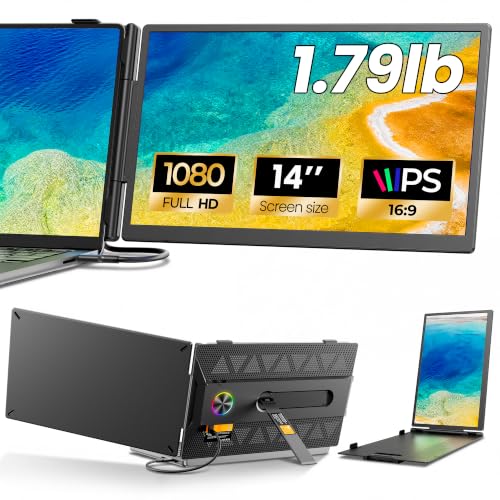
- Approximately 1.79 pounds and 0.3 inch thin
- 14-inch 1080p anti-glare IPS display
- Includes USB-C, HDMI, and power cables
Best For: Travelers prioritizing low weight and small footprint
Best Flexible 4-in-1 Option
15.6-inch FHD Detachable Extender

- 1080p IPS display with extend, mirror, and portrait modes
- Adjustable, rotating stand with detachable monitor use
- USB-C or HDMI connectivity with optional 100W PD charging
Best For: Remote workers and travelers needing flexible screen placement
Best Compact Choice
APILDELLA 14-inch Dual Extender

- Compact 14-inch 1080p display for smaller work areas
- Zero-contact frame fits 13- to 16-inch laptops
- Extend and mirror modes with included USB-C, USB-A, and HDMI cables
Best For: Small desks and travelers wanting a compact second screen
Best Lightweight Pick
Ultra-Portable 14.2-inch Extender

- 1.87-pound, 0.27-inch-thin design
- 1080p IPS display with matte finish
- Extend, mirror, and portrait modes
Best For: Travelers and small-desk multitaskers
Best Triple-Screen Option

- Two 15.6-inch 1080p displays
- Triple-screen extend, mirror, and portrait modes
- Includes cables, adapter, and carry bag
Best For: Professionals needing maximum portable screen space
Best Value Dual-Screen Pick – KEFEYA 14-Inch FHD Extender
If you need laptop screen extenders for small desks, the KEFEYA offers a relatively compact dual-screen setup without adding a second full-size desktop monitor. Its 14-inch 1080p IPS display supports extend and mirror modes, while USB-C and HDMI connectivity make it practical for work, video calls, research, and entertainment.
Best For: Remote workers, students, travelers, and anyone wanting an affordable second screen for a compact workspace.
Pros:
- 14-inch Full HD IPS display with 300-nit brightness and 60Hz refresh rate
- Supports extend, mirror, landscape, portrait, and 180-degree rotation modes
- Includes USB-C, USB-C-to-USB-A, and HDMI cables for flexible setup
- Broad compatibility with Windows, Mac, Chrome, Linux, Android, and selected consoles
Cons:
- HDMI connection requires an additional USB-A-to-USB-C cable for power
- At about 1.04 kg, it is heavier than the lightest options in this roundup
The KEFEYA is a sensible choice when desk space is limited but you still want a conventional 14-inch second display. Check your laptop’s ports before buying, particularly if you plan to use HDMI or a Mac with multiple external screens.
Most Flexible Configuration – Wixzet 15.6-Inch Detachable Extender
For shoppers comparing laptop screen extenders for small desks, the Wixzet stands out for its detachable design and multiple layout options. It can function as a triple-screen attachment, a dual-screen setup, or a standalone portable monitor, although its larger 15.6-inch panels take up more space than smaller models.
Best For: Remote professionals and creators who want multiple configurations for work, travel, meetings, and entertainment.
Pros:
- Detachable design supports 11-plus configurations, 235-degree folding, and 90-degree rotation
- 15.6-inch 1080p IPS display with HDR, 120% sRGB, and 300-nit brightness
- Each detachable screen weighs 1.5 pounds and includes a carrying case
- Supports Windows, macOS, ChromeOS, Linux, Android, and DeX
Cons:
- The complete unit weighs about 5 pounds and is bulkier for a small desk
- Two USB-C cables require two full-featured USB-C ports; HDMI setups need extra power
The Wixzet delivers the greatest layout flexibility of the four options, but it is best suited to users who will actually use its detachable or triple-screen capabilities. Confirm your laptop’s available video-capable ports and desk width before ordering.
Best Triple-Screen Travel Pick – Vixtan 14-Inch Lightweight Extender
The Vixtan is designed for people who want laptop screen extenders for small desks without giving up a triple-screen arrangement. Its 14-inch FHD IPS screens, adjustable stand, and 3-pound body make it suitable for compact home offices, cafés, campus use, and travel.
Best For: Traders, developers, designers, and remote workers who need triple-screen multitasking in a portable format.
Pros:
- Triple-screen setup with extended, mirrored, and portrait display modes
- 0.3-inch-thin, 3-pound design with a reinforced adjustable stand
- 14-inch 1080p IPS panels with 300-nit brightness and 100% sRGB coverage
- Includes USB-C and HDMI connection cables and supports multiple operating systems
Cons:
- Some setups may need a 5V/3A-or-higher power adapter for flicker or brightness issues
- MacBook M1, M2, and M3 models support only one screen without a DisplayLink adapter
The Vixtan balances triple-screen capability with a comparatively travel-friendly build. It is a strong fit for users who need several applications visible at once, but compatibility and power requirements deserve careful checking before purchase.
Lightest Compact Option – Anyking A6 14-Inch Extender
When portability matters most, the Anyking A6 is one of the more practical laptop screen extenders for small desks. At approximately 1.79 pounds and 0.3 inch at its thinnest point, it adds a 14-inch 1080p display while keeping the setup easy to move between a desk, bag, and temporary workspace.
Best For: Travelers, students, and remote workers who want a lightweight second screen for documents, calls, spreadsheets, and streaming.
Pros:
- Approximately 1.79 pounds with an ultra-slim 0.3-inch profile
- 14-inch anti-glare 1080p IPS display with 300-nit brightness and 100% sRGB
- Supports extend and mirror modes, 180-degree screen rotation, and a 90-degree-tilting stand
- Includes USB-C, HDMI-to-Mini HDMI, and USB-A-to-USB-C cables
Cons:
- External power adapter is not included
- USB-C single-cable operation requires DisplayPort Alt Mode video and power
- Devices without suitable video output cannot gain video through extra power alone
The A6 is the best choice here for minimizing carrying weight and desk clutter. Its connection requirements are more important than usual, so verify your laptop’s USB-C capabilities or plan to use HDMI plus a separate power connection.
Best Flexible 4-in-1 Option – 15.6-inch FHD Detachable Extender
For shoppers comparing laptop screen extenders for small desks, this 15.6-inch model combines a full-HD display with adjustable positioning and detachable use. Its extend, mirror, and portrait modes add workspace without requiring a permanent desktop monitor.
Best For: Remote workers and travelers who want a flexible second screen that can also operate as a standalone monitor.
Pros:
- 15.6-inch 1080p IPS display with wide 178-degree viewing angles, anti-glare coating, and eye-care features.
- Adjustable stand with two height slots, 192-degree rotation, non-slip pads, and rear support.
- Supports USB-C or HDMI connections, includes cables, and offers 100W PD reverse charging with a suitable power adapter.
- Detachable design supports extend, mirror, portrait, and standalone-monitor modes.
Cons:
- USB-C video requires a compatible Thunderbolt 3/4 or DisplayPort Alt Mode port.
- May need extra power through USB-A or an external source if the display shows “No Signal.”
- At 2.75 pounds, it is portable but not the lightest option in this roundup.
This is a strong small-desk choice when adjustability matters as much as screen size. Its broad compatibility and detachable format make it particularly useful for changing work locations, though buyers should confirm their laptop ports before ordering.
Best Triple-Screen Workspace – 15.6-inch Ultra-Slim Triple Monitor
This triple-screen model is designed for buyers who need substantial multitasking space from a compact setup. For laptop screen extenders for small desks, it adds two extra displays while using a free-standing bracket rather than attaching directly to the laptop lid.
Best For: Multitaskers, traders, designers, and remote workers who need three independent screens.
Pros:
- Creates a triple-screen workspace with independent displays for documents, calls, email, or other applications.
- 15.6-inch 1080p IPS screens offer 1000:1 contrast, 300-nit brightness, and low-blue-light functionality.
- Aluminum construction, anti-slip pads, and a free-standing bracket avoid direct stress on the laptop lid.
- Folds to 0.18 inches thick per screen and includes a soft leather carry bag.
Cons:
- Requires two video-output connections, such as two full-function USB-C ports or USB-C plus HDMI, depending on the setup.
- Some MacBook models with standard M1, M2, or M3 chips need an H5 cable for dual-screen functionality.
- At 3.9 pounds, the expanded workspace adds noticeable travel weight.
The main advantage here is screen capacity: it is the most suitable pick when two added displays are worth the extra connections and weight. Check your laptop’s video-output requirements carefully, especially for Apple silicon MacBooks.
Best Compact Choice – APILDELLA 14-inch Dual Extender
For compact work areas, the APILDELLA 14-inch model keeps the added display smaller while still providing 1080p resolution. It is a practical option among laptop screen extenders for small desks, with a zero-contact frame designed to avoid scratching the laptop screen.
Best For: Small-desk users and travelers with compatible 13- to 16-inch laptops who want a compact second monitor.
Pros:
- 14-inch 1080p display supports extend and mirror modes without requiring driver installation.
- Zero-contact frame and sliding support arm fit laptops from 13 to 16 inches while helping protect the screen.
- Includes USB-C, USB-A, and HDMI cables and works with Mac, Windows, Android, and many laptops.
- Folds through a 225-degree range and includes a stabilizing bracket.
Cons:
- The 250-nit brightness is lower than some larger alternatives in this roundup.
- May require external power or a specific connection arrangement for normal brightness or to resolve a “No Signal” message.
- Compatibility depends on the laptop having suitable USB-C or HDMI video output.
This is the most desk-conscious choice of the three, offering a smaller footprint and lighter structural design than a large triple-screen setup. Its connection troubleshooting guidance is useful, but buyers should verify both port compatibility and power requirements.
Best Lightweight Pick – Ultra-Portable 14.2-inch Extender
For shoppers seeking laptop screen extenders for small desks, this 14.2-inch model offers extra workspace without a particularly bulky setup. It weighs 1.87 pounds, is 0.27 inches thin, and supports extend, mirror, and portrait modes for flexible multitasking.
Best For: Frequent travelers, remote workers, students, and programmers using 14- to 17.3-inch laptops.
Pros:
- Lightweight, slim design is easier to carry and store on a small desk.
- Full HD IPS display with 300 nits brightness and a matte finish.
- Supports USB-C or HDMI plus USB-A connections, with no driver required.
- Works with Windows, macOS, ChromeOS, Linux, and Android systems.
Cons:
- Compatibility depends on having a full-function USB-C port or the required HDMI and USB-A connections.
- The 14.2-inch screen may provide less viewing area than larger extenders.
This is a practical choice when portability and a compact footprint matter most. Its adjustable viewing angle and multiple display modes add flexibility for focused work in tight spaces.
Best Triple-Screen Option – 15.6-inch FHD Laptop Extender
This 15.6-inch model is designed for users who want a triple-screen workspace while keeping the setup relatively streamlined. For laptop screen extenders for small desks, its two larger displays can reduce tab switching, while the included cables, power adapter, and carrying bag support mobile use.
Best For: On-the-go professionals who need a larger triple-screen workspace for multitasking.
Pros:
- Two 15.6-inch 1080p displays create a substantial triple-screen setup.
- USB-C connections can simplify the setup when the laptop supports full functionality.
- Aluminum shell, leather carry bag, and slim profile support portability.
- Supports extend, mirror, and portrait modes.
Cons:
- At 4 pounds, it is considerably heavier than more compact extenders.
- M1/M2/M3 MacBooks and laptops without full-featured USB-C may require an additional H5-T cable, HDMI, USB-A, power, and possibly driver installation.
- Its two larger panels may take more small-desk space than a single-screen extender.
This option prioritizes screen area and a three-display workflow over minimum weight. Check your laptop’s ports carefully before buying, especially if you use a MacBook or lack full-function USB-C.
Best Eye-Care Design – CIDETTY 14-inch Matte Extender
For compact work areas, the CIDETTY 14-inch extender combines a relatively small footprint with a Full HD IPS panel and flexible mounting. Among laptop screen extenders for small desks, its matte anti-glare coating, independent brightness controls, and adjustable telescopic stand are useful for longer work sessions.
Best For: Users who want a compact dual-screen attachment with adjustable positioning and an eye-care-focused display.
Pros:
- 14-inch 1080p IPS display with 300 nits brightness and a 178-degree viewing angle.
- Matte anti-glare coating and independent brightness controls support comfortable viewing.
- Adjustable telescopic stand and protective padding help stabilize and protect the laptop.
- Supports expand, mirror, and second-screen modes without requiring a driver in supported setups.
Cons:
- Some laptops may lack the full-featured USB-C or HDMI ports required for connection.
- Older Surface models and Surface Pro devices may need a special cable or additional compatibility support.
- Connection requirements vary between one-cable and two-cable setups.
This model is a strong fit when display comfort and stable attachment are more important than having the largest possible panel. Verify your laptop’s ports before ordering to avoid connection surprises.
How We Picked the Best Laptop Screen Extenders for Small Desks
We focused on practical features that matter when choosing Laptop Screen Extenders for Small Desks: compact dimensions, manageable weight, screen quality, laptop compatibility, connection options, and setup flexibility. The selection includes dual- and triple-screen designs in common 14-inch and 15.6-inch sizes, with USB-C and HDMI connectivity represented across the group.
Because specifications and compatibility can vary by laptop, verify the manufacturer’s requirements before buying. Some extenders need USB-C video output, while others may require HDMI, USB power, an adapter, or a combination of connections.
Quick Comparison
| Type | Best For | Main Advantage | Potential Trade-Off |
|---|---|---|---|
| 14-inch dual screen | Small desks and frequent travel | Lower weight and smaller footprint | Less viewing area than larger models |
| 15.6-inch dual screen | Comfortable multitasking | Larger workspace and easier text viewing | More weight and desk depth |
| 14-inch triple screen | Maximum workspace in a compact format | Three-screen productivity | More cables, power demands, and bulk |
| 15.6-inch triple screen | Desktop-style workflows | Largest multitasking area | Least portable option in this roundup |
Key Buying Factors for Laptop Screen Extenders for Small Desks
Desk Footprint and Weight
Measure the available width and depth around your laptop before choosing a model. A 14-inch extender is usually easier to position beside or behind a laptop, while 15.6-inch models can provide better readability but may overhang a narrow desk. Weight also matters if you frequently move between rooms or workspaces.
Screen Size and Resolution
Full HD 1080p resolution is a useful baseline for text, spreadsheets, browser tabs, and video. Match the extender’s size to your viewing distance: larger screens are more comfortable for extended use, but compact screens are often the better fit for crowded work surfaces.
Ports and Compatibility
Check whether your laptop supports USB-C video output, commonly through DisplayPort Alt Mode. If not, an HDMI connection may be necessary. Some setups use separate USB power, and Mac, Windows, and Chromebook compatibility can differ. Confirm supported operating systems, required adapters, and the number of ports before ordering.
Mounting and Adjustability
Look for detachable panels, adjustable hinges, multiple viewing modes, and a secure attachment range that matches your laptop. A stable extender should not place excessive pressure on the display or interfere with the keyboard, ports, webcam, or lid.
Power, Cables, and Travel Use
Triple-screen models typically demand more power and create a more involved setup. For travel, prioritize slim construction, protective storage, short cables, and a quick plug-and-play process. A compact dual-screen model is often more practical than a larger triple-screen unit for hotel desks and shared workspaces.
Who Should Buy Which Laptop Screen Extenders for Small Desks?
Choose a Lightweight 14-Inch Dual-Screen Model If:
You have limited desk space, travel regularly, or mainly need an extra display for email, reference material, chat, or documents.
Choose a 15.6-Inch Dual-Screen Model If:
You want a more comfortable second display for spreadsheets, editing, research, or extended work sessions and can accommodate a larger footprint.
Choose a 14-Inch Triple-Screen Model If:
You need three-screen multitasking but still want a relatively portable setup. Confirm your laptop can provide the required power and video connections.
Choose a 15.6-Inch Triple-Screen Model If:
You prioritize maximum workspace over portability and use a sufficiently sturdy desk. These models suit demanding multitasking, but they are less convenient for frequent transport.