A good headphone stand does more than keep your headset off the desk. Models with built-in cable holders help prevent tangles, protect earcups, and make your workspace easier to manage between uses.
This roundup compares 10 desktop, clamp-on, and under-desk options, including sturdy metal designs, wood-and-aluminum stands, rotating mounts, gaming-focused models, and stands with charging features.
Best 10 Headphone Stands with Cable Holder Picks for 2026
Best Compact Desktop Pick
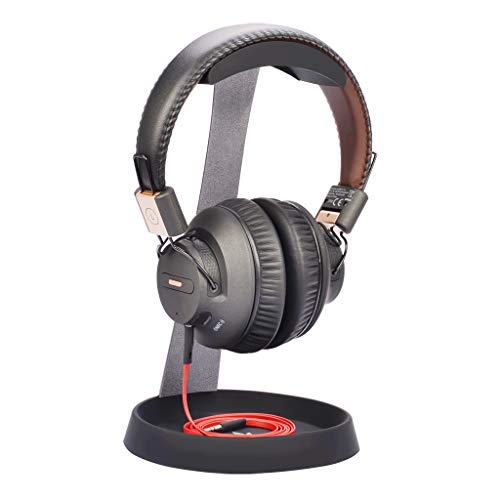
- Steel frame with silicone top pad
- Bottom cable holder can hold a phone
- Compact tabletop design
Best For: Organized work and gaming desks
Best Under-Desk Space Saver
Celerion 360-Degree Headphone Hook

- Rotates 360 degrees
- Built-in cable rack
- Clamp fits 0.47–1.57-inch surfaces
Best For: Desks where surface space is limited
Best for Large Headphones
Avantree TR902 Wood and Aluminum Stand

- Tall 12-inch profile
- Supports headbands up to 5 cm wide
- Large wooden cable holder
Best For: Larger and heavier headphones
Best Adjustable Clamp Mount
EURPMASK Rotating Headphone Holder

- 360-degree swivel arm
- Built-in cable clip
- Fits 0.31–1.57-inch desks
Best For: Flexible, non-permanent desk mounting
Best Built-In Organizer
Metal Texture Black Headphone Stand

- Built-in cable storage helps reduce desk clutter
- Wide base and curved headrest support headphones
- Quick three-part assembly with movable design
Best For: Tidy gaming, office, and bedroom desks
Best Clamp-On Cable Holder
Rotating Under-Desk Headphone Hanger

- Clamp fits desks from 0.31 to 1.57 inches thick
- 360-degree swivel arm tucks headphones under the desk
- Cable clip and rubber pads support tidy, protected storage
Best For: Space-saving gaming and office setups
Best RGB Desktop Upgrade

- Seven RGB lighting modes enhance gaming setups
- USB-C and USB ports add charging and transfer utility
- Weighted aluminum base and TPU rest support headphones securely
Best For: RGB gaming desks needing USB ports
Best Under-Desk Pick
Adjustable 3-in-1 Headphone and Controller Hanger

- Clamp-on installation needs no permanent adhesive
- Holds one headset and two controllers
- Rotating hook and cable clip improve organization
Best For: Gaming desks needing under-desk headset and controller storage
Best Stability Pick
Tall Desktop Headphone Stand with Cable Clip

- Tall 11.7-inch design keeps microphones off the desk
- Curved support helps protect headphone bands
- Stable base stores small accessories and manages cables
Best For: Desktop users wanting a tall, sturdy stand with accessory storage
Best Portable Design
Acrylic Headphone and Phone Stand with Cable Organizer

- Rear organizer wraps long headphone cables
- Detachable, lightweight design is easy to move
- Adds a phone or tablet holder to the stand
Best For: Portable workstations needing headset, cable, and device organization
Best Compact Desktop Pick – Avantree HS102 Metal Stand
If you want headphone stands with cable holder functionality in a compact desktop design, the Avantree HS102 is a practical choice. Its steel construction, silicone top pad, and bottom cable holder provide a stable place for compatible headphones while helping keep your desk organized.
Best For: Workstations, gaming desks, and users with headphones up to 4 cm wide at the headband and 25 cm tall.
Pros:
- Sturdy metal construction with a silicone top pad
- Bottom silicone holder organizes the cable and can hold a phone
- Compact tabletop footprint helps clear desk space
- Compatible with many major headphone brands
Cons:
- Headphone compatibility is limited by the listed 4 cm headband width and 25 cm height
- Designed for tabletop use rather than under-desk mounting
The HS102 is a straightforward desktop stand for shoppers who value a clean appearance, basic cable management, and a stable metal-and-silicone build without a complicated setup.
Best Under-Desk Space Saver – Celerion 360-Degree Headphone Hook
For shoppers seeking headphone stands with cable holder features that stay out of the way, this clamp-on Celerion hook mounts beneath or along a desk and rotates 360 degrees. Its built-in cable rack keeps wired headphones tidier, while the spring clamp avoids glue or permanent fastening.
Best For: Gaming and office desks where preserving surface space and tucking headphones away matters.
Pros:
- 360-degree rotating arm adjusts for convenient access
- Built-in cable organizer keeps cords off the floor
- Spring clamp fits surfaces from 0.47 to 1.57 inches thick
- Rubber pads help protect the desk and headphone band
Cons:
- Plastic construction may feel less substantial than a metal stand
- Requires a compatible desk edge for clamp mounting
This model is especially useful when desk real estate is limited. The rotating arm can hold headphones within reach or swing under the desk for more compact storage.
Best for Large Headphones – Avantree TR902 Wood and Aluminum Stand
The Avantree TR902 is one of the headphone stands with cable holder designs aimed at larger, heavier headsets. Its tall aluminum-and-wood construction provides a stable base, while the larger wooden cable holder helps support the stand and offers a convenient place for a phone.
Best For: Owners of bigger headphones with headbands up to 5 cm wide and overall height up to 30.5 cm.
Pros:
- Tall 12-inch design accommodates larger headphones
- Solid aluminum alloy and wood construction
- Large wooden cable holder helps maintain balance
- Wood-and-metal styling suits professional or gaming spaces
Cons:
- Taller footprint requires more vertical and desk space
- Not intended for under-desk mounting
Choose the TR902 when headset size and stand stability are higher priorities than a minimal footprint. Its heavier materials and taller profile make it a stronger fit for substantial headphones.
Best Adjustable Clamp Mount – EURPMASK Rotating Headphone Holder
The EURPMASK rotating holder is a flexible option for shoppers comparing headphone stands with cable holder features. Its removable spring clamp fits a broad range of desk thicknesses, and the 360-degree arm lets you position the headset beside or beneath the desk.
Best For: Wired or wireless headphone users who want adjustable, non-permanent mounting and built-in cable organization.
Pros:
- 360-degree swivel arm improves positioning flexibility
- Built-in cable clip helps keep the headset cord organized
- Clamp fits desks from 0.31 to 1.57 inches thick
- Soft rubber pads help protect both the desk and headset
Cons:
- Clamp mounting depends on having a suitable desk or shelf edge
- Plastic-and-rubber construction is less substantial than a metal desktop stand
This holder is a good match for adaptable setups. It provides the same general space-saving benefits as an under-desk hook while allowing the arm to swivel into a convenient storage position.
Best Built-In Organizer – Metal Texture Black Headphone Stand
If you want headphone stands with cable holder functionality without adding another desk accessory, this metal-texture black stand combines a stable desktop holder with built-in cord storage. Its curved headrest is designed to support wired and wireless over-ear headphones while helping keep small desk items organized.
Best For: Gaming, office, and bedroom desks where a freestanding headphone stand and concealed cable storage are useful.
Pros:
- Built-in wire storage helps reduce cable clutter.
- Wide, sturdy base provides stable support.
- Curved top helps protect headphones from squeezing and deformation.
- Assembles in a few seconds from three parts.
Cons:
- It occupies space on the desktop rather than mounting under the desk.
- Headphone fit is specified for headrests up to 2.36 inches wide and devices up to 7.87 inches tall.
- Headphones are not included.
This is a practical choice if cable management matters as much as headphone storage. The freestanding design is easy to move, while the included storage area adds useful organization for a tidy setup.
Best Clamp-On Cable Holder – Rotating Under-Desk Headphone Hanger
For setups that need to preserve desktop space, these headphone stands with cable holder features offer a convenient clamp-on alternative. The EURPMASK hanger attaches to desks from 0.31 to 1.57 inches thick, swivels 360 degrees, and includes a cable clip for keeping a headset cord in place.
Best For: Gamers and office users who want headphones stored under or beside the desk without drilling or adhesive.
Pros:
- Clamp fits a broad range of desk thicknesses and leaves no glue residue.
- 360-degree swivel arm allows flexible positioning and under-desk storage.
- Built-in cable clip helps keep headset wires organized.
- Rubber pads and curved edges help protect the desk and headphones.
Cons:
- Requires a compatible desk edge for secure clamping.
- It is a hanger rather than a freestanding desktop stand.
- Its white finish may not match every setup.
This model is especially useful when desk real estate is limited. Its removable clamp, rotating arm, and cable clip make it a flexible solution for keeping a wired or wireless headset accessible while maintaining a cleaner workspace.
Best RGB Desktop Upgrade – Aluminum Gaming Headset Stand
If lighting and charging matter more than an integrated cable holder, this aluminum desktop stand adds RGB effects and two extension ports to a headphone setup. Its wide weighted base and curved TPU rest are designed to support headphones of different sizes while protecting the headband.
Best For: Gaming desks that need a sturdy headphone holder with customizable RGB lighting and USB connectivity.
Pros:
- Offers seven RGB lighting modes for personalized desk ambience.
- USB-C and standard USB ports support device charging and file transfer.
- Aluminum construction, a weighted base, and non-slip pads improve stability.
- Curved TPU rest helps protect the headphone headband from scratches and deformation.
Cons:
- The supplied notes do not identify a dedicated cable-holder or cable-storage feature.
- Wireless charging is not supported.
- RGB lighting requires a long press to toggle on or off.
This stand suits users who want their headphone holder to contribute to a gaming setup rather than simply store a headset. Choose it for the lighting, aluminum build, and USB ports, but consider a dedicated cable-management feature if cord storage is a priority.
Best Under-Desk Pick – Adjustable 3-in-1 Headphone and Controller Hanger
For shoppers seeking headphone stands with cable holder functionality, this under-desk model combines a headset hook, two controller slots, and built-in cable organization. Its spring-loaded clamp mounts without permanent adhesive, while the rotatable hook helps you position your gear where it is easiest to reach.
Best For: Gaming desks that need under-desk storage for one headset and two controllers.
Pros:
- Spring-loaded clamp fits a variety of desk surface widths.
- Supports one headset and two controllers, with a stated capacity of up to 3 pounds.
- 360-degree rotatable hook allows flexible positioning.
- Built-in cable clip helps keep headset and controller cords organized.
Cons:
- Under-desk clamp mounting is less suitable for users wanting a freestanding desktop stand.
- Its storage is focused on controllers and one headset rather than multiple headsets.
This is a practical choice for a gaming setup where desk space is limited. The clamp-on design and cable clip make it especially useful for keeping frequently used accessories off the desktop.
Best Stability Pick – Tall Desktop Headphone Stand with Cable Clip
This desktop stand is a strong candidate among headphone stands with cable holder features, pairing an 11.7-inch tower with a dedicated cable-winding clip. Its curved support is designed to reduce dents and scratches, while the broad base adds accessory storage and stability.
Best For: Desktop users who want a tall stand for different headphone styles plus room for small accessories.
Pros:
- Extended 11.7-inch height helps keep headphone microphones off the desktop.
- Curved support is designed to help prevent dents and scratches during storage.
- Large base includes space for items such as a Bluetooth headset case or keys.
- Built-in metal divider helps keep the stand stable with lightweight or heavy headphones.
Cons:
- Its 4.72-by-4.72-inch base requires dedicated desktop space.
- The white finish may not suit every desk setup.
Choose this model if stability, height, and accessory storage matter more than portability. The integrated winding clip adds useful cable control without requiring a separate organizer.
Best Portable Design – Acrylic Headphone and Phone Stand with Cable Organizer
For a lightweight option among headphone stands with cable holder features, this detachable acrylic stand adds a rear cable organizer and a second space for a phone or tablet. Its roughly 10-inch height is sized for headphone storage, and the portable construction makes it easy to move between workstations.
Best For: Users who want a compact, portable headset stand that also organizes cables and supports a phone or tablet.
Pros:
- Rear cable organizer lets you wrap long headphone cords around the stand.
- Detachable design supports easy installation and transportation.
- Two-in-one layout combines headphone storage with a phone or tablet holder.
- Compatible with a broad range of listed headphone brands and models.
Cons:
- Acrylic construction is lightweight at 10.2 ounces, so it may feel less substantial than a heavy-duty stand.
- Its single-level design is intended for one headset rather than multiple headphones.
This stand is well suited to flexible setups where cable tidiness and portability are priorities. Its phone-holder function also helps consolidate common desk accessories in a small footprint.
How We Picked the Best Headphone Stands with Cable Holder
We focused on the features that matter most in daily use: stability, material quality, cable management, compatibility with different headset sizes, and ease of installation. The selection includes freestanding desktop stands as well as clamp-on and under-desk holders for buyers who want to save surface space.
We also considered practical extras such as rotating hooks, controller storage, phone stands, USB charging ports, RGB lighting, and adjustable mounting. Because headsets vary in weight and shape, the best choice depends on both your equipment and your available space.
Quick Comparison
| Type | Best For | Main Advantage | Potential Trade-Off |
|---|---|---|---|
| Desktop stand | Open workspaces | Easy access and simple placement | Uses desk surface |
| Clamp-on holder | Small or crowded desks | Frees up desktop space | Needs a compatible desk edge |
| Under-desk hanger | Minimalist setups | Keeps the headset out of sight | Installation can be less convenient |
| Gaming stand | PC and console setups | May add charging, lighting, or controller storage | Usually larger and more feature-focused |
Key Buying Factors for Headphone Stands with Cable Holder
Stability and Weight Support
Look for a wide, weighted, or non-slip base if you use a heavy gaming headset. A clamp or under-desk mount should tighten securely without flexing or damaging the desk.
Material and Construction
Aluminum and steel generally offer strong long-term durability. Wood-and-metal designs can provide a more finished appearance, while plastic models may be lighter and more affordable. Check the contact points for padding to reduce scratches.
Cable Storage Design
A cable hook, clip, or dedicated channel should hold the cord without forcing sharp bends. If your headset uses a detachable cable, confirm that the storage area accommodates its connector and thickness.
Fit and Mounting Clearance
Measure your desk thickness before choosing a clamp-on holder. For desktop stands, check the height and cradle shape so the headband and earcups rest naturally without touching the surface.
Extra Features
USB ports, RGB lighting, controller slots, phone holders, and rotating hooks can be useful, but they should not replace a stable structure. Prioritize the features you will actually use.
Who Should Buy Which Headphone Stands with Cable Holder?
Choose a freestanding desktop model if you want the simplest setup and frequently pick up or put down your headphones. A clamp-on or under-desk option is better for compact workstations where every inch of surface space matters. Choose a gaming-oriented stand if you want charging, lighting, or controller organization alongside headset storage. For a cleaner, more decorative workspace, a wood-and-aluminum design may fit better than a utilitarian metal holder.
Before buying, confirm your headset’s weight, cable length, desk dimensions, and preferred mounting position. The right stand should keep your headphones accessible, protect them from clutter, and make cable storage effortless.